


Waterfall Project Management Module Powerpoint Presentation Slides PM CD




Try Before you Buy Download Free Sample Product
 Impress Your
 Audience
 100%
100% Editable
 Save Hours
 of Time


We are introducing our comprehensive PowerPoint Presentation Waterfall Project Management Module, a dynamic solution tailored for Waterfall Project Management enthusiasts. Dive into the essentials of the Waterfall methodology with a detailed introduction covering its overview, features, fundamental principles, best practices and suitability areas. Uncover the nuances of Waterfall versus Agile methodologies with a thorough comparison, exploring benefits, challenges and solutions. Leverage visually appealing slides that break down key elements, processes and best practices for each project phase. Navigate the intricacies of project implementation with insights into testing, verification and deployment. Delve into tools and software with our selection criteria guide, types and categories overview and a software comparison chart. Gain industry specific insights through use cases across various sectors, including construction, software development and healthcare, presented with Gantt charts for enhanced clarity. Designed for practical application, our product includes a user training plan for Waterfall project implementation and management team considerations, ensuring your team is well equipped for successful project execution. Elevate your presentations with this PowerPoint product, blending informative content with visually appealing design for an impactful audience experience. Download it now.
People who downloaded this PowerPoint presentation also viewed the following :
Content of this Powerpoint Presentation
Slide 1: This slide showcase title Waterfall Project Management Module. State Your Company Name.
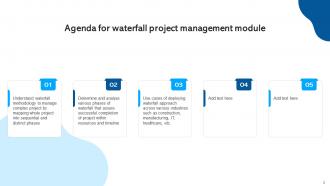
Slide 2: This slide showcase Agenda for waterfall project management module.
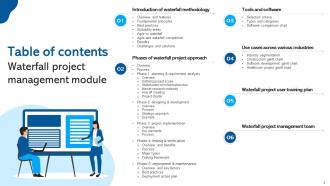
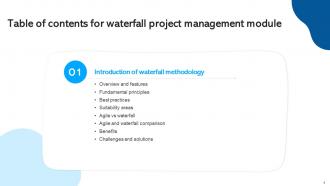
Slide 3: This slide exhibit Table of Content.
Slide 4: This slide exhibit Table of Content.
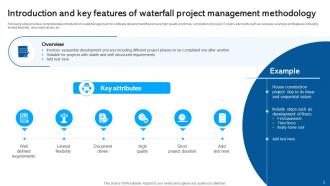
Slide 5: This slide provides comprehensive introduction to waterfall approach for software development that ensure high quality and timely completion of project.
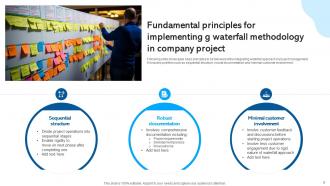
Slide 6: This slide showcases basic principles to be followed while integrating waterfall approach in project management.
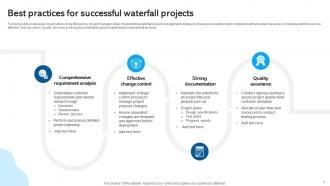
Slide 7: This slide showcases core practices to be followed by project manager while implementing waterfall project management strategy.
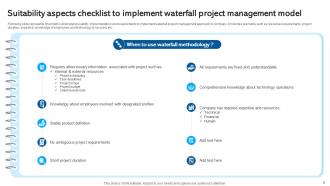
Slide 8: This slide represents checklist to understand usability, implementation and requirements to implement waterfall project management approach in company.
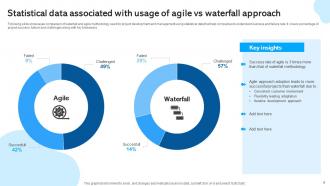
Slide 9: This slide showcases comparison of waterfall and agile methodology used for project development and management using statistical data.
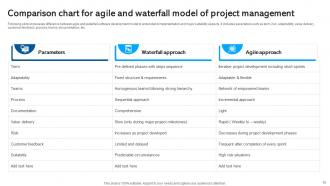
Slide 10: This slide showcases difference between agile and waterfall software development model to understand implementation and major suitability aspects.
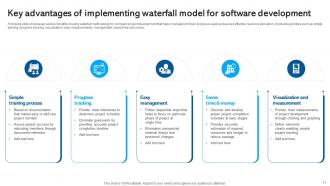
Slide 11: This slide showcases various benefits of using waterfall methodology for company project development that helps managers to track progress easily.
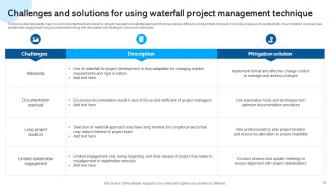
Slide 12: This slide represents major risk and uncertainties that is faced by project managers in waterfall approach that may reduces efficiency and goodwill of project.
Slide 13: This slide exhibit Table of Content: Phases of waterfall project approach.
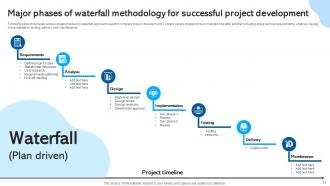
Slide 14: This slide showcases various stages involved in waterfall approach used for company project development.
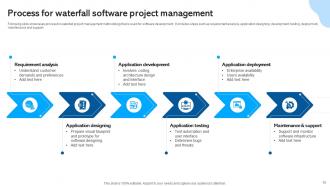
Slide 15: This slide showcases process for waterfall project management methodology that is used for software development.
Slide 16: This slide exhibit Table of Content: Phases of waterfall project approach.
Slide 17: This slide provides introduction to initial planning phase of waterfall project development that assure fulfillment of requirements and resources.
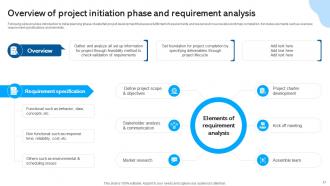
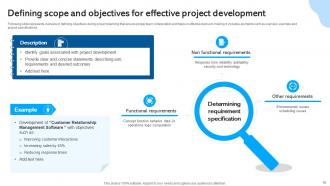
Slide 18: This slide represents overview of defining objectives during project planning that ensure proper team collaboration and helps in effective decision making.
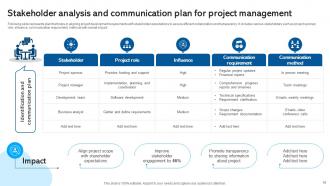
Slide 19: This slide represents plan that helps in aligning project development requirements with stakeholder expectations to assure efficient collaboration and transparency.
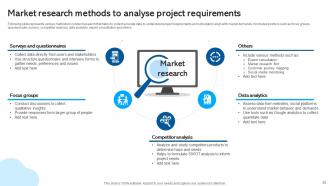
Slide 20: This slide represents various methods to conduct research that helps to collect accurate data to understand project requirements and schedule.
Slide 21: This slide showcases kick off meeting plan that helps to structure and helps to formulate clear project development structured with collected data.
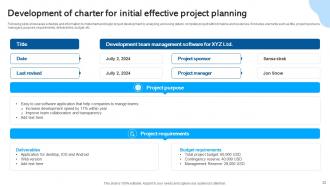
Slide 22: This slide showcases schedule and information to implement and begin project development by analyzing and using data to complete project within timeline and resources.
Slide 23: This slide exhibit table of content: Phases of waterfall project approach.
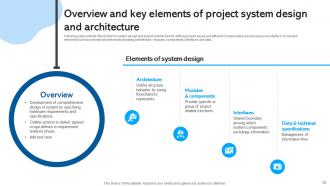
Slide 24: This slide exhibits introduction to system design and project architecture for defining project layout and efficient components to ensure easy user interface.
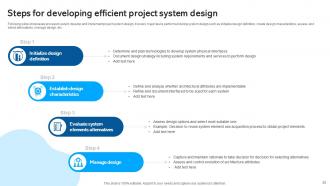
Slide 25: This slide showcases process to select, develop and implement project system design.
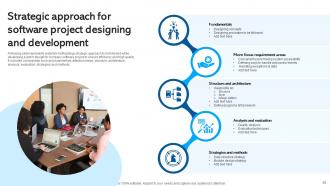
Slide 26: This slide represents waterfall methodology strategic approach to be followed while developing system design for company software project.
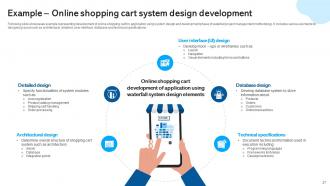
Slide 27: This slide showcases example representing development of shopping cart for application using system design and development phase of project management methodology.
Slide 28: This slide exhibit Table of Content: Phase 3: Project implementation.
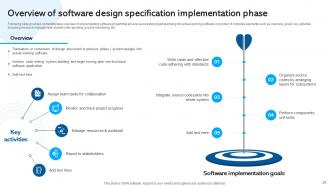
Slide 29: This slide provides comprehensive overview of implementing software project that ensure successful project planning into actual working software or product.
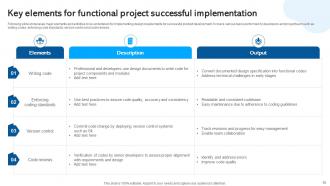
Slide 30: This slide showcases major elements and activities to be undertaken for implementing design requirements for successful product development.
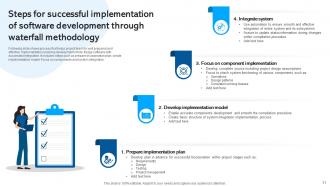
Slide 31: This slide shows process that helps project team for well prepared and effective implementation ensuring development of fully fledge software.
Slide 32: This slide exhibit Table of Content: Phase 4: Testing & Verification.
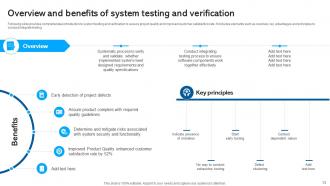
Slide 33: This slide provides comprehensive introduction to system testing and verification to assure project quality and improved customer satisfaction rate.
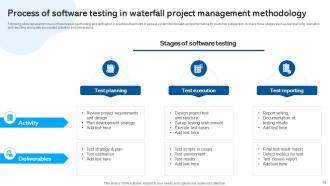
Slide 34: This slide represent process of business project testing and verification in practices that helps to assess system functionality and performance for customer.
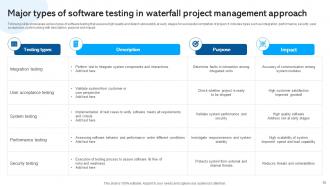
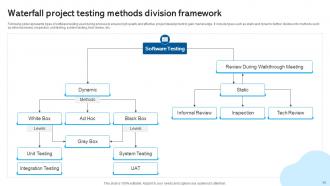
Slide 35: This slide showcases various types of software testing that assures high quality and detect vulnerability at early stages for successful completion of project.
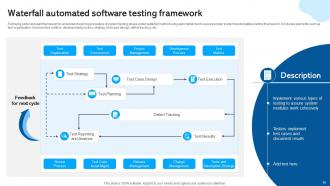
Slide 36: This slide represent framework to understand working procedure of system testing phase under waterfall method using automation tool to assure proper system.
Slide 37: This slide exhibit Table of Content: Phase 5: Deployment & Maintenance.
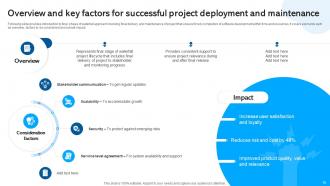
Slide 38: This slide provides introduction to final phase of waterfall approach involving final delivery and maintenance of project.
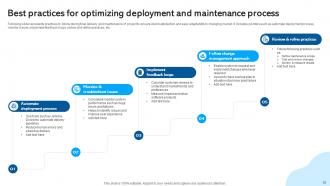
Slide 39: This slide represents practices to follow during final delivery and maintenance of project to ensure client satisfaction and easy adaptability to changing market.
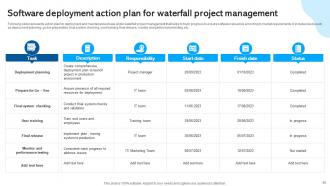
Slide 40: This slide represents action plan for deployment and maintenance phase under waterfall project management that helps to track progress.
Slide 41: This slide exhibit Table of Content: Tools and software.
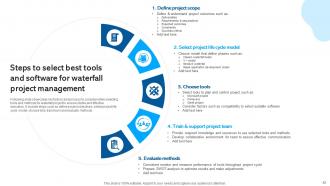
Slide 42: This slide showcases key factors and process to consider while selecting tools and methods for waterfall project to ensure stable and effective execution.
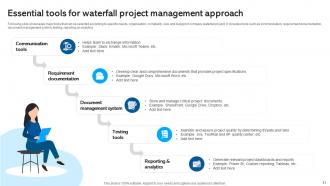
Slide 43: This slide showcases major tools that can be selected according to specific needs, organization, complexity, size and budget of company waterfall project.
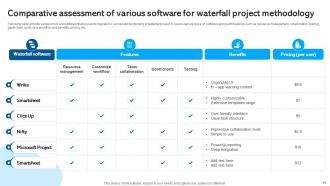
Slide 44: This slide exhibits various tools and software that is used to operate for successful functioning of waterfall project.
Slide 45: This slide exhibit Table of Content: Use cases across various industries.
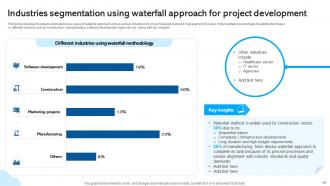
Slide 46: This slide depicts data to understand use cases of waterfall approach across various industries for project development and management.
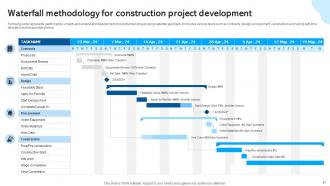
Slide 47: This slide represents gantt chart to simplify and understand development of construction project using waterfall approach.
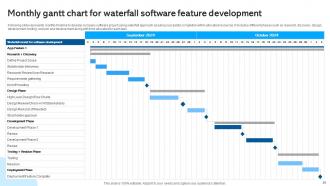
Slide 48: This slide represents monthly timeline to develop company software project using waterfall approach assuring successful completion within allocated resources.
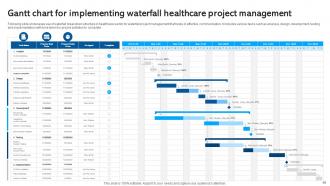
Slide 49: This slide showcases use of waterfall breakdown structure in healthcare sector for waterfall project management that helps in effective communication.
Slide 50: This slide exhibit table of content that is to be discussed further.
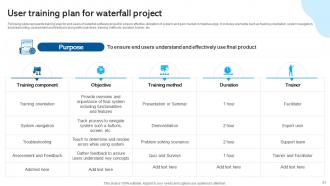
Slide 51: This slide represents training plan for end users of waterfall software project to ensure effective utilization of system and gain market competive edge.
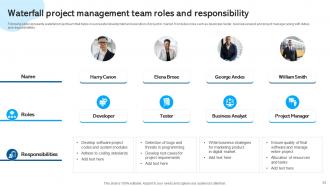
Slide 52: This slide represents waterfall project team that helps in successful development and execution of project in market.
Slide 53: This slide shows all the icons included in the presentation.
Slide 54: This slide is titled as Additional Slides for moving forward.
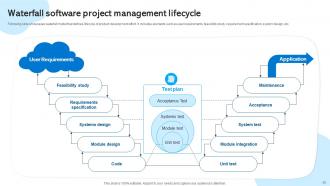
Slide 55: This slide showcases waterfall model that defines lifecycle of product development effort.
Slide 56: This slide represents types of software testing used during process to ensure high quality and effective project development to gain market edge.
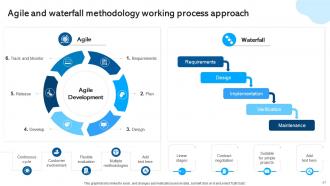
Slide 57: This slide showcase title Agile and waterfall methodology working process approach.
Slide 58: This slide contains Puzzle with related icons and text.
Slide 59: This slide shows Post It Notes for reminders and deadlines. Post your important notes here.
Slide 60: This is Our Target slide. State your targets here.
Slide 61: This is a Timeline slide. Show data related to time intervals here.
Slide 62: This is a Thank You slide with address, contact numbers and email address.
Waterfall Project Management Module Powerpoint Presentation Slides PM CD with all 70 slides:
Use our Waterfall Project Management Module Powerpoint Presentation Slides PM CD to effectively help you save your valuable time. They are readymade to fit into any presentation structure.












FAQs for Waterfall Project Management Module Powerpoint Presentation
So waterfall has five phases you go through one by one: Requirements (figuring out what to build), Design (planning how), Implementation (the actual coding), Testing (does it work?), and Maintenance (keeping it running after). You can't skip around or go backwards - once you're done with a phase, that's it. Honestly, this can be super frustrating if you realize you missed something early on. Changes later cost a fortune and mess everything up. Oh, and get everyone to actually sign off at each step or you'll regret it later. The whole thing really depends on nailing those requirements upfront.
Waterfall is super linear - you finish requirements, then design, then development, then testing. No going back. Agile works in short sprints where you're constantly tweaking things based on feedback. The house analogy actually works well here - Waterfall is like traditional construction where you can't put up walls before the foundation's set. Agile would be more like... okay maybe that analogy breaks down lol. Point is, Waterfall's great when requirements won't change much and you need clear milestones. But honestly? Most projects benefit from Agile's flexibility these days.
Honestly, go with Waterfall when you know exactly what you need from the start. Like, zero ambiguity. Think compliance stuff or manufacturing - those projects where changing course halfway through would be a nightmare. Documentation-heavy industries love it too. Plus if you're dealing with outside vendors, they'll want every detail nailed down before giving quotes anyway. The step-by-step approach works when each phase actually builds on the last one. Really though, if your stakeholders might suddenly decide they want something totally different three months in, skip Waterfall entirely.
Look, waterfall's main thing is you get total predictability. Everyone knows the timeline upfront and what's getting delivered when. Stakeholders eat that up because they can actually plan budgets and resources without guessing. Each phase has to wrap up completely before the next one starts, so documentation ends up being pretty solid. It's definitely not trendy anymore, but honestly? For projects where requirements won't change much - like regulatory work or construction stuff - it makes sense. Changes get expensive fast in those scenarios, so having everything locked down from day one is actually smart.
Look, waterfall's main problem is you're locked into decisions way too early. Changes later? Total nightmare for your timeline and budget. You won't actually see working software until super late, so when problems pop up, you're kinda screwed. Testing at the end is brutal too - imagine finding major bugs when it's hardest to fix them. Oh and stakeholders get weird when they don't see anything for months (honestly can't blame them). Build in extra time and be super upfront about how painful changes will be once you start.
Don't wait until the end to document everything - trust me, I've been there and it's absolute chaos. Build it right into each phase gate from the start. Templates are your best friend here - set them up early for requirements, design specs, test plans, all that stuff. Your team will actually know what they need to capture instead of guessing later. Make doc reviews part of your exit criteria and assign someone to own each piece. Oh, and use something like Confluence so things don't disappear into email hell. Honestly, once it becomes routine it's not even that bad.
Oh man, risk management in Waterfall is so important because you're basically locked into that sequence from day one. Unlike Agile where you can pivot whenever, Waterfall doesn't give you much wiggle room. If something breaks in one phase, it'll mess up your whole timeline - trust me on this one. Start with a thorough risk assessment during planning and actually build in some backup plans. I'd definitely create a risk register early on and check it at every phase gate. Honestly, it's way better to catch problems before they completely wreck your project schedule.
Oh man, Waterfall is brutal with tight deadlines. You can't just skip phases or compress them easily - everything's locked in sequence. So if requirements gathering runs long, that delay hits every single phase after it. Development, testing, deployment... it all gets pushed back. Agile teams can at least pivot or ship something partial, but Waterfall? You're basically waiting in line until each phase wraps up completely. Honestly feels like the worst kind of traffic jam sometimes. My advice: pad your timeline between phases from the start and nail down those stakeholder approvals ASAP. Trust me on this one.
Ugh, Waterfall projects crash when you don't plan upfront properly or when teams get zero flexibility once things start rolling. Requirements gathering gets rushed - totally guilty of this when my boss was breathing down my neck about deadlines. Then boom, requirements change halfway through (they always do) and you're stuck doing massive rework since there's no way to pivot. Another killer? When your devs and the people writing specs never actually talk to each other. Creates these weird silos. Even if you're stuck doing Waterfall, try sneaking in regular check-ins. Don't let those phase gates become prison walls, you know?
With Waterfall, you're basically doing formal check-ins - monthly reports, milestone meetings where you update everyone on the plan. You collect all requirements upfront, then just track progress. Super structured but honestly feels rigid. Agile's the opposite - constant informal chats, sprint reviews, feedback sessions where stakeholders actually help shape what you're building. Way more collaborative, but they have to stay engaged the whole time (which some people hate). Short sentences work better here. If your stakeholders want clear timelines and formal updates though, Waterfall communication might be the better fit.
Track budget variance and schedule adherence first - that's your core stuff. Did you hit deadlines and stay on budget? Also watch scope creep (all the extra requests that pile up), defect rates during testing, and how happy stakeholders actually are. Requirements traceability is useful but honestly kind of a pain to keep updated. Pick maybe 4-5 metrics max that your team will genuinely look at each week. Don't go overboard with tracking everything. Start from day one so you've got baseline data when things get chaotic later.
Honestly, Waterfall's kinda rigid by design, but you can work around it. Set up formal checkpoints between each phase where you actually reassess everything - requirements, scope, the whole deal. Don't lock phases down completely. Create a change management process that looks at how tweaks will mess with your timeline and budget. Breaking projects into smaller "mini-waterfalls" helps too - shorter cycles mean you can grab feedback way more often. Oh, and document literally everything before getting stakeholder approval. It's not perfect since Waterfall wasn't built for flexibility, but it works.
For Waterfall projects, you're gonna want solid project management software - Microsoft Project and Smartsheet are solid choices, though Excel works too if you're keeping it basic. Gantt charts are your best friend for mapping out those sequential phases. Requirements tools like Jira help document everything upfront (which is kinda the whole point since you can't pivot later). My honest take? Don't overthink the tool selection. Whatever your team will actually use without complaining is the winner. I've seen fancy setups fail because nobody wanted to learn them.
Yeah, testing in Waterfall is huge but honestly pretty stressful. You can't touch anything until development's completely done - that whole rigid sequence thing means requirements, design, and coding all have to be finished first. So when you finally get to test, it's this massive intensive phase where you're scrambling to catch everything before launch. I learned this the hard way on a project last year. The worst part? Finding major bugs at that point is basically a nightmare. Don't skimp on time for this phase though - rushing testing will definitely come back to haunt you later.
Dude, bad requirements in Waterfall will totally destroy your project. You can't just go back and fix stuff like in Agile - once you mess up early, you're stuck with it. Costs blow up, deadlines get missed, and honestly? You end up building something nobody actually wanted. Stakeholders get pissed because the final product doesn't match what they needed. The whole sequential thing means mistakes just compound through every phase. Do yourself a favor and spend real time upfront - workshops, prototypes, lots of stakeholder conversations. Way better than rebuilding the entire thing later.
-
Informative and engaging! I really like the design and quality of the slides.
-
Extensive range of templates! Highly impressed with the quality of the designs.