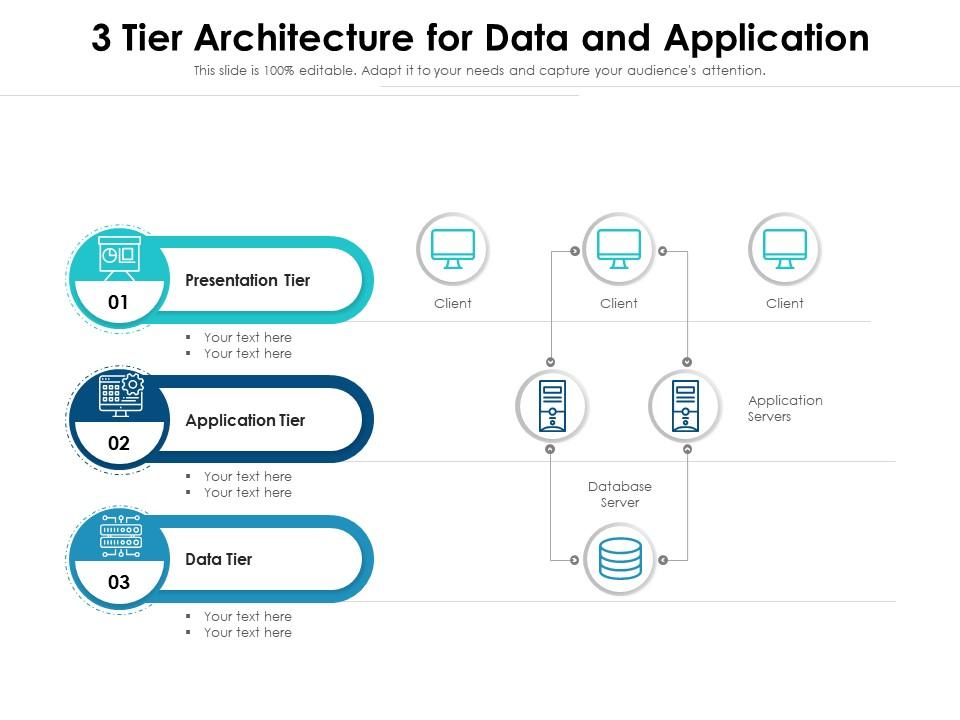
3 tier architecture for data and application

Rating:
89%
3 tier architecture for data and application
Slide 1 of 2
Favourites Favourites

Try Before you Buy Download Free Sample Product

Audience Impress Your
Audience
Editable 100%
Editable
Time Save Hours
of Time
The Biggest Sale is ending soon in
0
0
:
0
0
:
0
0
Rating:
89%
Presenting our set of slides with name 3 Tier Architecture For Data And Application. This exhibits information on three stages of the process. This is an easy-to-edit and innovatively designed PowerPoint template. So download immediately and highlight information on Database Server, Application Servers, Client, Application Tier, Data Tier.

FAQs for 3 tier architecture for

So you've got three main parts to work with: presentation, application, and data tiers. Basically your UI, business logic, and database stuff. The presentation layer is what users actually see and click around in. Your application tier - that's where all the real work happens with business rules and processing. Data tier just handles storing and getting your info back. The cool thing is each one can live on different servers, which makes scaling way easier. Oh, and maintenance too - you don't have to tear everything apart when you need to fix one piece. Honestly, just spend some time upfront figuring out what goes where. Trust me on this one.

Dude, the scalability thing is huge. Each tier can grow independently - so when your database is dying but everything else runs fine, just beef up that data layer. Leave the rest alone. You can spread tiers across different servers too, which beats having one massive system where everything's tied together. That's honestly such a pain to deal with. Each layer gets optimized for what it actually does best. I'd start by figuring out your biggest bottleneck first - that's where you'll see the most improvement right away.

Dude, 3-tier gives you way better security isolation. Each layer gets its own access controls and restrictions. Your database isn't sitting there naked for users to hit directly - the business logic tier protects it. Multiple firewalls between tiers, different auth at each level. It's basically like having several locked doors instead of one flimsy one. Front-end only talks to the middle tier, which handles all the database stuff with proper validation. Honestly, most people overthink this part. Just figure out what data your front-end actually needs access to and lock down everything else behind those layers.

For the frontend, you've got your usual suspects - HTML, CSS, JavaScript. React and Angular make things way less painful, trust me on that one. Mobile-wise, Swift or Kotlin if you want native apps, but React Native and Flutter work great for cross-platform stuff. Next.js is solid for server-side rendering, though honestly the templating engine route works fine too. There's like a million options out there these days - kinda overwhelming tbh. Just pick what your team already knows and make sure it plays nice with your backend. You can always switch things up later if needed.

So the middle tier is basically your app's brain - it's doing all the thinking between what users see and where data lives. Your presentation layer just displays stuff, database handles storage, but this middle part? It's validating data, enforcing business rules, managing who can access what. Think of it as the smart middleman making all the decisions about data flow. Oh and definitely try to keep it stateless if you can - trust me on this one, it'll make scaling way less painful later. It's handling transactions, transforming data, all that orchestration work.

Network latency is gonna be your biggest headache - all those calls between tiers add up fast. Debugging becomes a nightmare when something breaks across multiple layers. Data consistency is another pain point you'll deal with constantly. Three separate systems trying to work together? Yeah, that's messy. Connection pooling and load balancing become must-haves, not nice-to-haves. Don't let your business logic creep into the presentation layer either - seen that mistake too many times. Oh, and performance bottlenecks love to hide in multi-tier setups. Start small, document everything religiously. Trust me on this one.

So basically you can update each layer without breaking the other parts - super handy when you need to swap databases or fix business logic. Way better than those monolithic apps that fall apart if you breathe on them wrong lol. Each layer handles its own thing, so tracking down bugs becomes way less painful. Your frontend people can mess with the UI while backend devs work on APIs at the same time. Just make sure you draw clear lines between presentation, logic, and data layers from the start. Trust me, future you will thank past you for this.

So basically, 3-tier architecture is just client-server relationships stacked on top of each other. Your presentation layer asks the business logic layer for stuff, then that layer turns around and asks the database for data. Responses bubble back up the same way. Each tier only talks to the ones right next to it - no shortcuts allowed. The cool part? You can swap out or scale any layer without screwing up the others. Like, you could completely redo your UI and the database wouldn't even notice. It's honestly pretty neat how clean the separation is.

So basically, 3-tier architecture splits your app into three separate layers that each do one specific thing. The presentation layer handles all your UI stuff, business logic takes care of rules and processing, and data layer deals with storage. Think of it like having three different teams that don't mess with each other's work. When you need to debug something, you're not digging through a massive pile of tangled code – honestly such a lifesaver. Each layer can be updated independently too. Boss wants a new interface? Just touch the presentation layer. Database change? Only affects the data tier. Way cleaner than having everything mixed together.

Yeah so 3-tier architecture can actually bite you performance-wise if you're not thinking it through. All those network hops between your presentation, business, and data layers? That's pure latency right there, especially when they're on different servers. The constant back-and-forth chatter between layers gets annoying fast. But honestly, the scalability benefits are pretty solid - you can beef up each tier individually based on what's getting hammered. Makes debugging way less of a nightmare too since everything's compartmentalized. Just cache everything aggressively between those tiers and maybe keep your hot-path stuff physically closer when you can get away with it.

Think of your API like a bouncer at a club - it sits between your frontend and database, deciding what gets through. Your UI stays completely ignorant about database stuff, which is honestly a lifesaver. Business logic and validation all happen in one spot, making debugging way less painful. Security gets handled properly too. The best part? You can rip out and replace either side later without everything exploding. I learned this the hard way on a project where we skipped the API layer... what a mess. Just sketch out your endpoints first and you'll save yourself tons of headaches.

Honestly, cloud stuff is perfect for 3-tier setups. Each layer becomes its own service - front-end goes on hosting platforms, business logic runs through serverless functions or containers, and data sits in managed databases like RDS. Way better than dealing with physical servers, trust me. The cool part? You can scale each piece separately. So if your app logic is getting hammered but your database is fine, you only upgrade what needs it. I'd probably start by figuring out which cloud services match what you've got now, then move one tier at a time.

Start with unit tests for your business logic - that's honestly where you'll catch most bugs anyway. Mock the dependencies so you can isolate problems fast. Integration tests are crucial for the data layer, and don't forget UI testing for the front end. The tricky part? Those interface points between tiers - that's where everything usually breaks. I always run some end-to-end tests too, but keep 'em light since they're painfully slow. Your unit tests at the business tier are like your safety net. Build that foundation solid and you'll save yourself tons of headaches later.

So microservices break up that middle business logic layer instead of having one huge app doing everything. Your front-end still makes requests and shows data, data layer's still there, but now you've got tons of little services handling specific stuff independently. Way more of a headache to set up initially, not gonna lie. But the flexibility you get is pretty sweet - each service can scale and deploy on its own. Think of it more like upgrading the traditional 3-tier setup rather than scrapping it completely. I'd start by figuring out which chunks of your business logic make sense to split off first.

Banks and financial companies are obsessed with 3-tier architecture - makes sense since they can lock down sensitive data processing. E-commerce sites use it too for handling crazy traffic spikes. Healthcare loves the clean separation between patient data and user interfaces. Honestly, it's probably overkill if you're just building something simple, but once you're dealing with complex business rules or multiple user types, it becomes pretty much essential. Oh, and compliance stuff - if you need that, you'll definitely want this setup. I'd map out your data flow first to see if it even makes sense for what you're building.

Ratings and Reviews

89% of 100
Review Form
Write a review
Most Relevant Reviews
  1. 100%

    by David Wright

    Great product with effective design. Helped a lot in our corporate presentations. Easy to edit and stunning visuals.
  2. 80%

    by Edmundo Watkins

    Visually stunning presentation, love the content.
  3. 80%

    by Cristopher Cole

    Awesomely designed templates, Easy to understand.
  4. 80%

    by Cory Reynolds

    Understandable and informative presentation.
  5. 80%

    by Dee Hicks

    Topic best represented with attractive design.
  6. 100%

    by Harry Williams

    Informative presentations that are easily editable.
  7. 100%

    by Clay Castillo

    Easily Understandable slides.

7 Item(s)

per page: