3 year planning timeline with forward pointing arrow

3 year planning timeline with forward pointing arrow
Slide 1 of 5
Favourites Favourites

Try Before you Buy Download Free Sample Product

Audience Impress Your
Audience
Editable 100%
Editable
Time Save Hours
of Time
The Biggest Sale is ending soon in
0
0
:
0
0
:
0
0
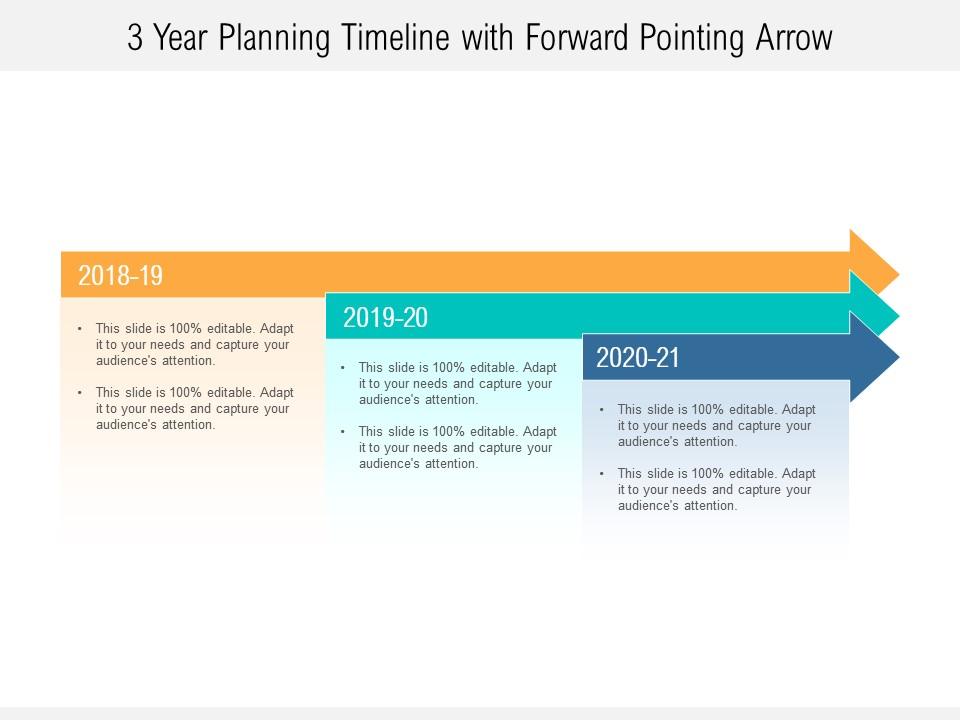
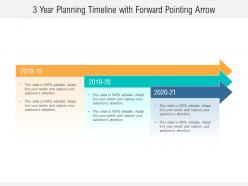
Presenting this set of slides with name - 3 Year Planning Timeline With Forward Pointing Arrow. This is a three stage process. The stages in this process are 3 Year Planning Timeline, Roadmap, Timeline.

FAQs for 3 year planning timeline with

Start and end dates are obvious but don't forget specific deadlines for each milestone. Make it chronological and easy to scan - nobody wants to squint at a wall of text. Brief descriptions for each step, plus who's responsible. Color coding by team or priority is honestly a game changer. Give everything room to breathe with decent spacing. I always test mine with a coworker first because what makes sense to me doesn't always translate. Oh, and keep your formatting consistent throughout or it'll look messy. The whole point is someone should get your project flow in like 5 seconds.

Dude, timelines are a game-changer for presentations. They turn boring data dumps into actual stories people can follow - like showing how you went from chaos to solution, or mapping out what's happening next quarter. Our brains love narratives way more than random bullet points (honestly, who doesn't zone out during those?). The cool thing is you'll catch holes in your argument before presenting. Just sketch your main milestones first. You'll instantly see if everything connects or if you're jumping around. Makes the whole thing feel less scattered and way more convincing.

Honestly, just keep it simple and clean - go horizontal or vertical, whatever feels right. Space everything evenly and stick to maybe 2-3 colors tops. The biggest mistake I see? Way too much text crammed everywhere. Bullet points are your friend here, not giant paragraphs. For the actual milestone markers, circles or diamonds work great - just don't go overboard with fancy stuff. You want people's eyes to flow naturally from one event to the next. Oh, and start with your biggest moments first, then build everything else around those. Makes the whole thing way easier to follow.

So it totally depends on what industry you're in. Tech companies are always showing those product roadmaps to investors - you know, the whole sprint timeline thing. Healthcare's big on treatment plans and clinical trials (makes sense for patient stuff). Construction teams? They're basically married to Gantt charts - I swear they put timelines on everything. Marketing uses them for campaign launches and seasonal pushes. Really though, you gotta match your style to who's listening. Internal teams want all the details, but executives just need the big picture stuff.

Timeline JS is probably your best bet - pulls straight from Google Sheets and looks really professional. PowerPoint's morph transitions work too if you mess around with them enough. Prezi does that cool zooming thing but honestly makes half the audience nauseous lol. Oh, Canva has interactive templates now too which is kinda surprising. If you've got time to figure it out, definitely go Timeline JS. PowerPoint morph is faster though if you're in a crunch. Really depends on how fancy you wanna get vs how much time you have.

Honestly, don't cram everything onto one timeline - it gets messy fast. Make your dates big enough to actually read (sounds obvious but you'd be surprised). Also watch your spacing between events because weird gaps make people think time passed differently than it did. I always forget this part but include WHY stuff matters, not just when it happened. Pick a format that works for whoever's reading it too. Clean design helps a lot. Oh, and definitely have someone else look at it first - they'll catch confusing bits you totally missed.

Hey! So for presentations, strip out all the tiny task stuff and just show the big milestones. Color coding is your friend - different phases, teams, whatever makes sense. Buffer time is clutch too, visually show you've thought about delays. Honestly, executives zone out if there's too much detail, so keep it high-level with just the major deliverables and deadlines. Oh and dependencies - definitely include those. I always make two versions now: detailed for my team, then a clean summary for the C-suite folks. Saves me so much time in meetings.

Colors and typography can totally make or break your timeline - I've seen people stare at confusing ones forever. Use colors to group related stuff or highlight big moments, but seriously don't go overboard with the rainbow thing. Stick to maybe 3-4 colors max. Typography-wise, keep your fonts consistent and make sure there's clear hierarchy so people can scan dates and titles easily. Oh, and here's something that actually works - squint at your timeline when you're done. If you can still follow the main flow while squinting, you're good to go. Sounds weird but it works.

Animation can totally save your timeline from being a hot mess. Don't dump everything on screen at once - that's how you lose people. Fade things in chronologically instead, maybe with some smooth slide transitions. The key is keeping consistent timing so there's actually a rhythm to it. Also, try connecting related events with animated lines or color changes - it really helps the story flow. Just don't go overboard with fancy effects because choppy animations are honestly worse than none at all. Build it progressively and each new piece should feel natural.

Honestly, just go horizontal for most stuff - it's what everyone's used to reading. Vertical works when you're cramped for space or really want to show that upward progression thing. Circular ones look cool but they're kinda gimmicky unless you're dealing with cycles or repeating events. I'd probably stick with horizontal for basic project timelines. Oh, and vertical can actually hit harder when you've got clear stages to show off. Really though, figure out what info you need to get across first, then worry about the format. Your audience will thank you for picking whatever's easiest to follow.

So historical timelines are more about teaching - you're showing how events connect and what caused what. Dates matter a lot. Project timelines? Totally different vibe. They're tracking who does what by when, with all the deadlines and dependencies. I always think of it like storytelling vs. a roadmap, you know? When you're presenting them, historical ones need way more explanation and context (people forget stuff from history class). Project timelines should just hit the critical deadlines and what's coming up next. Pick based on whether you're explaining the past or managing the future.

Start with a crisis or problem moment - that immediately hooks people. Specific dates and concrete details beat vague stuff every time. Surprising stats? Those "wait, what?" moments are gold. Make sure your events connect with clear cause-and-effect relationships. Visual stuff matters too - bold colors for key milestones, maybe bigger text. I'm obsessed with good visual hierarchy, honestly. Short punchy details work better than long explanations. End with where things are heading next, something that connects to what your audience actually wants. The whole thing should feel like a story, not just random events listed out.

Honestly, timelines are amazing for complex stuff because they show how things actually connect over time. You can stack different data on one timeline and suddenly see patterns that spreadsheets totally hide. I'm obsessed with using them for project workflows - you'll catch bottlenecks you never noticed before. They work great for historical analysis too, or basically anything where timing is crucial. The visual flow just clicks with people way faster than boring bullet points. Last week I plotted out this messy project timeline and immediately spotted three issues that would've killed us later. Trust me, try it on your next complicated project.

Honestly, you gotta get the order right or people will be totally lost. Think about it - if someone's jumping around between 1995 and 2010 randomly, how are they supposed to follow what actually happened? The whole cause-and-effect thing falls apart. Plus later when you need to reference something specific, good luck finding it in a messy timeline. I learned this the hard way in my last presentation lol. Double-check those dates before you show anyone. Maybe throw in some arrows or color coding too - makes it way clearer visually.

Honestly, it all comes down to knowing who you're presenting to first. Executives? Just hit the major milestones - they don't want to get bogged down in details. Technical teams are the opposite though, they'll want all the phases and dependencies mapped out. Age is weirdly important too. Younger people usually love interactive digital stuff, but I've noticed older stakeholders still prefer something they can print out and mark up. Don't forget about cultural context either - some groups need simpler language or different visual approaches. The whole thing is basically figuring out how your audience actually processes information, then matching your timeline format to that.

Ratings and Reviews

0% of 100
Review Form
Write a review
Most Relevant Reviews

No Reviews