


Actual Cost Vs Budget Powerpoint Presentation Slides





Try Before you Buy Download Free Sample Product
 Impress Your
 Audience
 100%
100% Editable
 Save Hours
 of Time


Our Actual Cost Vs Budget Powerpoint Presentation Slides are an artistic handiwork. Created by excellent craftsmen.
People who downloaded this PowerPoint presentation also viewed the following :
Content of this Powerpoint Presentation
Slide 1: This slide introduces Actual Cost Vs Budget. State Your Company Name and begin.
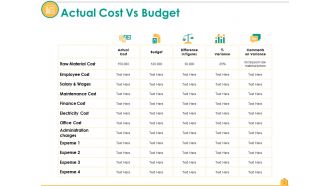
Slide 2: This slide shows Actual Cost Vs Budget. Use the table for the preparation of budget.
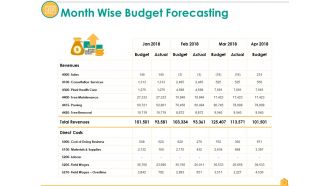
Slide 3: This slide presents Month Wise Budget Forecasting. Add the details as per your requirement.
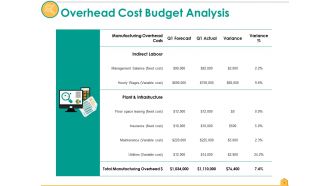
Slide 4: This slide presents Overhead Cost Budget Analysis. You can add the data as per your requirement.
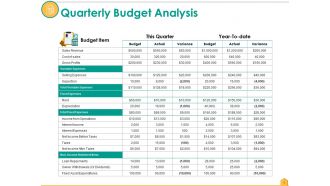
Slide 5: This slide shows Quarterly Budget Analysis. You can add the data as per your business requirement.
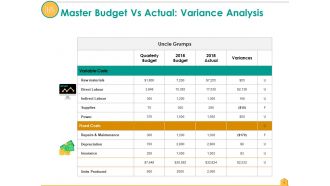
Slide 6: This slide presents Master Budget Vs Actual: Variance Analysis. You can add the information of your company and add text in it.
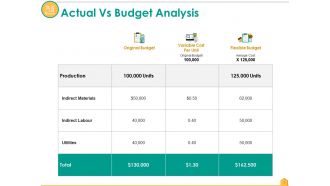
Slide 7: This slide shows Actual Vs Budget Analysis. Add your own company data and analyse.
Slide 8: This slide presents Actual Vs Target Variance. Use this to analyse the actual and target.
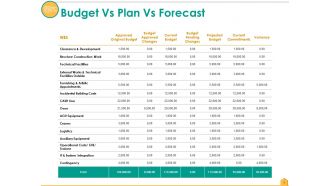
Slide 9: This slide shows Budget Vs Plan Vs Forecast. Add the data in this table and make the use of it.
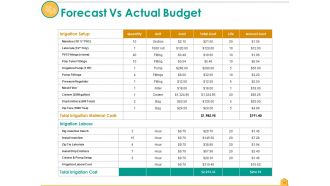
Slide 10: This slide presents Forecast Vs Actual Budget. Add your own information and use it.
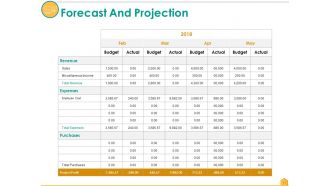
Slide 11: This slide showcases Forecast And Projection. You can project and forecast the budget in the table.
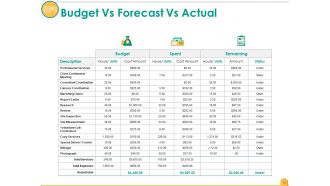
Slide 12: This slide displays Budget Vs Forecast Vs Actual. Use our slide to put your own data .
Slide 13: This slide shows Coffee Break image.
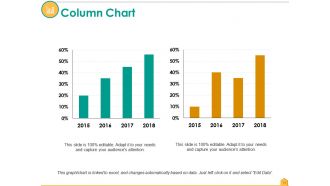
Slide 14: This slide is for Column Chart. Use this for the comparing of the product.
Slide 15: This slide showcases Line Chart. Add your data in this and make use of it.
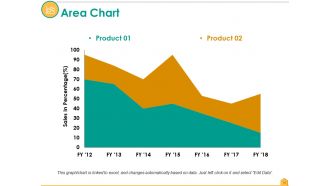
Slide 16: This slide shows Area Chart. Use this for your use.
Slide 17: This slide contains Our Mission with text boxes.
Slide 18: This slide helps show- About Our Company. The sub headings include- Creative Design, Customer Care, Expand Company .
Slide 19: This slide showcases Our Team with Name and Designation to fill.
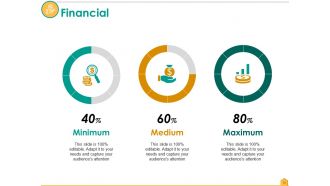
Slide 20: State your Financial score in this slide with relevant imagery and text.
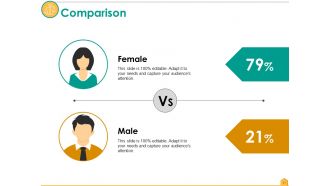
Slide 21: This slide presents Comparison slide . You can add the male and female comparison.
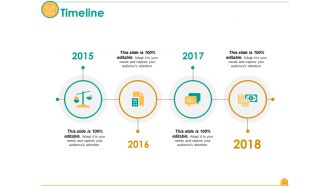
Slide 22: This is a Timelines slide to show- Plan, Budget, Schedule, Review.
Slide 23: This slide displays a Venn diagram image.
Slide 24: This is a Magnifying glass image slide to show information, scoping aspects etc.
Slide 25: This is a Thank You slide for acknowledgement.
Actual Cost Vs Budget Powerpoint Presentation Slides with all 25 slides:
Handle ineffectual effort with our Actual Cost Vs Budget Powerpoint Presentation Slides. Bring about changes that derive the desired impact.







FAQs for Actual Cost Vs Budget
So actual costs are just the real money you've already spent on your project. Budgeted costs? That's what you originally thought you'd spend when you were planning everything out. Honestly, they're never gonna match up perfectly - I learned that the hard way on my last project lol. Reality vs your initial guess, basically. But tracking both is super useful because you can catch budget overruns early and see where your estimates were way off. I'd check them weekly if you can. Makes it easier to fix things before they spiral.
Set up monthly variance reports - compare what you actually spent vs your budget, line by line. Excel works fine, honestly better than some fancy software I've tried. Calculate both dollar amounts and percentages so you catch problems early. Anything over 5-10% difference should be your warning sign. The trick is keeping your expense categories exactly the same between budget and actual, otherwise you'll go nuts trying to match things up. Oh, and automate the reports if you can - you're way more likely to actually look at them that way.
Ugh, scope creep is the absolute worst - that's when extra stuff keeps getting added without adjusting your budget. Your initial estimates were probably too optimistic too (we've all been there). Material costs can jump around like crazy, plus labor gets expensive fast. Sometimes you just don't have all the info upfront, so your budget's based on guesswork. Poor change management screws people over constantly. Honestly, Murphy's Law loves construction projects. Build in like 15-20% extra for surprises and check your spending every week instead of waiting till the end of the month. Trust me on that one.
So variance analysis takes that gap between what you planned to spend and what you actually spent, then breaks it down by category. Way better than just staring at "$10k over budget" and panicking, right? You'll see if it's because suppliers raised prices, your team used way more materials, or people worked overtime you didn't expect. I honestly think it's one of those things that seems obvious once you start doing it. Calculate both price and quantity variances for each cost area - then you know which fires to put out first instead of guessing.
So many good options out there! I'd probably start with QuickBooks or Xero for basic tracking - they're pretty straightforward. Monday.com and Asana have budget features built right in if you're already using them for projects. For bigger stuff, NetSuite or SAP handle complex operations well, though they're overkill for most people. Honestly? Sometimes a smart Excel setup works just fine when you're getting started. Pick whatever plays nice with your current accounting setup - trust me, you don't want to be manually entering data all day. The main thing is getting your team to actually use it consistently.
Ugh, market swings can totally mess up your budget - especially anything with materials or labor that bounce around price-wise. Remember when lumber went insane during COVID? That's exactly what I'm talking about. Stable markets = your estimates stay solid. But when things get crazy, you're looking at 20-50% swings from what you originally planned. Longer projects get hit worse since there's more time for prices to go nuts. Honestly, I always pad my budgets now with buffer money and update estimates regularly. Learned that one the hard way.
Okay so financial forecasting is like having a crystal ball for your budget. You look at past revenue, expenses, cash flow patterns to predict what's coming. Way better than guessing randomly, trust me. Check your last 12-24 months of data first - seasonal trends, market shifts, all that stuff. Then set realistic budget targets based on what you actually see. I swear, so many companies mess this up by being way too optimistic about next year's numbers. Also build in some wiggle room for surprises because something always comes up that you didn't plan for.
Check your budget monthly or quarterly - depends how fast your project moves. Once you're 10-15% off track, time to dig in. Get the team together and figure out what's happening. Scope creep? Higher resource costs? Something totally random you didn't see coming? From there you can shuffle money around or ask for more budget. Honestly, catching this stuff early saves you so much headache later. Oh, and set up those automated alerts in whatever tool you're using - way better than manually checking numbers all the time like some kind of spreadsheet masochist.
Look, those surprise costs hit your profits hard - every extra dollar comes straight out of what you're making. Can't really bump up your prices halfway through most projects, you know? I've seen profitable jobs turn into barely breaking even real quick. The worst part? It screws up your cash flow for the next project too. Honestly, I always pad my budgets now - usually 10-15% extra depending on how complicated things might get. Learned that one the hard way! Better to have it and not need it.
Check your variances every month - see where you went over or under and dig into why that happened. I'd set up quarterly meetings to actually revise the budget based on what you're learning. Don't just wait until everything's falling apart to make changes. Build in some wiggle room from day one because honestly, rigid budgets are pretty much worthless when real life kicks in. Write down why you made each revision so you can spot patterns later. The stuff that keeps throwing you off? That's gold for making your next budget way more realistic.
Look, the biggest thing is getting departments to actually *talk* to each other - sounds obvious but you'd be shocked how many places don't do this. Weekly check-ins between teams catch budget problems early, before they turn into disasters. Real-time updates about scope changes and resource shifts? Game changer. Plus you avoid that annoying duplicate work when two teams are doing the same thing without knowing it. Set up shared dashboards so everyone's looking at the same numbers. Trust me, making communication routine instead of random will save you tons of headaches (and money).
Yeah, it's pretty wild how different each industry is! Manufacturing obsesses over material costs and efficiency metrics. But consulting? They're all about billable hours and resource stuff. Construction companies honestly have it rough - weather screws them over constantly, plus material prices are everywhere, so they plan for way more contingencies. Software folks mainly stress about labor costs and scope creep. Healthcare gets hit with compliance costs that nobody else deals with. My advice? Look up KPIs specific to your industry and see what similar companies are tracking. That'll give you a better starting point than generic advice.
Okay so basically you need multiple safety nets here. Check your spending weekly - trust me, monthly reviews miss way too much. Set up alerts when you hit certain thresholds so you're not scrambling later. Keep about 10-15% as backup money, and make your budget flexible enough that you can move funds between categories when needed. Rolling forecasts are clutch too - always be looking 3-6 months out. I learned this the hard way at my last job lol. Bottom line: spot problems fast and have backup plans ready to go.
Look at your past 2-3 years of spending vs what you budgeted. You'll start seeing patterns - like maybe you always blow past marketing costs in Q4 or IT expenses run 20% higher than planned. Don't stress about random one-time overages though, those just happen. Focus on the stuff that repeats. Calculate your average variances by department and actually use them in next year's budget. Honestly, most people skip this step and then act surprised when they overspend in the same areas again. If you know you typically undershoot certain costs, just plan for it upfront.
Honestly, start with accounting basics - most people think budget reporting is just comparing numbers but there's way more context around timing and accruals. Get your team familiar with your specific software and chart of accounts first. Then do hands-on practice pairing newbies with experienced people. Variance analysis is huge too - like what those differences actually mean for the business. I'd do a half-day workshop on fundamentals, then monthly sessions walking through real reports together. The approval workflows part always trips people up so cover that early.
-
Presentation Design is very nice, good work with the content as well.
-
It saves your time and decrease your efforts in half.