

Actual Cost Vs Plan Projection Powerpoint Presentation Slides





Try Before you Buy Download Free Sample Product
 Impress Your
 Audience
 100%
100% Editable
 Save Hours
 of Time


Are you facing trouble in creating a professional presentation on the concept of actual cost vs plan projection? Do not worry! SlideTeam has come up with the predesigned actual cost vs plan projection PowerPoint presentation slides. Using this actual vs forecast PPT presentation, you can represent an organization future revenue and expenditure. This planning budgeting and forecasting presentation PPT includes a template on relevant sub-topics such as actual cost vs budget, month wise budget forecasting, overhead cost budget analysis, quarterly budget analysis, master budget vs actual variance analysis, actual vs budget analysis, actual vs target variance, budget vs plan vs forecast, forecast vs actual budget, and forecast and project. It also covers a template on budget vs forecast vs. actual. With the assistance of these financial planning PPT slides, you will be able to achieve an organization economic prosperity. Employ this PPT presentation to compare the past and present report to predict the future performance of an organization. Our PowerPoint designers have used visuals and images of charts and graphs so that you can quickly represent the financial statistics of the business. So, do not wait; download this actual vs. forecast PPT presentation. Achieve the correct ambiance with our Actual Cost Vs Plan Projection Powerpoint Presentation Slides. Create the exact atmosphere you desire.
People who downloaded this PowerPoint presentation also viewed the following :
Content of this Powerpoint Presentation
Slide 1: This slide introduces Actual Cost Vs Plan Projection. State Your Company Name and begin.
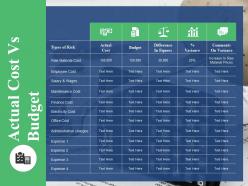
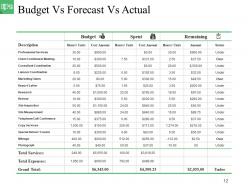
Slide 2: This slide presents Actual Cost Vs Budget table and use it to add the data.
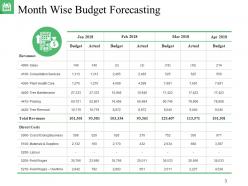
Slide 3: This slide showcases Month Wise Budget Forecasting with these information and add the different month budget calculations.
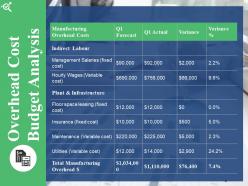
Slide 4: This slide presents Overhead Cost Budget Analysis.
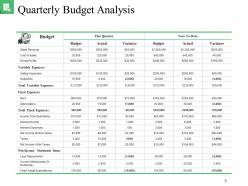
Slide 5: This slide showcases Quarterly Budget Analysis. You can add the budget for this quater and year to date.
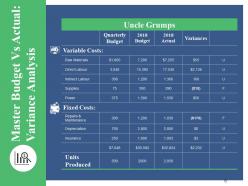
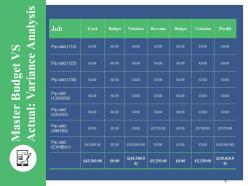
Slide 6: This slide presents Master Budget Vs Actual: Variance Analysis with variable cost and fixed cost.
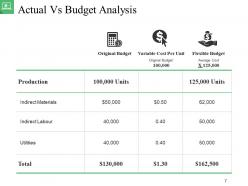
Slide 7: This slide presents Actual Vs Budget Analysis which further presents Original Budget.
Slide 8: This slide showcases Master Budget VS Actual: Variance Analysis.
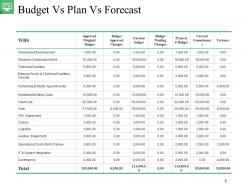
Slide 9: This slide showcases Budget Vs Plan Vs Forecast.
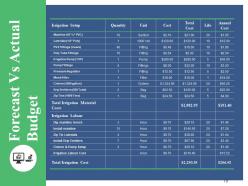
Slide 10: This slide presents Forecast Vs Actual Budget. Add the data and use it.
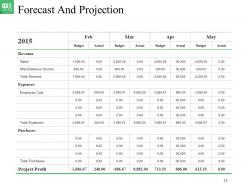
Slide 11: This slide shows Forecast And Projection.
Slide 12: This slide showcases Budget Vs Forecast Vs Actual. Use it accordingly.
Slide 13: This slide We’ll Come Back After 15 Minutes.
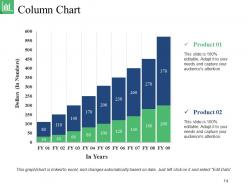
Slide 14: This slide presents Column Chart with the comparison table.
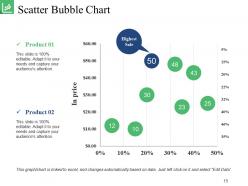
Slide 15: This slide showcases Scatter Bubble Chart. Add the data and use it.
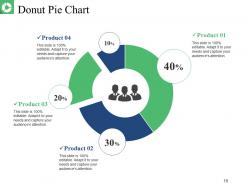
Slide 16: This slide shows Donut Pie Chart.
Slide 17: This is a Vision, Mission and Goals slide. State them here.
Slide 18: This is an About Us slide showing Our Company, Value Client, and Premium services as examples.
Slide 19: This slide showcases Our Team with Name and Designation to fill.
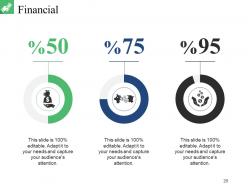
Slide 20: State your Financial score in this slide with relevant imagery and text.
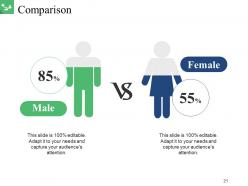
Slide 21: This slide shows Comparison of Positive Factors v/s Negative Factors with thumbsup and thumb down imagery.
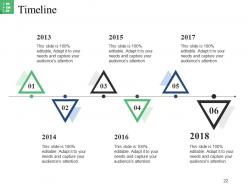
Slide 22: This is a Timelines slide to show- Plan, Budget, Schedule, Review.
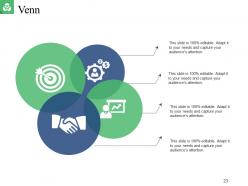
Slide 23: This slide displays a Venn diagram image.
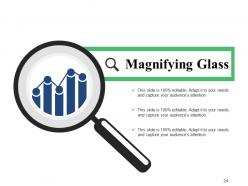
Slide 24: This slide displays a Magnifying Glass with icon imagery.
Slide 25: This is a Thank You slide with Address# street number, city, state, Contact Numbers, Email Address.
Actual Cost Vs Plan Projection Powerpoint Presentation Slides with all 25 slides:
Transform the difficult into the elementary. Our Actual Cost Vs Plan Projection Powerpoint Presentation Slides will do the conversion.

FAQs for Actual Cost Vs Plan Projection
Start by mapping out your cost categories - direct stuff like materials and labor, plus indirect costs like overhead and admin. Opportunity costs matter too, honestly they're often the biggest surprise. Timeline's crucial because delays = money. Hidden costs are everywhere and will mess you up if you're not careful. I always build in some kind of contingency buffer, maybe 10-15%? Things go sideways constantly. Risk assessment helps - run a few scenarios to see what happens if costs jump or timelines shift. Oh and do sensitivity analysis on your big numbers. Sounds fancy but it's just seeing how changes affect your total.
So basically, fixed costs don't change no matter what - rent, salaries, software subscriptions. Variable costs go up and down depending on how much you're actually doing, like materials or hiring freelancers by the hour. The tricky part is that variable costs can get out of hand super fast if you're not watching them. I learned this the hard way on a project last year, ugh. Start by figuring out your fixed costs since that's your minimum spending. Then really think through the variable stuff and add like 10-15% extra because they're way harder to predict accurately.
Think of cost analysis as your financial GPS - keeps you from driving off a cliff with bad decisions. Map out all your direct and indirect costs first, then stack them against expected returns. Super helpful when your boss gets excited about some shiny new project that'll blow the budget (been there). You can use it for product launches, expansions, basically any big move. Honestly saves my butt regularly. The trick is spotting those sneaky hidden costs early. Short version: don't spend money without doing the math first - sounds obvious but you'd be surprised how often people skip this step.
Break down your expenses into detailed categories and compare them against what you spent before. Look at cost per unit, department spending, vendor contracts - that's where you'll catch the real budget killers. I always start with the biggest expense categories since that's where you get the most impact. Pull last quarter's data and find your top 5 cost drivers first. Sometimes it's embarrassing what you discover - like we were overpaying for printer paper by 40% for months. The real insights come when you dig into those numbers and spot patterns.
So there's a few ways to tackle this. Cost-benefit analysis is probably your best starting point - just weighing project costs against what you expect to get back. Activity-based costing (ABC) gets into the weeds more, breaking everything down by specific activities which is clutch when you need to see exactly where money's disappearing. Variance analysis compares budgeted vs actual costs to catch surprises early. There's also life-cycle costing for longer projects and break-even analysis. Most teams I know mix and match depending on the situation - honestly that's probably the smartest approach anyway.
Honestly, just break down your spending by department or product line first. You'll be shocked where money's actually going versus where you think it goes. Compare your numbers to industry benchmarks - that's where the real "oh shit" moments happen. I'd track your biggest expense categories for like a month, then tackle the stuff that'll move the needle most. Maybe it's renegotiating with suppliers or cutting redundant processes. The data pretty much speaks for itself once you actually look at it. Focus on areas where your costs seem way out of whack compared to what you're getting back.
Honestly, just stick with Excel for most cost stuff - you've already got it and it works great. I mean, I've watched people blow money on expensive enterprise tools when a decent spreadsheet would've done everything they needed. Tableau and Power BI are solid if you want fancy charts. QuickBooks or Xero work better for operational costs though. For project tracking over time, maybe look at Smartsheet or Monday.com, but that's only if you're dealing with really complex stuff. My advice? Start with whatever you have now, then only upgrade when you actually hit a wall.
Honestly, external stuff can completely wreck your cost analysis. Supply chain issues or demand spikes? Your costs could jump 20-30% literally overnight - I've watched it destroy entire project budgets. Market trends mess with supplier pricing, material costs, labor rates. What looks profitable today might tank tomorrow, which is why you need flexibility built in. Run different scenarios - best case, worst case, realistic. Oh and speaking of realistic, don't be overly optimistic with your projections. You'll thank yourself later when markets inevitably shift and you're actually prepared for it.
Honestly, the biggest mess-ups are forgetting hidden costs and using old data. Implementation always costs way more than expected - kinda like those home reno shows where they're like "oops, we found asbestos." Don't just look at upfront costs either. Training, downtime, all that stuff adds up fast. Oh, and make sure you're actually comparing similar things when weighing options. I'd probably make a list of cost categories first so you don't miss the obvious ones. Also, factor in time value of money or your numbers won't mean much.
Okay so cost analysis is huge for pricing decisions - it shows you what everything actually costs to make and deliver. Once you know your real break-even point, you can figure out realistic margins and stay competitive without shooting yourself in the foot. Think of it like a roadmap for pricing instead of just winging it. Plus the data reveals cool opportunities, like maybe you can trim costs for lower prices or your quality's good enough to charge premium. Honestly I'd start with calculating your true cost per unit first, then work backwards to see what pricing actually makes sense.
So basically, you run "what if" scenarios on your biggest cost categories to see where you're most exposed. Like what happens if your supplier jacks up prices 20% or demand tanks? It shows you which budget areas are shakiest and helps you figure out what risks to worry about first. Pretty handy for catching problems before they wreck your finances - though obviously it's not foolproof or anything. I'd start with your top 3-5 cost buckets and play around with different scenarios. Way better than getting blindsided later when something actually goes wrong.
Manufacturing cost analysis is way more straightforward tbh - you've got material costs, overhead to allocate, and actual inventory to value. Services though? That's where it gets messy. Your biggest expenses are usually labor and random indirect costs that don't tie neatly to specific projects. Like, how do you even measure one "unit" of consulting work? You can't. Manufacturing companies focus on cost per widget produced. Service businesses have to think about cost per hour or per project instead. First step is figuring out if your costs are more physical stuff or time-based - that'll point you in the right direction.
Lead with your big recommendation right away - don't make them dig for it. Charts and graphs are your friend because spreadsheets just make people's eyes glaze over. Focus on 3-4 main points max, and always connect costs to actual business impact. Show them different scenarios too - best case, worst case, realistic middle ground. That way they get the full picture. Oh, and definitely come with clear next steps and timelines ready. Nobody wants to sit through another meeting just to figure out what happens next. Your job is helping them decide, not showing off every calculation you did.
Here's what I'd do - grab at least 2-3 years of historical data if you've got it. Way better than shooting in the dark with cost estimates. You'll start seeing actual patterns, like seasonal spikes or how certain factors mess with your pricing. Honestly, it's the closest thing to a working crystal ball you're gonna get. Just make sure the data's clean and still relevant to what you're dealing with now. Once you spot those trends, you can build realistic forecasts and hopefully catch any nasty cost surprises before they wreck your budget. Trust me, beats guessing every time.
Honestly, look beyond just the numbers on your spreadsheet. Who's actually getting hurt or helped by these cost decisions? Environmental damage, crappy wages, long-term community impacts - that stuff matters even if it doesn't show up in your calculations. Your data sources might be biased too, which is annoying but pretty common. Be upfront about what you're including and what you're not. Stakeholders deserve to know how you're crunching these numbers. Short version: figure out who wins and who loses from each decision you're analyzing.
-
The Designed Graphic are very professional and classic.
-
Excellent work done on template design and graphics.