Affinity Diagram With Key Customer Requirements

Rating:
90%
Affinity Diagram With Key Customer Requirements
Slide 1 of 6
Favourites Favourites

Try Before you Buy Download Free Sample Product

Audience Impress Your
Audience
Editable 100%
Editable
Time Save Hours
of Time
The Biggest Sale is ending soon in
0
0
:
0
0
:
0
0
Rating:
90%
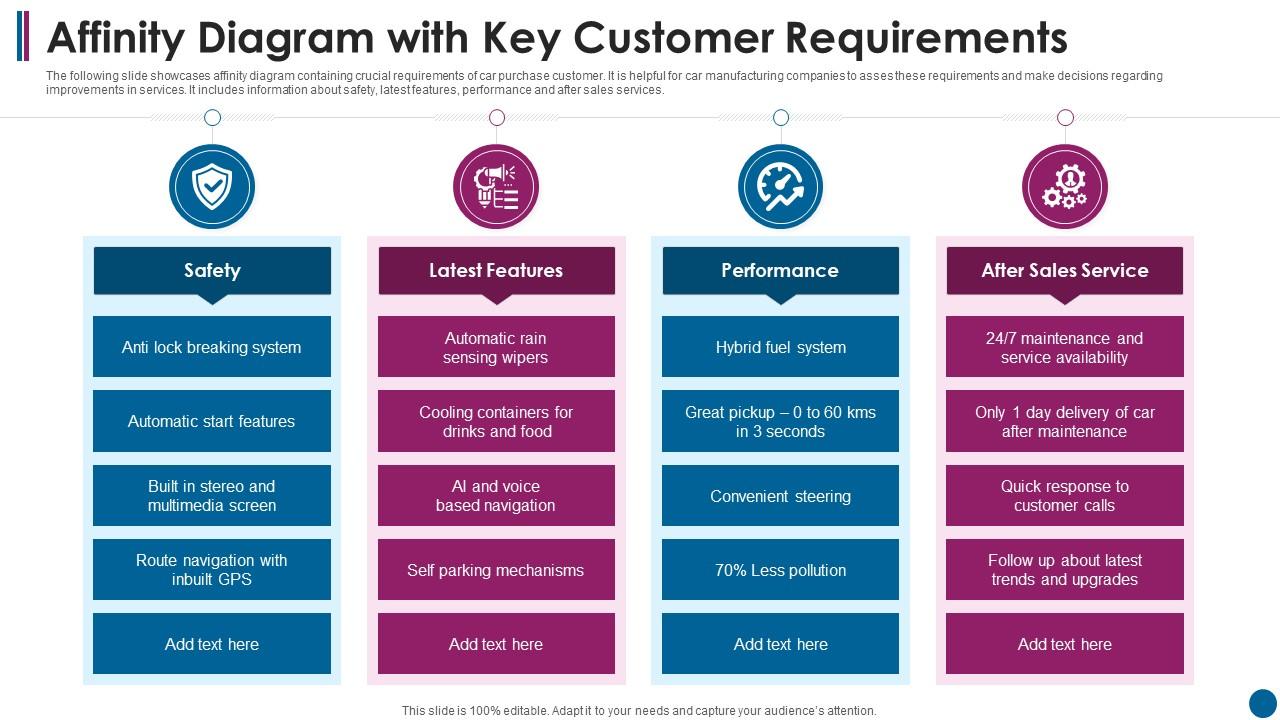
The following slide showcases affinity diagram containing crucial requirements of car purchase customer. It is helpful for car manufacturing companies to asses these requirements and make decisions regarding improvements in services. It includes information about safety, latest features, performance and after sales services.Introducing our Affinity Diagram With Key Customer Requirements set of slides. The topics discussed in these slides are Latest Features, Performance, After Sales Service This is an immediately available PowerPoint presentation that can be conveniently customized. Download it and convince your audience.

FAQs for Affinity Diagram With

Affinity diagrams enhance team brainstorming by organizing diverse ideas into coherent themes, improving pattern recognition, fostering collaborative synthesis, and ensuring all perspectives are captured systematically. These visual frameworks streamline decision-making processes by revealing hidden connections between concepts, enabling teams to prioritize actionable insights more effectively, while ultimately delivering clearer strategic direction and stronger team alignment on complex challenges.

Affinity diagrams facilitate better project management in diverse teams by organizing disparate ideas into coherent themes, identifying common priorities across different perspectives, and creating visual consensus around project goals. This structured approach enables teams with varied backgrounds to streamline decision-making, reduce miscommunication, and align resources more effectively, ultimately delivering improved collaboration and faster project outcomes.

Creating an effective affinity diagram involves brainstorming ideas individually, writing each idea on separate sticky notes, displaying all ideas without discussion, and silently grouping related concepts into natural clusters. Teams then label each group with descriptive headers, discuss patterns and insights, and refine groupings as needed, with many organizations finding that this structured approach streamlines problem-solving and enhances strategic decision-making across departments.

Digital tools enhance affinity diagram functionality by enabling real-time collaboration, automatic clustering suggestions, advanced search capabilities, version control, and seamless integration with other project management platforms. These technologies streamline the grouping process through drag-and-drop interfaces, collaborative editing features, and data visualization options, with many remote teams finding that digital platforms deliver faster consensus building and more comprehensive pattern recognition than traditional methods.

Affinity diagrams help resolve conflicts by organizing diverse viewpoints into logical categories, revealing common ground among disagreeing parties, and shifting focus from individual positions to shared themes. This structured approach enables teams to identify underlying patterns, reduce emotional tension through objective data grouping, and build consensus around clustered insights, ultimately transforming contentious discussions into collaborative problem-solving sessions.

Affinity diagrams capture customer feedback effectively by organizing diverse opinions, complaints, suggestions, and insights into meaningful themes and patterns. Through clustering similar feedback from surveys, interviews, and reviews, businesses streamline analysis, identify recurring pain points, and prioritize improvement areas, ultimately enabling data-driven decisions that enhance customer experiences and operational efficiency.

Common pitfalls include rushing the grouping process, forcing unrelated ideas together, creating too many or too few categories, and allowing dominant voices to override collaborative input. Teams often struggle with unclear labeling and insufficient data collection, with many organizations finding that premature categorization and lack of diverse perspectives ultimately compromise the diagram's effectiveness and strategic value.

Affinity diagrams organize existing ideas into related clusters through post-analysis grouping, while mind maps branch outward from a central concept during initial brainstorming. Affinity diagrams excel at synthesizing research findings, user feedback, and team insights into actionable themes, whereas mind maps facilitate creative exploration and idea generation, with many organizations finding that combining both methods streamlines strategic planning processes.

Affinity diagrams work effectively in remote environments through digital collaboration platforms like Miro, Mural, and Microsoft Whiteboard, enabling distributed teams to organize ideas virtually. Remote teams use these tools for brainstorming sessions, project retrospectives, and customer feedback analysis, with many organizations finding that digital affinity mapping actually enhances participation and documentation compared to traditional in-person methods.

Facilitation ensures objective grouping, manages diverse perspectives, and maintains focus during affinity diagram sessions by guiding participants through clustering processes, encouraging equal participation, and preventing bias. Skilled facilitators streamline decision-making, resolve disagreements about category placements, and help teams reach consensus efficiently, ultimately delivering clearer insights and stronger buy-in across organizations.

Affinity diagrams assist in prioritization by grouping related tasks or ideas into clusters, revealing natural themes and patterns that highlight areas of greatest importance or frequency. This visual organization enables teams to identify high-impact clusters, allocate resources more strategically, and focus efforts on grouped priorities rather than scattered individual items, ultimately streamlining decision-making processes.

The ideal group size for creating an affinity diagram ranges from 4-8 participants, with 6 being optimal for most organizational contexts. This size enables diverse perspectives while maintaining manageable discussion dynamics, allowing teams to efficiently categorize ideas, reach consensus on groupings, and generate meaningful insights without overwhelming complexity or insufficient input variety.

Affinity diagrams benefit user experience design, product development, market research, healthcare process improvement, and strategic planning projects across various industries. Organizations in technology, healthcare, financial services, and manufacturing find them particularly valuable for organizing customer feedback, identifying service gaps, and streamlining complex workflows, ultimately enhancing decision-making and operational efficiency.

Visual elements within affinity diagrams enhance stakeholder communication by providing clear hierarchical structures, color-coded categories, and intuitive groupings that transcend language barriers and technical expertise levels. These visual cues enable cross-functional teams, from marketing to engineering, to quickly identify patterns, prioritize initiatives, and align on strategic directions, ultimately streamlining decision-making processes and reducing meeting times significantly.

Successful affinity diagram implementations include Toyota's production system optimization, IDEO's user experience design processes, healthcare systems organizing patient feedback, and financial services streamlining customer journey mapping. These organizations leverage affinity diagrams to synthesize complex data sets, identify recurring patterns, and prioritize strategic initiatives, ultimately delivering improved operational efficiency and enhanced customer experiences across diverse business functions.

Ratings and Reviews

90% of 100
Review Form
Write a review
Most Relevant Reviews
  1. 100%

    by Coy Wallace

    “The presentation template I got from you was a very useful one.My presentation went very well and the comments were positive.Thank you for the support. Kudos to the team!”
  2. 80%

    by Derrick Rice

    Thank you for offering such helpful pre-designed templates. They are really beneficial to me in my job.

2 Item(s)

per page: