


Analysis Of Retail Store Operations Efficiency Powerpoint Presentation Slides





Try Before you Buy Download Free Sample Product
 Impress Your
 Audience
 100%
100% Editable
 Save Hours
 of Time


Analysis of Retail Store Operations Efficiency is a process to analyze the current level of the stores performance using multiple KPIs. The store manager can use this module to identify the areas with poor performance and formulate strategies to achieve operational efficiency. The PowerPoint deck includes a holistic view of retail store operational areas such as inventory management, store administration, customer service, and employee management, sales. It visually presents the inventory inspection findings of safety stock, holding costs, and stock status and lists strategies to overcome identified challenges by deploying inventory management software, using catalog sheets for perishable food items, etc. This presentation also contains approaches to improve store management functions efficiency by deploying cash management software, using cleaning checklists, installing cameras, and applying merchandise tags to prevent shoplifting. The PowerPoint module showcases the inspection discoveries of customer service in terms of high wait time at checkout counters, nonfriendly return policy, disengaging store atmosphere, etc. Additionally, the PPT deck includes workforce challenges the store faces, such as high turnover rates, low employee engagement, etc., and solutions to overcome the same by giving competitive salaries, ensuring work-life balance, etc. Talk about the major sales and marketing challenges, limited social media presence, etc., with techniques for improvement. Lastly, it also contains expected benefits to drive from retail store operational excellence and dashboards top track retail store sales, inventory, etc. Download this editable template now.
People who downloaded this PowerPoint presentation also viewed the following :
Content of this Powerpoint Presentation
Slide 1: This slide introduces Analysis of Retail Store Operations Efficiency. State your company name and begin.
Slide 2: This slide states Agenda of the presentation.
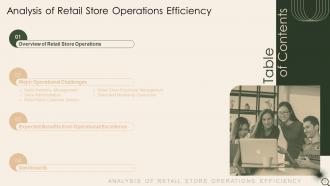
Slide 3: This slide shows Table of Content for the presentation.
Slide 4: This slide depicts title for three topics that are to be covered next in the template.
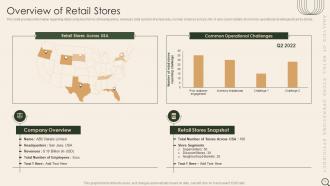
Slide 5: This slide provides information regarding retail company in terms of headquarters, revenues, total number of employees, number of stores across USA.
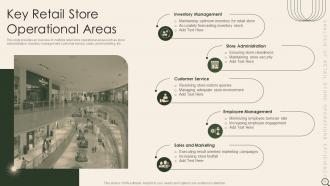
Slide 6: This slide provides an overview of multiple retail store operational areas such as store administration, inventory management, customer service, etc.
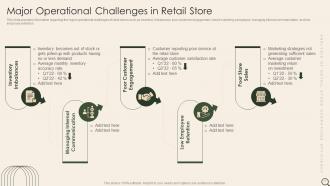
Slide 7: This slide provides information regarding the major operational challenges of retail stores such as inventory imbalances, poor customer engagement, etc.
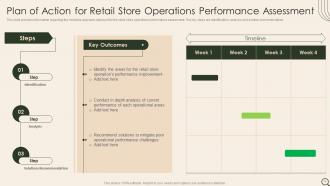
Slide 8: This slide shows Plan of Action for Retail Store Operations Performance Assessment.
Slide 9: This slide depicts title for the topic that are to be covered next in the template.
Slide 10: This slide depicts title for Retail store inventory management.
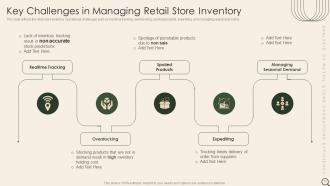
Slide 11: This slide reflects the retail store inventory operational challenges such as real time tracking, overstocking, spoiled products, expediting, etc.
Slide 12: This slide depicts title for Inventory Operations Assessment.
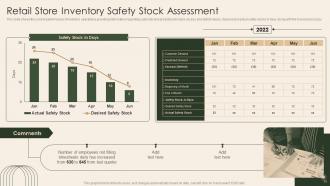
Slide 13: This slide shows the current performance of inventory operations providing information regarding customer and predicted demand, excess and deficit values, etc.
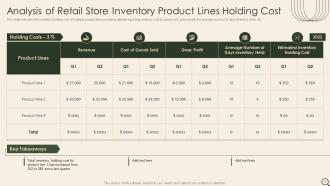
Slide 14: This slide indicates the inventory holding cost of multiple product lines providing details regarding revenue, cost of goods sold, gross profit, etc.
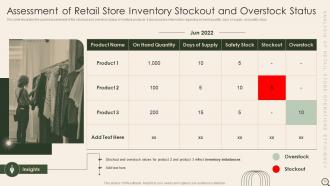
Slide 15: This slide illustrates the current assessment of the stockout and overstock status of multiple products.
Slide 16: This slide depicts title for Recommend Solutions for Retail Store Inventory Operational Challenges.
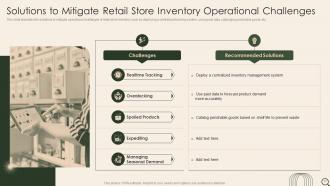
Slide 17: This slide tabulates the solutions to mitigate operational challenges of retail store inventory such as deploying a centralized tracking system, etc.
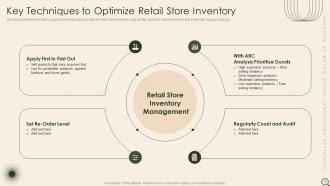
Slide 18: This slide presents information regarding key techniques to optimize retail store inventory such as ABC analysis, set reorder level, first in first out, etc.
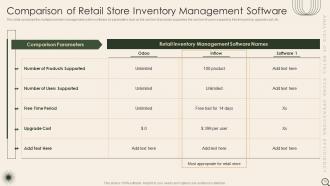
Slide 19: This slide compares the multiple inventory management system software on parameters such as the number of products supported, etc.
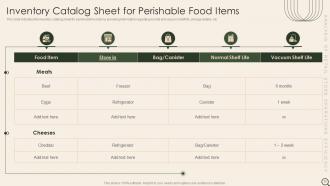
Slide 20: This slide indicates the inventory catalog sheet for perishable food items providing information regarding normal and vacuum shelf life, storage details, etc.
Slide 21: This slide depicts title for Retail Store Administration.
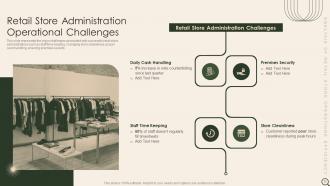
Slide 22: This slide represents the major challenges associated with successful retail store administrations such as staff time keeping, managing store cleanliness, etc.
Slide 23: This slide depicts title for Store Administration Assessment.
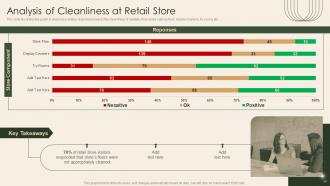
Slide 24: This slide illustrates the graph to showcase visitors responses towards the cleanliness of multiple store areas such as floor, display counters, try rooms etc.
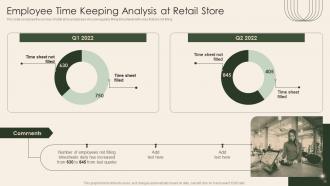
Slide 25: This slide compares the number of retail store employees who are regularly filling timesheets with ones that are not filling.
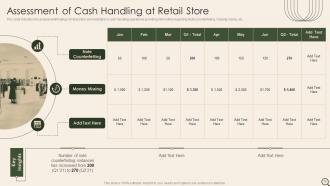
Slide 26: This slide indicates the assessment findings of retail store administration’s cash handling operations providing information regarding Note Counterfeiting, etc.
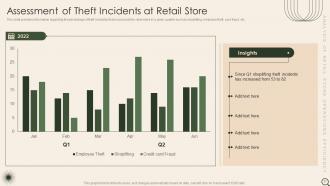
Slide 27: This slide provides information regarding the percentage of theft incidents that occurred at the retail store in a given quarter such as shoplifting, etc.
Slide 28: This slide depicts title for Recommend Solutions for Retail Store Administration Operational Challenges.
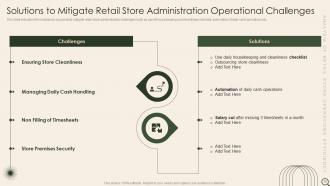
Slide 29: This slide indicates the solutions to successfully mitigate retail store administration challenges such as use of housekeeping and cleanliness checklist, etc.
Slide 30: This slide depicts the checklist for cleaning of multiple areas of the retail store such as entrance, stairways, shelves, restrooms, etc.
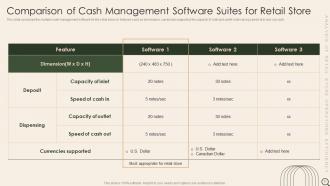
Slide 31: This slide compares the multiple cash management software for the retail store on features such as dimensions, currencies supported, etc.
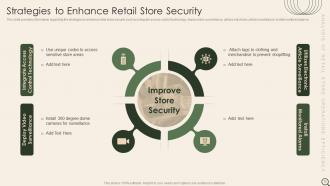
Slide 32: This slide provides information regarding the strategies to enhance retail store security such as integrate access control technology, etc.
Slide 33: This slide depicts title for Retail Store Operations Customer Service.
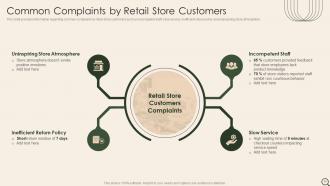
Slide 34: This slide provides information regarding common complaints by retail store customers such as incompetent staff, slow service, etc.
Slide 35: This slide depicts title for Store Customer Service Assessment.
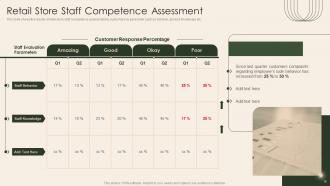
Slide 36: This slide shows the results of retail store staff competence assessment by customers on parameter such as behavior, product knowledge etc.
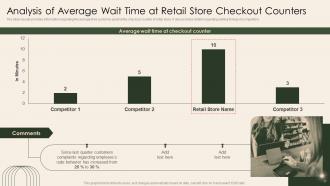
Slide 37: The slide visually provides information regarding the average time customer spent at the checkout counter of retail store.
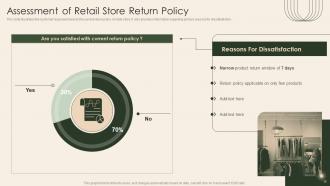
Slide 38: This slide illustrates the customer response towards the current return policy of retail store.
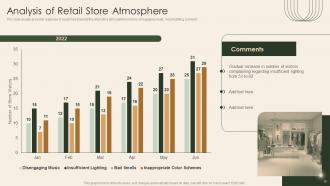
Slide 39: This slide visually presents response of customers towards the retail store atmosphere in terms of engaging music, mood lighting, scent etc.
Slide 40: This slide depicts title for Recommend Solutions for Improving Customer Service at Retail Store.
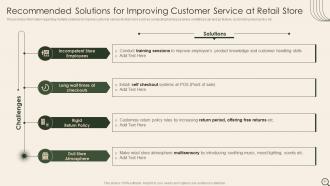
Slide 41: This provides information regarding multiple solutions to improve customer service at retail store such as conducting training sessions, etc.
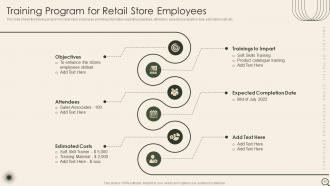
Slide 42: This slide shows the training program for retail store employees providing information regarding objectives, attendees, expected completion date, etc.
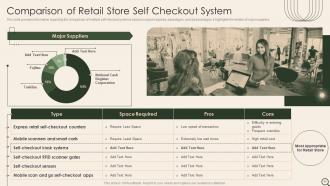
Slide 43: This slide provides information regarding the comparison of multiple self checkout systems based on space required, advantages, and disadvantages.
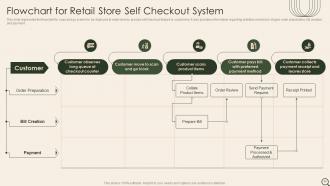
Slide 44: This slide represents the flowchart for scan and go system to be deployed at retail store to provide self checkout feature to customers.
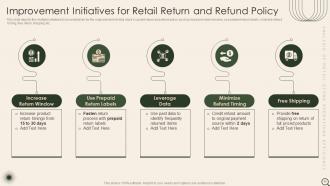
Slide 45: This slide depicts the multiple initiatives to be undertaken for the improvement of retail store’s current return and refund policy.
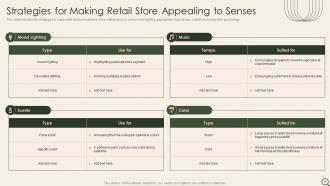
Slide 46: This slide indicates the strategies to make retail store atmosphere more multisensory by using mood lighting, appropriate music tempo, etc.
Slide 47: This slide depicts title for Retail Store Employee Management.
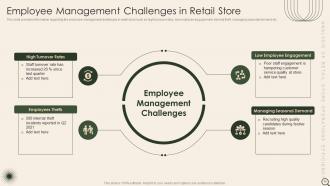
Slide 48: This slide provides information regarding the employee management challenges in retail store such as high turnover rates, low employee engagement, etc.
Slide 49: This slide depicts title for Store Workforce Assessment.
Slide 50: This slide visually presents the information regarding the employee turnover rate and engagement score at retail store.
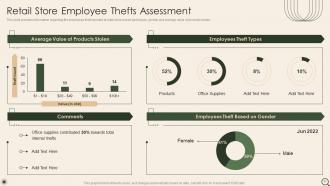
Slide 51: This slide provides information regarding the employees theft reported at retail store based upon types, gender and average value of products stolen.
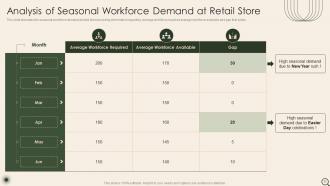
Slide 52: This slide tabulates the seasonal workforce demand at retail store providing information regarding average workforce required average workforce.
Slide 53: This slide depicts title for Recommend Solutions to overcome Employee Management Challenges at Retail Store.
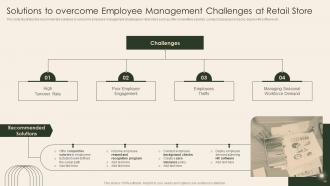
Slide 54: This slide illustrates the recommended solutions to overcome employee management challenges in retail store such as offer competitive salaries, etc.
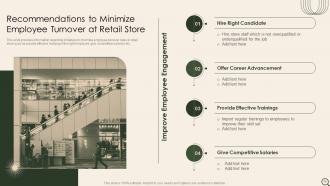
Slide 55: This slide provides information regarding initiatives to minimize employee turnover rates in retail store such as provide effective trainings, etc.
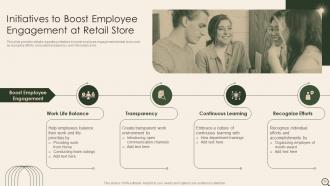
Slide 56: This slide provides details regarding initiatives to boost employee engagement at retail store such as recognize efforts, inculcate transparency, etc.
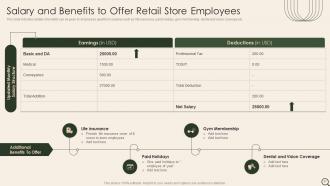
Slide 57: This slide indicates details of benefits can be given to employees apart form salaries such as life insurance, paid holidays, gym membership, etc.
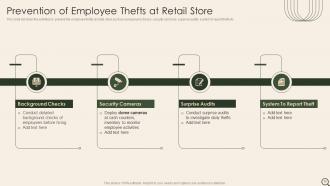
Slide 58: This slide list down the activities to prevent the employee thefts at retail store such as background checks, security cameras, surprise audits, etc.
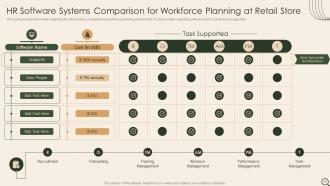
Slide 59: This slide provides information regarding the HR systems comparison for workforce planning at retail store.
Slide 60: This slide depicts title for Retail Store Operations Sales And Marketing.
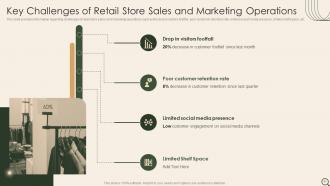
Slide 61: This slide provides information regarding challenges of retail store sales and marketing operations such as the drop in visitors footfall, etc.
Slide 62: This slide depicts title for Sales and Marketing Operations Assessment.
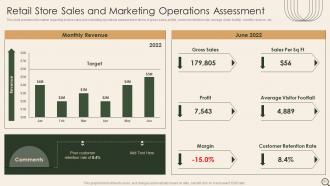
Slide 63: This slide provides information regarding instore sales and marketing operations assessment in terms of gross sales, profits, customer retention rate, etc.
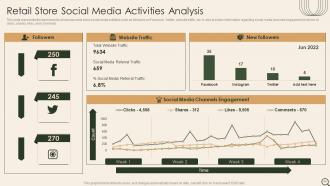
Slide 64: This slide represents the dashboard to showcase retail store social media activities such as followers on Facebook, Twitter, website traffic, etc.
Slide 65: This slide depicts title for Improvement Initiatives for Retail Store Sales & Marketing Operations.
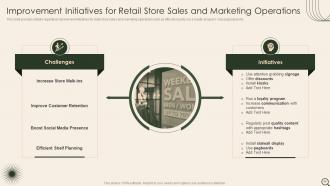
Slide 66: This slide provides details regarding improvement initiatives for retail store sales and marketing operations such as offer discounts, run a loyalty program.
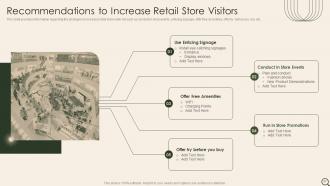
Slide 67: This slide provides information regarding the strategies to increase retail store walk-ins such as conduct in store events, enticing signage, etc.
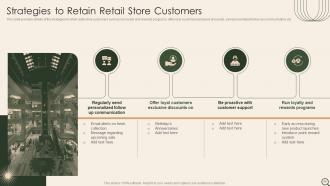
Slide 68: This slide provides details of the strategies to retain retail store customers such as run loyalty and rewards programs, etc.
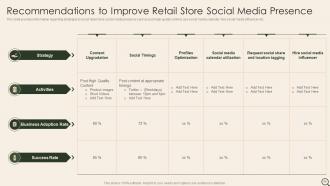
Slide 69: This slide provides information regarding strategies to boost retail store social media presence such as post high quality content, use social media calendar, etc.
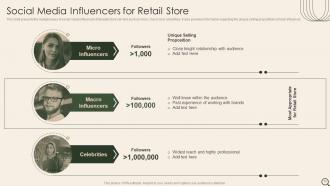
Slide 70: This slide presents the multiple types of social media influencers that retail store can hire such as micro, macro and, celebrities.
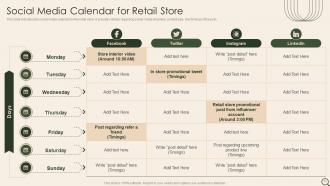
Slide 71: This slide indicates the social media calendar for the retail store. It provides details regarding social media channels, content type, and timings of the post.
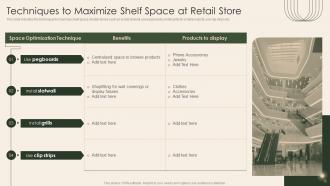
Slide 72: This slide indicates the techniques to maximize shelf space at retail stores such as install slatwall, use pegboards, install grills for small products, etc.
Slide 73: This slide depicts title for Expected Benefits from Operational Excellence.
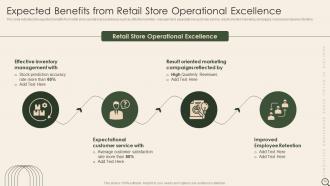
Slide 74: This slide indicates the expected benefits from retail store operational excellences such as effective inventory management, expectational customer service, etc.
Slide 75: This slide depicts title for Dashboards.
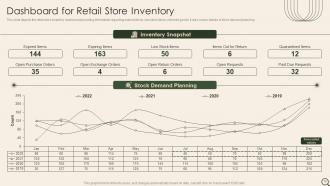
Slide 76: This slide depicts the retail store inventory dashboard providing information regarding expired items, low stock items, returned goods.
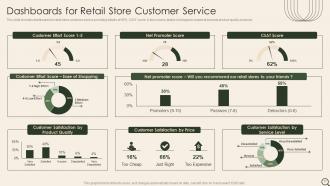
Slide 77: This slide includes dashboards for retail store customer service providing details of NPS, CSAT score.
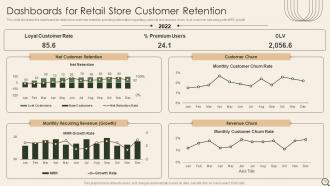
Slide 78: This slide illustrates the dashboard for retail store customer retention providing information regarding customer and revenue churn, loyal customer rate.
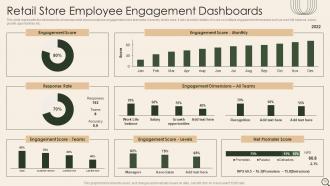
Slide 79: This slide represents the dashboard to showcase retail stores employee engagement score teamwise, hierarchy levels wise.
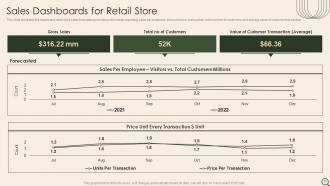
Slide 80: This slide illustrates the dashboard retail store sales forecasting providing information regarding sales per employee, price unit every transaction, etc.
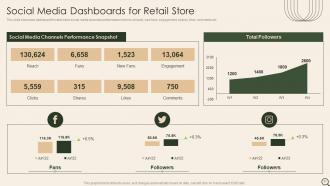
Slide 81: This slide showcase dashboard for retail store social media channels performance in terms of reach, new fans, engagement, shares, likes, comments etc.
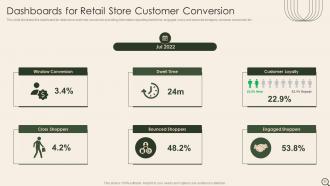
Slide 82: This slide shows Dashboards for Retail Store Customer Conversion.
Slide 83: This slide contains all the icons used in this presentation.
Slide 84: This slide is titled as Additional Slides for moving forward.
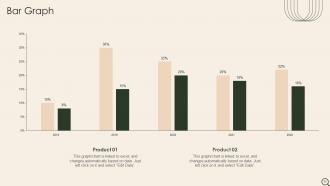
Slide 85: This slide presents Bar chart with two products comparison.
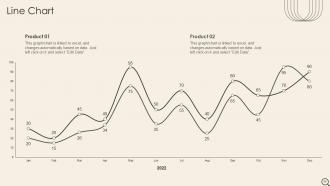
Slide 86: This slide describes Line chart with two products comparison.
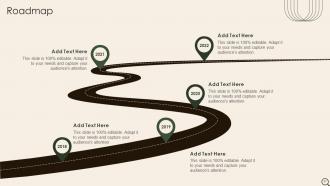
Slide 87: This slide presents Roadmap with additional textboxes.
Slide 88: This is an Idea Generation slide to state a new idea or highlight information, specifications etc.
Slide 89: This slide shows Post It Notes. Post your important notes here.
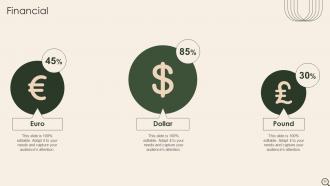
Slide 90: This is a Financial slide. Show your finance related stuff here.
Slide 91: This slide contains Puzzle with related icons and text.
Slide 92: This is a Thank You slide with address, contact numbers and email address.
Analysis Of Retail Store Operations Efficiency Powerpoint Presentation Slides with all 97 slides:
Use our Analysis Of Retail Store Operations Efficiency Powerpoint Presentation Slides to effectively help you save your valuable time. They are readymade to fit into any presentation structure.









FAQs for Analysis Of Retail Store Operations Efficiency
Focus on inventory turnover first - that's your money sitting on shelves. Sales per square foot and labor costs as percentage of sales are huge too. Gross margin by category will show you what's actually profitable. Oh, and conversion rates! Like how many people walk in vs actually buy something. Average transaction value tells you if customers are buying more stuff. There's probably 50 other metrics you could obsess over, but honestly these give you the real picture. I'd do weekly check-ins on these core ones, then dig deeper when numbers look weird.
Honestly, start with inventory management - that's where you'll see the biggest wins. AI handles demand forecasting so you don't get stuck with random dead stock (learned that one the hard way). Automated reordering keeps your popular stuff stocked without you checking every single item. The IoT sensors are actually pretty sweet - you can watch shipments move in real-time on dashboards instead of guessing where everything is. Cloud platforms let all your suppliers and warehouses sync up instantly. No more spreadsheet chaos or playing phone tag with updates. Pick one area first, then build from there.
So data analytics is like having a crystal ball for your inventory - you can actually predict what'll sell and when. Historical sales show you those seasonal patterns, plus you'll spot the slow movers before they eat up your cash flow. Honestly, most people sleep on this but tracking inventory turnover rates is huge. Demand forecasting helps you hit those reorder points without going crazy on overstock. Oh, and it's great for catching product duds early - learned that one the hard way! Start with those two metrics and you'll see exactly where you're bleeding money.
Honestly, good training is a game-changer for retail. Your staff can help customers way faster when they actually know the products. They'll handle returns and POS stuff without that awkward fumbling around - you know what I mean? Fewer mistakes too, which saves money on pricing errors and damaged stuff. Confident employees don't need to bug managers every five minutes either. Oh, and definitely start with product knowledge first, then move to your specific systems. Trust me, it's worth the upfront investment.
Your customers are literally telling you what's broken in your business. Long checkout lines? Time to rethink your staffing or throw in some self-checkout kiosks. Honestly, they're way better at spotting problems than we are since they're the ones dealing with our mess. Track the complaints you're getting - if the same issues keep popping up, that's where you focus first. Set up a simple system to collect feedback regularly (even just a basic survey works). Then tackle whatever's hurting the customer experience most. I'd start looking at patterns in your feedback this week.
Honestly, just keep your return policy super simple - like "30 days with receipt" and don't overcomplicate it. Train your staff to handle returns fast so customers aren't standing there forever. I'd set up a dedicated returns area too, makes everything way smoother than digging around for paperwork. Always try offering store credit or exchanges first before giving cash back. Stick to your rules consistently - I've watched stores lose customers over confusing policies that change randomly. Oh, and definitely track which products get returned a lot. That's usually a red flag about quality issues or bad suppliers.
Look, automation saves you money by cutting labor costs and reducing those annoying human errors that happen. Start with inventory tracking or maybe a basic chatbot - honestly, chatbots have gotten way better lately. Your team can do actual customer service instead of boring repetitive stuff. The upfront costs suck, but the ROI is wild once everything's running. These systems don't need breaks or health insurance either, which is huge. Just pick whatever process is currently the biggest time-suck and automate that first. You'll see results pretty quick.
Your store layout basically controls how smoothly everything runs. Good design pushes customers through your money-making sections without creating those awful checkout lines - IKEA's honestly annoying but brilliant at this. Wide aisles matter more than you'd think since your staff needs space to restock while customers shop. When the layout sucks, people get lost, employees waste time walking around confused, and nobody's happy. Stick with clear sight lines so you can see across the store. Group similar stuff together logically, and don't make aisles too narrow for carts.
Honestly, the biggest game-changer is getting all your inventory systems talking to each other. Real-time sync between online, mobile, and stores means no more awkward "sorry, we're actually out of stock" moments. Your physical stores basically become little warehouses too - customers can buy online and grab it in-store, or you can ship directly from whatever location has the item. Saves a ridiculous amount on shipping. Oh, and having all customer data in one place is clutch because your team can see someone's full history no matter where they usually shop. I'd start with inventory integration first, then build out from there.
Honestly, get yourself a decent POS system first - you need that real-time sales data. Then grab inventory software that actually updates as stuff moves. I swear by having one dashboard that shows everything instead of jumping between like 5 different apps (learned that the hard way). Foot traffic tools are clutch too, and scheduling software that tracks how productive your team is. Oh, and make sure you can check all this stuff from your phone. The biggest thing though? Pick systems that connect to each other. Trust me, nothing's worse than data scattered everywhere when you're trying to make quick decisions.
Oh man, seasonal swings are brutal for retail ops. You'll hit holiday rushes where everything breaks - not enough inventory, staff going crazy, customers waiting forever. Then January hits and you're stuck with way too much product and people standing around. Honestly, the whole feast-or-famine thing is exhausting. Build in flexibility from day one though. Set up staffing that can actually scale (temp workers are your friend), get suppliers who'll work with you on timing, and invest in decent forecasting tools. Trust me, predicting those swings beats scrambling every single time.
Honestly, most shrinkage isn't some Ocean's Eleven situation - it's just messy inventory tracking. Three things to hit: tighten up your receiving process and do regular cycle counts first. That's where you'll see the biggest difference. Train your team on handling procedures, especially with pricey stuff. Security cameras in the obvious spots help too, plus those electronic tags on expensive items. Oh, and create clear accountability for who's responsible for what inventory. I'd definitely start with fixing the tracking side before throwing money at fancy security tech though.
Okay so you NEED your teams talking to each other or everything goes to hell. Like, when merchandising doesn't loop in inventory and suddenly you're advertising stuff that's been sold out for weeks? That's the worst. Marketing, buyers, store ops - they all gotta be on the same page. Otherwise you end up with products nobody has floor space for (been there). Weekly 15-minute check-ins honestly save so much drama later. Better forecasting, smoother launches, fewer angry customers. I swear most retail problems come from teams just not communicating.
Track the basics first - inventory turnover, labor costs, transaction speed. Customer satisfaction matters just as much though, because what's the point of being "efficient" if everyone hates shopping there? I'd also watch checkout times and how often you're out of stock. Honestly, the biggest mistake is trying to measure everything at once. Pick like 3-4 metrics that actually matter for your situation. Get your baseline numbers before changing anything, then stick to consistent measuring afterward. Employee feedback is huge too - they'll tell you if your "improvements" are actually making their jobs impossible.
Honestly, the stuff that's really moving the needle right now is AI demand forecasting - like, companies can predict what you'll buy before you even think about it. Crazy, right? Automated warehouses are insane to watch too, robots just zipping around packing orders way faster than people. Dynamic pricing is huge - prices change all day based on what competitors are doing. Oh, and warehouse tech has gotten so good it's almost scary how efficient it is. If you're trying to figure out where to start, I'd go with demand forecasting software first. That usually gives you the biggest bang for your buck pretty quickly.
-
I joined SlideTeam last month and there’s no doubt that I tend to find our bond only strengthening over time. Best place to find world-class themes, templates, and icons.
-
I can say with full confidence that all your business, academic, or professional work requirements will be sufficed with SlideTeam. Their gallery is as rich as 2Million+!!