

Anatomy Powerpoint Ppt Template Bundles





Try Before you Buy Download Free Sample Product
 Impress Your
 Audience
 100%
100% Editable
 Save Hours
 of Time


Our Anatomy Powerpoint Ppt Template Bundles are topically designed to provide an attractive backdrop to any subject. Use them to look like a presentation pro.
People who downloaded this PowerPoint presentation also viewed the following :
Anatomy Powerpoint Ppt Template Bundles with all 18 slides:
Use our Anatomy Powerpoint Ppt Template Bundles to effectively help you save your valuable time. They are readymade to fit into any presentation structure.
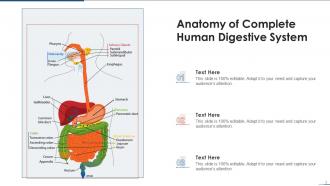
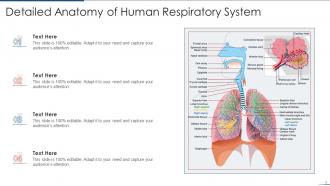
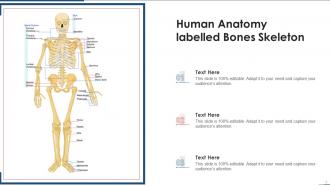
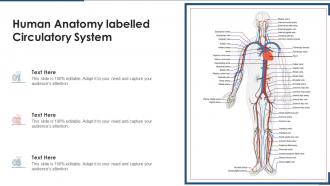






FAQs for Anatomy Powerpoint
Okay so first thing - make sure the anatomical diagrams are actually accurate because trust me, nothing's more embarrassing than teaching with wrong info. The layout needs good contrast so your text doesn't disappear into the background. I'd definitely go for ones with editable diagrams where you can highlight stuff. Color-coding is clutch for different organ systems. Also check that the formatting stays consistent across slides - some templates are weirdly inconsistent and it drives me crazy. Oh, and make sure it fits your audience! Medical school presentations need a totally different vibe than patient education stuff.
Honestly, anatomy templates are lifesavers for this stuff. They break down all those crazy biological systems with pre-made diagrams and color-coded layouts so people don't get overwhelmed. Way better than throwing a wall of text at someone about the circulatory system - that's just brutal. The templates help you structure everything step-by-step. Pick one that matches your topic (respiratory, nervous, whatever) and tweak the colors to highlight the connections you want people to notice. Visual hierarchy is key here. Your audience can actually follow along instead of zoning out halfway through.
Dark backgrounds are your friend here - they make anatomical details really pop. I'd go with deep blues, greens, or black since they won't fight with all the natural reds and pinks in organ images. Bright white or light blue text shows up great against these darker colors. Seriously, avoid red text at all costs - I've watched so many people lose their labels against muscle tissue and it's just painful to sit through. Test your color combo with some actual anatomy pics first. Trust me, what looks good on a blank slide might be terrible once you add images with all those warm tissue tones.
Yeah totally! Circulatory and nervous systems need those flow chart layouts since they're all about connections. The respiratory system is honestly my favorite to map out - use hierarchical layouts to show how everything branches from trachea down to alveoli. For muscles and bones, go with side-by-side grids so you can compare different groups clearly. Digestive systems work best as step-by-step processes. I always start by figuring out if my system is more about flow, structure, or process, then pick the layout from there. Makes the whole thing way easier.
High-res images are everything - pixelated stuff looks awful projected. Vector graphics are your best friend since they scale perfectly. For anatomy, pick consistent colors and fonts across all slides. I'm obsessed with finding the perfect arterial red tbh, probably spend way too long on it. Compress images after adding them so your file doesn't get crazy huge. Make sure there's enough contrast for different lighting. Oh, and definitely test on the actual projector beforehand - learned that one the hard way!
Dude, typography can totally make or break your anatomy presentation. Your audience is already dealing with complex diagrams - don't make them squint at weird fonts too. Stick with clean stuff like Arial or Helvetica. I made this mistake once with some curvy font that looked cool but nobody could read from the back. Font size matters big time - 24pt minimum, bigger for labels. Oh and pick maybe two fonts max and actually stick with them. Consistent headings help too. Trust me, boring fonts that people can actually read beat pretty ones every time.
Honestly, clickable hotspots are where it's at for anatomy stuff - students can click on different parts of a diagram and get labels or details to pop up. Super helpful. You can also throw in some animation triggers so organs appear one at a time when they click around. Navigation buttons are clutch too for jumping between different body systems without scrolling through everything. Oh, and embedding quizzes or drag-and-drop activities right into slides keeps things engaging. I'd say start with just one interactive slide first though - don't go crazy right away. Once you get the hang of it, you'll probably want to make everything clickable!
Okay so first - don't cram tons of text everywhere. Anatomy's super visual so let your diagrams do the work. Use bigger fonts too, like 16pt minimum or people in back can't see anything. Those crazy detailed 3D models? Skip them, they just confuse everyone. Pick colors that actually help tell structures apart instead of making some weird rainbow situation. Oh and define basic terms - not everyone knows what you're talking about. Here's the thing though - definitely test it on the actual projector first because I've learned the hard way that your laptop screen lies about how things will actually look.
Yeah, totally! Start with your most complex version - way easier to dumb things down than build them up later. For high school kids, just swap out the fancy medical terms and throw in some basic analogies. College students can handle the technical stuff and molecular details. I do this all the time honestly, beats making new slides from scratch every semester. You're basically just adjusting your vocab and maybe simplifying some diagrams. Oh, and high schoolers need way more visual examples - they zone out with too much text. Super efficient approach though!
Build your anatomy diagrams step-by-step instead of dumping everything on screen at once. I always start with bones, then add muscles and organs layer by layer as I'm explaining each part. Keeps kids focused instead of drowning in visual chaos. Fade-in animations work best - way better than those bouncy effects that just distract everyone. Oh, and make your labels appear right when you mention each structure. Just don't rush the timing or people won't keep up. Actually had a teacher tell me she slowed hers down even more after seeing students squinting at the screen trying to catch up.
Heart rate trends are perfect for this kind of thing. Bar graphs comparing organ sizes work really well too. I'd definitely throw in some flowcharts for circulation or digestion - those processes are honestly made for that format. Before/after comparisons are surprisingly effective, especially for showing anatomical changes over time. Heat maps on body diagrams can highlight activity areas or problem spots. Timeline visualizations are great if you're covering developmental stages. Just don't go crazy with too many visuals on one slide - it gets messy fast. Start with one simple chart per slide, then you can always add more later.
Honestly, standardized templates are a game-changer for anatomy departments. Students won't waste time deciphering different formatting styles - they can actually focus on memorizing all those muscle attachments (ugh). Your professors will thank you too since they're not rebuilding slides every term. Quality stays consistent across the board. Resource sharing becomes way easier between departments. Oh, and anatomy's already complicated enough without adding unnecessary design work. I'd start small though - roll it out to just your anatomy faculty first, see how it goes. Much better than forcing it campus-wide immediately.
Hey! So for your anatomy presentation, definitely grab some 3D apps like Complete Anatomy - they're seriously amazing for showing how everything connects. YouTube's your friend too. Crash Course A&P is solid, and Khan Academy never lets you down. Oh, and those surgical time-lapse videos are weirdly addictive, but maybe skip those unless your audience is pretty advanced lol. You could throw in some textbook excerpts for the credibility factor. Virtual dissection tools work great if you can't get your hands on the real deal. Just mix like 2-3 different types so you're not boring people to death.
Oh man, this is SO important but gets overlooked constantly! Different cultures have totally different comfort levels with body imagery - some are super conservative about nudity, others have religious restrictions. I'd definitely research your audience first and maybe prep a few versions of your presentation. Content warnings help too. You can still be educational without showing everything in full detail, you know? Alternative diagrams or more covered-up imagery work just as well for learning. Trust me, it's way better to be overly cautious than deal with uncomfortable situations mid-presentation.
Okay so basically everyone's doing clean, minimal vector stuff now - way less cluttered than those old textbook nightmares. You want templates that handle both 3D renders and flat designs since teachers flip between them depending on who they're teaching. Interactive features are everywhere too, which honestly makes total sense. Students actually remember things when they can click through layers and stuff. Go for modular designs where you can hide/show different body systems easily. Also leave space for notes without cramming everything together - trust me on this one. Templates with consistent color coding will save you tons of headaches later.
-
Unique design & color.
-
Easy to edit slides with easy to understand instructions.