


Brand Awareness Powerpoint Presentation Slides





Try Before you Buy Download Free Sample Product
 Impress Your
 Audience
 100%
100% Editable
 Save Hours
 of Time


Are you looking for Professionally designed presentation on brand awareness? Not sure where to find best designs and diagrams on brand management and brand development? Here we are presenting content ready brand awareness PowerPoint presentation slides. All you have to do is click and download perfectly designed brand positioning slide presentation. Going further, this brand advertising PPT includes brand awareness roadmap, campaign, metrics, effective measurement, bar graph, charts, etc. and much more. Besides this we aim to provide you the best slides related to branding which are highly useful as well as impactful. To thoroughly cover every aspect, we provide PPT templates like consumer behaviour, advertising management, brand recall, brand recognition, consumer purchase decision, brand strength, brand plan, brand positioning and many more. To suit your requirements, download this brand awareness PowerPoint presentation graphics today! Our brand campaign, metrics and charts have significance role for ensuring your win over your audience. Don't allow envy to get the upper hand with our Brand Awareness Powerpoint Presentation Slides. Establish control over jealousy.
People who downloaded this PowerPoint presentation also viewed the following :
Content of this Powerpoint Presentation
If you don’t give the market the story to talk about, they’ll define your brand’s story for you.” -David Brier, brand manager known for his disruptive marketing.
You can tell your brand’s story by creating an awareness program for your targeted audience. Creating brand awareness is the most crucial investment you can make in your business, as it helps make a positive mark in the marketplace. Are you passionate about your brand and want to make it a global one? We have got you covered with our 100% ready to use and customizable brand awareness powerpoint presentation slides. The aim is to help you create a perfect brand awareness program.
“The way a company brands itself is everything- it will ultimately decide whether a business survives.” These wise words of Sir Richard Branson are well reflected in the story of a poor sweet vendor who made 100 extra sweets daily out of his savings each day. He used to offer one sweet to each passerby without asking for money. Months and a year passed by and he continued with this strategy. No wonder there came a time when almost the entire city came to know about him through one another and the praises of his sweets and his affectionate gesture filled everyone’s hearts. The small vendor now became the owner of a very famous sweet brand known not only in his city but in the entire country! So, you see, a simple brand awareness strategy took him from the street-corner to the top of the business world.
SlideTeam’s brand awareness powerpoint presentation slides will help you with knowing your audience base, creating an online presence and keep a track of the entire process and help understand the metrics.
Slide 1: Brand Awareness
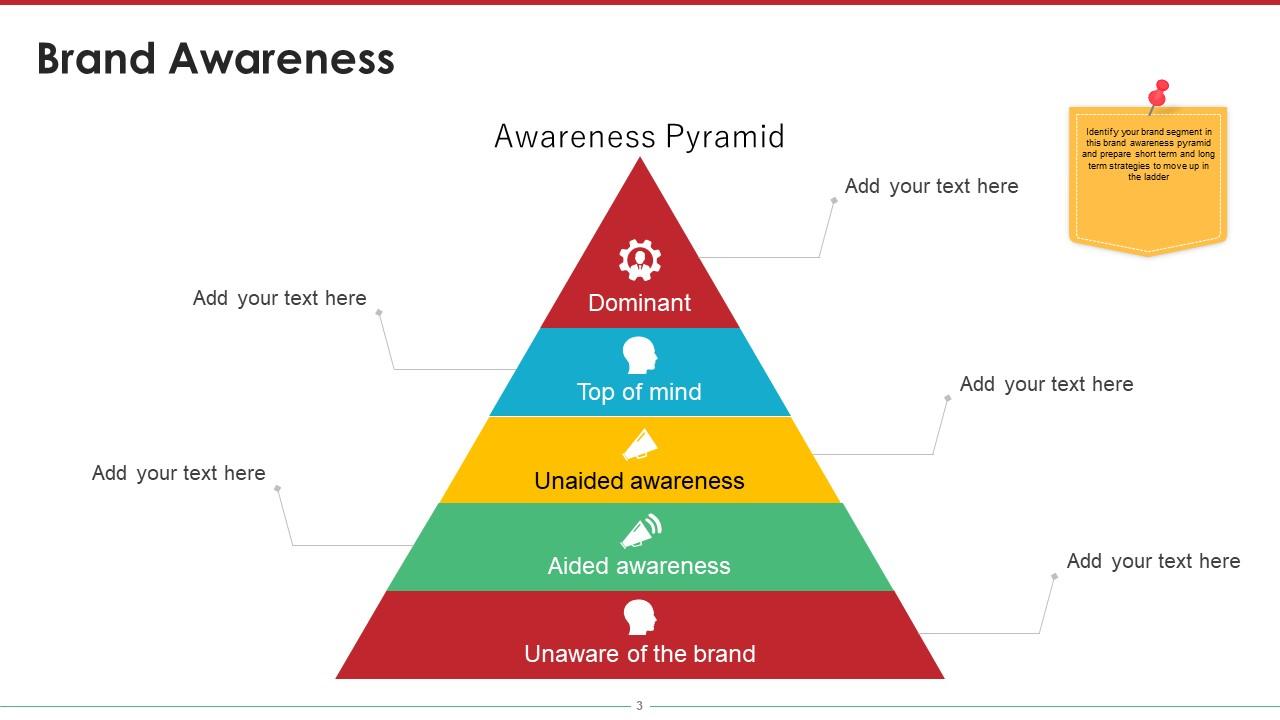
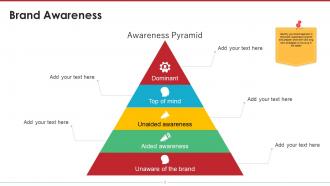
The very first thing that needs to be done even before creating a brand awareness program is knowing the position of your brand in the marketplace. Once you know where you stand, you can chalk out things thereafter for your brand’s betterment. The awareness pyramid will help you know your consumers better and the status of your brand. At the bottom of the pyramid are the consumers who have zero knowledge about your brand or are unaware of the brand. Next in line are the consumers who have aided awareness that is they will recognise the brand when shown the logo or the name or being mentioned of any particular viral product. Moving up are the unaided awareness consumers who mention about your brand as one of their preferences when told of a particular product. Then comes the top of mind consumers whose first choice is your brand when searching for a particular product.
At the top are the dominant consumers, who always rely on your brand for any of your products and prefer them over your competitors. Once you have known your consumer’s perception about your brand and the percentage of each category of consumers, the task is clear for you to work on brand awareness.
Slide 2: Brand Awareness Steps:
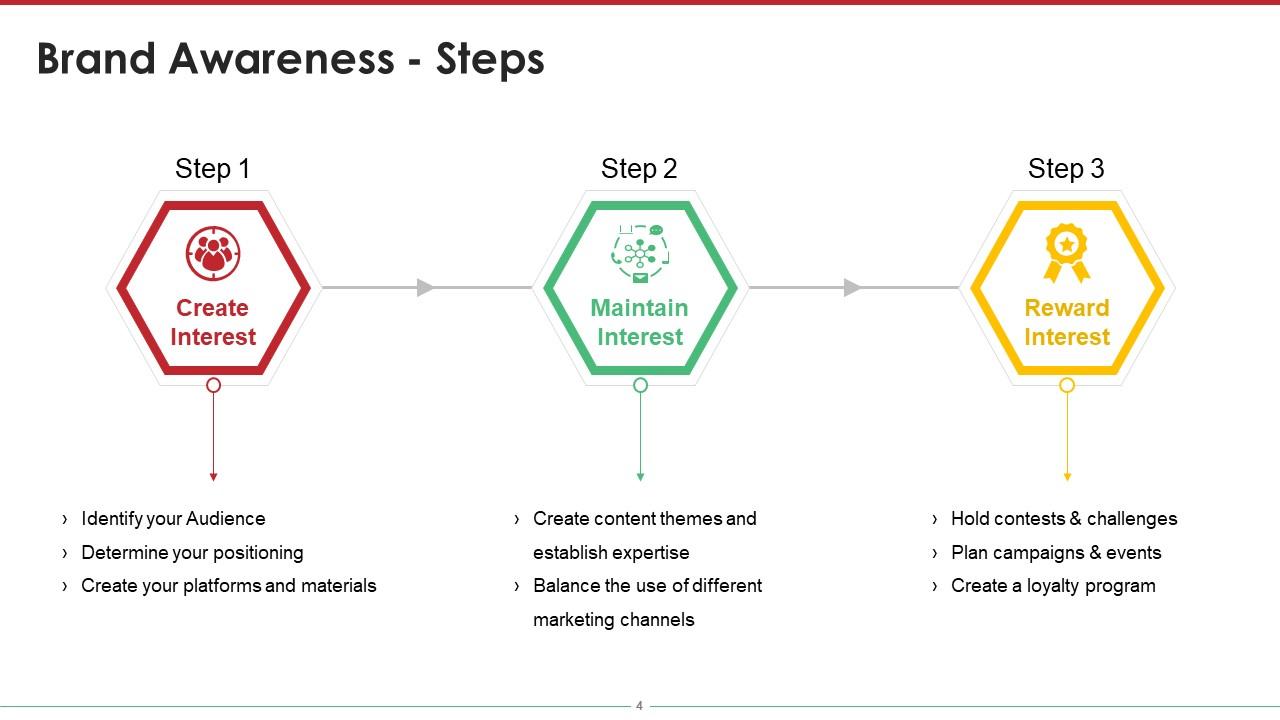
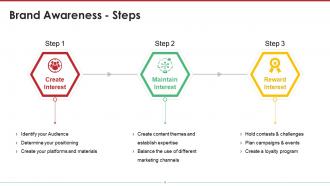
Once you have known your customers, it’s now time to chalk out the steps for creating the brand awareness program. This slide will help you plan the entire program in just 3 steps viz. create interest, maintain interest and reward interest. The first step will help you identify your audience and determine positioning thereafter you can make use of various marketing strategies like advertising campaigns, social media platforms, partner with influencers and thus highlight the uniqueness of your brand and communicate with your target audience. The second step will help you keep your audience engaged with your brand with engaging contents, unique services and let your audience have positive interactions with your brand through various social media platforms. It will also help to learn which platforms are more productive for your brand than the rest so that more focus is paid on the valuable ones. The last step will help you to reward your loyal audiences with contests or challenges, discounts and loyalty programs.
This ensures positive reinforcement for your brand from your loyal customers who advocate your brand to others and also attract new customers to your brand.
Slide 3: Steps To Build Brand Awareness Online
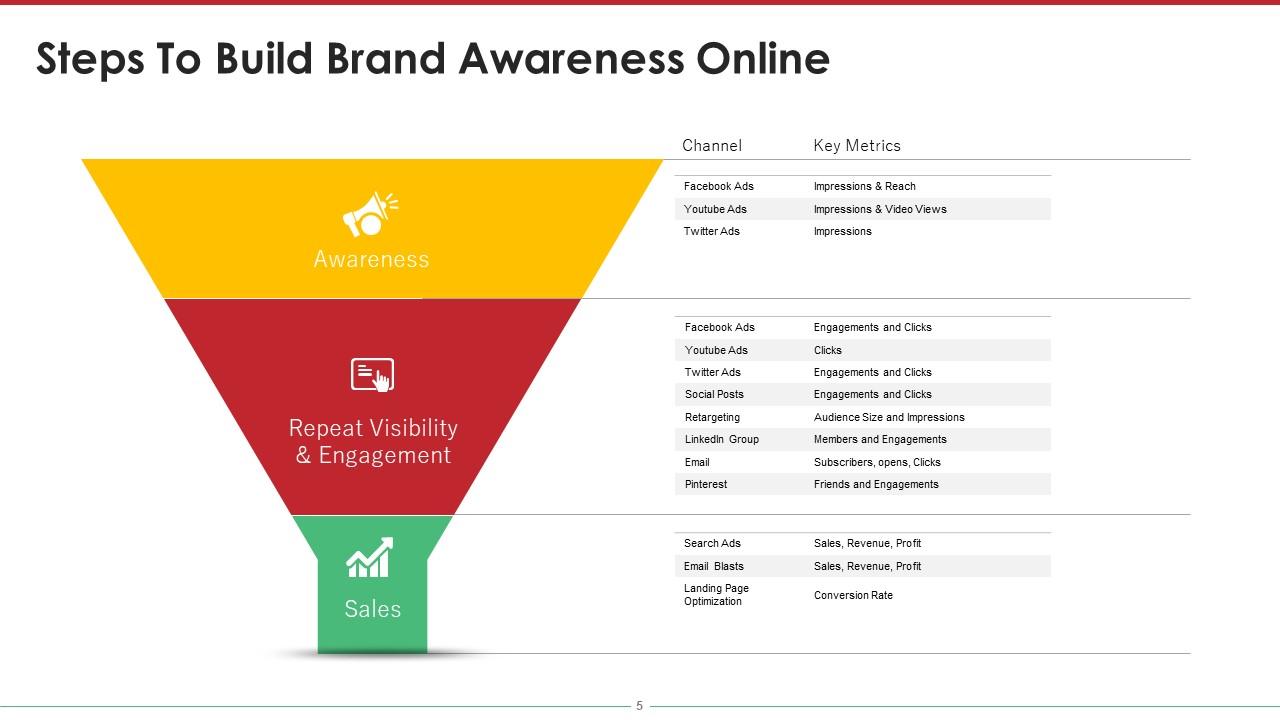
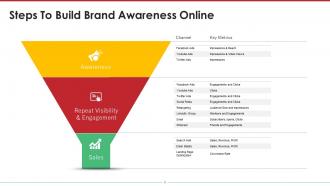
In the era of social media, you cannot be left behind in marketing your brand online. Online marketing is the essence of today’s success and this slide will help you plan your online marketing strategies at its best.
The core points of this chart ar sales, repeat visibility and engagement and awareness, it will help you to reach out to your audience, engage them with your contents and retain them with valuable perks and benefits. Each category is redivided into two sections viz. channel and key metrics. The channel section will allow you to add sources of your online brand promotions like email blasts, Facebook ads, YouTube ads, twitter sds, social posts, Pinterest, LinkedIn, etc. and the key metrics section will help you keep a track on them with number of views, reach, impressions, clicks, subscribers, sales, revenue and profit.
Slide 4: Brand Awareness Roadmap (Layout)
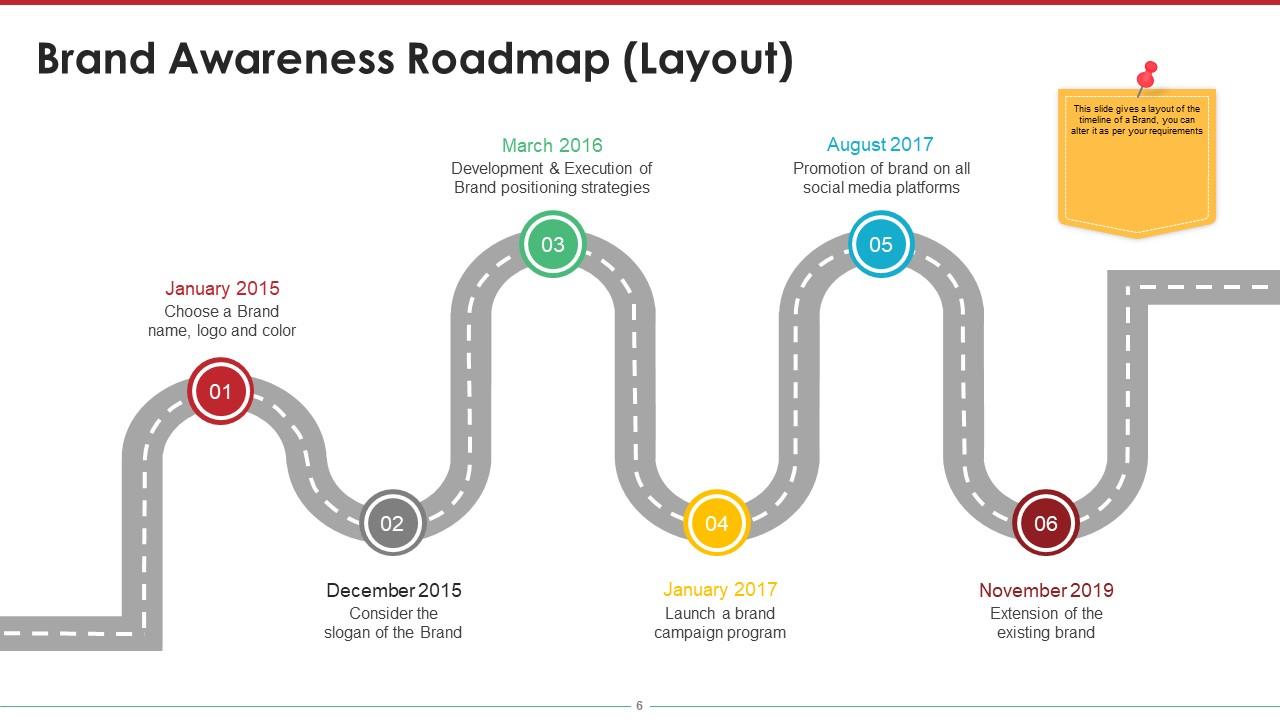
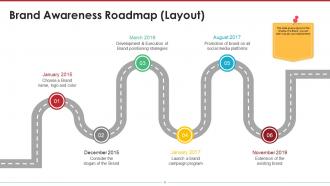
You cannot win the game without a proper layout and that’s your roadmap to success. The brand awareness roadmap will help you from the scratch to the finish. It will help plan and track your entire brand awareness journey from choosing a brand name and logo to extension of your existing brand. You can add entities like what will be your brand’s slogan, how to develop and execute brand positioning strategies, launching a brand campaign program, promotion of your brand on social media platforms and steps for the extension of your existing brand.
Slide 5: Brand Awareness Campaign
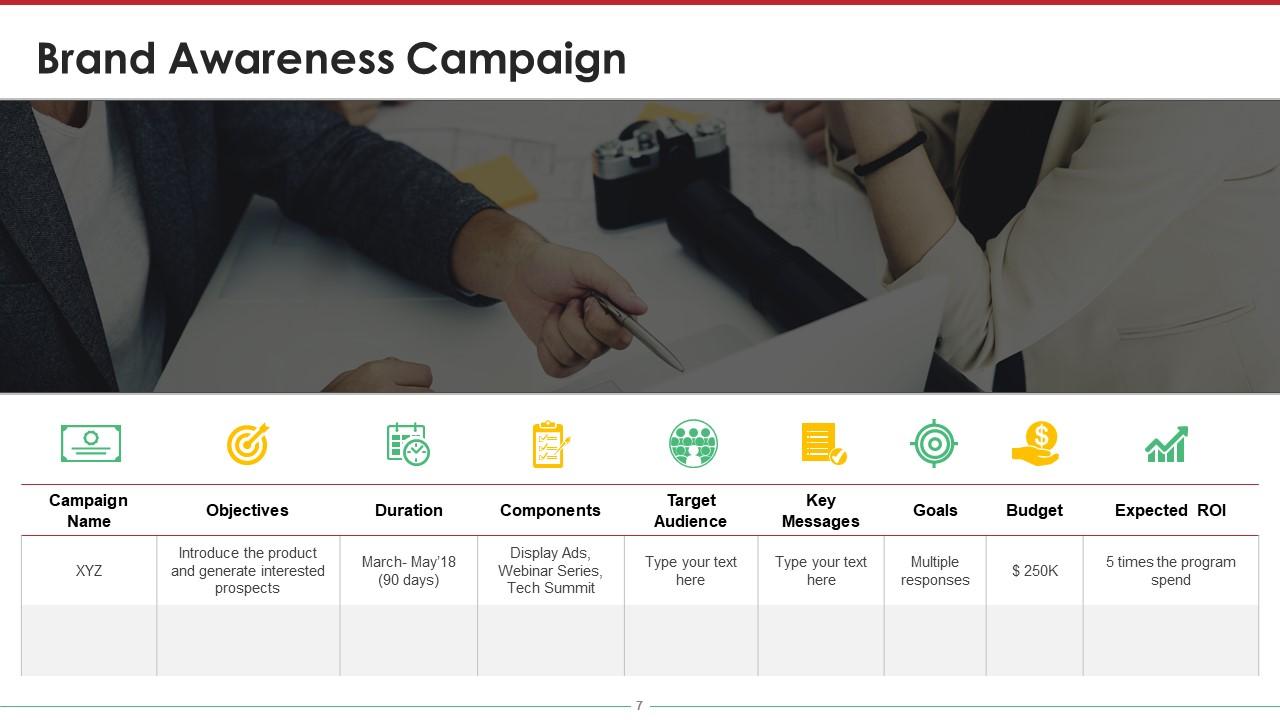
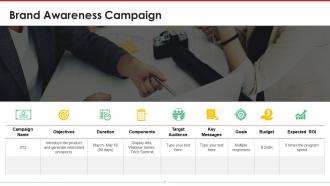
Launching a brand awareness campaign isn’t an easy task, right? But you can certainly make it easy with our brand awareness campaign chart that will help you plan the campaign. You can begin with assigning a name to your campaign and setting the objectives of it and then decide the duration of the campaign. It will help to establish a targeted campaign with fruitful results as variables will be crystal clear before you beforehand.
These are things to be done during the campaign. For example, run ads, organise webinar series and tech summit, set your target audience, decide on the message you want to communicate to your audience, set your goals and budget and last but not the least learn about the expected ROI.
Slide 6: Brand Awareness Metrics:
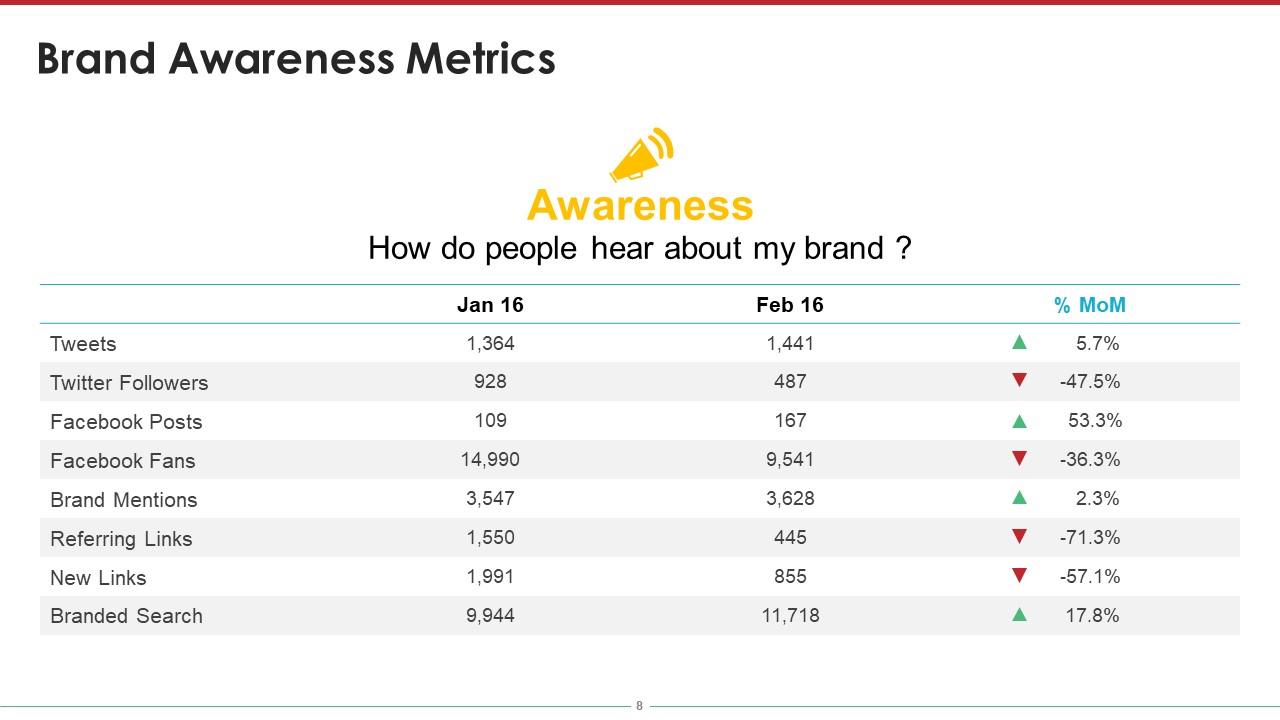
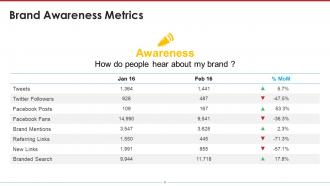
Establishing a brand metrics will help you know the current position in the market and learn which online platforms have paid you the most. You can keep a track on how people hear about your brand, from which sources, and its metrics will help you figure out which platforms you should focus on more and invest on to get potential results.
Slide 7: Effective Measurement:

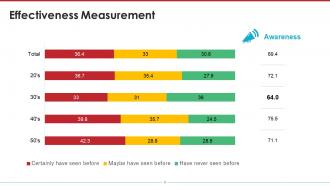
When you run an ad or a campaign for your brand, it is important to measure the effectiveness of it. The effectiveness measurement slide will help you know the percentage of your audience of each group that have been involved with your brand. It will also give you a clear view of the percentage from each group that have never seen before, may have seen before and certainly have seen before your brand and its ads. Now, you know which group of customers to target more to boost engagement.
WORK ON BRAND AWARENESS NOW!
Creating brand awareness is the first step towards advertising your brand and its products. Awareness does not mean that people would recognise your brand at one go, but awareness will ensure that people will be able to recall distinguishing features of your brand from another while purchasing a product.
Brand Awareness Powerpoint Presentation Slides with all 30 slides:
Our Brand Awareness Powerpoint Presentation Slides enable fruitful conversations. You will find them to be good company.

FAQs for Brand Awareness
Look at your direct website traffic first - that's the easiest win. Then check if people are actually searching for your brand name on Google (not just finding you by accident). Social mentions matter too, but honestly the engagement rates are what really count. Are people just scrolling past or actually interacting? I'd set up Google Alerts so you know when people talk about you without being prompted - that's when you know you're getting somewhere. Oh and compare your share of voice to competitors if you can swing it. Survey data is gold but who has time for that regularly, right? Start with branded keyword tracking in your analytics.
Look, templates are honestly a game changer for keeping your brand looking tight. Your team won't have to start from scratch every time - which let's be real, nobody wants to do anyway. I'd make maybe 3-4 different ones for sales decks, reports, whatever you use most. The cool thing is people start recognizing your style without even realizing it. Same fonts, colors, layout every time? That builds trust subconsciously. Whether it's Jim doing a client pitch or Sarah presenting quarterly numbers, everything looks professional and... I don't know, intentional? You'll see the difference immediately once everyone starts using them.
People remember what they see way more than what you say - like 60,000 times faster, which is honestly crazy when you think about it. Your brand colors, fonts, and images need to show up consistently throughout your slides. Nobody wants to stare at boring bullet points for 20 minutes. When your visuals match your brand identity, it gets stuck in people's heads naturally. Every slide should scream "this is us" without actually saying it. Trust me, compelling graphics beat clever writing every single time. Your audience will walk away remembering your visual vibe more than your actual words.
So here's the thing - your presentation format totally changes how people see your brand. Webinars make you look like the expert teacher everyone wants to learn from. Pitch decks? Pure professionalism and "we mean business" vibes. Conference speaking is honestly the ultimate credibility hack - people just assume you're legit if you've spoken somewhere. Interactive demos show you're cutting-edge and actually care about user experience. Oh, and don't mix these up - like, don't use some stuffy formal deck when you're trying to be the friendly, helpful educator type. Match the format to whatever brand vibe you're going for.
Build your brand right into the template structure - don't just throw logos everywhere. Your brand colors should be the main palette, obviously. Stick your logo in the same spot every time (top corner usually works). But seriously, less is way more here. Too much branding just makes everything look messy and nobody pays attention to what you're actually saying. Add subtle stuff like branded dividers if you've got them. Oh, and make a few different template versions for different presentation types - your team will thank you later when they're not trying to force every single presentation into one rigid layout.
Honestly, good presentations are like content goldmines for social media. Each slide can become its own Instagram post or LinkedIn graphic - I've seen brands stretch one deck into weeks of content. Your slides already have that visual consistency thing going, so people start recognizing your stuff instantly. Plus you've got all these bite-sized stats and quotes just sitting there, perfect for sharing. TikTok snippets work too if that's your thing. The reach goes way beyond whoever saw the original presentation. Next time you finish a deck, just grab your best stats and turn them into social graphics. It's honestly kind of genius how well it works.
So basically, when people actually engage with your presentation instead of just sitting there zoning out, they'll remember your brand way better. Interactive stuff like polls or Q&As makes them process what you're saying on a deeper level. You know how you remember conversations but forget most lectures? Same deal here. Their brains form stronger connections between your company and positive feelings when they're participating. I always throw in 2-3 interactive moments - honestly, it's such a game changer. The more they interact, the more likely they'll think of you when they're ready to buy something.
Track reach and engagement, but don't stop there. Do brand recall surveys before and after - boring but super telling if people actually remember you. Check for website traffic spikes on presentation dates, plus social media mentions and search volume bumps. Most people completely skip the follow-up surveys which is honestly dumb because that's where the real insights are. Also compare lead quality from attendees vs other channels. Oh, and set up your tracking beforehand or you'll be kicking yourself later when you can't measure the actual impact.
Honestly, most companies are stuck using those same boring default PowerPoint themes - you know the ones. Create templates that actually feel like YOUR brand instead. Custom colors, fonts that match your vibe, visual elements that scream "this is us." Every presentation becomes a chance to reinforce who you are as a company. Sales decks, client meetings, even boring internal stuff - they all work harder for your brand. I'd start by looking at what your team uses now (probably pretty generic) and figure out where you can inject more personality. Way better than that blue template everyone's seen a thousand times.
Honestly, the worst thing you can do is just read straight off your slides - nobody remembers presentations like that. Your visuals need to match across everything, and you'd be surprised how many people forget to actually say their company name enough times. Those generic PowerPoint templates? They're making you invisible. Don't cram paragraphs onto slides either. Tell a real story that connects to your brand instead of just listing features. Oh, and skip the corporate jargon - it's boring. Before you present, ask yourself: "Would someone walk away knowing our name and what we actually do?" If not, you're wasting everyone's time.
Honestly, consistency is huge for branding but nobody talks about it enough. Your logo, colors, fonts - they need to look the same everywhere. Website, social media, presentations, all of it. People have to see your brand like 5-7 times before they remember it (which is kind of insane if you think about it), but only if it actually looks identical each time. Otherwise you're just confusing everyone. It's like showing up to every party with a different outfit and expecting people to recognize you. Just make a simple brand guide and stick to it. Seriously.
Honestly, the brands crushing it right now are just being super consistent with their visual stuff - same fonts, colors, layouts every single time. Clean and simple beats cluttered mess any day (seriously, people's attention spans are shot). Interactive bits and smooth animations help too, but don't go overboard. Oh, and here's what I learned the hard way - build one solid template you can actually reuse instead of starting from scratch each time. Your future self will thank you. Bold designs work better than playing it safe, but keep everything minimal. People should recognize your slides before they even see your logo.
People remember stories way better than bullet points, trust me on this one. Your audience will actually connect with what you're saying instead of just zoning out during another boring pitch. Think about it - would you rather hear dry features or listen to how someone else solved the exact problem you're facing? Stories make people picture themselves using your stuff. Plus they create those lightbulb moments where everything just clicks. Just don't make it all about how incredible your company is (honestly, nobody cares). Focus on real challenges your audience deals with every day.
Canva's probably your best bet here - super easy to use and has tons of templates you can customize with your brand colors. PowerPoint works great too if your team's already comfortable with it. Google Slides is solid for collaboration stuff. If you want something flashier, Prezi does those cool zoom-in presentations, though honestly they can be a bit much sometimes. Beautiful.AI is another option that helps with design automatically. I've seen people do amazing things with just Canva's free version, so don't overthink it. Whatever tool your team will actually stick with is the right choice. Then just make sure your brand elements are consistent throughout.
Dude, culture is everything when it comes to brand awareness globally. What works in one place can totally bomb somewhere else. You've gotta switch up your messaging, visuals, even your whole value prop based on local norms. Red means luck in China but screams danger in Western markets - wild how brands mess this up constantly. Some cultures want you formal and buttoned-up, others prefer chill and casual. Oh, and don't even get me started on communication styles. Bottom line: do your homework on each market first and test everything locally before going big.
-
Great quality slides in rapid time.
-
Awesome use of colors and designs in product templates.