Vorlage für eine Geschäftsfallstudie Ppt

Rating:
80%
Slide 1 of 5
Favourites Favourites

Try Before you Buy Download Free Sample Product

Audience Impress Your
Audience
Editable 100%
Editable
Time Save Hours
of Time
The Biggest Sale is ending soon in
0
0
:
0
0
:
0
0
Rating:
80%

Funktionen dieser PowerPoint-Präsentationsfolien:

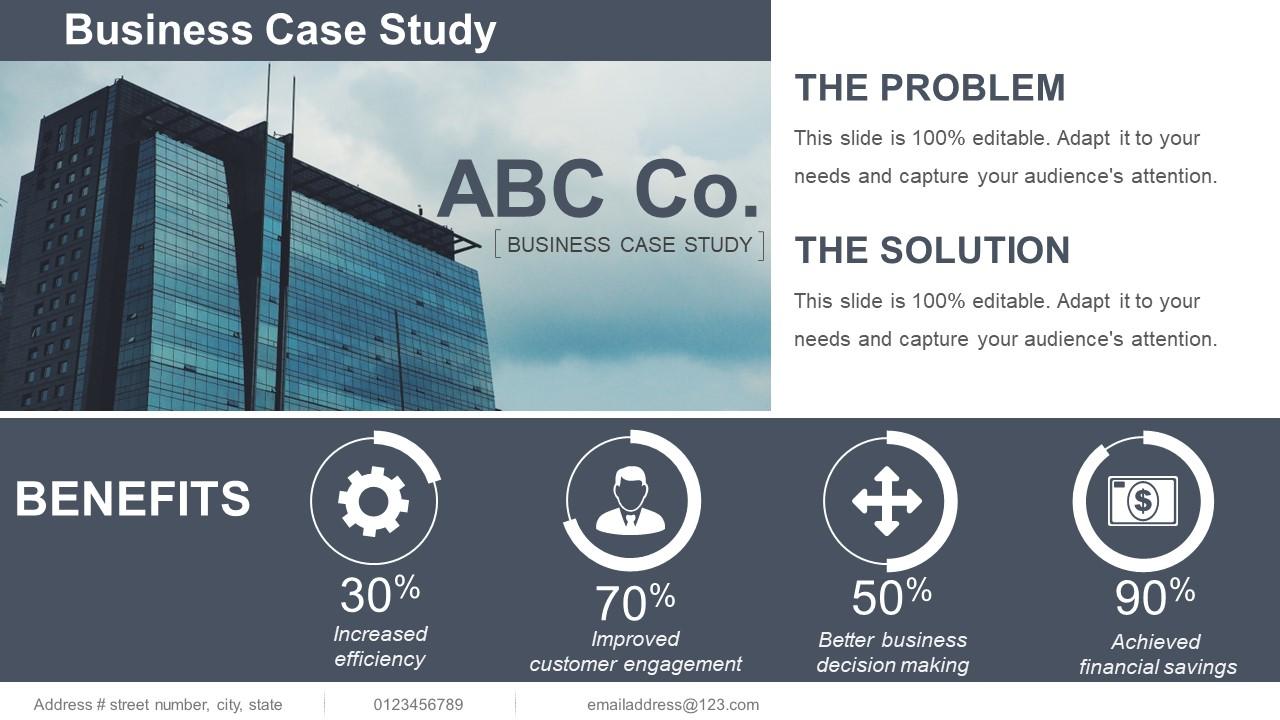
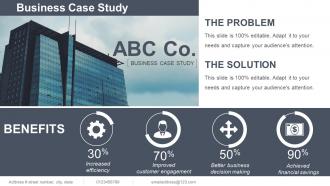
Vorlage für eine Geschäftsfallstudie ppt. Dies ist eine Vorlage für eine Geschäftsfallstudie ppt. Dies ist ein vierstufiger Prozess. Die Phasen in diesem Prozess sind erhöhte Effizienz, verbesserte Kundenbindung, bessere Geschäftsentscheidungen und erzielte finanzielle Einsparungen.

FAQs for Business case

So definitely hit the basics first - company background, what problem they had, how they fixed it, and the actual results with real numbers. Numbers are everything honestly. I'd add a quick methodology bit too since it makes you look more legit. Don't forget the timeline and who was involved from their team. Oh, and any roadblocks they hit along the way - that stuff's gold because it shows you actually solved real problems. Once you nail the template with one solid case study, you can just rinse and repeat for the rest.

Okay so basically frame it around the problem-solution journey instead of just listing events. Start with the actual problem, then walk through your approach - what data you collected, options you weighed, why you chose what you did. Honestly, include the messy bits too because that's where the real learning happens. Show your pivots and iterations along the way. The methodology matters way more than just the final result. Oh and definitely add a "lessons learned" section - that's pure gold for readers trying to apply your thinking to their own stuff. It's about your decision-making process, not the outcome.

Start with clear headings and ditch the business jargon - nobody wants to decode corporate speak. Add brief explanations for beginners but make detailed sections optional. Charts and bullet points are your best friends here, plus lots of white space so it doesn't look overwhelming. Keep formatting simple since people might read this on their phones. Honestly, the best thing you can do? Grab someone from another department and make them test it first. They'll catch the confusing stuff you're blind to. Throw in a couple examples too - people learn way better when they can see what you mean.

Honestly, storytelling just makes case studies so much better to read. Nobody wants to slog through boring data dumps. Turn it into an actual story - your client had this problem, things got messy, then boom, you swooped in and saved the day. People eat that stuff up! Structure it simple: "Company X was drowning in Y problem, here's what we did, here's how awesome the results were." Throw in real quotes from actual humans and specific numbers. Trust me, readers will remember your story way longer than some generic bullet points about features. It's like the difference between watching a movie versus reading a manual, you know?

Honestly, visuals are a game-changer for case studies. Your stakeholders don't want to wade through spreadsheet data - they want the story behind those numbers. Charts and graphs make everything digestible super quickly, which matters since most execs are crazy busy anyway. I always throw in infographics to break up text walls too. Makes people actually stick around to read the whole thing. ROI metrics hit way harder when they're visual versus buried in some dense paragraph. Oh, and here's what works - put your strongest chart right at the beginning. Hook them before they even think about clicking away.

Take your best template and just swap out the boring generic stuff for what actually matters in each industry. Healthcare clients want to hear about patient satisfaction scores, not conversion rates. Retail folks care about inventory turnover - you get it. That challenge/solution/results format? Works for literally everyone, but you gotta change up the language. Don't throw around "optimize synergies" when you're pitching to a construction company. I'd make like 3-4 versions of your top template first. Keep the same backbone but totally flip the examples and metrics. Way easier than starting from scratch every time.

Honestly, just stick to the actual data and don't cherry-pick stuff that only backs up what you want. Show the good AND the bad findings - let people decide for themselves. I get that you really want this project approved, but spinning things always bites you later. Try pulling from different data sources if you can, and definitely get input from other departments who might see things differently. Oh, and make sure you're super clear about what's actual fact vs. what you're assuming. Before you present anything though, have someone totally outside your team look it over. They'll spot bias you completely missed.

So set up the same sections for every scenario - stuff like "Investment Required," "Expected ROI," "Timeline," "Risk Factors." Makes it way easier to compare when everything's in the same format. I learned this the hard way after presenting a messy comparison once. Use bullet points instead of long paragraphs because nobody wants to read walls of text. Keep sections short but don't be vague. Oh, and definitely throw a summary chart at the end with all the key numbers - honestly, some stakeholders will skip straight to that anyway. Trust me, consistent formatting makes the differences jump out at you immediately.

Pick metrics that actually matter to the people holding the purse strings - ROI, cost savings, revenue bumps, time saved, customer satisfaction scores. Don't get caught up in vanity numbers just because they look good on a slide deck. Stick to 3-5 main ones you can realistically track before and after. Mix quick wins (like faster processes) with longer stuff like keeping customers around. Oh, and figure out HOW you're collecting this data first - learned that one the hard way! Short-term and long-term impacts both count.

Just throw in review checkpoints after each big section - problem analysis, solutions, financials, whatever. I add a little "Feedback & Iteration" box where people can dump their thoughts and I track what changes. Don't make it feel like some weird corporate thing though. Pick actual dates for collecting input, then actually use it to update your case study. That's honestly the part most people skip - they ask for feedback but never circle back. Your business case should get better with each round, not just sit there doing nothing.

So the template has spots for both your numbers and the story behind them. Financial projections, ROI, metrics - all that goes in one section. Then you've got room for stakeholder feedback, market research, risk stuff. Both parts matter equally, trust me. Hard data proves your idea works, but the narrative explains *why* it works and what could go wrong. I've seen too many solid proposals tank because they skipped one side or the other. Fill everything out completely - executives need those spreadsheets but they're also trying to understand your reasoning.

Honestly, do quarterly check-ins on your template or it'll get stale fast. I learned this the hard way when ours became totally outdated! Subscribe to industry publications and follow some thought leaders in your space. Professional groups are goldmines for case study best practices too. Your regular users will catch outdated stuff you miss - ask them for feedback. Maybe create a simple tracking sheet? Note when sections got updated and what changed. Oh, and tackle the most important sections first since you probably won't get to everything at once.

Just build the branding into your template from the start - way easier than scrambling later. Stick your logo in a header, use your company colors for dividers and callouts, keep fonts consistent throughout. Oh and don't forget placeholder spots for branded charts or whatever visual stuff you'll need. I've seen too many people try to slap branding on at the end and it always looks messy. Start with that branded shell first, then drop in your actual case study content. Trust me, your future self will thank you.

Don't make it too complicated - seriously, I've watched people create these insane 20-page templates that just collect dust. Keep it flexible so it actually works for different situations. Skip the leading questions that basically force you toward the answer you already want (kinda defeats the point, right?). Financial stuff should be realistic without going down rabbit holes of endless scenarios. Oh, and test it on a few real cases first! You'll spot problems you never saw coming. Most people skip that step and regret it later.

For digital stuff, add clickable sections and embedded links so people can actually interact with it. Break up those chunky paragraphs with bullets and subheadings - nobody reads online the same way they read print. Maybe throw in some collapsible sections too. Print's trickier since you can't scroll past the boring bits. Wider margins help. Strategic page breaks matter more than you'd think. And seriously, test that your charts actually print clearly - learned that one the hard way! Pick your main format first, then adapt. Way less headache than trying to nail both at once.

Ratings and Reviews

80% of 100
Review Form
Write a review
Most Relevant Reviews
  1. 80%

    by Devon Ferguson

    The Designed Graphic are very professional and classic.
  2. 80%

    by Dominique Vazquez

    Best way of representation of the topic.

2 Item(s)

per page: