


Business Framework Value Proposition Powerpoint Presentation Slides





Try Before you Buy Download Free Sample Product
 Impress Your
 Audience
 100%
100% Editable
 Save Hours
 of Time


Are you preparing to give PowerPoint presentation on business framework value proposition? Not finding the right designs and graphics? No worries! We present you, our predesigned and content ready business framework value proposition PowerPoint presentation templates. This customer value proposition PPT presentation will be useful for middle-level management to define company’s internal strategy to the senior level. It includes company overview, product, and services, elevator pitch, problem areas, find a solution, value proposition product & services, company revenue model & expense model. It also includes company’s growth strategy, competitive landscape, two product comparison, SWOT analysis, business shareholders pattern etc. Want to make PPT slides on business strategy, value proposition, personal value proposition, company values, customer value proposition framework, value proposition model and value marketing, employee value proposition, strategic management, value proposition model. You can deploy this value-focused enterprise model presentation. Download business framework value proposition PowerPoint presentation slides now. Get everyone to come to an agreement with our Business Framework Value Proposition Powerpoint Presentation Slides. It helps identify disputed aspects.
People who downloaded this PowerPoint presentation also viewed the following :
Content of this Powerpoint Presentation
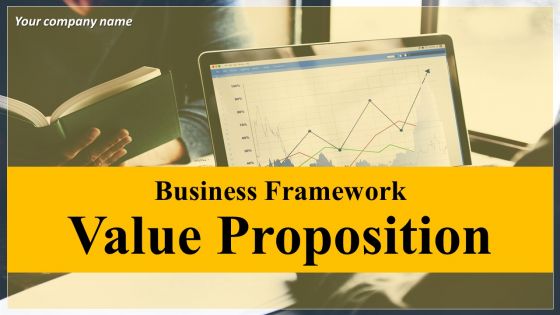
Slide 1: This slide introduces Business Framework Value Proposition. State Your company name and get started.
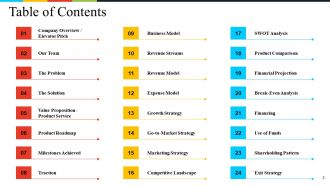
Slide 2: This slide showcases Table of Contents displaying- Company Overview / Elevator Pitch, Our Team, The Problem, The Solution, Value Proposition - Product Service, Product Roadmap, Milestones Achieved, Traction, Business Model, Revenue Streams, Revenue Model, Expense Model, Growth Strategy, Go-to-Market Strategy, Marketing Strategy, Competitive Landscape, SWOT Analysis, Product Comparison, Financial Projection, Break-Even Analysis, Financing, Use of Funds, Shareholding Pattern, Exit Strategy.
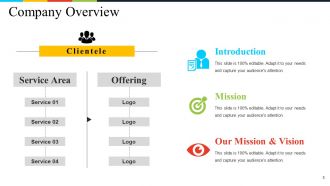
Slide 3: This slide present Company Overview consisting of- Mission, Introduction, Vision, Offering, Service Area, Clientele.
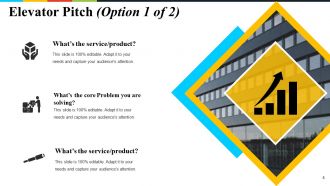
Slide 4: This slide presents the first Elevator Pitch displaying- What’s the service/product? What’s the core Problem you are solving? What’s your big vision?
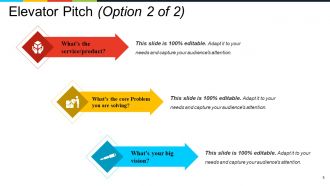
Slide 5: This slide presents the second Elevator Pitch displaying- What’s the core Problem you are solving? What’s the service/product? What’s your big vision?
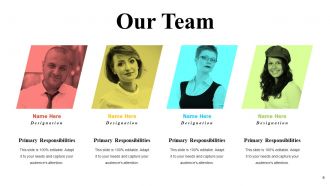
Slide 6: This is an Our Team slide with name, image & text boxes to put the required information.
Slide 7: This slide presents The Problem of the business. To better illustrate your problem, as well as convey the problem statement to someone who’s less immersed in it than you, consider adding some components in the following way: 1. Customer Tries Something; 2. Here’s the terrible they are facing; 3. Existing solutions are broken/Non-existent.
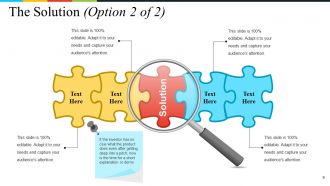
Slide 8: This slide showcases The Solution provided by the upcoming/existing business endeavors. If the investor has no clue what the product does even after getting deep into a pitch; now is the time for a short explanation or demo.
Slide 9: This slide also showcases The Solution provided by the upcoming/existing business endeavors.
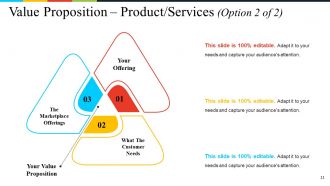
Slide 10: This slide showcases Value Proposition – Product/Services second slide displaying- Your Offering, What The Customer Needs, The Marketplace Offerings, Your Value Proposition.
Slide 11: This slide also presents Value Proposition – Product/Services second slide displaying- Your Offering, What The Customer Needs, The Marketplace Offerings, Your Value Proposition.
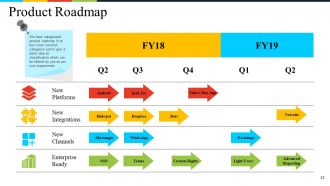
Slide 12: This slide presents a Product Roadmap. We have categorized product roadmap in to four most common categories just to give a basic idea on classification which can be altered by you as per your requirement.
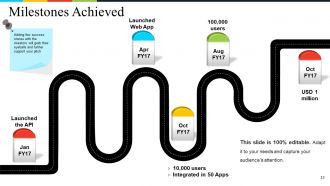
Slide 13: This slide showcases Milestones Achieved. Adding few success stories with the investors will grab their eyeballs and further support your pitch.
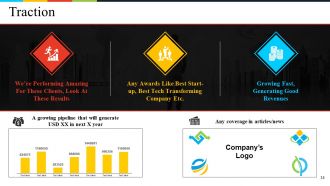
Slide 14: This slide shows Traction for the business/startup.
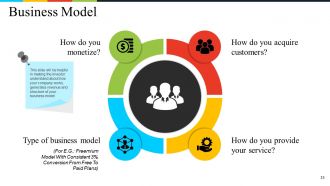
Slide 15: This slide presents a Business Model showcasing- How do you acquire customers? How do you provide your service? How do you monetize? Type of Business Model This slide will be helpful in making the investor understand about how your company works, generates revenue and structure of your business model.
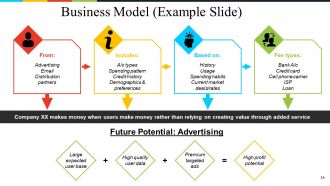
Slide 16: This slide shows a Business Model (Example Slide) displaying- User Acquisition- From: Advertising, Email, Distribution partners: Gather User information. Includes: A/c types, Spending pattern, Credit history, Demographics & preferences, Intelligent Suggestion. Based on: History, Usage, Spending habits, Current market deals/rates, User switches = Referral fee. Fee types: Bank A/c, Credit card, Cell phone carrier, ISP, Loan, Future Potential: Advertising High profit potential, Large expected user base, High quality user data, Premium targeted ads.
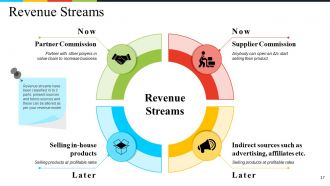
Slide 17: This slide showcases Revenue Streams with- Partner with other players in value chain to increase business, Partner commission, Anybody can open an A/c start selling their product, Supplier commission, Selling products at profitable rates, Selling in-house products, Selling products at profitable rates, Indirect sources such as advertising, affiliates etc. Revenue streams have been classified in to 2 parts: present sources and future sources and these can be altered as per your revenue model
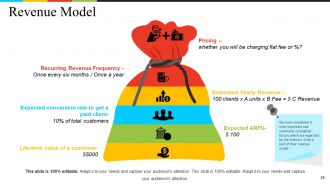
Slide 18: This slide showcases a Revenue Model with- Pricing, Estimated Yearly Revenue, Expected ARPU, Life-time value of a customer, Recurring Revenue Frequency , Expected conversion rate to get a paid client.
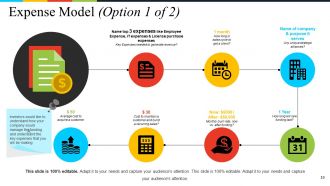
Slide 19: This is an Expense Model. State expenditure aspects here. Investors would like to understand how your company would manage the funding and understand the key expenses that you will be making
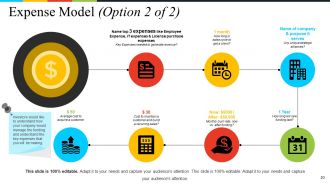
Slide 20: This is an Expense Model. State expenditure aspects here. Investors would like to understand how your company would manage the funding and understand the key expenses that you will be making
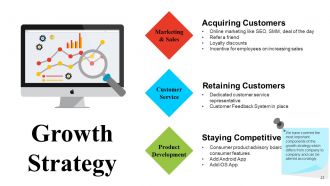
Slide 21: This slide presents Growth Strategy showcasing- Marketing & Sales, Customer Service, Product Development. We have covered the most important components of the growth strategy which differs from company to company and can be altered accordingly.
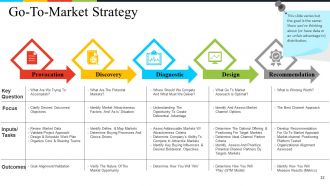
Slide 22: This is a Go-to-Market Strategy slide presenting- Provocation, Discovery, Diagnostic, Design, Recommendation. This slide varies but the goal is the same: Show you’re thinking about (or have data or an unfair advantage in) distribution.
Slide 23: This slide showcases the Marketing Strategy with the following points- Social Media, Email Marketing, Analytics & Reporting, Paid Advertising, Blog, Website Design, Search Engine Optimization.
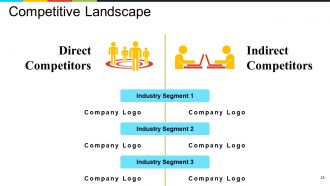
Slide 24: This slide presents a Competitive Landscape Direct Competitors, Indirect Competitors, Industry Segment, Company Logo. Don’t try to hard to force a slide that winds up meaningless in being overly positive. Instead, speak to how you’ll win against the most relevant two or three competitors
Slide 25: This is a Product Comparison table slide.
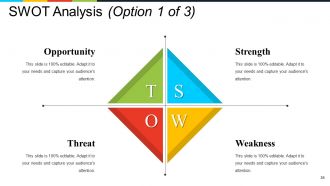
Slide 26: This is a SWOT Analysis slide.
Slide 27: This is another SWOT Analysis slide.
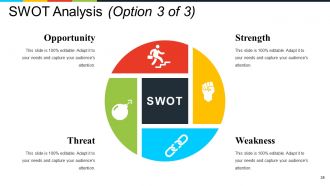
Slide 28: This is also a SWOT Analysis slide.
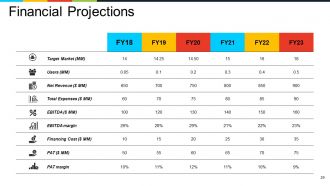
Slide 29: This slide showcases Financial Projections in tabular form.
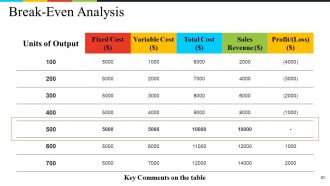
Slide 30: This slide showcases Break Even Analysis in tabular form.
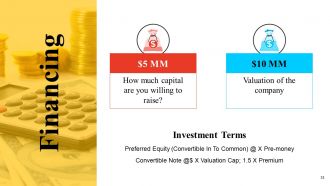
Slide 31: This slide is titled Financing. State financial aspects, highlights, stats etc. here.
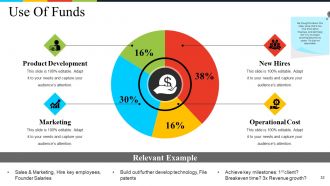
Slide 32: ide shows Use of Funds in a creative pie chart form.
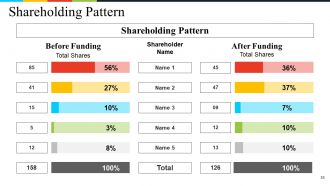
Slide 33: This slide displays the Shareholding Pattern in tabular form.
Slide 34: This slide presents the Exit Strategy with- Acquisition, Financial Buyer, IPO.
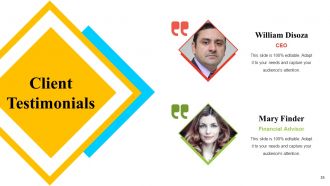
Slide 35: This slide showcases Client Testimonials to be presented.
Slide 36: This slide showcases Contact Details to be shown.
Slide 37: This is a Coffee Break image slide. You may alter/change the slide content as per need.
Slide 38: This slide is titled Graphs and Charts. You can change the slide content as per need.
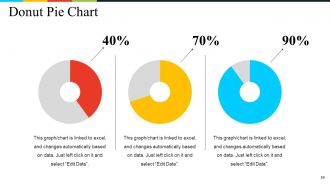
Slide 39: This is a Donut Pie Chart slide to show product/entity growth, comparison, specifications etc.
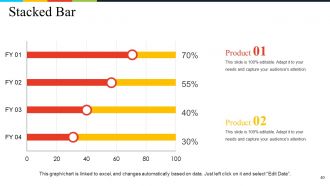
Slide 40: This is a Stacked Bar Chart slide to show product/entity growth, comparison, specifications etc.
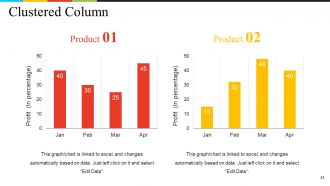
Slide 41: This is a Clustered Column Chart slide to show product/entity growth, comparison, specifications etc.
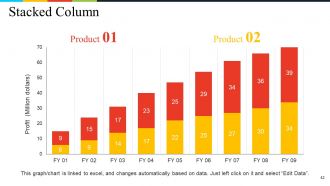
Slide 42: This is a Stacked Column Chart slide to show product/entity growth, comparison, specifications etc.
Slide 43: This is an Area Chart slide to show product/entity growth, comparison, specifications etc.
Slide 44: This slide is titled Additional slides for moving forward. You may change the content as per need.
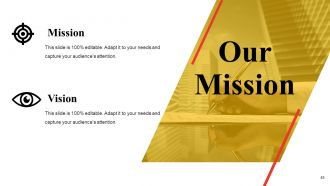
Slide 45: This is Our Mission slide with Vision. State them here.
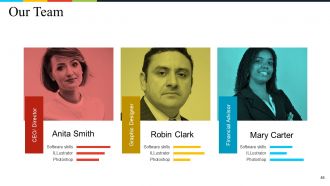
Slide 46: This is Our team slide with name, designation and text boxes to state information.
Slide 47: This is an About Us slide. State company/team specifications here.
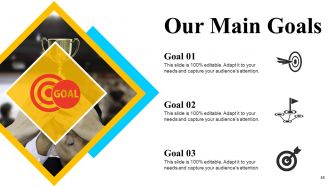
Slide 48: This is Our Main Goal slide. State targets, goals here.
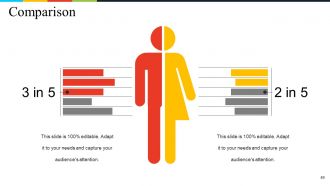
Slide 49: This is a Comparison slide to show comparison, information, specifications etc.
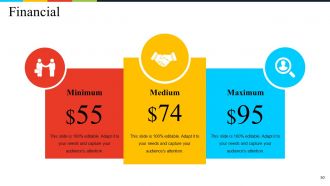
Slide 50: This is a Financial score slide. State financial aspects, results etc. here.
Slide 51: This is a Quotes slide. You can modify it according to your need.
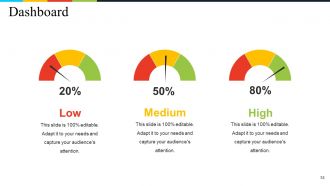
Slide 52: This is a Dashboard slide to state Low, medium and High aspects, kpis, metrics etc.
Slide 53: This is a Puzzle image slide. State specifications, information here.
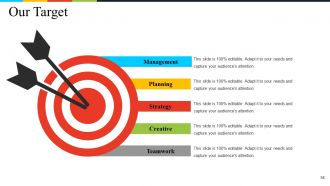
Slide 54: This is Our Target slide. State your targets here.
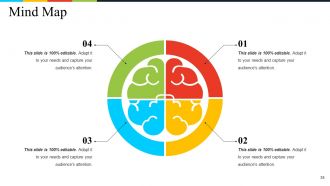
Slide 55: This is a Mind Map image slide to show information, specifications etc.
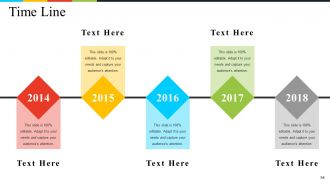
Slide 56: This is a Timeline slide to present important dates, milestones etc.
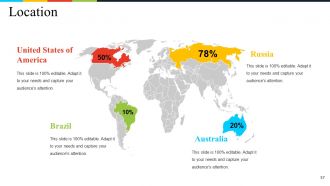
Slide 57: This is a Location slide to show global segragation, presence etc. on a world map and text boxes to make it explicit.
Slide 58: This is a Bulb or Idea image slide to show ideas, innovative information etc.
Slide 59: This is a Magnify Glass image slide to show information, specifications etc.
Slide 60: This is a Thank You slide with Address# street number, city, state, Contact Number, Email Address.
Business Framework Value Proposition Powerpoint Presentation Slides with all 60 slides:
Feel the glow with our Business Framework Value Proposition Powerpoint Presentation Slides. Enjoy the adulation you have earned.










FAQs for Business Framework Value Proposition
Focus on three things: time savings, professional results, and how easy it is. Start with the time angle - something like "create stunning presentations in 10 minutes instead of hours." People are honestly scared of making ugly slides, so play into that. Promise them designer-quality results without needing any design skills. Oh, and don't forget versatility - mention it works for sales pitches, reports, whatever they need. Keep it benefit-heavy, not just listing features. I'd definitely test your messaging with real users first though. They'll tell you what actually matters to them.
Dude, you gotta figure out what each industry actually stresses about first. Healthcare? They're paranoid about compliance and patient stuff. Tech bros only care about scaling fast. I bombed so hard once trying to sell "efficiency" to creative types - turns out they wanted to hear about "unleashing potential" or whatever. Same product, completely different angle. Start digging into what keeps them up at night, then flip your benefits to match their world. Use their buzzwords too. Honestly, separate landing pages are worth it because then you're not doing this weird generic pitch that lands nowhere.
UX is everything for your value prop - it's how people actually *experience* what you're promising. Like, if your presentation template is a mess to navigate or looks terrible, you've already killed whatever value you claimed to offer. Say you promise "effortless professional presentations" but then users can't even find basic features or customize slides without wanting to throw their laptop out the window. Your credibility is shot. The experience has to back up your promise, not work against it. Honestly, test your templates with real people first - don't just assume they'll save time or look good.
Honestly, talking to your actual users is way better than just guessing what they want. Ask them what they love about your templates - you'll get specific stuff like "saves me 3 hours" or "makes my presentations look way less amateur." That's the kind of concrete feedback you can actually use in your marketing. I'd do quick surveys or maybe hop on calls with a few users (though surveys are easier if you're swamped). Then just pull out the best quotes and build your messaging around what people are actually saying works for them.
Conversion rates are your best friend here - track how many people actually sign up after seeing your value prop. Time-on-page matters too, plus bounce rates tell you if folks are bailing immediately. Honestly, user surveys beat data sometimes because numbers don't always explain the "why" behind people's decisions. A/B test different versions of your landing page - that's where you'll see what actually resonates. Oh, and definitely watch your acquisition costs versus lifetime value ratios. I know it sounds like a lot, but start with the conversion tracking first and build from there.
Honestly, your design is probably more important than you think. People judge your whole value prop within seconds of seeing your site or materials. Bad visuals make everything look sketchy - I've watched solid products tank because their website screamed "built by my cousin's friend." Clean design builds trust and helps explain complicated stuff way better. Your visuals need to back up what you're saying, not fight against it. Oh, and consistent branding across everything matters too. Quick reality check: pull up your current stuff and ask yourself if it actually makes your value prop stronger or weaker.
Okay so the biggest mistake? Being way too vague. Everyone says "professional designs" and "easy to use" - it's meaningless at this point. Don't just list features either. Like who cares about "50 slide layouts" unless you explain how they actually save time? Focus on your customer's problems, not how amazing you are. I see this all the time - companies just talking about themselves. Keep it simple and specific about what you're solving. Skip the fancy marketing jargon too, it sounds fake. Here's a quick test: if someone reads your value prop, would they immediately get what they're getting and why they should care? If not, you're probably still too generic.
Okay so basically turn your pitch into a mini story about someone's transformation. Don't just rattle off features - show how a real person (even if she's fictional) went from stressed to successful. "Sarah used to waste 10 hours every week on reports, now she actually has weekends again." People connect with stories way more than boring bullet points, trust me. When they hear it, they should immediately think "oh shit, that's literally me." Keep it short though - like 2-3 sentences max showing the before/after. Works every time.
So basically, your USP is the specific thing that makes you different - like "only templates with built-in animations" or "designed by ex-McKinsey people." Pretty narrow focus there. Your value prop is way broader though - it's all the actual benefits customers get. Time savings, looking professional, better storytelling, you know? Think of it this way: USP helps you stand out from other template sellers. Value prop explains why someone should buy templates at all instead of just making their own slides. Honestly, most people mix these up. Use your USP when you're trying to beat competitors and your value prop to educate customers who might not even know they need templates yet.
Dude, seasonal stuff is honestly a game-changer for template sales. People go crazy for holiday presentations in December or those back-to-school designs come August - it's predictable but works every time. When your templates solve what someone needs RIGHT NOW, they'll pay more for it too. Demand spikes during peak seasons, so you can bump up prices. I learned this the hard way last year when I wasn't ready for the holiday rush. The trick is getting ahead of these cycles - have your seasonal content done before everyone else starts panicking and searching.
Look, most templates out there are honestly trash, so if yours actually look good, make that your main selling point. Talk about how much time people save - like "skip 3 hours of formatting" instead of just saying it's "efficient." What specific stuff can yours do that others can't? Maybe easier customization or layouts that don't suck? Focus on the actual problems you're solving rather than just listing features. And definitely mention if they're polished enough for big presentations - that's huge for people trying to impress their boss or clients.
Testimonials are like having other customers do your selling for you. People trust reviews way more than whatever fancy copy you write - I mean, who believes marketing claims these days? When prospects see someone just like them getting actual results, suddenly your promises don't sound like BS anymore. It's the difference between you saying "this works" and five customers proving it actually does work. Restaurant analogy works perfectly here too. You're way more likely to try a place based on solid reviews than some flowery menu description. Grab testimonials that specifically mention the results you're promising to deliver.
Talk to your actual customers first - surveys, interviews, whatever works. See what they really care about, not what you assume they do. Check out your competitors too, find the gaps. Then test different messages with real people because honestly? Half the stuff that sounds amazing in brainstorm sessions totally bombs in practice. Your sales team is gold for this - they hear every objection and know what's actually landing. Track what's driving conversions and lean into that hard. Oh, and don't treat your value prop like it's set in stone. Markets shift, so should your messaging.
Honestly, pricing is huge for how people judge your templates. Go too cheap and they'll assume it's garbage quality - even if your stuff rocks. But jack up the price without showing why it's worth it? You'll lose everyone. What works is matching your price to what you actually deliver - the time people save, how professional it looks, real business impact. I've seen templates kill it at $15 and others at $150. Totally depends on who you're targeting and how you position it. Just test a few price points and see what clicks with your audience's wallet.
Ugh, most people try cramming everything into one message and it becomes this messy word salad. Nobody knows what you actually do anymore. I see this all the time - companies obsessing over features when customers just want to know how it helps them. Different people need different versions too, which makes it trickier. Also avoid internal jargon at all costs. People tune out instantly. Here's what works: pick the ONE big problem you solve first. Write that down. Everything else can come after, but nail that core thing first or you're just adding noise.
-
Much better than the original! Thanks for the quick turnaround.
-
The Designed Graphic are very professional and classic.