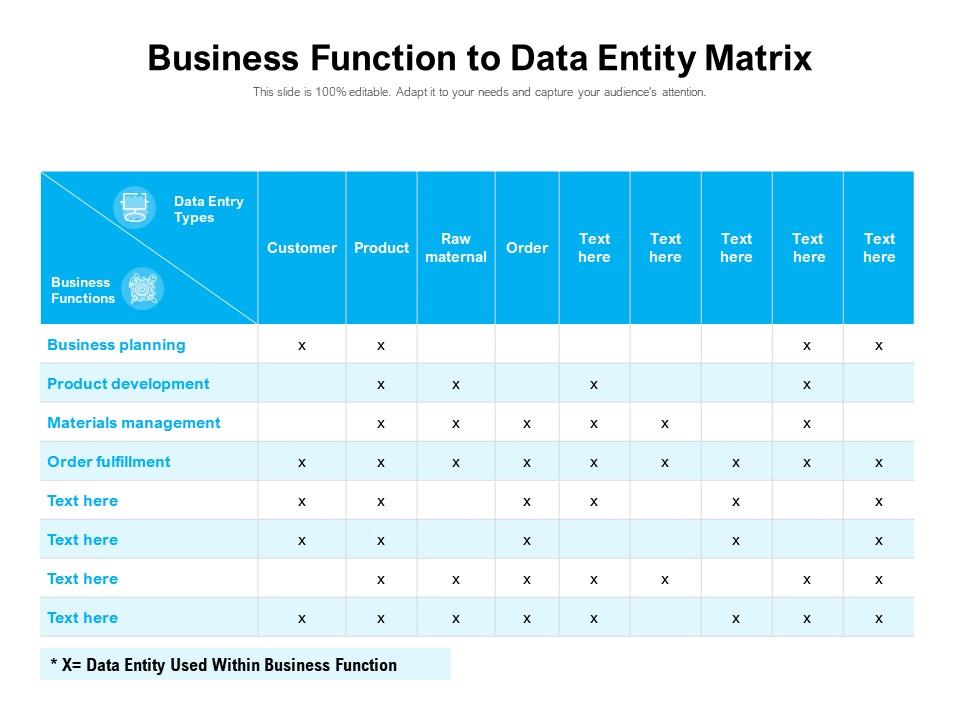
Business function to data entity matrix
Try Before you Buy Download Free Sample Product
Audience
Editable
of Time
Our Business Function To Data Entity Matrix are topically designed to provide an attractive backdrop to any subject. Use them to look like a presentation pro.
People who downloaded this PowerPoint presentation also viewed the following :
Business function to data entity matrix with all 2 slides:
Use our Business Function To Data Entity Matrix to effectively help you save your valuable time. They are readymade to fit into any presentation structure.
FAQs for Business function to
So data mapping is like creating a cheat sheet that shows how info from one system matches up with another system. Picture translating between languages - you gotta know what goes where. Without it? Your data becomes a hot mess. Sales figures end up in random columns, dates get jumbled, or stuff just disappears completely. Honestly, I've seen people spend weeks fixing data that could've been mapped correctly from day one. Map everything upfront and write it down somewhere your team can actually find it later.
Think of data mapping as your sanity check before moving anything. It makes you spell out exactly how info changes from point A to point B, which catches all those weird inconsistencies early. You'll create this blueprint that validates formats and business rules - honestly, it's saved my butt more times than I can count. Those random edge cases that always show up? The mapping spots them first. Plus you get documentation of your whole transformation process, so when something breaks (and it will), you can actually trace it back. Trust me - map everything first, then migrate.
So for data mapping tools, it really comes down to your setup and how much you wanna spend. Informatica and Talend are everywhere in big companies - super powerful but they'll hit your wallet hard. SSIS works great if you're already deep in Microsoft land. I've personally saved tons using open source stuff like Apache Nifi. Finance and healthcare folks usually need something like MuleSoft for all their compliance headaches. Oh, and Pentaho's pretty decent too if you want middle ground. Just pick whatever plays nice with what you've already got running.
Legacy systems are a total nightmare - you're basically detective work trying to figure out what "CUST_FLG_3" even means. Modern apps? Way cleaner. You get actual documentation and APIs that make sense. With old systems, you'll waste so much time reverse-engineering schemas and tracking down Bob from accounting who's the only one who remembers why certain fields exist. I swear there's always one guy like that at every company. Start with a data dictionary for legacy stuff though. Seriously saves your sanity when you're three weeks deep and nothing makes sense anymore.
Think of metadata as your cheat sheet for data mapping. It shows you what's actually in each field, the format, and how everything connects. Trust me, you'll be lost without it - especially when you're trying to match "customer_id" from one system to "cust_num" in another. Legacy systems are the worst for this stuff. You can use metadata to check data types, validate your work, and spot problems early. Oh, and definitely keep notes on your own mappings as you build them. I learned that one the hard way when I had to debug something months later.
Look, data mapping is honestly your best friend for GDPR and HIPAA compliance. It shows you exactly where all your sensitive stuff is hiding and who's touching it. Without it, you're basically flying blind when auditors come knocking. Map out your critical data flows first - trust me, that's where you'll get the most value. Once you know which systems have EU citizen data or health records, handling those data requests becomes so much easier. Plus you can actually set up proper access controls instead of just hoping for the best. My old boss learned this the hard way during our last audit.
Data quality is going to be your biggest headache - I'm not even kidding. Everything's scattered across different systems that don't talk to each other, and good luck getting consistent definitions when marketing calls it "leads" but sales calls it "prospects." Legacy stuff makes it worse since those systems were built in like 2005. Real-time transformations get pretty gnarly too. My advice? Pick one small data flow first instead of trying to boil the ocean. Build some wins before you tackle the whole mess.
So automated mapping basically uses algorithms to spot patterns and suggest which fields should connect. Way faster than doing everything manually, plus it catches stuff you'd probably miss. But here's the thing - sometimes it makes totally random connections that make zero business sense lol. Manual mapping? You control everything and get it right, but god it takes forever. Doesn't work with huge datasets either. Most people I know just do both - let the automation handle the obvious matches, then go back and fix the weird ones yourself.
Start with data profiling - you need to really understand both your source and target schemas. Document field names, data types, all that boring stuff. Automated mapping tools help, but don't trust them completely. Manual validation catches the weird edge cases that always pop up. Test everything with sample data first. Seriously, going live without testing is asking for trouble. Get subject matter experts to review your work - they know the business rules better than anyone. Build a clear audit trail so you can track down issues later. Oh, and set up monitoring to catch problems early once you're in production.
Think of data mapping as getting all your messy data sources to speak the same language. Your BI tools won't work right if they're trying to make sense of inconsistent formats and naming conventions - it's like trying to have a conversation where everyone's speaking different dialects. Once you map everything properly, your dashboards actually show reliable numbers instead of random garbage. Plus when your boss inevitably questions the quarterly report (they always do), you can trace exactly where each data point originated. Honestly, just tackle your most important data flows first and build from there.
Think of data mapping as your GPS for moving stuff into a data warehouse. You're basically figuring out which fields from your source systems land where, plus what transformations you need along the way. Trust me, skip this step and you'll hate yourself later when everything breaks. I learned that one the hard way! Different data types need different handling too. My advice? Start with documenting what you've got in your source systems, then work backwards from whatever reports your business actually needs. Way easier than doing it the other way around.
Map your source to target fields with clear transformation rules - seriously, document the "why" behind every decision because someone will definitely ask later. Include data types and validation rules too. Store everything in version control where both tech and business people can access it. Plain language works better than jargon for most of this stuff. Short sentences help. Dependencies between fields matter, so call those out. Oh, and actually keep it updated when things change - I know it's annoying but future you will appreciate it when you're not scrambling to remember what that weird mapping was for.
So data mapping is basically building bridges between your systems so they can actually understand each other. Like, your CRM calls it "customer_name" but your billing system wants "client_full_name" - mapping connects those dots. Without it? Total disaster. Your CRM sends "John Smith" but billing expects separate first/last fields and everything just breaks. Honestly, I've seen this mess up entire workflows. Start by writing down how each system organizes its main data fields. Then you can figure out what connects to what. It's like being a translator for all your different tools.
So you'll mostly need reverse data mapping for migrations going backwards, rollbacks, or when your data transformations completely break. Honestly, the hardest part is that some transformations just can't be reversed - like if you aggregated data or lost info along the way. Here's what works: document your forward mappings really well first. Then build inverse transformation rules from there. Figure out which fields map back cleanly versus the messy ones that'll need special handling. Pro tip - always test this stuff before you actually need it, because debugging backwards mappings under pressure sucks.
Go for the high-impact, low-effort stuff first - customer data feeding multiple systems or those manual regulatory reports everyone hates. Your team will actually love you for fixing the daily pain points. Sales, billing, compliance data should be top priority. Bad data quality costing money or pissing off customers? Fix that immediately. Honestly, I'd just make a quick impact vs effort grid and hit those easy wins first. Way better than jumping straight into some massive enterprise mapping project that'll take forever. The complex stuff can wait - get some victories under your belt.
No Reviews