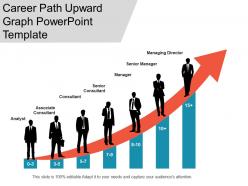
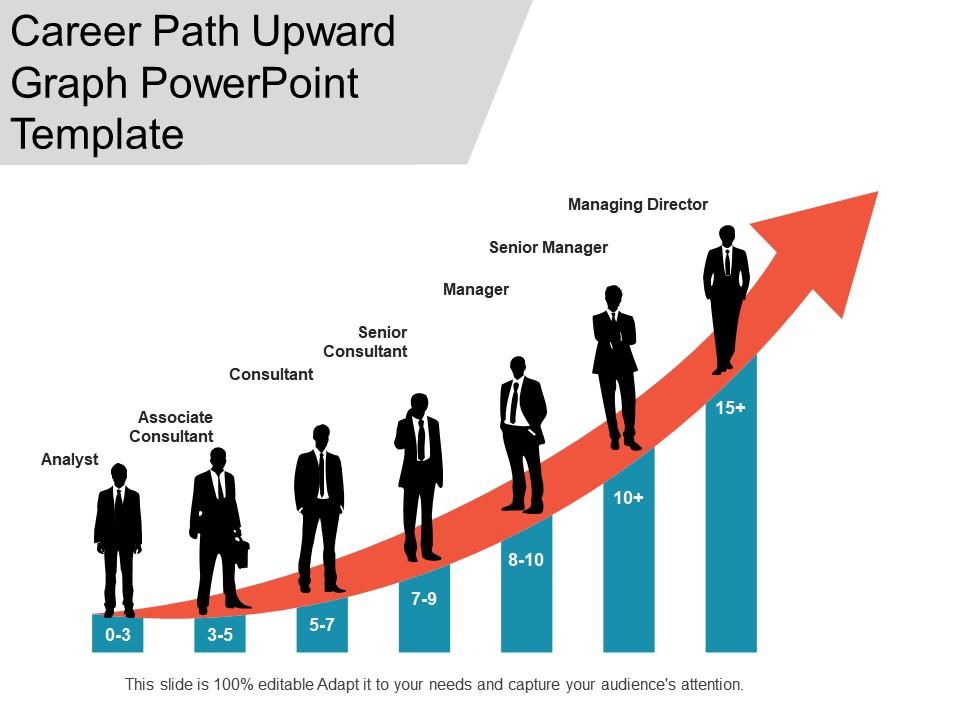
Career path upward graph powerpoint template
Try Before you Buy Download Free Sample Product
Audience
Editable
of Time
Enhance the decor with our Career Path Upward Graph Powerpoint Template. They embellish every appearance.
People who downloaded this PowerPoint presentation also viewed the following :
Career path upward graph powerpoint template with all 5 slides:
Compulsions become fewer with our Career Path Upward Graph Powerpoint Template. They cut down on any constraints you have.
FAQs for Career path upward
So for your career presentation, you'll want to hit these main points: show your current achievements with actual numbers, spell out what role you're gunning for next, and do a skills gap analysis (most people totally skip this part but it actually makes you look super self-aware). Include concrete examples where you took charge or led something. Oh, and don't forget any training or certs you've done recently. The whole thing should flow like a story - here's where I've been, here's where I want to go, here's my realistic plan to get there.
Honestly, making your career plan visual is a game changer. Your brain just processes pictures way faster than reading through paragraphs of goals. I love using flowcharts for different career paths or timelines with major milestones marked out. Color coding works great too - like green for short-term stuff, blue for longer goals. You can create boxes for jobs you want or build out a skills matrix. Even simple icons help break things up. The best part? You'll actually look at it more often instead of letting some document collect digital dust. Plus you spot connections between things that weren't obvious before.
Honestly, the worst thing you can do is make it all about you wanting something instead of showing what you bring to the table. Like, don't just rattle off your accomplishments - tie them to actual business results with real numbers. Stop being so apologetic about it too! You earned this conversation. Do your homework first though - research what people in similar roles actually make and when promotions typically happen at your company. Nobody cares that you "work hard" (everyone says that). Focus on specific examples where you led something, solved a problem, or made money. Oh, and practice saying it out loud beforehand so you don't sound desperate.
Honestly, making visual maps of your career path is a game changer. You can see exactly what skills you need and when, instead of just having some vague idea floating around in your head. I'm talking flowcharts showing promotions, heat maps for skill gaps - way more useful than those boring career docs HR gives you. Plus it's so much easier to have real conversations with your boss when you've got something visual to point at. You'll spot the roadblocks faster too. Try sketching out where you want to be in three years first.
Track your technical skills, certifications, and project wins with actual numbers. Feedback from reviews matters too. Honestly, the networking stuff is huge - mentorship, working with other teams, even just leading a random meeting. People sleep on this but it's what gets you promoted half the time. Oh and training hours, definitely log those. Check in every quarter to see how you're doing and tweak your goals. Start with maybe 5 key things you're tracking instead of going crazy with a million spreadsheet columns. You'll burn out otherwise.
Dude, seriously - turn your career stuff into actual stories instead of that boring resume format. Like when you hit a roadblock at work and figured out how to fix it. That's way more interesting than "managed teams from 2019-2021" or whatever. Start with where you began, talk about the messy parts you worked through, then boom - what you accomplished. Honestly, everyone zones out when you just rattle off job titles. But tell them how you spotted a problem your team was having, taught yourself some new skill, and actually solved it? They'll remember that. Makes you look like someone who thinks ahead instead of just bouncing around randomly.
Think of personal branding as your career GPS - it shows you where you're headed and proves you're serious about getting there. Your LinkedIn, portfolio, network, even how you talk to people all tell the same story about your skills and goals. I know it sounds super buzzword-y (and honestly, it kind of is), but this stuff actually works. When everything lines up with your career target, you're marketing yourself for the opportunities you want - both inside your company and out. Start by looking at what your current "brand" says about you. Then tweak it to match where you want to end up.
First thing - swap out the skills section and industry terms. Like if you're going sales to healthcare, "client relationships" becomes "patient care." I made this mistake once using all my tech language for a manufacturing job and wow, it was painful. Your achievements need translation too. Revenue impact? That's cost savings now. Team leadership becomes crew management. You get it. The structure stays but the language has to match what they actually care about. Honestly, just stalk their job postings first - you'll spot the buzzwords they use over and over.
Honestly, keep those slides super clean and tell a story with each one. Skip the bullet points - nobody wants to read a grocery list during your presentation. One goal per slide works best, then add some visual stuff like progress bars or timelines to make it interesting. Consistent colors are key (though I'm terrible at this myself lol). Each goal should show what problem you're solving or how you're helping the team. Don't overdo animations either - we've all been trapped in those slideshow nightmares. Wrap up each slide with concrete next steps and deadlines so people know exactly how to help you.
Honestly, polls are a game-changer - start with something like "what's your biggest career roadblock right now?" Breakout rooms work great for goal-setting stuff too. I've seen people do this cool exercise where everyone draws their career path on a digital whiteboard (sounds cheesy but people actually love it). Role-playing practice for those awkward manager convos is solid. Oh, and career milestone bingo is surprisingly fun - way better than just talking at people for an hour. The whole point is getting them involved instead of zoning out while you drone on.
So PowerPoint or Google Slides for the actual slides, obviously. But honestly? The prep work is where you'll make or break this thing. Canva's great for templates that don't scream "I grabbed the first free option." Before you even touch slides though, map out your wins and goals in Notion or just a basic Google Doc. LinkedIn's super helpful for researching what people in your target role actually make - salary convos are way easier when you've done homework. Oh, and run your talking points through Grammarly if you're worried about sounding polished. Start with a decent template, then make it yours.
Ugh, this stuff is honestly such a balancing act! Some cultures want you to be super direct about your wins - like really own your success. Others think that's way too pushy and prefer when you talk up the team instead. What sounds confident here might make you look like a total show-off there. Research beforehand is clutch though. Do they care more about hierarchy? Are they data people or story people? I'd definitely run your approach by someone who knows that culture first - saves you from any awkward moments later.
Honestly just go with PowerPoint or Google Slides - that's what managers actually expect to see. Google Slides is clutch for team stuff since everyone can jump in and edit together. PowerPoint has way more formatting options though, so it's better for formal presentations. Oh and Canva's pretty decent too if you suck at design (no shame, I definitely do). But real talk? Just use whatever your team's already on. Nobody cares about fancy features if you're the only one who can't open the file.
Work feedback right into your career story - it shows you actually grow from criticism. Like when my old manager told me I sucked at stakeholder communication, so I started doing all the client presentations. Honestly, this separates people who just brag about wins from those who actually learn stuff. Mention specific feedback you got and what you did about it. Don't make it an afterthought either. Talk about what you're working on now too - shows you're still trying to get better instead of thinking you're already perfect.
Okay so here's the thing - numbers are your best friend on a resume. "Increased sales by 30%" hits way harder than "strong leader" or whatever generic stuff people write. I'm talking actual percentages, dollar amounts, team sizes - anything you can measure. Start with your most impressive win first, then work down. Use power verbs like "spearheaded" or "delivered" instead of boring ones. Oh, and focus on what you actually accomplished, not just your daily tasks. Even if you can't find exact numbers, at least show the scale of what you handled. Trust me, hiring managers love this stuff because it's concrete proof you get results.
-
It saves your time and decrease your efforts in half.
-
Easily Understandable slides.