


Challenges and opportunities identification in a process powerpoint presentation slides




Try Before you Buy Download Free Sample Product
 Impress Your
 Audience
 100%
100% Editable
 Save Hours
 of Time


Plan and deliver a power-packed presentation with our challenges and opportunities identification in a process PowerPoint presentation slides. The slides in this objection and convenience PPT deck presents a docket about understanding the key strategies, implementation, and benefits of the same. Elaborating on the problems as well as the effective solutions, SWOT analysis, future forecast, etc, is all collaborated in this threats PowerPoint template. Presenting the series of steps involved such as- mapping, analyzing, redesigning, implementing, and reviewing, this creative PPT set makes it convenient for the audience to have every detail at an easy access. The slides in this trial and scope PowerPoint layout is beneficial in terms of laying out the challenges of the company so that the audience can come up with efficient solutions for the same. This defiance and liberty PPT bundle effectively presents the industry overview for the knowledge of the shareholders along with FMEA analysis for better understanding. Grab it instantly to make way for additional perks in the business.
People who downloaded this PowerPoint presentation also viewed the following :
Content of this Powerpoint Presentation
Slide 1: This slide displays title i.e. 'Challenges and Opportunities Identification in a Process' and your Company Name.
Slide 2: This slide presents agenda.
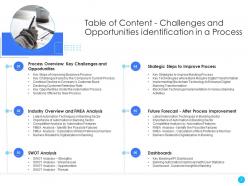
Slide 3: This slide exhibits table of contents.
Slide 4: This slide shows title for 'Process overview'.
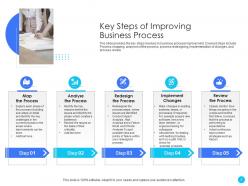
Slide 5: The slide provides the key steps involves in business process improvement.
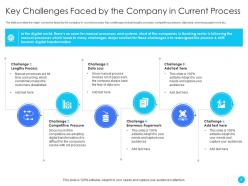
Slide 6: The slide provides the major concerns faced by the company in current process.
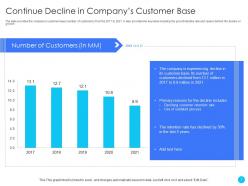
Slide 7: The slide provides the company’s customer base (number of customers) from the 2017 to 2021.
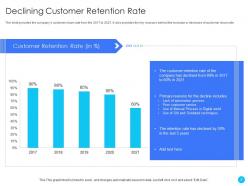
Slide 8: The slide provides the company’s customer churn rate from the 2017 to 2021.
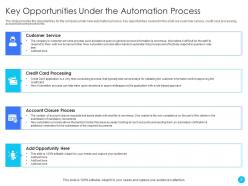
Slide 9: The slide provides the opportunities for the company under new automation process.
Slide 10: The slide provides the major problems in the current process along with the solutions for all those problems.
Slide 11: This slide depicts title for 'Industry overviews & FMEA analysis'.
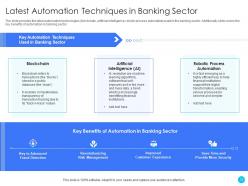
Slide 12: The slide provides the latest automation technologies.
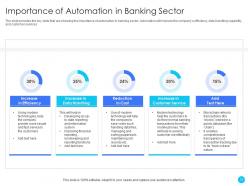
Slide 13: The slide provides the key stats that are showing the importance of automation in banking sector.
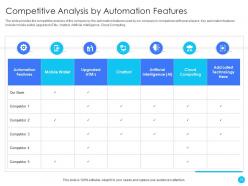
Slide 14: The slide provides the competitive analysis of the company by the automation features.
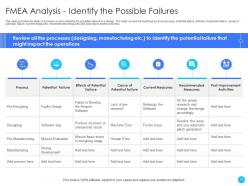
Slide 15: This slide provides the table of process review to identify the possible failures in a design.
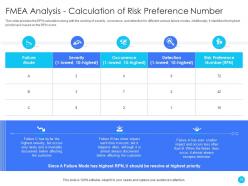
Slide 16: This slide provides the RPN calculation along with the ranking of severity, occurrence, and detection for different various failure modes.
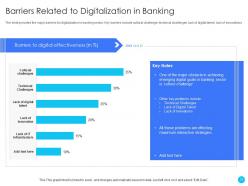
Slide 17: The slide provides the major barriers for digitalization in banking sector.
Slide 18: This slide displays title for 'SWOT Analysis'.
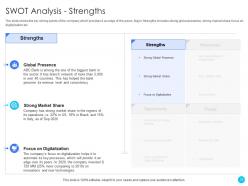
Slide 19: The slide shows the key strong points of the company which provides it an edge of the peers.
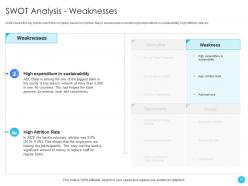
Slide 20: This slide shows the key points which the company needs to improve.
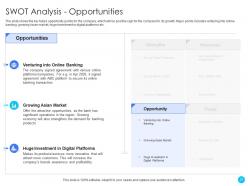
Slide 21: The slide shows the key future opportunity points for the company, which will be positive sign for the company for its growth.
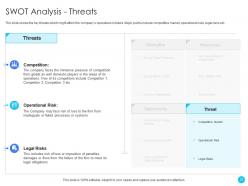
Slide 22: The slide shows the key threats which might affect the company’s operations in future.
Slide 23: This slide presents title for 'Strategic steps to improve process'.
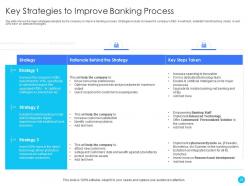
Slide 24: The slide shows the major strategies adopted by the company to improve banking process.
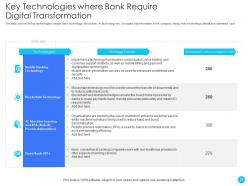
Slide 25: The slide shows the key technologies (mobile bank technology, blockchain, AI technology etc.) for digital transformation.
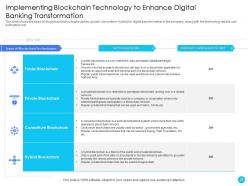
Slide 26: The slide shows the types of blockchain technologies.
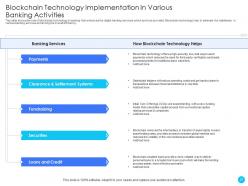
Slide 27: This slide shows the role of blockchain technology in banking that enhances the digital banking services which are to be provided.
Slide 28: This slide presents title for 'Future forecast - after process improvement'.
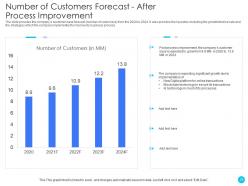
Slide 29: The slide provides the company’s customer base forecast (number of customers) from the 2020 to 2024.
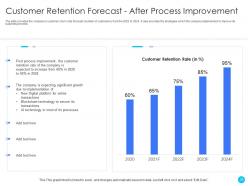
Slide 30: The slide provides the company’s customer churn rate forecast (number of customers) from the 2020 to 2024.
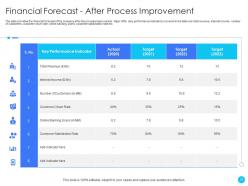
Slide 31: The slide provides the financial forecast of the company after the process improvement.
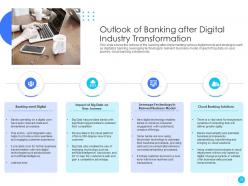
Slide 32: This slide shows the outlook of the banking after implementing various digital trends and strategies.
Slide 33: This slide exhibits title for 'Dashboards'.
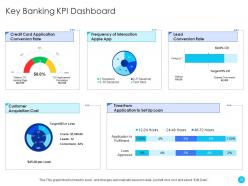
Slide 34: This slide shows 'Key Banking KPI Dashboard'.
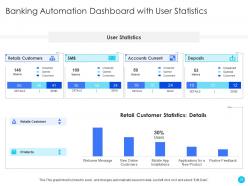
Slide 35: This slide depicts 'Banking Automation Dashboard with User Statistics'.
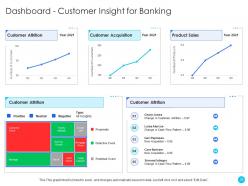
Slide 36: This slide highlights 'Dashboard - Customer Insight for Banking'.
Slide 37: This is the icons slide.
Slide 38: This slide presents title for additional slides.
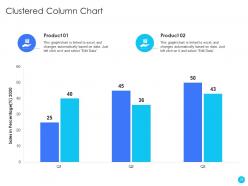
Slide 39: This slide exhibits quarterly sales clustered column charts for different products. The charts are linked to Excel.
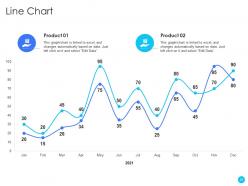
Slide 40: This slide displays monthly line charts for different products. The charts are linked to Excel.
Slide 41: This slide presents your company's vision, mission and goals.
Slide 42: This slide depicts posts for past experiences of clients.
Slide 43: This slide displays Venn.
Slide 44: This slide exhibits yearly timeline.
Slide 45: This slide shows about your company, target audience and its client's values.
Slide 46: This slide showcases financials.
Slide 47: This slide displays targets.
Slide 48: This slide shows details of team members like name, designation, etc.
Slide 49: This slide highlights comparison of products based on selects.
Slide 50: This is thank you slide & contains contact details of company like office address, phone no., etc.
Challenges and opportunities identification in a process powerpoint presentation slides with all 50 slides:
Use our Challenges And Opportunities Identification In A Process Powerpoint Presentation Slides to effectively help you save your valuable time. They are readymade to fit into any presentation structure.












FAQs for Challenges and opportunities identification in a process
Honestly, just focus on 3-5 metrics tops or you'll go crazy with all the data. Track your efficiency stuff - time and cost savings, obviously. Quality improvements like fewer errors. Customer satisfaction scores too. Oh, and don't forget employee engagement because if your team hates the changes, good luck making anything stick long-term. Get your baseline numbers first before you change anything - learned that one the hard way. Then check progress monthly or quarterly depending on how fast things move. Start with whatever's easy to measure, then you can get fancier later once you've got the basics down.
Honestly, just pick one workflow and watch it for a week - you'll be shocked at how much pointless stuff happens. Map out what you're doing now and hunt for anything that doesn't actually help customers. Don't try fixing everything though, that's a recipe for burnout. Hit the biggest problems first with tiny changes. Maybe standardize how people do repetitive tasks or throw up some visual boards so everyone can see what's happening. Your team probably has the best ideas anyway since they're in the trenches daily. Small tweaks beat massive overhauls every time.
Think of data analysis like being a detective - you're hunting for where stuff gets jammed up. Cycle times and wait periods will show you the exact trouble spots. But honestly, the visual stuff is where it gets interesting. Charts and heat maps make bottlenecks super obvious (way better than staring at endless spreadsheets). Flow diagrams are great too - they'll show you where work actually piles up. I'd start by mapping out your current process first, then add timing data on top. You'll be surprised what patterns jump out at you.
Your frontline people are honestly the best source for this stuff. They see all the daily disasters and weird workarounds that never bubble up to management reports. Leadership's looking at spreadsheets while your team is actually wrestling with broken processes every day. When people help identify the problems, they'll actually care about fixing them too - which is huge. Set up some easy ways for them to flag issues, maybe quick surveys or letting them log frustrations without making it feel like homework. Those insights are pure gold compared to guessing from the top down.
Honestly, most people try to change everything at once - huge mistake. Your frontline workers need to be involved from the start, otherwise good luck getting anyone on board. Teams also love jumping straight to solutions without understanding what's actually broken, which is so backwards to me. Communication falls apart fast, and half the time nobody's measuring if the changes even work. Leadership gets bored when results don't happen overnight too. Start with small wins, set realistic deadlines, and figure out how you'll track success before you begin.
Dude, you'll save yourself so much time by automating the tedious data collection and tracking stuff. Process mining tools can show you bottlenecks instantly instead of you spending weeks manually gathering everything. The setup's annoying at first, I won't lie. But digital dashboards mean way fewer status meetings - thank god. Everyone can just check progress whenever. My advice? Don't go crazy right away. Pick one process to test it out on first. Once you can show the higher-ups it actually saves money, then you can expand from there. Trust me on this one.
You absolutely need everyone involved because most processes hit like 3-4 different teams. Getting just one department's view? Recipe for disaster. I've watched so many "fixes" backfire because they solved accounting's problem but totally screwed over operations. Map out who actually touches your process first - might be more people than you think. Then get them in a room together early on. People will actually use changes they helped design instead of fighting them. Plus you'll catch the real bottlenecks, not just what looks broken from your corner of the office.
Honestly, you gotta bake sustainability into the whole thing from the start. Document everything clearly - can't have stuff disappearing when Sarah from accounting quits, you know? Set up regular check-ins to see if changes are actually sticking. I've watched so many "wins" fall apart after like 6 months because nobody was paying attention. Train several people on new processes instead of making one person the go-to expert. That just creates bottlenecks. Connect your improvements to actual numbers and check quarterly. Oh, and don't try fixing everything at once - nail one thing, then move on.
Honestly, I'd go with Lean, Six Sigma, or Kaizen for process improvement stuff. Lean's about cutting waste, Six Sigma fixes quality problems, and Kaizen does tiny changes over time. I'm biased toward Kaizen because it doesn't feel as intense - you're not overhauling everything at once. PDCA (Plan-Do-Check-Act) is pretty solid too, works with any of these really. Oh, and if you're dealing with projects, Agile/Scrum might fit better. My advice? Map out what you're doing now first. Then figure out your biggest headache - is it waste, quality, or just needing quick wins? That'll tell you which way to go.
Honestly, you can't transform processes without getting leadership and culture right first. I've watched amazing process redesigns crash and burn because nobody thought about the people side. Your leaders need to actually show up - not just send an email about change, but remove obstacles and explain why this matters. The culture piece is huge too. People have to feel safe calling out problems without getting thrown under the bus. Oh, and don't make my mistake of jumping straight into process mapping. Get your leadership team on the same page first, then work on shifting how people think about change. Trust me on this one.
Figure out who's affected by your changes first - and actually talk to them about the problem before you start solving it. Nobody wants to sit through endless status meetings, so keep updates quick. The people doing the actual work usually have better insights than their managers (trust me on this one). Give everyone clear roles so they know what kind of input you need from them. Check in regularly, but here's the key part - you've got to show people how their feedback actually changed things. Otherwise they'll stop caring pretty fast. Don't just map out impacts from your desk either - get out there and ask around.
Honestly, just grab a whiteboard and dump out everything that makes your team want to scream. Look for stuff that generates the most customer complaints or burns through your budget. Score each thing on impact vs how hard it'll be to fix - you want high impact, easy wins obviously. Oh and prioritize anything touching your biggest customers or revenue first, that's just common sense. Sometimes the thing driving everyone nuts is exactly where you should start, even if it doesn't seem "strategic." Don't get too fancy with this - the obvious choice is usually right.
Yeah, automation's a game changer - you get way faster turnaround times and way fewer screw-ups since robots don't get tired or distracted. The speed boost is the obvious win, but honestly the quality improvements might be even better. Your team can focus on actual strategic stuff instead of mind-numbing repetitive work. Look at whatever processes eat up the most time and follow clear rules - those are your golden tickets. We tried it with our invoicing last year and it was like night and day. Just don't automate everything at once or you'll overwhelm people.
Honestly, root cause analysis is a game changer - stops you from fixing the same crap repeatedly. You know how you'll patch something, then it breaks again next week? That's because you're only treating symptoms. Think detective mode instead. Trace backwards through your whole process to find where it *actually* broke, not just where you noticed it. The "five whys" trick works pretty well - keep asking why until you hit the real issue. Once you nail down that root cause, your fixes will stick. Way better than constantly putting out fires. I learned this the hard way after redoing the same project like three times.
Dude, training is where everything goes to die if you mess it up. Most people think they can just roll out new processes and everyone will magically adapt - huge mistake. Get your team trained BEFORE you flip the switch, not when stuff starts falling apart. Change freaks people out naturally, so showing them the why behind it all makes a massive difference. I've watched brilliant process changes completely crash and burn because nobody actually knew how to use them. Make it hands-on, start early, and don't expect people to just wing it. Trust me on this one.
-
Content of slide is easy to understand and edit.
-
Topic best represented with attractive design.