

Collaborate With Different Teams Powerpoint Presentation Slides




Try Before you Buy Download Free Sample Product
 Impress Your
 Audience
 100%
100% Editable
 Save Hours
 of Time


Managing cross-functional teams within the company wherein a group of people with different functional expertise comes together for a common goal requires collaboration strategies. Check out our efficiently designed Collaborate with different teams template on the current state analysis of the company wherein the company is using a functional team approach. Issues faced by the company have been discussed, along with the effect of lack of collaboration at the workplace. Different types of project teams have been shared, along with choosing the right project team and the benefits of choosing a cross-functional over functional approach. The need for cross-functional collaboration and challenges faced by this approach with the solutions to overcome such challenges has been shared here. This slide also focused on various phases of cross-functional team development and the Tuckman phases. Steps for choosing the right set of project team members, cross-functional process, and team performance model have been covered in this template. Various strategies needed to build the cross-functional teams, confidence charts for project collaboration, and training schedules have been discussed in detail in this PowerPoint presentation. Download it now.
People who downloaded this PowerPoint presentation also viewed the following :
Content of this Powerpoint Presentation
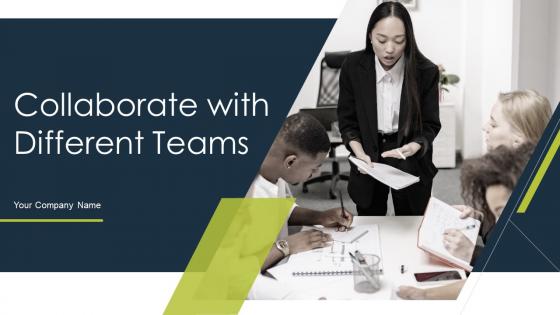
Slide 1: This slide highlights title Collaborate with Different Teams. State Your Company Name and begin.
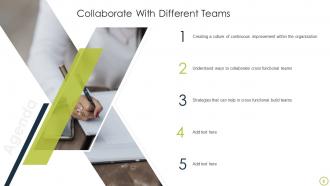
Slide 2: This slide states Agenda of the presentation.
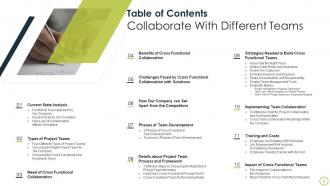
Slide 3: This slide presents Table of Content for the presentation.
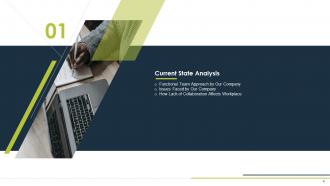
Slide 4: This slide highlights title for topics that are to be covered next in the template.
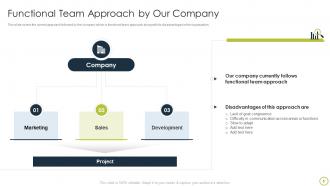
Slide 5: This slide displays Functional Team Approach by Our Company.
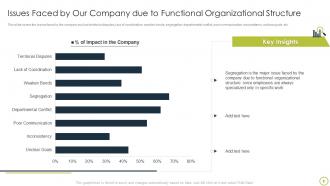
Slide 6: This slide represents Issues Faced by Our Company due to Functional Organizational Structure.
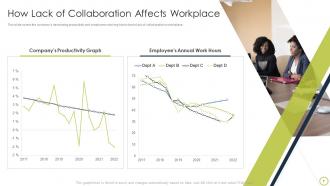
Slide 7: This slide showcases How Lack of Collaboration Affects Workplace.
Slide 8: This slide highlights title for topics that are to be covered next in the template.
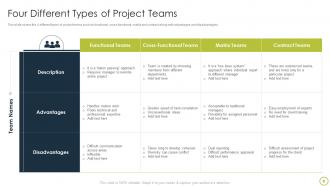
Slide 9: This slide shows Four Different Types of Project Teams.
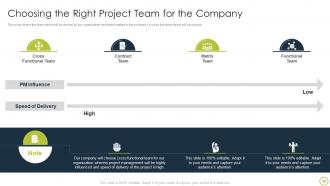
Slide 10: This slide presents Choosing the Right Project Team for the Company.
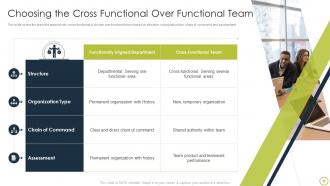
Slide 11: This slide displays Choosing the Cross Functional Over Functional Team.
Slide 12: This slide highlights title for topics that are to be covered next in the template.
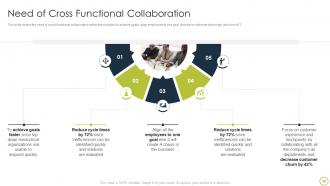
Slide 13: This slide represents Need of Cross Functional Collaboration.
Slide 14: This slide highlights title for topics that are to be covered next in the template.
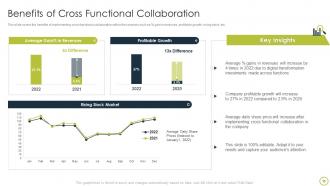
Slide 15: This slide showcases Benefits of Cross Functional Collaboration.
Slide 16: This slide highlights title for topics that are to be covered next in the template.
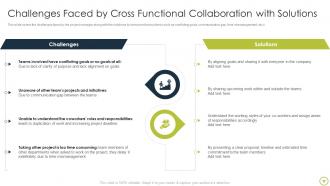
Slide 17: This slide shows Challenges Faced by Cross Functional Collaboration with Solutions.
Slide 18: This slide highlights title for topics that are to be covered next in the template.
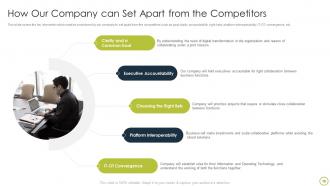
Slide 19: This slide presents How Our Company can Set Apart from the Competitors.
Slide 20: This slide highlights title for topics that are to be covered next in the template.
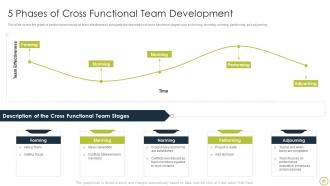
Slide 21: This slide displays 5 Phases of Cross Functional Team Development.
Slide 22: This slide represents Tuckman’s Phases of Team Development.
Slide 23: This slide highlights title for topics that are to be covered next in the template.
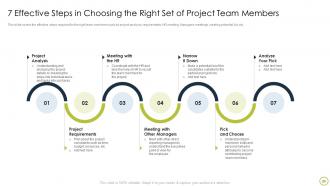
Slide 24: This slide showcases 7 Effective Steps in Choosing the Right Set of Project Team Members.
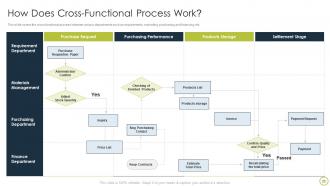
Slide 25: This slide covers the cross functional process between various departments.
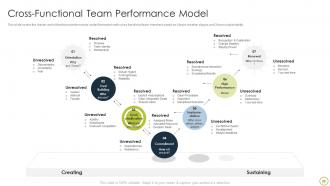
Slide 26: This slide shows Cross-Functional Team Performance Model.
Slide 27: This slide highlights title for topics that are to be covered next in the template.
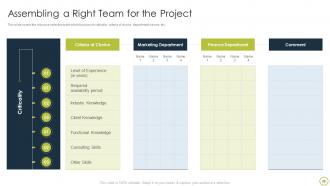
Slide 28: This slide presents Assembling a Right Team for the Project.
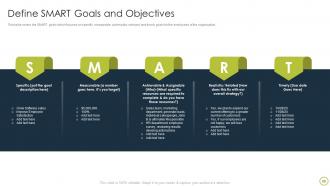
Slide 29: This slide displays SMART goals which focuses on specific goals for the employees of the organization.
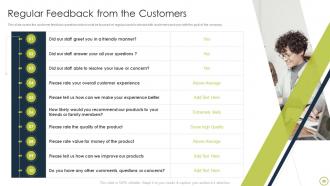
Slide 30: This slide represents Regular Feedback from the Customers.
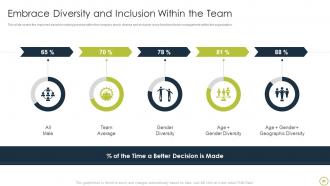
Slide 31: This slide showcases Embrace Diversity and Inclusion Within the Team.
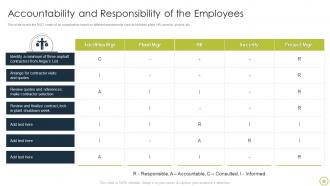
Slide 32: This slide shows Accountability and Responsibility of the Employees.
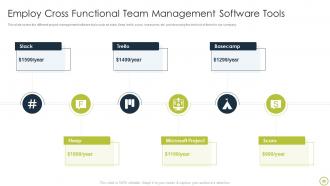
Slide 33: This slide presents Employ Cross Functional Team Management Software Tools.
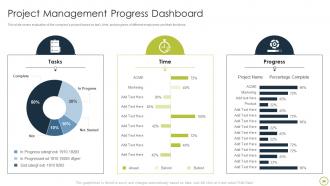
Slide 34: This slide displays Project Management Progress Dashboard.
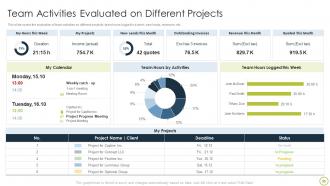
Slide 35: This slide represents Team Activities Evaluated on Different Projects.
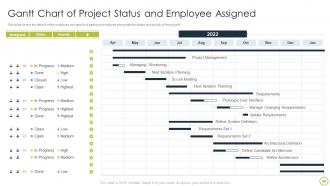
Slide 36: This slide showcases Gantt Chart of Project Status and Employee Assigned.
Slide 37: This slide highlights title for topics that are to be covered next in the template.
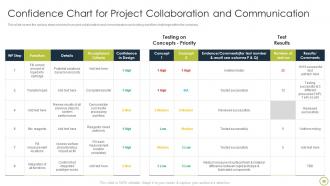
Slide 38: This slide shows Confidence Chart for Project Collaboration and Communication.
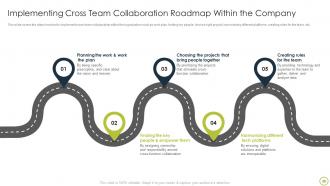
Slide 39: This slide presents Implementing Cross Team Collaboration Roadmap Within the Company.
Slide 40: This slide highlights title for topics that are to be covered next in the template.
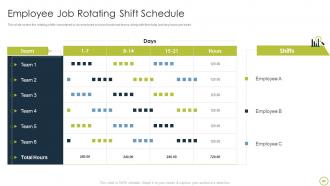
Slide 41: This slide covers the rotating shifts considered by an employee in cross functional teams.
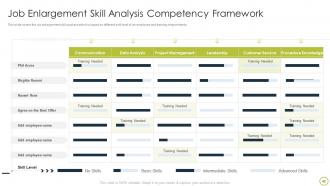
Slide 42: This slide displays Job Enlargement Skill Analysis Competency Framework.
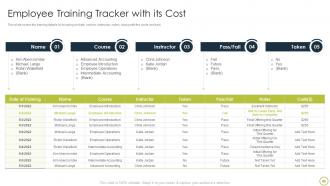
Slide 43: This slide represents Employee Training Tracker with its Cost.
Slide 44: This slide highlights title for topics that are to be covered next in the template.
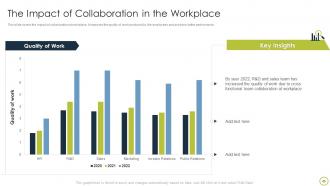
Slide 45: This slide showcases the Impact of Collaboration in the Workplace.
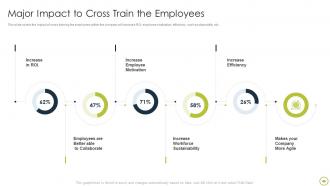
Slide 46: This slide shows Major Impact to Cross Train the Employees.
Slide 47: This slide is titled as Additional Slides for moving forward.
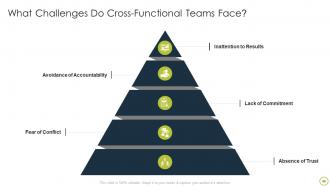
Slide 48: This slide shows Challenges faced in Managing Cross-functional Teams.
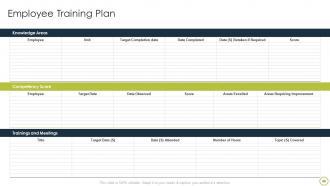
Slide 49: This slide represents Employee Training Plan.
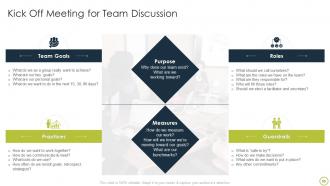
Slide 50: This slide presents Kick Off Meeting for Team Discussion.
Slide 51: This slide displays Icons for Collaborate With Different Teams.
Slide 52: This is Our Mission slide with related imagery and text.
Slide 53: This slide provides 30 60 90 Days Plan with text boxes.
Slide 54: This slide contains Puzzle with related icons and text.
Slide 55: This is Our Target slide. State your targets here.
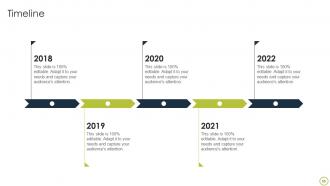
Slide 56: This is a Timeline slide. Show data related to time intervals here.
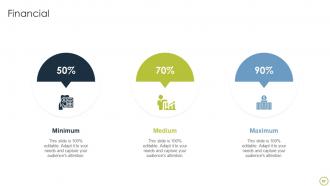
Slide 57: This is a Financial slide. Show your finance related stuff here.
Slide 58: This slide shows Post It Notes. Post your important notes here.
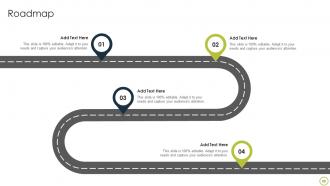
Slide 59: This slide presents Roadmap with additional textboxes.
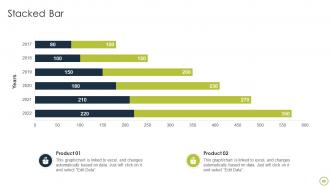
Slide 60: This slide represents Stacked Bar chart with two products comparison.
Slide 61: This is a Thank You slide with address, contact numbers and email address.
Collaborate With Different Teams Powerpoint Presentation Slides with all 65 slides:
Use our Collaborate With Different Teams Powerpoint Presentation Slides to effectively help you save your valuable time. They are readymade to fit into any presentation structure.







FAQs for Collaborate With Different Teams
Honestly, the best part is getting different brains on the same problem - you solve stuff way faster that way. People actually start trusting each other more too, which makes the whole vibe better. No more knowledge hoarding either, since everyone's sharing what they know instead of keeping secrets in their corner. Innovation happens quicker when you've got diverse perspectives bouncing ideas around. Just make sure communication doesn't get messy and people know their roles, or it becomes a total disaster instead of helpful.
Oh man, these tools are game-changers honestly. You get messaging, file sharing, project stuff all in one place instead of switching between like 15 different apps. Real-time updates mean nobody's confused about what's happening. The async thing is clutch too - people can actually work when they're in the zone rather than sitting through endless meetings. I swear they're weirdly addictive once you start using them though, like you'll find yourself checking updates way too much. My advice? Pick whatever fixes your biggest headache first, then add more later.
Honestly, trust and transparency are what separate teams that actually get stuff done from teams that just... exist. When people trust each other, they'll share real ideas and admit when they screwed up - no political BS. Everyone knowing what's going on matters too. Like, why decisions got made, what you're supposed to be doing. I've watched so many projects crash because someone was hoarding info or everyone was second-guessing motives. Pretty frustrating tbh. Just start being open about your own work and problems first. Others usually catch on and follow your lead.
Honestly, most collaboration crashes because of three main things - fuzzy goals, crappy communication, and teams being weirdly territorial about their work. First thing: nail down what "done" actually looks like so nobody's guessing. Weekly check-ins are way better than monthly ones (learned that the hard way). Get some shared tools where people can actually see what's happening instead of sending endless email updates. The turf war thing? That's usually a leadership problem - if managers aren't collaborating, why would anyone else? Oh, and create space for people to say when stuff isn't working without getting their heads bitten off.
Honestly, diverse teams are amazing once you get past the initial weirdness. Different backgrounds mean way more creative solutions - like, people just think differently about problems. But yeah, communication can be messy at first. Some people are super direct, others hint around stuff, and it's confusing until everyone figures each other out. My advice? Set clear communication rules early and just be patient. There's definitely an adjustment period where things feel awkward. Once you hit your groove though, you'll crush it compared to teams where everyone thinks the same way.
Honestly, you gotta be way more intentional about connecting since there's no more random coffee chats. I always kick off meetings with like 5 minutes of just shooting the breeze - feels weird initially but it works. Get everyone on tools like Miro where they can actually collaborate in real-time, and rotate who's running different projects so people feel invested. But here's the thing that really matters: you have to show your own messy moments first. When I'm stuck on something, I just say it. Ask for help out loud. Make a big deal when teammates help each other out - that stuff is gold. Oh, and try adding "collaboration wins" to your standups!
Okay so first thing - figure out who's doing what and when stuff is due. Seriously, this part is crucial or you'll be scrambling later. Set up quick check-ins, even just 15 minutes here and there, because random issues always pop up. Use shared docs or some project tool so you're not digging through a million emails trying to find things. I'd rather overcommunicate than have people confused about what's happening. Oh and definitely pad your timeline - collaborative stuff always takes way longer than expected, trust me on this one. Start with a solid plan and you'll save yourself so much stress down the road.
Honestly, templates are game-changers for keeping meetings on track. Everyone starts with the same framework, so there's way less "wait, what are we talking about again?" moments. Plus visual people actually stay engaged instead of zoning out. I've noticed teams waste so much time just figuring out where they are in a discussion - templates fix that. You'll spend more time solving actual problems instead of explaining basic context over and over. Oh, and they're great for preventing those random rabbit holes that derail everything. Try a simple problem-solution-action setup next time. You'll be surprised how much smoother it goes.
Honestly, retrospectives after big milestones are where you'll catch the real issues before they blow up. Regular check-ins work too, plus anonymous surveys if people are shy about speaking up directly. The trick is actually doing something with the feedback - otherwise everyone stops being honest pretty fast. I always make a shared action list with deadlines so stuff doesn't just disappear into the void. Oh, and dedicated feedback sessions where people can say what's broken or working well. Makes such a difference when the team feels safe to be real with you.
Honestly, tech makes the whole creative thing so much smoother these days. Real-time brainstorming with tools like Miro or Figma means you're not waiting around for feedback anymore. Your team can jump on a shared doc and just start riffing on ideas together, even if someone's working from their couch in another timezone. Those random "wait, what if we..." moments actually get captured instead of disappearing into meeting void. AI can throw out some decent starting concepts too - though sometimes it gets weird with suggestions. The trick is finding tools your team doesn't hate using.
You'll want both hard numbers and the touchy-feely stuff. Track completion rates, how often deadlines get hit, delivery times - basic project health. But honestly? The soft metrics are where the magic happens. Run quick pulse surveys to see if people actually like working together. Watch how often they collaborate without being forced to. Are they updating docs for each other? Asking for input on stuff? How fast do they sort out conflicts when they pop up? I'd probably start with maybe 3 metrics max that actually align with what your team's trying to accomplish. Too many and you'll just drown in data.
Look, people just want to feel like they matter, you know? Collaboration does that - suddenly they're not just grinding through their own to-do list but actually contributing ideas and solving stuff together. Work gets way less boring when you're not stuck in your own little bubble all day. People stick around longer too because they build real relationships with their coworkers. Honestly, I've seen teams completely change when they start doing regular cross-department projects or even just casual brainstorming sessions. It's like night and day. Gets everyone talking and actually caring about the work again.
You've gotta design for this stuff upfront - don't just cross your fingers and hope it works out. Rotate who runs meetings because honestly, the same loudmouths always take over otherwise. Set actual time limits for speaking. Also create different ways people can jump in beyond just talking - shared docs work great, or those anonymous suggestion tools. Oh and if you're remote, definitely factor in time zones and how people prefer to work. Short version: check in regularly and straight-up ask if folks feel like they can actually contribute. Most won't speak up unless you directly ask.
Honestly, working with others just speeds up how fast you learn stuff. You get to see how different people tackle the same problem, which is pretty cool. When you explain something to a teammate, it actually makes you understand it better too – weird how that works. Plus you're constantly getting feedback instead of wondering if you're doing things right. The communication skills you pick up are a nice bonus, though that wasn't really the point of your question. Short version: set up some regular sessions where people can share what they've learned or pair up more experienced folks with newer team members.
Honestly, cross-department communication is a game changer. You stop duplicating work and those ridiculous bottlenecks disappear. Different teams see problems from angles you'd never think of - some of our best fixes came from random hallway chats, no joke. Better visibility means you catch issues before they explode into disasters. My advice? Skip the formal committees at first. Just pick one project where teams actually need to work together and watch how much smoother everything gets. Regular check-ins beat crisis meetings every time. You'll be shocked how much easier things flow when everyone's on the same page.
-
You guys are life-saver when it comes to presentations. Honestly I cannot do much without your services. Thank you!!!
-
Commendable slides with attractive designs. Extremely pleased with the fact that they are easy to modify. Great work!