

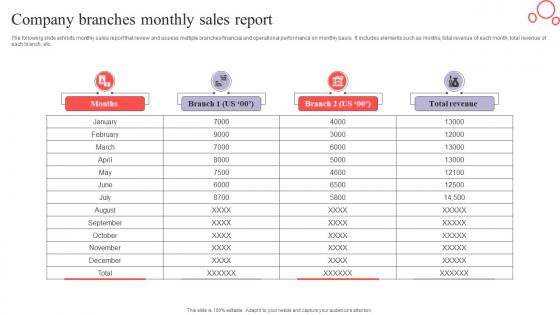
Company Branches Monthly Sales Report




Try Before you Buy Download Free Sample Product
 Impress Your
 Audience
 100%
100% Editable
 Save Hours
 of Time


he following slide exhibits monthly sales report that review and assess multiple branches financial and operational performance on monthly basis. It includes elements such as months, total revenue of each month, total revenue of each branch, etc.
People who downloaded this PowerPoint presentation also viewed the following :
Company Branches Monthly Sales Report with all 9 slides:
Use our Company Branches Monthly Sales Report to effectively help you save your valuable time. They are readymade to fit into any presentation structure.








FAQs for Company Branches
Start with your sales numbers - actual vs targets, revenue breakdown, conversion rates. Pipeline data's crucial too since leadership wants to know what's coming. I always toss in competitor intel even if it's brief, helps everyone stay sharp. Individual rep performance goes in there but don't make anyone look terrible, you know? Key wins and losses with the "why" behind them. Oh, and call out any weird trends you're noticing. Finish with action items so people actually know what to do next. Make it skimmable but meaty enough that your boss can actually make decisions from it.
Honestly, charts and graphs are lifesavers for sales reports. People can spot trends right away instead of drowning in spreadsheet hell. Color coding works great - red for problem areas, green for wins. Icons help too, especially if you've got different product lines to track. Short sentences keep things moving. Tables with alternating row colors are way easier on the eyes (learned that one the hard way). Clean spacing between sections makes a huge difference. The whole point is making it scannable so your boss can get the main insights in like 30 seconds flat.
So B2B is all about those longer sales cycles - you're tracking lead-to-customer conversion, deal size, how long deals take to close, customer lifetime value. Pipeline velocity too. B2C is completely different though - transaction volume, order values, traffic conversion rates, acquisition costs. Way faster pace. Honestly, B2C feels more stressful to me with all those daily trends vs quarterly pipeline stuff. The main thing is B2B = relationships and complex deals, B2C = transactions and traffic. Figure out if you're selling relationships or products first, then your metrics will make sense.
Weekly's the sweet spot, honestly. Daily reports are just noise unless you're putting out fires - I used to drown myself in daily spreadsheets that told me absolutely nothing useful. Monthly? You'll miss way too many chances to fix things. Weekly gives you real trends without all the random daily ups and downs. Though if you're selling something that moves super fast or seasonal stuff, maybe twice a week works better. Just start weekly and see what your team actually looks at to make decisions. No point creating reports that sit in someone's inbox forever.
Start with your biggest findings right off the bat - nobody wants to hunt for the good stuff. Charts and graphs are your friend here, way easier to absorb than boring spreadsheet rows. Focus on trends that actually matter instead of drowning them in every metric you collected. Trust me, I bombed a presentation once with like 20 slides of pure data overload. Structure everything around what keeps them up at night: revenue growth, pipeline health, hitting targets. Oh and always wrap up with clear next steps. Otherwise you've just given them a nice story with no ending, which helps nobody.
Dude, sales reports are like having x-ray vision for your marketing. They tell you which products people actually buy (not just browse), what customer types convert, and which channels bring in real money. Way more useful than just looking at clicks, honestly. Geographic stuff shows you where to dump your ad budget, and you can catch trends early before everyone else jumps on them. I always check timing data too - helps with campaign scheduling. Bottom line: double down on what's making sales and ditch the campaigns that aren't converting.
Honestly, just stick with Excel or Google Sheets at first - everyone already knows them and they handle most basic reporting fine. Once you outgrow those (and you'll know when), then look at Tableau or Power BI for the fancy visualizations. Learning curve's real though, fair warning. Already using Salesforce? Their built-in reports are actually pretty good and save you from exporting data constantly. HubSpot's decent too if that's your thing. My take is don't overthink it - use what you've got until it genuinely can't do what you need anymore.
Look, sales reports basically show you what's moving - when, where, and who's buying. Pretty straightforward once you dig in. I'd start with month-over-month comparisons from last year to get your baseline. Then watch for those seasonal things like back-to-school rushes or holiday crazes. Your best products will jump out at you, plus you'll notice which regions are killing it vs. struggling. The data feels like a lot at first (trust me), but it's honestly like having a roadmap for what'll happen next. Those recurring patterns? That's your goldmine for predicting demand.
Dude, stop dumping raw numbers on people - turn that data into actual stories they'll remember. Like instead of "Q3 revenue up 15%," walk them through what happened. Maybe that new onboarding thing finally stopped customers from bailing, or those big enterprise deals you've been nursing for months actually closed. Connect your data points to real moments that matter. Honestly, most people's eyes glaze over at spreadsheets anyway. Structure your next report around 2-3 solid stories instead of just metric after metric. Way more engaging than the usual number dump.
Oh dude, templates are honestly a lifesaver for this stuff. They handle all the boring data-pulling and formatting automatically - no more rebuilding reports every single week. I wasted so many hours before I figured this out. Your reports end up looking way more polished too, which your boss will definitely notice. Plus you'll spot mistakes quicker since everything's in the same format each time. The best part? You actually get to focus on what the numbers mean instead of just moving them around. I'd start with whatever report you make most often and go from there.
Don't just throw numbers at people without explaining what they mean – honestly, it's the fastest way to lose everyone. I've seen too many presentations where people only show the wins and hide the messy stuff. Bad move. Your audience will notice those gaps and you'll lose all credibility. Make sure you're actually comparing similar time periods and markets too. Oh, and always mention outside factors that screwed with your results (because there's always something). Start with what the data tells you, then show the numbers that prove it. End with what you think they should do next.
Just grab your key metrics - conversion rates, deal size, sales cycle length, revenue per rep. Start with year-over-year comparisons since that's the easiest data to pull. Industry benchmarks are great if you can find them (trade associations usually have this stuff). Honestly, don't go crazy trying to benchmark everything - pick maybe 3-5 metrics that actually move the needle for your business. Monthly tracking works best. Oh, and set up some kind of simple dashboard so you're not scrambling to pull numbers every time. Way easier to spot trends that way.
Dude, connect your sales reports to live feeds from your CRM and POS systems. Game changer, seriously. Instead of waiting for those end-of-week updates, you'll see numbers change in real time. Automated dashboards are where it's at - they pull from everything simultaneously. You'll spot trends immediately and catch problems before they explode. I actually wish I'd done this sooner at my last job. Start with whatever metrics you check obsessively first. Way faster decisions when opportunities pop up.
So you're basically figuring out who's actually bringing in the money and who needs help. I always look at individual performance data first - that's where the real story is. You'll catch things like why certain quarters killed it while others sucked, or which territories are just... not working. Honestly, the coolest part is seeing how training actually connects to revenue (or doesn't). High-level sales numbers miss so much context. Try tracking individual metrics next to your team totals in the next report - you'll probably spot patterns you never noticed before.
Oh man, cultural stuff totally messes with sales data interpretation. Germany's B2B cycles are painfully slow because they analyze everything to death - learned that the hard way. Your "bad" numbers might just be seasonal patterns or different buying timelines. Payment preferences vary wildly too. What crushes it in the US? Probably won't work in Asia or Europe without major tweaks. Seriously, get your local team involved when you're looking at regional data. They'll spot cultural things you'd completely miss and stop you from freaking out over normal market behavior.
-
Kudos to SlideTeam for achieving the high success rate in delivering the top-notch slides.
-
Great quality slides in rapid time.