

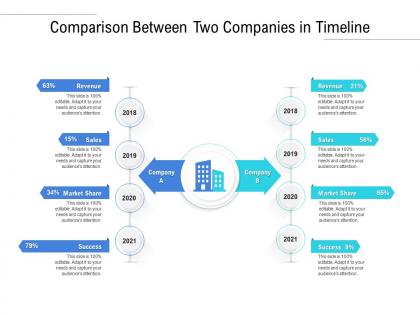
Comparison between two companies in timeline




Try Before you Buy Download Free Sample Product
 Impress Your
 Audience
 100%
100% Editable
 Save Hours
 of Time


Our Comparison Between Two Companies In Timeline are topically designed to provide an attractive backdrop to any subject. Use them to look like a presentation pro.
People who downloaded this PowerPoint presentation also viewed the following :
Comparison between two companies in timeline with all 2 slides:
Use our Comparison Between Two Companies In Timeline to effectively help you save your valuable time. They are readymade to fit into any presentation structure.
FAQs for Comparison between two
Definitely sketch it out on paper first - trust me, saves so much time later when you're not wrestling with formatting. Pick different colors for each timeline but make sure they actually look good together (I once made a timeline that looked like a highlighter exploded). White space is your friend here. Don't cram everything together or it'll look messy. Use the same scale for both so you can actually compare them fairly. Dots or little icons work well for marking key events. Oh, and add callout boxes where the timelines intersect or differ significantly - that's usually what people care about most anyway.
Make your big milestones pop with bigger icons or bold colors - honestly, I'm obsessed with using different colored highlighters for different categories. Way more fun than plain black text. Don't just throw dates at people though. Add quick descriptions that actually explain why each moment mattered. Space things out so your major events aren't all cramped together. But here's the thing - you can't highlight everything or nothing will stand out. Pick maybe 3-5 moments that really changed the game and focus on those.
So basically, historical timelines are stuck in the past (obviously) and focus on showing how events connect - like cause and effect stuff. Project timelines? Totally different beast. They're all about what's happening next, who's responsible, and hitting deadlines. History gets messy because real life is complicated. You might have years between major events. Projects are way more detailed - sometimes tracking daily tasks. The tools you pick should match what you're doing. Are you telling a story about the past or actually managing work? That makes all the difference in how you set it up.
Colors are seriously a game-changer for timeline stuff. Each project gets its own color, or you can do status colors—green for done, yellow for ongoing, red for "oh crap we're behind." Makes it so much easier to follow what's happening when you've got multiple things running at once. I learned this the hard way after staring at a confusing mess of timelines for way too long. Don't use every color in the rainbow though. Stick to maybe 4-6 max or it'll hurt people's eyes.
Honestly, Timeline JS is probably your best bet - it's free and you can throw something together super quick. Tiki-Toki's solid too if you want people clicking around and exploring stuff. I used to hate Prezi because of all that zooming madness, but it actually works pretty well for timeline presentations now. Even PowerPoint isn't terrible anymore with those morph transitions. Really depends if you need it embedded on a website or just for presenting live. I'd start with Timeline JS though - worst case you're out like 20 minutes if it sucks.
Color coding is your best friend here - makes it super easy to track different categories. I'd go with thicker lines for the more important stuff and keep lighter ones for background data. Bar charts are perfect when you need specific quantities, but honestly line graphs just flow better for trends over time. Hover tooltips are a game changer too, gives you all the detail without making everything look messy. Oh, and use the same icons for similar events across timelines - keeps things consistent. Start with basic colors and fonts first, then you can get fancy with the interactive stuff once that's locked down.
Oh man, the worst thing you can do is mix up your time scales - like having one timeline in months and another in quarters. Drives me crazy when people do that. Same goes for random start/end dates unless there's actually a reason. Don't cram everything onto one view either, it gets messy fast. Keep your colors and visual style consistent across all timelines or nobody will spot the patterns. Start with just the major events, then add details later if you need them. The whole point is people should see what's similar and what's different right away.
Honestly, less text is way better - shoot for like 70% visuals, 30% words. I made this mistake once where everyone just glazed over during my presentation because I crammed too much text in. Each point needs just enough writing to cover the basics, but let your images and graphics tell most of the story. Animations or clickable stuff helps break things up too. Keep your design consistent so it flows nicely. The goal? People should get it even if they zone out during parts of what you're saying.
Look, audience analysis is everything when you're building timelines. Who's actually going to use this thing? Executives want the quick hits, researchers need all the nitty-gritty details, students are starting from zero. I can't tell you how many timelines I've seen bomb because someone just guessed what people wanted. Your audience totally shapes whether you go deep on certain periods or keep things surface-level. Do they know the jargon already? Will they need extra context to understand what happened? Honestly, just start by figuring out what decisions they're trying to make with your timeline - that'll guide everything else.
Honestly, pick your 3-5 most important events and ditch the rest. I made this mistake once - created a timeline that looked like someone threw data at a wall. Use the same colors or icons for related stuff so people can actually follow along. Keep descriptions short and sweet. Here's what works: put the basics right on the timeline, then add hover details or expandable bits for people who want more. Pro tip - show it to someone who knows nothing about your topic. If they're lost, you need to cut more stuff out. Sometimes less really is more with these things.
Honestly, the best timeline comparisons I've done are the classic before/after situations. Like showing how something used to take 6 weeks but now takes 2 days - executives love that stuff. You can also compare your product dev speed to competitors, especially if you're shipping features way faster than them. Project milestones work too, particularly when you beat your original estimates. Oh and definitely keep it visual with clear markers. Don't overthink it though - I'd stick to maybe three comparison points max or it gets messy to read.
Oh man, this is actually trickier than you'd think! Western readers expect left-to-right flow, but Arabic/Hebrew audiences go right-to-left. Then you've got cultures that see time as circular instead of linear - Indigenous cultures often view events as connected rather than just one-after-another. Colors are weird too since red screams "danger" here but means good fortune elsewhere. I learned this the hard way on a project once. Anyway, arrows and numbers usually work for everyone, plus consistent spacing helps guide people through your timeline no matter their background. Just really depends who you're designing for.
Hey! So for your timeline thing - definitely go with high contrast colors and readable fonts. Nobody wants to squint at tiny gray text, trust me. Don't forget alt text for images and maybe throw in a text summary too since screen readers need that. Here's the thing though: don't rely just on colors to show different categories because colorblind people won't catch those differences. Use patterns or shapes instead. Keep your wording simple and explain any jargon. Oh, and get someone else to look it over first - you'll miss obvious stuff that jumps out to fresh eyes.
Dude, animated timelines are seriously clutch for keeping people hooked. You're basically feeding them bite-sized pieces instead of dumping this massive wall of dates on them. The movement naturally shows how events connect - like cause and effect stuff becomes obvious. People stay tuned in because they're waiting to see what pops up next, rather than their eyes glazing over trying to absorb everything. Honestly, even basic fade-ins look 100x better than boring bullet points. Don't overthink it though - you don't need some crazy Hollywood production. Simple slide transitions work perfectly fine.
Honestly? Turn it into a story with actual people making real decisions. Don't just dump dates - explain WHY stuff happened. What made them choose that path? Use words like "meanwhile" to connect things happening at the same time. I used to hate timelines until I realized they're basically just drama with dates lol. The contrasts and plot twists are what hook people. When you highlight those unexpected turns, suddenly your audience is following along like it's Netflix instead of just memorizing random facts.
-
Really like the color and design of the presentation.
-
Amazing product with appealing content and design.
-
Easily Understandable slides.
-
Perfect template with attractive color combination.
-
Use of different colors is good. It's simple and attractive.
-
Unique research projects to present in meeting.
-
It saves your time and decrease your efforts in half.
-
Excellent Designs.