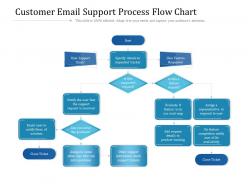
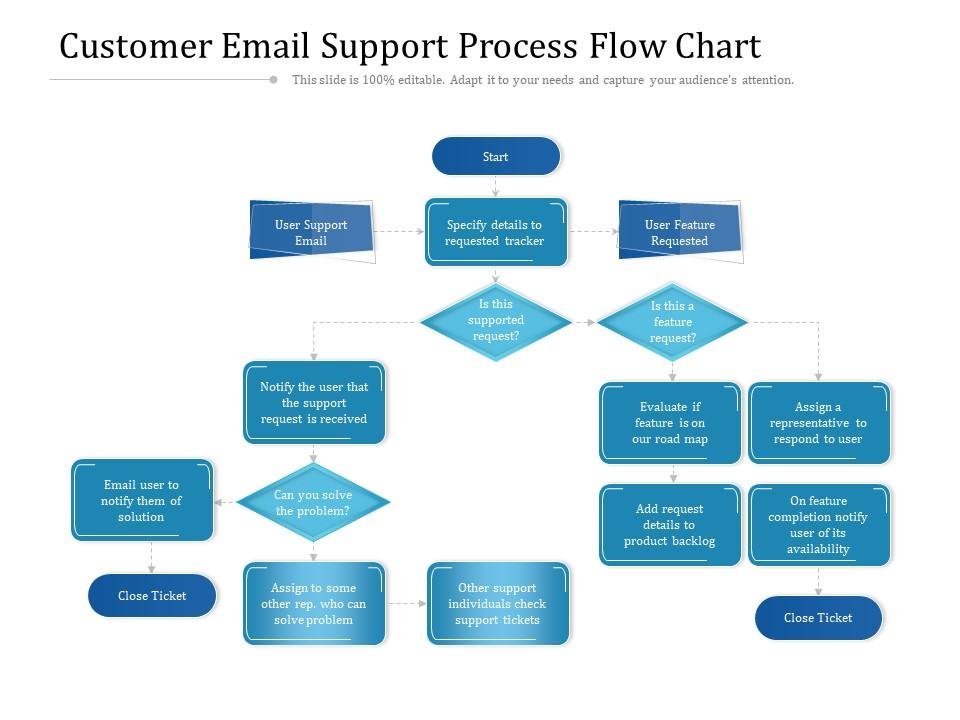
Customer email support process flow chart
Try Before you Buy Download Free Sample Product
Audience
Editable
of Time
Our Customer Email Support Process Flow Chart are explicit and effective. They combine clarity and concise expression.
People who downloaded this PowerPoint presentation also viewed the following :
Customer email support process flow chart with all 2 slides:
Give your audience a fulfilling experience. They will find our Customer Email Support Process Flow Chart elevating.
FAQs for Customer email support
You've gotta set some boundaries or you'll go crazy. I check emails at specific times instead of living in my inbox - way less stressful. Try to hit people back within 24 hours, even if it's just "got your message, looking into this." Templates are lifesavers for repetitive stuff, but tweak them so you don't sound robotic. Honestly, nothing screams lazy like an obvious copy-paste job. Handle the angry customers first though - they get nuclear if you leave them hanging. Oh, and if something needs research time, just tell them upfront how long it'll take. People appreciate honesty over radio silence.
Dude, templates will literally save your sanity. I used to type out the same password reset instructions like 20 times a day - such a waste of time. Now I just have pre-written responses for all the common stuff (billing issues, troubleshooting, etc.) and tweak them for each person. The trick is making them sound human, not like some corporate bot wrote them. Pick your most annoying repeat questions first - maybe 5 or 6 - and build templates around those. You'll thank me later when you're not mindlessly retyping the same thing over and over.
Just be yourself, honestly. Talk like you're helping a friend figure something out, not delivering some corporate speech. When customers are pissed off, acknowledge it - don't just jump into solution mode. If they're excited about something, match that energy a bit. I always read my emails out loud because if it sounds robotic when I say it, it definitely reads that way too. Skip the fancy business words that make you sound like a bot. Short version: be genuinely helpful without being that weird fake-happy person nobody trusts.
Honestly, you need something that grabs feedback automatically and lets you search through it easily. Tag stuff in your email - billing problems, complaints, compliments, whatever. Sentiment analysis tools are actually pretty amazing for catching patterns fast (took me forever to try them but worth it). Track everything in a basic spreadsheet or survey tool so you can spot what keeps coming up. Here's the thing though - you gotta actually look at this data every week, not just hoard it. Set up alerts for when negative feedback jumps so you can fix things before they blow up.
Honestly, start with the basics - response time and resolution time are everything. Customers lose their minds when they don't hear back quickly (learned that the hard way). Track your actual resolution rate too, not just how fast you reply. CSAT surveys after closing tickets will tell you if people actually liked your help or just pretended to. I'd watch escalation rates since nobody wants issues constantly getting kicked upstairs. Agent productivity and email volume trends are solid too. Once you nail these down, you can get fancy with other metrics later.
Oh man, I used to think templates made everything sound super robotic too, but you can actually make them work pretty well. What I do is create different versions for my most common email types - maybe 5 or so to start. Then I drop in personalization fields for their name, account stuff, whatever's relevant to their specific problem. The secret sauce is customizing just 2-3 sentences based on what they're dealing with. Honestly, when you nail those personal touches, customers usually can't tell it started from a template. Makes everything way faster while still feeling genuine. Just gotta make sure those customized bits flow naturally with the rest of it.
Okay so first thing - figure out your most asked questions, like maybe 5 to start. Zendesk and Freshdesk are pretty decent for this, they'll auto-reply when they spot certain keywords. Chatbots work well too if you don't mind that slightly robotic vibe - Intercom's solid but pricey, Tidio's cheaper. Honestly though? If you're bootstrapping it, even Gmail filters can handle basic stuff. I'd probably start there actually. Set up some templates for your top questions and see how it goes. You can always get fancier later once you know what's working.
Oh man, the worst thing you can do is sound like a robot and just copy-paste template responses without actually reading their message. Seriously drives people insane. Don't take forever to get back to them either. If they're pissed off, don't get defensive about it - I learned that one the hard way. Never promise stuff you can't deliver on timelines or fixes. Proofread everything because typos make you look sloppy as hell. Keep it friendly but not too casual, and double-check you actually answered what they asked before sending.
Keep your language super simple and ditch any idioms - they just confuse people. Break complex stuff into bullet points instead of long paragraphs. Do some homework on how different cultures communicate too. Like, some places are way more formal than others. Google Translate isn't amazing but it'll catch weird phrasing before you send anything out. Screenshots are your best friend since they work in any language. Oh, and create email templates for your most common problems in whatever languages you deal with most. Your team should know basic cultural stuff for your main markets.
Dude, follow-up emails are seriously underrated. Most people just close tickets and move on, but when you actually circle back asking "did that fix it?" or "need anything else?" - customers remember that stuff. It builds real relationships instead of just one-off transactions. Timing matters though. Wait like 2-3 days after your first response - any sooner feels pushy, any later and they've probably already written you off. I learned this the hard way lol. But yeah, catching issues early beats dealing with angry reviews later. Trust me on this one.
Honestly, role-playing with real email examples is your best bet here. Grab those nightmare scenarios from your inbox - angry customers, totally confusing requests, plus those bizarre edge cases that somehow always hit right before closing on Friday. I swear those are the worst ones. Set up 30-minute weekly sessions where your team practices responses. You'll want to build a shared doc with solid templates and de-escalation phrases they can steal from. Regular feedback helps too. The biggest thing? Train them to figure out what customers actually want, not just what they're saying. Makes a huge difference.
Honestly, just tackle whatever's burning through your team's time first. Most companies need templates for billing stuff, product issues, refunds, account problems, shipping delays - you know the drill. Track your tickets for like a week and see what keeps popping up. Then build templates for your top 5 or 6 patterns. Don't forget placeholders for names and specific details so it doesn't sound totally generic. The trick is making them sound human, not like some corporate robot wrote them. Short sentences work. Clear next steps too.
So the big thing is getting everyone on the same page with messaging and timing. Your phone team can't sound totally different from whoever handles emails, you know? Most companies screw this up because email gets treated like the ugly stepchild while chat gets all the attention. Train everyone using the same knowledge base. Match your email templates to what people say on calls. Also - and this might sound boring but trust me - have your different channel teams actually talk to each other regularly about tricky cases. Oh, and audit what you're doing now first. You'll probably find some weird inconsistencies.
Honestly, start with auto-replies so people know you're not ignoring them - that alone helps tons. I'd sort emails by how urgent they are, then make templates for the stuff you answer constantly (trust me, it's always the same five questions). Try batching similar emails instead of hopping around between random issues. Oh, and if you have different teams, route technical stuff directly to them rather than playing email hot potato. Measure your current response time first though. Pick one thing to test for a week and see what actually works.
Get escalations out of your normal queue ASAP and straight to senior people who actually know what they're doing. I made the mistake of letting these sit in regular workflow once - nightmare of angry follow-ups. You'll want triggers set up beforehand: legal threats, big billing issues, anything needing dev work. Document everything since these bounce between like 5 different people usually. Oh, and hit them back within an hour even if it's just "we got this, working on it." People chill out when they know someone's actually paying attention.
No Reviews