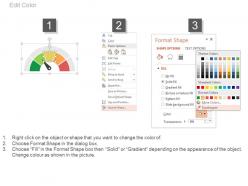
Tablero con indicador de etapas de crecimiento del progreso empresarial Diapositivas de PowerPoint
Try Before you Buy Download Free Sample Product
Audience
Editable
of Time
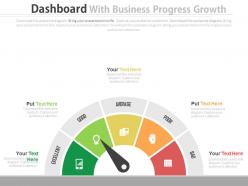
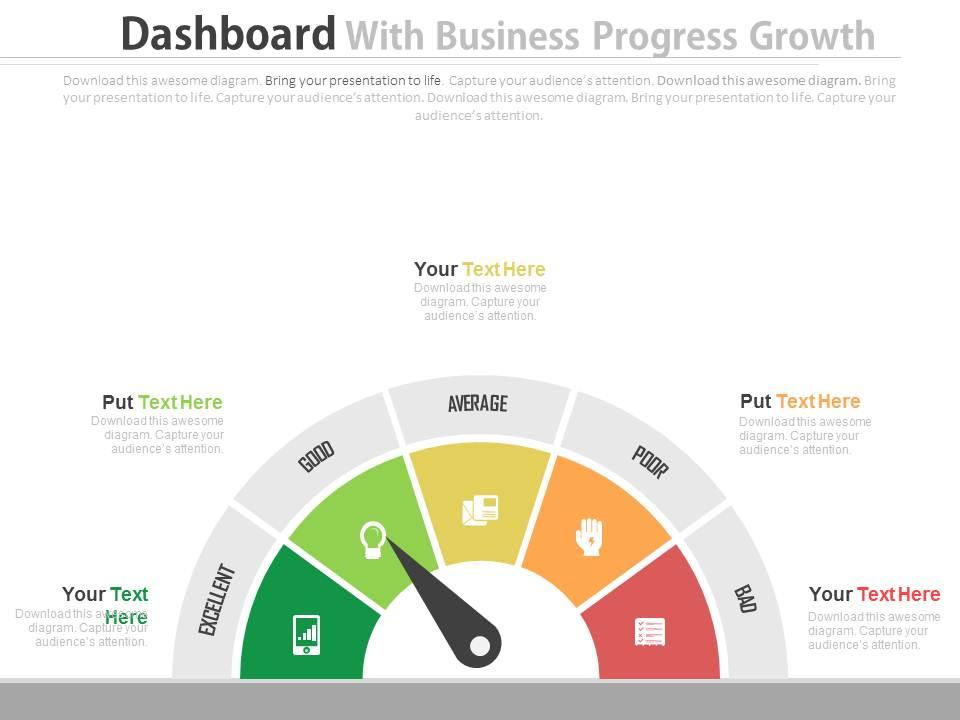
Mida el éxito de su organización con nuestra diapositiva de PowerPoint de etapas de crecimiento del progreso empresarial del tablero. Los cuadros de mando se utilizan generalmente para analizar las métricas comerciales y esta plantilla de presentación también se ha diseñado en este aspecto. Puede analizar el crecimiento de su empresa con este diseño simple pero impactante. El diagrama PPT muestra la imagen del tablero con algunos íconos que apuntan hacia los diferentes niveles de desempeño alcanzados por un individuo o como una organización. Puede comprobar su posición en este mundo competitivo y cuáles son las áreas de mejora. Nuestra plantilla de PowerPoint de crecimiento del progreso del negocio lo ayuda a realizar una investigación y un análisis completos de su negocio y luego decidir cómo le gustaría mejorarlo el próximo año. Los iconos están diseñados profesionalmente y mejoran la calidad general de la presentación. Puede utilizarlos según estén disponibles o editarlos según sus necesidades. La plantilla PPT es la manera perfecta de involucrar a su audiencia en su presentación. Así que descárguelo y utilícelo para compartir las métricas de rendimiento de forma profesional. Tus ideas se basan en una lógica de hierro fundido. Fortalezca la base con nuestro Tablero con Diapositivas de PowerPoint con Indicación de Etapas de Crecimiento del Progreso del Negocio.
Características de estas diapositivas de presentación de PowerPoint:
Diapositivas PPT diseñadas profesionalmente para usuarios profesionales. Diagramas e ilustraciones de PowerPoint editables. Privilegio de inserción de logo y marcas registradas para mayor personalización. Formato gráfico de información presentable y fácil de comprender. Adaptable a la vista de pantalla ancha sin el problema de pixelación. La plantilla de presentación se puede descargar y guardar en cualquier formato deseado. Perfecto para analistas de negocios, desarrolladores, profesionales de marketing digital, equipo de ventas, estudiantes, etc.
People who downloaded this PowerPoint presentation also viewed the following :
Panel de control con progreso empresarial Indicación de las etapas de crecimiento Diapositivas de PowerPoint con las 3 diapositivas:
Nuestro panel de control con indicadores de etapas de crecimiento de progreso empresarial en PowerPoint Slides lo mira desde todos los ángulos. Cada faceta queda expuesta.
FAQs for Dashboard with business progress growth stages
Focus on the big ones first - revenue growth, customer acquisition cost, and lifetime value. Cash flow matters way more than people think, trust me on that. If you're subscription-based, track monthly recurring revenue and churn rate religiously. Conversion rates help you spot where things fall apart in your funnel. Honestly, profit margins are non-negotiable too because growing while losing money is just expensive failing. Start with maybe 6 metrics max or you'll drown in spreadsheets. Add more later once you've got the basics dialed in.
Honestly, those dashboards are game-changers. You get all your important stuff - revenue, customer costs, conversion rates - right there in one spot. No more guessing what's actually working. I spend way too much time staring at mine now, but whatever. The charts make it obvious when something's going sideways, and you can dig deeper into the problem areas. Just don't go crazy with metrics - pick like 5-7 things that actually matter for your revenue. Trust me, you'll wonder how you ran things without it.
Tableau and Power BI are solid choices if you need something heavy-duty - they handle messy data and look professional. Google Data Studio's free and works great if you're already using Google products (which, let's be honest, most people are). Excel dashboards can actually look pretty slick too if you're decent with charts. Don't overthink it though. Focus on your main KPIs instead of shoving every metric onto one screen. I'd start basic and add stuff as you figure out what you actually need to track.
Weekly's your sweet spot, but honestly daily is even better if you can swing it. Fast-moving startup? You'll want those daily updates to catch things early. Monthly is way too slow - you'll miss all the good stuff and can't pivot when you need to. Some metrics like customer lifetime value don't need constant refreshing though. Weekly's fine for those deeper dives. Here's what I'd do: start weekly and see how much your team actually looks at it. If they're checking daily and making real decisions, bump it up. No point updating something that just sits there collecting digital dust, you know?
Honestly, the worst thing you can do is jam like 20 metrics on one screen - total chaos and no one knows where to look. Skip the vanity stuff too (page views are cool but conversions actually matter, you know?). Check that your data's reliable and refreshes often enough to be useful. Mobile needs to work obviously. I'd start with maybe 5-7 key things max. Once everyone's comfortable with those basics, then you can get fancy and add more. Trust me, less is more at the beginning or people just get paralyzed by all the numbers.
So basically you dump all your marketing spend and new customer numbers into one dashboard - makes the math way easier. It automatically calculates how much each new customer actually costs you across different channels like ads, social, events, whatever you're doing. The cool part is comparing channels side by side to see what's working. I'd definitely set up alerts when your cost per customer hits a certain limit - learned that one the hard way when Facebook ads got out of control last year. You can also track trends over time which honestly saves so much headache.
Okay so think of it like this - real-time data is GPS vs that crusty paper map sitting in your glove compartment. Your dashboard updates live, so you catch problems while they're actually happening instead of finding out weeks later when it's too late. Revenue tanking? Conversion rates dying? You'll know immediately and can actually fix stuff. I'm terrible at checking dashboards constantly though, so definitely set up alerts for your important metrics. That way the data finds you instead of the other way around. Static reports just tell you what already went wrong - real-time lets you pivot before things get worse.
Dude, start with what people actually need to see - put the important stuff right up front. Executives just want the big picture trends, but your ops teams need the detailed data they can actually do something with. I swear, half the dashboards I've used try to cram everything in and become totally pointless. Make the navigation dead simple and keep your colors consistent. Oh, and speed matters - nobody's waiting around for slow charts to load. But here's the thing that'll save you: test it with real users first. They'll spot problems you'd never notice and tell you what actually helps versus what just looks cool.
Track your market share percentage and how fast you're acquiring customers in your target segments. Geographic expansion matters too. I'd set up alerts for when metrics dip below your benchmarks - saved my ass a few times when things started sliding. Brand awareness scores are solid, plus track how often you're beating established competitors for deals. Revenue per segment and repeat purchases show you're actually penetrating deep, not just spreading thin. Honestly, ignore the flashy vanity metrics that make presentations look good but don't help you make real decisions.
Yeah, most growth dashboards connect pretty easily to whatever BI stuff you're already running. APIs, data connectors, direct database links - the usual suspects. Zapier's probably your easiest bet, though Power BI connectors work great too if you're in that ecosystem. Salesforce and HubSpot usually play nice with most platforms. Fair warning though - the data mapping part can be a total pain if your current setup is messy. I learned that one the hard way. But once you get it dialed in, everything syncs automatically from your existing sources. I'd honestly just peek at your current BI tools' integration marketplace first before overthinking it.
Line charts are definitely your go-to here - you can spot growth patterns instantly. Bar charts work too for comparing specific months or quarters. Area charts show cumulative stuff pretty well, but honestly they get cluttered fast with multiple data sets. Don't even think about pie charts since they can't show time progression at all. For your dashboard, I'd make line charts the main thing and throw in a bar chart for breakdowns. People need to see right away if you're going up or down, so keep it clean and simple.
So basically, growth dashboards let you spy on your competitors' metrics while tracking your own stuff. Market share, how fast they're getting customers, pricing shifts - all that data in one spot. Honestly pretty clutch for not falling behind. You'll catch trends early, like when they start dumping money into TikTok ads or whatever. The best part? Set up alerts so you don't have to obsessively check everything yourself (been there). When something big happens, you get pinged and can adjust fast. Way better than scrambling to react after everyone else already knows what's up.
Dude, garbage data will absolutely wreck you. Like, you'll be making decisions based on complete BS and not even know it. I've watched entire teams waste months chasing metrics that weren't even tracking properly - talk about painful to watch. Bad data makes you miss real problems while celebrating wins that never happened. Your dashboard turns into this dangerous thing feeding you lies instead of insights. Short version: get someone to own data quality and actually audit your sources regularly. Trust me on this one.
Executives want the big picture - revenue growth, market share, quarterly stuff. Teams need metrics they can actually do something about, like conversion rates or customer satisfaction. Here's what I've learned from screwing this up before: don't try making one dashboard for everyone. It'll suck for everybody. Executive dashboards should be clean - maybe 5-6 key metrics max, looking at trends over months. Team dashboards can get messy with drill-downs and real-time data they'll actually use. Start by asking each group what decisions they're trying to make. Sounds obvious but most people skip that step.
Okay so three main things - start with the weird stuff that jumps out, like sudden spikes or drops that need fixing ASAP. Make your most critical numbers super obvious visually so people spot them right away. Never just throw raw data at people though - if revenue's down 15%, say why and what to do about it. Group similar metrics together and stick with the same colors throughout (saves people from having to decode your dashboard every time). Oh and this is huge - add little notes that actually tell your team what to DO tomorrow, not just what happened yesterday. Numbers without action items are pretty useless honestly.
-
Nice and innovative design.
-
Editable templates with innovative design and color combination.