


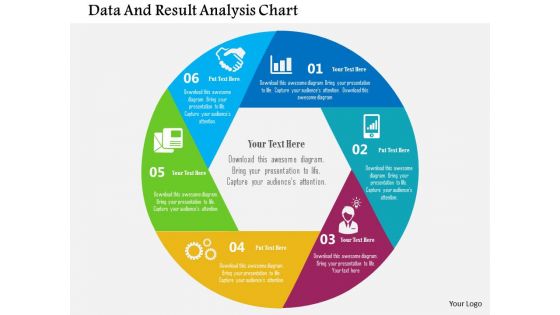
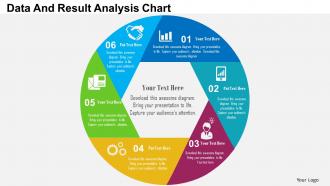
Data and result analysis chart flat powerpoint design





Try Before you Buy Download Free Sample Product
 Impress Your
 Audience
 100%
100% Editable
 Save Hours
 of Time


We are honoured to introduce our extremely popular and professional looking data and result analysis graph PPT diagram to enable you to propose your business-related data and information in a visually attractive and interesting manner. These exceptional quality graphics and patterns add a hint of glance to the entire presentation and captures your viewers’ attention. Also, reviewing and analysing the data and results helps the organisation to get an in-depth report of the working of the system and also guides the management to work towards enhancing the performance. Apart from this, these slides help the user and the viewers to make comparisons between the past and the present results which can further lead to improved functioning of the processes. Moreover, the titles and subtitles related to the data can also be integrated in these capacious backgrounds. Overall, to make significant advancements simply merge this life changing informative illustration with your presentations and witness the change. Acquire global flexibility with our Data And Result Analysis Chart Flat Powerpoint Design. Cut across geographical borders.
People who downloaded this PowerPoint presentation also viewed the following :
Data and result analysis chart flat powerpoint design with all 5 slides:
Focus on the gist with our Data And Result Analysis Chart Flat Powerpoint Design. Give due credence to core aspects.
FAQs for Data and result analysis chart
So I'm totally guilty of using bar charts for like everything because they're so flexible lol. But honestly, it depends what you're trying to show. Line charts work best for trends over time, pie charts for parts of a whole. Scatter plots are perfect when you want to show how two things relate to each other. Sometimes tables are actually better if people need exact numbers to reference later. Heat maps are clutch for big datasets too - they make patterns super obvious. Just pick whatever makes your point clear immediately. Nobody should have to squint and figure out what you're trying to say.
Honestly, good chart design is all about telling a story with your data. Pick the right chart type first - don't force a pie chart when you need a bar graph, you know? Use colors to highlight what actually matters, and ditch all the extra junk that makes it look busy. Quick test: can someone in the back row read it? If not, make it bigger. Your titles should explain what's happening, and throw in some notes if needed. Here's the thing - people should "get it" in like 5 seconds max. Before you even start designing, ask yourself what's the ONE key point you want them to walk away with.
Okay so bar charts are great for comparing stuff between different categories - like sales numbers or survey results. Way more flexible than most people realize. Pie charts? Only use them when you've got maybe 3-5 chunks that add up to 100% and you really want to show proportions. They're honestly kind of overused in my opinion. Don't go with pie if your categories don't make up a complete whole, or if you end up with these tiny slivers nobody can read. Bar charts work for almost everything else. You'll save yourself headaches just defaulting to bars most of the time.
Know your data first - sequential stuff needs gradual color shifts, but categorical data wants contrasting colors. Never use red-green combos (colorblind people can't tell them apart). I made that mistake once and my boss was so confused during our presentation. Keep it to 5-7 colors max or things get messy fast. ColorBrewer's pretty solid for finding accessible palettes automatically. Oh, and always test your charts in grayscale - if you can't read it then, you've got problems. Trust me, people will actually pay attention to your data instead of wondering what the hell those colors mean.
Dude, interactivity is what makes data viz actually worth looking at. You can hover for details, click to filter stuff, drill down into specifics - way better than those boring static charts nobody cares about. Your audience gets to explore the data themselves instead of you trying to guess every question they might have. Honestly, once you add interactive features, going back to regular charts feels weird. Start simple though - even basic hover tooltips make a huge difference. It's like the difference between reading about a place vs actually exploring it yourself.
Annotations are like having someone point out the good stuff on your chart. Without them, people just stare at your data wondering what they're supposed to see. You can call out weird outliers, explain why something spiked on a specific date, or highlight trends that aren't super obvious. Honestly, I've seen so many charts that look great but tell you nothing because there's zero guidance. Just add 2-3 annotations to your key points - trust me, it'll make your whole story way clearer. Think of them as helpful arrows saying "hey, look here."
Your axis labels need to actually tell people what they're looking at - skip the "var1" nonsense and spell it out. Don't forget units either (like $ or %). I'm telling you, legends are annoying when you're presenting fast, so just label your data points directly on the chart. Font size matters too - nobody wants to squint. Oh and here's the thing: if you catch yourself explaining what an axis means during your presentation, that's your cue the label sucks. Keep everything consistent and you'll be good.
Honestly, it's all about reading your audience. Executives want simple stuff - bar charts, line graphs - because they're busy and need the point quickly. Technical people? They can handle scatter plots and heat maps since they actually like digging into messy data. I learned this the hard way once with a box plot presentation that went nowhere. General audiences get confused by anything fancy, so stick to basics. Short sentences work. Mix in some longer ones that flow naturally when you're explaining trickier concepts. You'll save yourself headaches by matching chart complexity to who's sitting across from you.
Honestly, if you want interactive dashboards that actually tell a story, go with Tableau or Power BI. Excel's still solid for basic stuff and everyone knows how to use it already. Python people love matplotlib and seaborn but yeah, there's a learning curve. Google Data Studio's free which is nice if your data's already in their ecosystem. The tool doesn't matter as much as knowing your audience though - like, are they executives who want pretty visuals or analysts who need to dig into details? Start with whatever you're comfortable with, then upgrade based on what you actually need.
First thing - make sure your data's actually legit. Pick charts that make sense too, like don't throw trends into a pie chart because that's just weird. Label everything clearly so people aren't playing guessing games with what your axes mean. Oh, and this drives me crazy - starting your y-axis at some random number to make tiny changes look huge? Don't be that person. Keep colors consistent, don't cherry-pick dates that tell the story you want, and cite where you got everything. Honestly, if someone can't look at your chart and reach the same conclusion you did, you've probably messed up somewhere.
Okay so the main things that'll mess you up: don't truncate your y-axis unless you absolutely have to - it makes tiny differences look huge. Skip the 3D effects and random colors, they're just distracting. Pie charts are seriously overrated when a simple bar chart would work better. Wrong chart type for your data will confuse everyone. Make your titles actually useful instead of vague. Oh, and start your y-axis at zero most of the time. Honestly though, just show it to someone else first - if they squint at it confused, you need to fix something.
Honestly, with huge datasets you gotta think aggregation first. Group stuff by categories or time periods instead of cramming every data point in there - like seriously, who wants to stare at 10,000 dots? Try sampling or rolling averages to show patterns without making people's eyes bleed. Heat maps work pretty well too. Interactive charts are clutch since people can dig deeper if they actually want the details. Oh and figure out your main story first, then pick whatever chart type tells it best.
For time trends, line charts are probably your best bet - super clean for continuous data like weekly or monthly changes. Bar charts work better when you're comparing specific time periods. Area charts are solid if you want to show cumulative stuff or stack multiple data series. Heat maps are actually pretty cool for spotting patterns across different cycles (think daily vs seasonal). Honestly though? I keep coming back to basic line charts - they just work and people get them instantly. Really depends on how often your data updates, but start simple and see what clicks.
Honestly, the chart type totally shapes what people take away from your data. Line charts scream "look at this trend!" while bar charts make everyone compare different categories. Don't even get me started on pie charts - they're awful unless you're showing really basic stuff. Here's the thing though: your audience will zero in on whatever the design emphasizes. Mess with the y-axis scale and suddenly tiny changes look dramatic. I always think about what's the ONE thing I want them to remember? Pick your chart based on that key relationship you're trying to show.
For comparing datasets, I'd go with side-by-side bar charts if you're looking at different categories. Line charts are your best bet when tracking trends over time - honestly they make patterns super obvious. Multi-series charts let you stack datasets right on top of each other, which is clutch for spotting differences quickly. Oh, and stacked charts work well when you need both individual numbers and totals visible. Just don't go crazy with colors or try cramming like 10 datasets into one chart (learned that the hard way). Figure out what you're actually trying to compare first, then pick whatever makes those differences jump out.
-
Great experience, I would definitely use your services further.
-
Easily Editable.