

Employee training program proposal powerpoint presentation slides




Try Before you Buy Download Free Sample Product
 Impress Your
 Audience
 100%
100% Editable
 Save Hours
 of Time


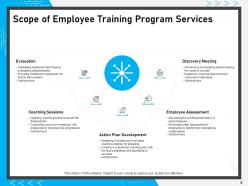
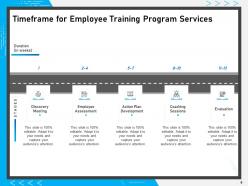
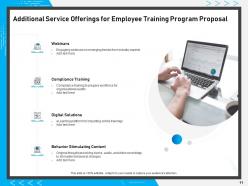
Efficient personnel administration is the foundation of any successful organization. For any business to thrive, it has become important to focus on the overall growth and development of the employees in the workplace. Enhance technical skills of the employees and polish their pre-existing capabilities by availing training services for your workforce. Utilize our Employee Training Program Proposal PowerPoint Presentation Slides to groom the new employees and help them adapt to their job roles. Outline the project context and objectives for training services with the help of this job training PPT template. With this PPT slideshow, assist your employees to develop their technical, communication, and time-management skills as well as the development of emotional quotient with ease. Prepare a plan of action depicting various stages of the coaching session with the help of this PPT presentation. Mention the scope of training and how it indulges in evaluation, sessions, action plan development, employee assessment, and discovery meeting with this asset development PPT design. This PPT proposal helps you formulate a time-frame for all the training services that allow you to track the timely achievement of each task. Educate your clients about the additional services that you offer like webinars, compliance training, digital solutions, and behaviour stimulating content by taking the aid of this personnel management PPT graphic. Allow your viewers to choose wisely from the wide range of services offered through this PPT layout. Give a detailed account of the activities to be performed and the investment required for each activity by employing this well-organized and systematic PowerPoint presentation. Gain the trust of your audience by providing the client testimonials and case studies in an orderly fashion by taking the assistance of this PowerPoint template. With this PPT visual, you can present an attractive business overview and assure your audience by displaying your strengths, achievements, vision, mission, and goals. Download these completely customizable PowerPoint slides and impress the viewers with your presentation.
People who downloaded this PowerPoint presentation also viewed the following :
Content of this Powerpoint Presentation
Slide 1: This slide introduces Employee Training Program Proposal. State Client name, Submission Date and User Assigned.
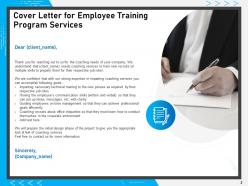
Slide 2: This slide displays Cover Letter for Employee Training Proposal.
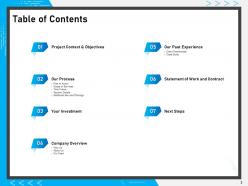
Slide 3: This slide displays Table of Contents.
Slide 4: This slide displays Table of Contents of the presentation.
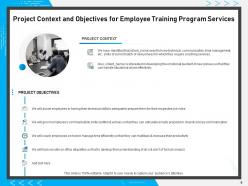
Slide 5: This slide describes Project Context and Objectives for Employee Training Proposal.
Slide 6: This slide showcases Table of Contents.
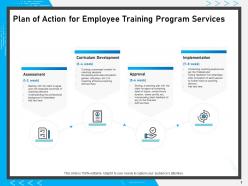
Slide 7: This slide represents Plan of Action for Employee Training Proposal.
Slide 8: This slide displays Scope for Employee Training Proposal Services
Slide 9: This slide depicts Timeframe for Employee Training Proposal with- STAGES, Duration (In weeks), Analysis, Course Designing, Corporate Trainers, Assessment.
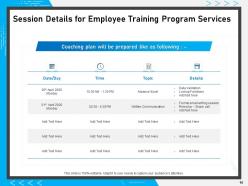
Slide 10: This slide showcases On-The-Job Training Details
Slide 11: This slide represents Additional Service Offerings contaning- eLearning Design Solutions, eLearning platform for imparting online trainings, Virtual Instructor Led Training, Comprehensive virtual instructor led training for the geographically dispersed audience, Compliance Training, etc.
Slide 12: This slide displays Table of Contents.
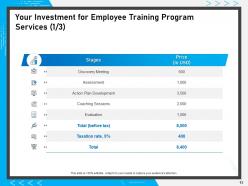
Slide 13: This slide presents Investment details for Company Staff Training Proposal.
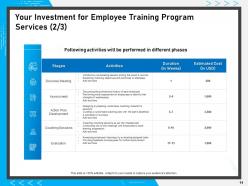
Slide 14: This slide shows Investment details for Employee Training Proposal.
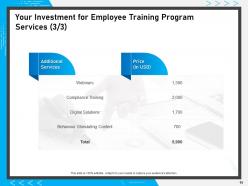
Slide 15: This slide also presents Investment details.
Slide 16: This slide depicts Table of Contents.
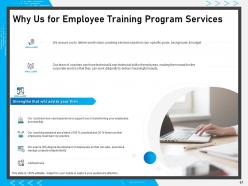
Slide 17: This slide shows reasons for choosing Us for Employee Training Proposal.
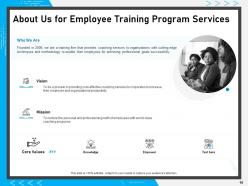
Slide 18: This is About Us slide to showcase Company specifications.
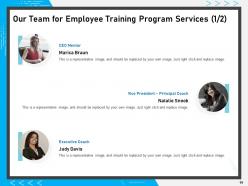
Slide 19: This is Our Team slide with names and Designations.
Slide 20: This is also Our Team slide.
Slide 21: This slide displays Table of Contents of the presentation.
Slide 22: This slide displays Client Testimonials.
Slide 23: This slide represents Client Testimonials.
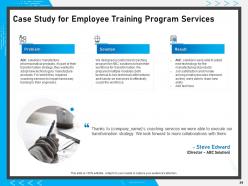
Slide 24: This slide represents Case Study for Employee Training Proposal.
Slide 25: This slide showcases Table of Contents.
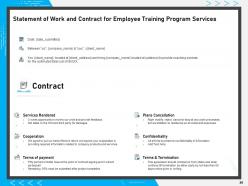
Slide 26: This slide showcases Statement of Work and Contract for Employee Training Proposal.
Slide 27: This slide displays Table of Contents.
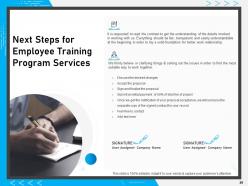
Slide 28: This slide shows Next Steps for Employee Training Proposal.
Slide 29: This is Contact Us slide with Address, Email address and Contact number.
Slide 30: This is Icons Slide for Employee Training Proposal.
Slide 31: This slide is titled as Additional Slides for moving forward.
Slide 32: This is About Us slide to showcase Company specifications.
Slide 33: This slide showcases Vision and Mission for Company Staff Training Proposal.
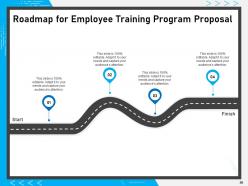
Slide 34: This slide displays Roadmap process.
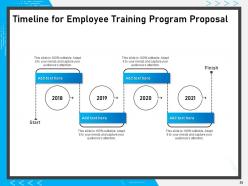
Slide 35: This slide depicts five years Timeline for Employee Training Proposal.
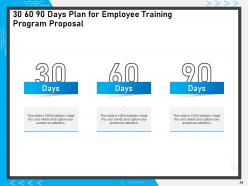
Slide 36: This is 30 60 90 Days Plan slide.
Employee training program proposal powerpoint presentation slides with all 36 slides:
Give your audience a fulfilling experience. They will find our Employee Training Program Proposal Powerpoint Presentation Slides elevating.
FAQs for Employee training program proposal
Honestly, start by figuring out what specific skills people actually need - then work backwards. Your training needs clear goals so participants know what they're getting into. Interactive stuff works way better than those awful lecture-style sessions (seriously, nobody retains anything from those). Include hands-on practice that connects to their real work situations. Build in some way to track if it's actually effective - could be simple feedback forms or skill assessments. Don't make it a one-and-done thing either. People forget fast, so plan follow-up sessions or give them resources they can reference later. Oh, and definitely ask for feedback during the process so you can tweak things.
Performance reviews are your starting point - managers usually spot the obvious gaps. But honestly, just asking employees what they want to learn gets you way better info than you'd think. Business changes drive a lot of it too - new software rollouts, process updates, that kind of thing. Skills assessments work great for technical stuff. Don't sleep on checking what's happening industry-wide either. Oh, and compliance requirements if that applies to you. Bottom line: mix the formal analysis with real input from people doing the actual work daily.
Honestly, tech runs training nowadays - LMS platforms, VR sims, mobile apps, the whole deal. People can learn whenever works for them, which is pretty clutch. The VR stuff is insane btw, like actually practicing procedures without real-world consequences. AI personalizes everything based on learning styles too. But here's what really matters - you finally get real data on what's actually sticking versus what's just wasted time. Analytics don't lie. I'd start by looking at what you're already using and figure out where the biggest holes are. Most companies have way more tech than they realize.
Honestly, just give people options - that's the biggest thing. Visual learners love infographics and videos, while others prefer podcasts or discussion groups. My old company did hands-on workshops too, which was great for people who learn by doing. Let folks go at their own pace if you can manage it. Some people need time to think things through, others just want to blast through everything quickly. Oh, and definitely survey your team first about what they actually want - you'd be amazed what you'll learn just by asking instead of guessing.
Honestly, measuring training effectiveness is trickier than most people think. I'd focus on maybe 3-4 key things max - otherwise you'll go crazy with all the data. Right after sessions, check if people actually liked it and test their knowledge. The real challenge though? Seeing if they're using what they learned back at their desks. That's the golden metric but super hard to track. Oh, and don't skip the business stuff - are errors dropping? Is productivity up? Customer complaints down? Pick metrics that actually connect to why you did the training in the first place.
Oh man, this is so important - people zone out when trainings suck! Make it about real stuff they actually deal with at work. Break up those marathon sessions with activities where they can jump in and participate. I always learn way more when I can share what's worked (or totally failed) for me. Death by PowerPoint is real, trust me. Ask questions, get them talking to each other, maybe add some fun elements if your workplace isn't super stuffy. But here's the key: show them how it'll actually help their day-to-day work or career. Then give them something specific to try right away.
Honestly, the worst part is always budget and getting people to actually show up. Everyone's constantly "too busy" - which I get, schedules are insane these days. Plus you're dealing with different skill levels in the same room, trying not to bore the experts while not losing the beginners. Leadership sometimes doesn't see the point unless there's instant ROI, which is frustrating. Oh, and measuring if it actually worked? Good luck with that. I'd say start with small pilot programs first, get feedback quick, and track whatever metrics your executives actually care about. Way easier than going big right away.
Figure out what you're actually trying to accomplish first - better customer scores, higher sales, whatever. Map your training straight to those goals. Want 20% more sales? Focus on specific techniques that'll get you there, not some generic course everyone sleeps through. I've seen too many companies just dump random training on people. Set up your metrics ahead of time so you can tell if it's working. Are people using what they learned? Is it helping your numbers? That's how you know if you're wasting time or not.
So mentorship is honestly a game changer for training. Your new people get that personalized help instead of just generic stuff everyone gets. Mentors catch knowledge gaps super early and can pivot quickly. The relationship building is solid too - people actually stick around longer when they feel supported. Oh and the informal knowledge transfer? That's where the magic happens. All those unwritten rules and "here's how we really do things" conversations that would take months to figure out otherwise. I'd definitely pair experienced folks with new hires for at least 90 days. You'll see the difference.
Don't wait until the end to get feedback - that's basically useless. Do quick pulse checks right during the sessions, like thumbs up/down or just one simple question. People are way more honest in the moment than weeks later, trust me on this. Set up multiple touchpoints: check-ins halfway through, peer feedback sessions, then follow-up surveys maybe 30-60 days later to see what actually stuck. The trick? Make it super easy for them to give input, then show how you used their suggestions next time around.
Honestly, spaced repetition is everything - don't let people forget after day one. I'd schedule follow-ups at 1 week, 1 month, and 3 months. Trust me, retention rates go through the roof. Break complex stuff into smaller chunks instead of those brutal all-day sessions that nobody remembers anyway. Get them practicing right away with job shadowing or mock scenarios. Microlearning is your friend here. Oh, and book that first follow-up before they even walk out the door, otherwise you'll never see them again.
Ask your team what they actually want to learn first - you'll probably get some surprising answers. Then build it into the regular work flow instead of making it feel like extra homework. Monthly lunch sessions work great, or those quarterly workshops where people can dive into stuff they're curious about. Let them choose their own development path rather than forcing boring mandatory courses on everyone. Mentorship programs are solid, and cross-department shadowing gives people a real taste of other roles. Your managers need to be doing this too, obviously. Celebrate when someone tries out new skills on actual projects - makes it feel worth it.
Oh absolutely, training makes a huge difference! You'll usually see results in like 2-3 months. People get way more confident when they actually know what they're doing, so work gets done faster and better. The retention thing is probably my favorite part though - employees stick around when they feel like you care about their growth. I read somewhere that trained workers are 50% more productive than untrained ones (which honestly seems low to me). Start with your biggest problem areas first. That's where you'll get the biggest bang for your buck right away.
Honestly, the biggest thing is keeping sessions way shorter - like 60-90 minutes max. I've seen too many people try to do those marathon 8-hour workshops online and everyone just ends up scrolling their phones with cameras off. Break it into chunks with polls and Q&As to keep people engaged. Breakout rooms are your friend for small group stuff. Make sure whatever platform you use actually works for screen sharing (learned that one the hard way). Oh, and follow up within a couple days with all the resources and next steps - remote people need that way more than in-person groups do.
Honestly, everyone's going nuts for microlearning right now - those tiny bite-sized modules instead of those awful 3-hour training marathons. AI personalization is everywhere too, which actually makes sense for once. Companies are ditching the whole top-down thing for peer-to-peer learning platforms. VR training's blowing up, especially for hands-on stuff. Most places would rather reskill their current people than hire new ones (probably cheaper, let's be real). You should definitely audit what you've got and chop it into smaller pieces. Add some interactive bits while you're at it - that's where you'll see engagement actually improve.
No Reviews