Examples of expert systems ppt powerpoint presentation professional example

Examples of expert systems ppt powerpoint presentation professional example
Slide 1 of 2
Favourites Favourites

Try Before you Buy Download Free Sample Product

Audience Impress Your
Audience
Editable 100%
Editable
Time Save Hours
of Time
The Biggest Sale is ending soon in
0
0
:
0
0
:
0
0
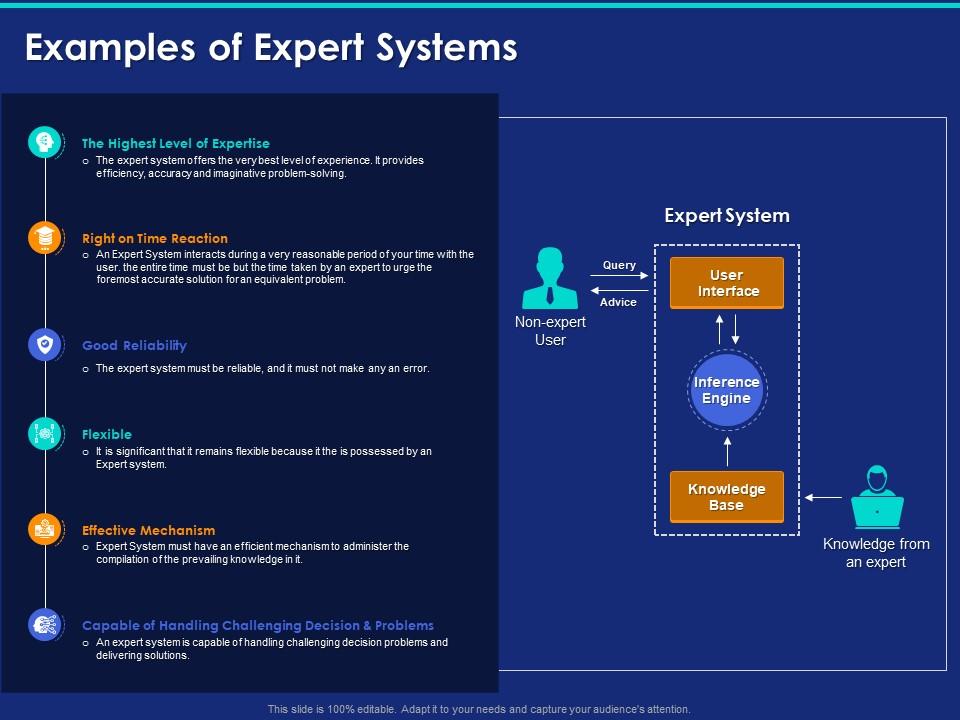
Presenting this set of slides with name Examples Of Expert Systems Ppt Powerpoint Presentation Professional Example. This is a six stage process. The stages in this process are The Highest Level Of Expertise, Right On Time Reaction, Good Reliability, Flexible, Effective Mechanism, Capable Of Handling Challenging Decision And Problems. This is a completely editable PowerPoint presentation and is available for immediate download. Download now and impress your audience.

People who downloaded this PowerPoint presentation also viewed the following :

Content of this Powerpoint Presentation

Description:

The image is a PowerPoint slide titled "Examples of Expert Systems," which likely serves as an educational tool to explain the concept and components of expert systems in technology:

1. Title: 

"Examples of Expert Systems" - Suggests that the slide will provide instances or explain the concept of expert systems.

2. Text Elements:

"The Highest Level of Expertise" - Expert systems provide top-tier problem-solving efficiency and accuracy.

"Right on Time Reaction" - They operate within reasonable timeframes, akin to an expert's response time.

"Good Reliability" - Expert systems are dependable and error-free.

"Flexible" - They are adaptable and can be adjusted as needed.

"Effective Mechanism" - They must have efficient processes to manage complex tasks.

"Capable of Handling Challenging Decisions & Problems" - Expert systems can tackle difficult problems and provide solutions.

3. Icons:

Lightbulb, clock, check mark, and gears - Represent ideas, time efficiency, reliability, and operational mechanics, respectively.

4. Diagram:
   
Illustrates the interaction between a non-expert user, the user interface, the inference engine, and the knowledge base, with input from an expert.

Use Cases:

Expert systems are valuable in sectors that require decision-making support and knowledge management:

1. Healthcare:

Use: Assisting in diagnosis and treatment planning.

Presenter: Medical Informaticist.

Audience: Healthcare providers, and medical staff.

2. Finance:

Use: Analyzing financial data for investment decisions.

Presenter: Financial Analyst.

Audience: Investment teams, and portfolio managers.

3. Automotive:

Use: Supporting complex engineering design processes.

Presenter: Automotive Engineer.

Audience: Design teams, and technical staff.

4. Retail:

Use: Managing inventory and supply chain decisions.

Presenter: Supply Chain Manager.

Audience: Inventory specialists, management.

5. Aerospace:

Use: Simulating flight conditions and problem-solving.

Presenter: Aerospace Scientist.

Audience: Engineers, and safety analysts.

6. Agriculture:

Use: Optimizing crop management and yield predictions.

Presenter: Agro-technologist.

Audience: Farmers, and agricultural consultants.

7. Legal Services:

Use: Providing support for case analysis and legal research.

Presenter: Legal Tech Expert.

Audience: Lawyers, paralegals.

FAQs for Examples of expert systems ppt powerpoint

So expert systems have three main parts you gotta know about. Knowledge base comes first - that's where all the rules and facts live, basically everything a human expert would know. Then there's the inference engine, which takes that knowledge and actually makes decisions with it. User interface is pretty self-explanatory - lets regular people use the system without being programmers. Oh, and some have explanation features too, which I think are actually really useful since they show you how the system got its answer. Honestly, I'd start by figuring out what knowledge you need first.

So basically, expert systems store all their knowledge separately from the actual code that processes it. Traditional programming? You're hardcoding every single "if this happens, do that" scenario. But expert systems can actually reason through stuff more naturally - like those medical diagnosis tools that compare symptoms against huge rule databases. Way more flexible when info is incomplete or messy. The cool part is you can update the knowledge base without touching any code, which honestly saves so much headache in fields where the expertise keeps changing.

Hey! So there's a bunch of these systems out there. MYCIN was like the OG one for bacterial infections and antibiotics. DXplain helps docs figure out diagnoses from symptoms - pretty neat actually. INTERNIST-1 does similar stuff for internal medicine. IBM's Watson for Oncology was supposed to be revolutionary for cancer treatment recommendations, but honestly it's been kinda hit-or-miss in real hospitals. DENDRAL started with chemistry but now they use it for drug discovery too. The crazy part is how much medical research these things can crunch through compared to humans. Your local hospital probably already has some clinical decision support system running behind the scenes - might be worth asking what they're using if you're curious about this stuff.

So knowledge bases are like the brain of expert systems - they hold all the facts, rules, and expertise the system needs. It's not just storing data though. The system actually understands how everything connects, which is pretty neat when you think about it. You'll find if-then rules in there, plus domain facts and relationships that human experts would know. Without a good knowledge base, you're basically working with an empty shell. Oh, and here's the thing - if you ever build one, focus most of your energy on nailing the knowledge base first. That's honestly where everything comes together.

So expert systems in finance are basically like having a super smart calculator that eats data for breakfast. They crunch historical patterns, economic indicators, all that market stuff to predict what might happen next. Banks use them everywhere - loan approvals, spotting fraud, managing portfolios. Honestly, they're way better at catching patterns than we are. Trading platforms rely on them for those crazy-fast decisions when markets go nuts. Oh, and robo-advisors? Those are probably the easiest example to understand since you've probably seen ads for them. They're doing the same thing but for regular people's investments.

Honestly, healthcare and finance are crushing it with expert systems right now. Doctors use diagnostic tools to spot diseases faster, while banks catch fraud in real-time. Manufacturing and military aren't far behind - they're using them for quality control and equipment fixes. Oh, and oil companies? They literally use these systems to figure out where to drill, which is pretty wild if you think about it. The ROI is actually there now, not just hype. If you're thinking about this for your company, look for those boring repetitive decisions that eat up your experts' time. That's where you'll see the biggest impact.

Honestly, expert systems are a pain to maintain - you're constantly updating rules when things change. They're super narrow too, like they'll nail one specific thing but completely fall apart if you throw anything else at them. The lack of common sense is brutal - they'll make these ridiculously obvious mistakes that make you wonder what you were thinking. Oh, and getting knowledge out of experts? That's a whole nightmare by itself, takes forever and costs a fortune. Just make sure your problem is pretty stable and well-defined first, or you'll hate your life dealing with all this stuff.

So the inference engine is basically your expert system's brain - it processes all the rules and facts to figure stuff out. You've got two main approaches: forward chaining (starts with facts, works toward conclusions) or backward chaining (starts with the goal, works backwards). It's like being a detective, honestly. Rules get triggered when conditions match, new facts update the working memory, and it keeps going until bam - solution found or it runs out of options. Oh, and pick your chaining method based on what you're actually trying to solve. That part matters more than people think.

So knowledge acquisition is pulling expertise out of human experts and turning it into rules your system can actually use. You'll interview domain experts, watch them work, maybe analyze how they make decisions. Honestly, it's super tricky because experts can't always explain *why* they know something - they just do, you know? Structured interviews help, plus case studies and protocol analysis to dig out those hidden rules. I always end up asking a million "why" and "how" questions to map their thinking. Takes forever but it's worth it.

So these expert systems basically work with if-then rules - like "if temp hits 100°F and pressure's high, then check the cooling system." You chain a bunch of these together and boom, automated decision-making. Think of it as a super detailed flowchart that runs itself. They're actually pretty solid for diagnostic stuff where the logic is straightforward. MYCIN from the 70s was the big breakthrough - diagnosed infections better than most doctors, which was wild. Oh, and if you're building one? Map out your rules first. Don't jump straight into coding or you'll hate yourself later.

So expert systems deal with uncertainty through probability stuff - fuzzy logic, Bayesian networks, certainty factors. They give you confidence scores instead of black/white answers. Like "70% chance this diagnosis is right" rather than just yes/no. Pretty neat actually. They pull evidence from different sources and crunch the numbers to find what's most likely. One thing though - if you're making one of these systems, don't set your confidence thresholds too high or low. Nobody wants overconfident AI making sketchy medical calls, you know?

MYCIN was the big one - diagnosed bacterial infections better than actual doctors in tests, which is kinda wild. XCON saved Digital Equipment Corporation millions by configuring computer systems. American Express used them for credit decisions too. Oh, and DENDRAL analyzed molecular structures from mass spectrometry data - that one's still impressive honestly. They all worked because they focused on narrow problems where expertise was expensive or hard to find. If you're thinking about building one, stick to domains with clear rules and measurable results. Way easier than trying to solve everything at once.

So basically test it against cases where you already know the right answers - that'll show you accuracy rates. Speed matters too, obviously. User feedback is probably your best bet though since they're actually dealing with it daily. Does it give consistent answers to the same question? That's huge. Also check if it can explain its reasoning clearly - some systems are smart but absolutely terrible at showing their work, which drives people nuts. I'd definitely start with a small group first before going big. Oh and track everything over time so you can see if tweaks are actually helping.

So ML and NLP are totally changing the game with expert systems right now. These AI models can learn from fresh data instead of just following old rigid rules - makes the traditional stuff look ancient honestly. Cloud computing's been massive for this too since you don't need crazy expensive infrastructure anymore. The conversational AI part is what gets me excited though. You can literally just ask questions like you're talking to someone instead of dealing with those awful complex interfaces. Oh, and definitely look into hybrid systems - they mix the old rule-based stuff with machine learning and the results are pretty wild.

So expert systems are basically like having your best support person work 24/7 without getting tired or annoyed. They're perfect for handling the boring stuff - troubleshooting tech problems, processing refunds, answering those same questions everyone asks. Plus they can route tricky cases to actual humans when needed. Honestly, I'd start by looking at whatever tickets come in most often since those are no-brainers to automate. The downside? They're pretty useless when someone's genuinely upset and needs empathy. But for consistent, straightforward responses, they're solid.

Ratings and Reviews

0% of 100
Write a review
Most Relevant Reviews

No Reviews