

Existing Data Center Assessment And Process In Detail Powerpoint Presentation Slides




Try Before you Buy Download Free Sample Product
 Impress Your
 Audience
 100%
100% Editable
 Save Hours
 of Time


A data center is a physical facility where organizations store their critical applications and data. The process of moving specific assets from one data center environment to another is known as data center relocation. It is also known as data center migration. This presentation i.e. Existing Data Center Assessment and Process in Detail provides information on the objectives of data center relocation, why the company wants to relocate the data center, creating a project plan for data center relocation, and prerequisites for data center relocation. This presentation also covers details on the current task status for data center relocation, assessment of the existing data center and team structure, key factors driving data center relocation, and the data center relocation process in detail. Additionally, this presentation provides details on risks and mitigation strategies for data center relocation, project plan for data center relocation, the cost involved in data center relocation, data center migration best practices, and data center relocation benefits to the company. Download this template now.
People who downloaded this PowerPoint presentation also viewed the following :
Content of this Powerpoint Presentation
Slide 1: This slide displays the title Existing Data Center Assessment and Process in Detail.
Slide 2: This slide displays the title Agenda for existing data center assessment and process in detail.
Slide 3: This slide exhibit table of content.
Slide 4: This slide exhibit table of content- Objectives of Data Center Relocation.
Slide 5: This slide provides information about the various types of data relocation that the companies aim for in order to increase efficiency and reduce costs.
Slide 6: This slide shows the reasons that why the company is looking to relocate its data center.
Slide 7: This slide exhibit table of content- Data Center Relocation Prerequisites and Current Status.
Slide 8: The following slide shows an overview of the project plan that must be implemented by the company for data center relocation.
Slide 9: This slide provides information about the person/individual who will be responsible for handling data center relocation activity.
Slide 10: This slide shows the requirements that must be fulfilled by the company for successful and timely data center relocation.
Slide 11: This slide provides information about the current task status for data center relocation.
Slide 12: This slide exhibit table of content- Assessing Excising Data Center and Team Structure.
Slide 13: This slide shows the major factors/drivers due to which the company is looking for data center relocation.
Slide 14: The following slide provides information about the key areas that are to be included while assessing the existing data center.
Slide 15: This slide shows the team structure of the company with respect to the data relocation process.
Slide 16: This slide exhibit table of content- Data Center Relocation Process in Detail.
Slide 17: This slide provides information about the detailed overview of the data center relocation process.
Slide 18: This slide shows the first step that is involved in data center relocation process.
Slide 19: This slide shows the second step that is involved in data center relocation process.
Slide 20: This slide shows the third step that is involved in data center relocation process.
Slide 21: This slide shows the fourth step that is involved in data center relocation process.
Slide 22: This slide shows the fifth step that is involved in data center relocation process.
Slide 23: This slide shows the sixth step that is involved in data center relocation process.
Slide 24: This slide shows the seventh step that is involved in data center relocation process.
Slide 25: This slide shows the eighth step that is involved in data center relocation process.
Slide 26: This slide shows the eighth step that is involved in data center relocation process.
Slide 27: This slide exhibit table of content- Data Center Relocation Risk Mitigation Strategies and Project Plan Charter.
Slide 28: The following slide provides information about the risks involved in data center relocation process.
Slide 29: This slide shows the project plan charter for the data relocation process.
Slide 30: This slide shows the project plan charter for the data relocation process with details related to project plan details, project prerequisite details.
Slide 31: This slide exhibit table of content- Data center relocation costs, best practices and benefits.
Slide 32: The following slide shows the various types of costs that are involved in the process of data center relocation.
Slide 33: This slide shows the best practices that must be followed by the IT Team Manager in order to ensure a smooth transition from the existing data center to a new one.
Slide 34: The following slide shows the benefits of data center relocation to the company.
Slide 35: This is the icons slide.
Slide 36: This slide presents title for additional slides.
Slide 37: This slide presents your company's vision, mission and goals.
Slide 38: This slide showcase Meet our team.
Slide 39: This slide exhibits yearly timeline of company.
Slide 40: This slide depicts posts for past experiences of clients.
Slide 41: This slide display Venn.
Slide 42: This slide display Magnifying glass.
Slide 43: This slide showcase Location.
Slide 44: This is thank you slide & contains contact details of company like office address, phone no., etc.
Existing Data Center Assessment And Process In Detail Powerpoint Presentation Slides with all 49 slides:
Use our Existing Data Center Assessment And Process In Detail Powerpoint Presentation Slides to effectively help you save your valuable time. They are readymade to fit into any presentation structure.
-
Existing Data Center Assessment and Process in Detail
-

Agenda for existing data center assessment and process in detail
-
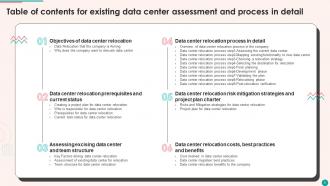
Table of contents for existing data center assessment and process in detail
-
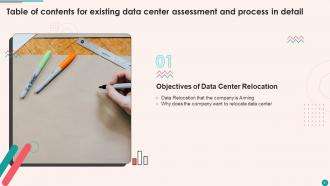
Table of contents for existing data center assessment and process in detail
-
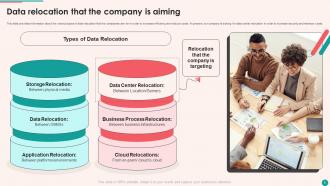
Data relocation that the company is aiming
-

Why does the company want to relocate data center
-

Table of contents for existing data center assessment and process in detail
-
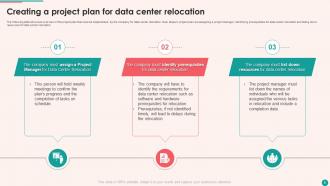
Creating a project plan for data center relocation
-
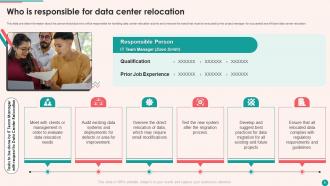
Who is responsible for data center relocation
-
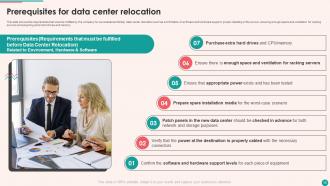
Prerequisites for data center relocation
-
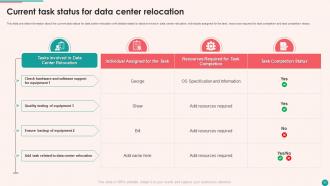
Current task status for data center relocation
-
Assessing Existing Data Center and Team Structure
-
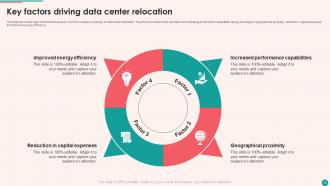
Key factors driving data center relocation
-

Assessment of existing data center for relocation
-
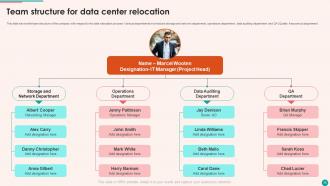
Team structure for data center relocation
-
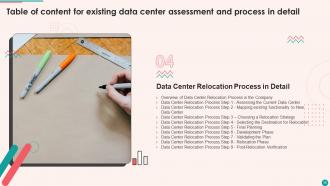
Table of content for existing data center assessment and process in detail
-
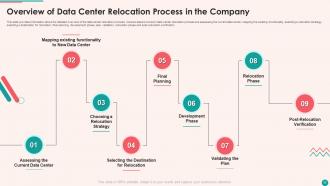
Overview of Data Center Relocation Process in the Company
-
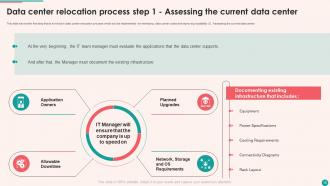
Data center relocation process step 1 Assessing the current data center
-
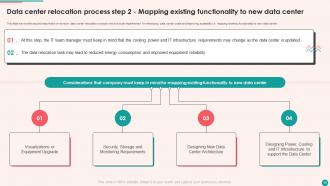
Data center relocation process step 2 Mapping existing functionality to new data center
-
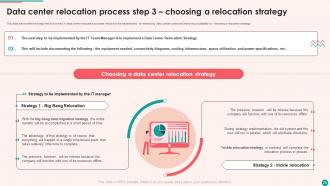
Data center relocation process step 3 choosing a relocation strategy
-

Data center relocation process step 4 Selecting the destination for relocation
-
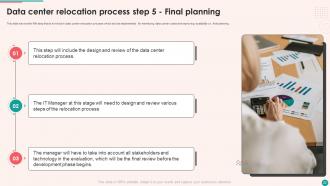
Data center relocation process step 5 Final planning
-

Data center relocation process step 6 Development phase
-
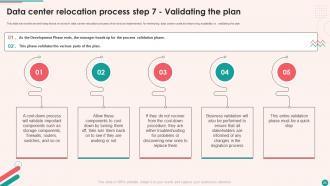
Data center relocation process step 7 Validating the plan
-
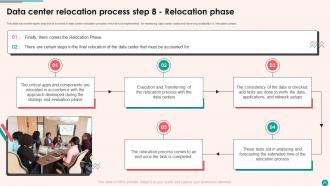
Data center relocation process step 8 Relocation phase
-
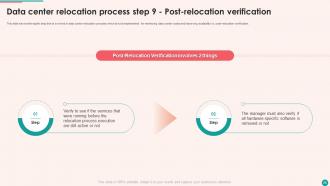
Data center relocation process step 9 Post relocation verification
-
Table of contents for existing data center assessment and process in detail
-
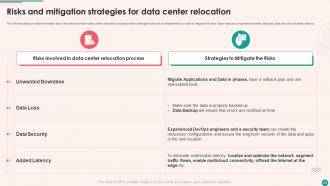
Risks and mitigation strategies for data center relocation
-
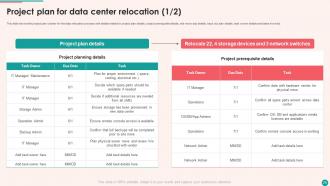
Project plan for data center relocation 1 2
-

Project plan for data center relocation 2 2
-
Table of contents for existing data center assessment and process in detail
-
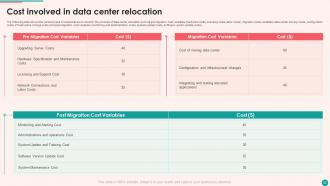
Cost involved in data center relocation
-
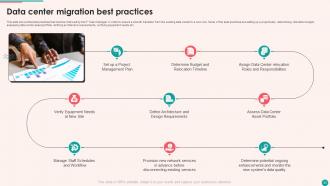
Data center migration best practices
-
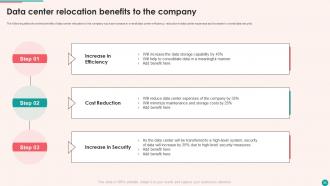
Data center relocation benefits to the company
-

Icons slide for existing data center assessment and process in detail
-

Additional slides
-
Our mission
-

Meet our team
-

Timeline
-
Post it notes
-
Venn
-
Magnifying glass
-

Location
-

Thank you for watching
-

-

-

-

-

FAQs for Existing Data Center Assessment And Process In Detail
So PUE is the big one - Power Usage Effectiveness. It shows how much extra juice you're burning vs what actually powers your servers. Track that plus cooling efficiency, server utilization rates, and uptime percentage. Oh, and your DCIM stuff like temp, humidity, airflow patterns. There's honestly a million other metrics you could get lost in (I've seen people obsess over the weirdest things), but those four give you the foundation. Get solid data on those first, then you can always add more based on what's actually breaking or costing you money.
Honestly, a data center assessment is like finding money you forgot you had. Most facilities are bleeding energy without realizing it - servers sitting at 10% capacity, cooling systems working overtime for no reason, ancient equipment that's basically a power vampire. The numbers will probably make you wince a little. But here's the thing: once you know where the waste is, you can actually fix it. Maybe virtualize those underused servers, tweak your cooling setup, swap out the energy hogs. Oh, and definitely start with measuring your PUE baseline first - gives you something concrete to work from.
So I see the same stuff over and over - unlocked doors and server rooms anyone can walk into, old firmware that hasn't been updated in forever, terrible passwords. There's always some ancient server running without patches too, honestly it's embarrassing how common that is. Bad cable management might sound boring but people can literally tap your network if cables are a mess. Oh and nobody monitors temperature/humidity which bites you later. Start with locking down physical access first. Everything else is pointless if someone can just walk in and plug into your network.
So you'll want to test both planned failures and the surprise ones that'll definitely happen eventually. Map out your critical stuff first - power, cooling, network paths, all the backup components. Then start breaking things on purpose: yank power feeds, kill cooling units, disconnect network links. Recovery times are what you're really after here, plus any weird cascading failures that pop up. The tricky part is testing under different loads - systems act totally different when they're stressed. Oh, and document everything because you'll forget the details later. Better to find the weak spots now than during a real outage when everyone's panicking.
Yeah, cooling is huge - probably the biggest thing to check honestly. It'll eat up like 30-40% of your total power, so bad cooling basically destroys your PUE scores. Hot spots are a nightmare too because they fry equipment and cause downtime. I've seen places where the cooling design was just terrible and it caused so many headaches. Check their current PUE numbers first, then look at how they distribute cooling and what redundancy they have. Temperature monitoring is key too. Oh, and definitely get their cooling load calculations - those will tell you a lot about whether they actually know what they're doing.
Yeah so compliance regs are basically your mandatory checklist - can't skip 'em unfortunately. Depending on your data, you'll be dealing with SOC 2, HIPAA, PCI DSS, whatever applies. Honestly kind of annoying but they actually help structure things so you don't miss obvious security holes. Map out what you need upfront, then build your assessment around those requirements. Way better than trying to backtrack later and prove you hit all the standards. Trust me on that one - I've seen people scramble at the end and it's not pretty.
Start with thermal imaging cameras - trust me on this one, they'll reveal hotspots you had no clue about. DCIM tools like Schneider's EcoStruxure or Vertiv's Trellis handle the monitoring and capacity planning stuff. Power analyzers show real consumption vs what the nameplate says. Airflow measurement tools catch cooling problems. Asset discovery scanners map your network topology, and something like RiT Tech's Ranchor DCIM pulls it all together in reports. Honestly, go thermal first since cooling issues waste the most energy and they're usually the easiest fixes you can make.
Okay so after your assessment, focus on three things: criticality, risk, and cost. Anything that'll cause downtime or security issues? Fix that first, obviously. Then tackle stuff hitting capacity limits or aging out. The budget talk is always awkward but whatever - try balancing quick wins with bigger strategic moves. I'd go for high-impact, cheaper fixes first while you're planning those massive infrastructure overhauls. Document it all with timelines so you don't forget dependencies later. Oh, and make sure your roadmap actually makes sense when you read it back!
So there are three main ones you should know about. TIA-942 is the big one - covers physical infrastructure and those tier classifications everyone talks about. Start there since it's like the foundation for everything else. ASHRAE handles thermal stuff and cooling efficiency (seriously, this can save you a fortune on energy bills). Then you've got ISO 27001 for security management and EN 50600 for general facility standards. Honestly, most auditors just expect these as bare minimum anyway. I'd tackle TIA-942 first, then add the others depending on what's actually broken in your setup.
Yeah, DR plans are absolutely critical for any decent data center assessment. Check their backup procedures, failover stuff, and RTO/RPO targets. But here's the thing - half these places have "plans" that are basically paperweights collecting dust. What you really want is proof they actually test this stuff regularly. I'd dig into their incident response history too, way more telling than whatever's written in their policies. Oh, and definitely sit down with their ops team to walk through a recent test. That conversation will tell you everything you need to know about whether they're serious or just going through the motions.
Dude, automated assessments are a game changer - they'll save you so much time compared to having someone manually check everything. Real-time monitoring beats those random periodic checks any day. The data's way more consistent too since you're not dealing with human errors or someone being tired and missing stuff. Honestly, walking around server racks all day sounds miserable anyway. You get standardized reports that actually make sense when you compare them month to month. My advice? Start small with your most boring, repetitive checks first. Then build out from there once you see how much easier it makes things.
Start by checking what certs they have - CISSP, CompTIA, vendor stuff. But honestly, I've seen people with fancy certificates who can't even troubleshoot basic network problems, so don't just rely on paper. Test their actual knowledge with hands-on scenarios or real-world questions. Training records matter too, especially for newer tech you're using. Incident response logs are gold though - they show how your team actually performs under pressure. Mix formal credentials with proven practical skills. Oh, and make sure their training isn't from like 2018 or something outdated.
Focus on latency first - that's your round-trip time between servers. Then track throughput (actual data speeds), packet loss percentage, and how much bandwidth you're using across switches. Jitter matters too if you've got real-time stuff running. Honestly, choppy video calls drive everyone nuts. Oh, and monitor traffic between your server racks, not just internet-bound stuff. Set up continuous monitoring instead of random checks - network problems are sneaky and you'll totally miss them if you're only looking occasionally. Trust me on that one.
Honestly, you've gotta test that DR plan constantly - tabletop exercises, actual failovers, the whole thing. Otherwise you're just crossing your fingers and hoping. Check if your RTO and RPO numbers actually make sense for the business (spoiler: they probably don't). Your backup sites need to handle full production load too. Documentation always sucks - I swear every plan I've seen looks solid but then you're missing some random critical step. Don't forget auditing your data replication and how communication flows during outages. Treat it like going to the dentist - regular checkups, not a once-and-done deal.
Tackle the biggest bottlenecks first - usually compute, storage, or network bandwidth. Maxed out servers? Virtualization or cloud hybrid gives you flexibility without buying tons of hardware. Storage getting crushed? Try tiered storage or expand your SAN. Network congestion is honestly the sneaky one that causes half the performance headaches nobody thinks about. Oh, and don't forget power and cooling - I've watched companies hit those walls hard when they try scaling up. Quick wins first to buy yourself breathing room, then map out the longer stuff.
-
Commendable slides with attractive designs. Extremely pleased with the fact that they are easy to modify. Great work!
-
The PPT layout is great and it has an effective design that helps in presenting corporate presentations. It's easy to edit and the stunning visuals make it an absolute steal!