


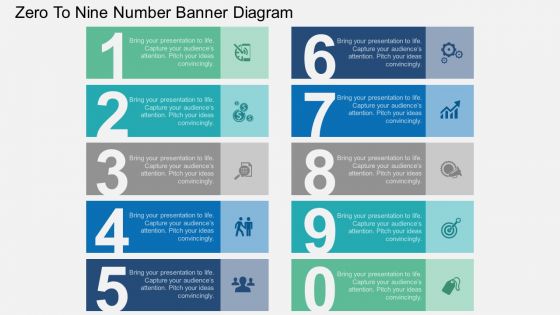
Fg zero to nine number banner diagram flat powerpoint design





Try Before you Buy Download Free Sample Product
 Impress Your
 Audience
 100%
100% Editable
 Save Hours
 of Time


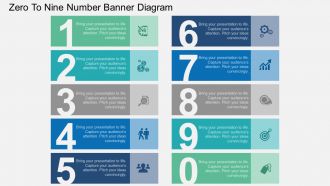
SlideTeam is here to provide a reliable solution for your business and marketing related presentations, bringing you a delightful design which contains the graphics of zero to nine number banner diagram. This PPT diagram contains the concept of business data representation, professionals can use this PPT diagram for business and marketing related presentations. Each stage is filled up with soothing colors and captivating icons which represent terms like growth, target, finances, management etc. add up in delivering a unified solution. Following PPT slide is diverse enough to elaborate topics like leadership, communication, and management, successfully through a PowerPoint presentation. Every design created at SlideTeam is dedicated to delivering satisfying results to the user. This eye-catching design is created to help you reach closer to your objective and if you don;t believe us then just click on the download button and find for yourself that how this PowerPoint slide can surprise you in many ways. Dissect the information with our fg Zero To Nine Number Banner Diagram Flat Powerpoint Design. Identify the key components.
People who downloaded this PowerPoint presentation also viewed the following :
Fg zero to nine number banner diagram flat powerpoint design with all 4 slides:
Our fg Zero To Nine Number Banner Diagram Flat Powerpoint Design ensure you don't fly off the handle. They keep you always calm and controlled.
FAQs for Fg zero to nine number banner diagram
Honestly, start with picking a good font first - that'll set the tone for everything else. Make sure all your numbers are the same size and weight so they don't look random. Spacing is huge too, keep it consistent between each digit. I'd stick with a simple color scheme, maybe 2-3 colors max. Don't go crazy with fancy effects though, readable always wins over flashy. Oh and make sure there's enough contrast so people can actually see it from far away. Keep your background pretty minimal so the numbers really stand out. Trust me on this one.
Honestly, red and orange are your best bet for urgent stuff – they just grab eyeballs. Blue and green work great for steady progress numbers since they feel more trustworthy. Yellow's tricky though, super attention-grabbing but can be a nightmare to read (trust me on this one). Who's your audience? Finance people usually want conservative blues and grays, but creative teams might dig bolder colors. Oh, and definitely test against your background first – some combos look awful on projectors. Just pick whatever reinforces your story.
Honestly, themed banners are where it's at! Seasonal stuff works really well - like autumn leaves with numbers tucked into the foliage, or go totally different with a space theme where each digit looks like a planet or rocket ship. Animal themes are super popular right now too. Picture numbers shaped like safari animals - so cute! Retro arcade vibes are fun, or you could do underwater/ocean themes. Oh, and food themes where each number looks like a different snack - though that might make people hungry lol. Just make sure whatever you pick matches your event's vibe, and don't go so crazy with decorations that you can't read the numbers from far away.
Look, it's all about how fast people can actually spot what they need. Clean grids work way better than random spacing - trust me on this one. Cramped layouts are just brutal on the eyes. You'll want consistent sizing and decent white space so nothing looks messy. Older folks or anyone squinting from across the room? Go bigger with those numbers. Honestly, the best thing is just watching real people use it. See where they look first, then tweak the spacing based on what actually makes sense to them.
Honestly, just go with Canva for number banners - it's crazy easy and has a million templates you can mess around with. I get lost in their font options way too often lol. Adobe Illustrator's solid if you want more control, but it takes forever to learn. GIMP works if you need free stuff. PowerPoint's surprisingly good for basic ones too, which is weird but true. Really depends on how fancy you want it and how much time you've got. Canva's my go-to when I need something that looks professional without the headache.
Oh, number banners are super useful! I'd hang them where all the kids can see and just point to them constantly during lessons. Works great for counting practice or when you're doing calendar time. My favorite thing is having kids actually walk up and touch the numbers while solving problems - gets them moving around. Definitely laminate them though, then you can circle stuff with dry erase markers. I've seen teachers do number recognition drills this way and it actually keeps the younger ones engaged. Honestly beats just having boring wall decorations that serve no purpose.
Honestly, those number banners work so well because people's brains just love organized lists. Makes everything feel way less overwhelming than huge text walls. I use them all the time for stats, step-by-step stuff, or when I'm listing product features. The numbers basically become little guideposts that walk people through whatever you're saying. It's weird how much better engagement gets when you swap regular bullet points for numbered ones - maybe we're all just secretly obsessed with order? Anyway, definitely worth trying if you want your content to actually get read instead of skipped over.
Dude, animations totally change the game for number banners! Start with counting effects - watching numbers tick up from zero is weirdly addictive. Fade-ins work great too, especially if you reveal each number one by one. Maybe throw in some subtle pulsing for your most important stats? Don't go overboard though - I learned this the hard way when I made my boss dizzy with spinning numbers lol. Keep things smooth so people can actually read your data. Scroll-triggered animations are pretty slick if you're feeling fancy. Honestly just try a basic slide-up first and see how it feels.
Go with sans-serif fonts - Arial, Helvetica, Futura, that kind of thing. They're way cleaner for banners and people can actually read them from far away. Skip anything fancy with decorative bits or super thin lines because they'll just vanish when viewed from a distance. Bold works really well here since it makes the numbers pop without being hard to read. Oh, and don't use condensed fonts - numbers look all squished together and weird. Honestly, the best thing you can do is print a test at full size and walk back to see how it actually looks from where people will be standing.
Honestly, your audience is everything when it comes to banner design. Kids need those bright, crazy fonts with fun colors - think neon green or hot pink. But if you're doing something corporate? Clean sans-serif fonts and boring (but professional) colors work way better. I made this mistake once and my client hated it lol. Oh, and older people need bigger text they can actually read - high contrast is your friend there. Don't forget cultural stuff either. Red screams "danger" to some people, "good luck" to others. Figure out who you're targeting first, then build everything around that.
Honestly, PNG is probably your safest bet for digital stuff - works everywhere and keeps things crisp. PDF's great too, especially if anyone might print it later since it scales perfectly. I mean, JPEG technically works but it makes text look kinda blurry, which is annoying for numbers. SVG is technically the best for scaling but some older programs still hate it for whatever reason. Oh, and PNG handles transparency really well if you need that. I'd just go PNG for most things unless you specifically need it printed, then PDF all the way.
So basically, you want your visuals to vibe with whatever story your numbers are telling. Growing stats? Go with upward arrows or charts that climb, maybe even a plant sprouting - anything that screams "we're crushing it." Colors shouldn't fight each other (trust me on this one, I've made some ugly charts). Keep your number fonts matching the image style too. Clean graphics need clean numbers, bold visuals can handle chunky fonts. The image is like your wingman - makes your data look good without stealing the show. Just try a few combos until something feels right.
Ugh, I've seen this disaster so many times - people make their numbers way too tiny! Like, hello, we need to actually READ them from across the room. Also avoid those crazy decorative fonts that look cute but you literally can't tell a 6 from an 8. Super annoying. Make sure your spacing between numbers stays consistent, and don't go with colors that barely contrast - nobody wants to squint at your banner. Oh and definitely print a test version first! What looks amazing on your laptop screen might be completely unreadable in real life.
Honestly, interactive stuff makes such a huge difference with number banners. Hover effects that show extra data are great, or you can do clickable sections for drilling down deeper. Animated counters are pretty satisfying too - people actually watch them build up to the final number instead of just glancing and moving on. Tooltips work well for explaining what everything means. Toggle buttons let people switch between different metrics, which is useful. Oh, and scroll-triggered animations are solid if you don't overdo it. The whole point is making people feel like they're discovering things instead of being lectured at. I'd say pick one simple feature first and test how it goes.
Okay so for number banners - make your digits like 60-70% of the banner height minimum. Anything smaller just disappears when people are far away. Space them about 10-15% of the character width apart, though honestly most people just wing that part and it works out fine. Definitely go with bold, sans-serif fonts because those little decorative bits on other fonts look terrible on banners. Oh and here's the thing - test it from whatever distance people will actually be viewing from. I learned this the hard way once. If you can't read it clearly from 20 feet away, neither will anyone else.
-
Appreciate the research and its presentable format.
-
Thanks for all your great templates they have saved me lots of time and accelerate my presentations. Great product, keep them up!
-
OK