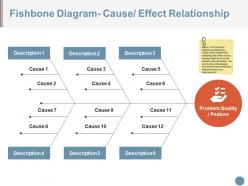
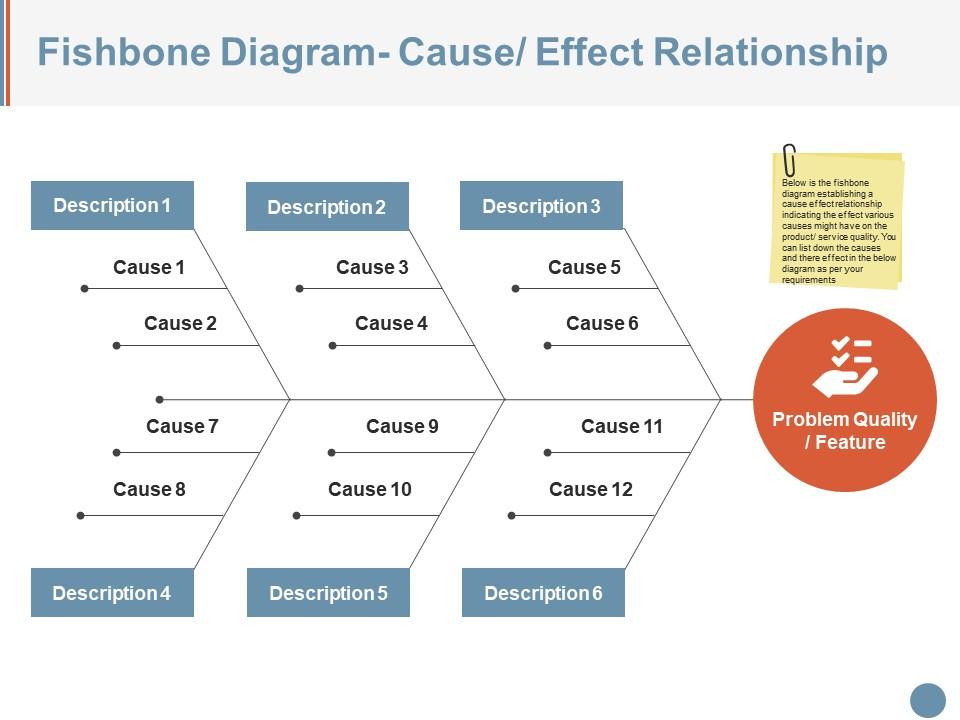
Fishbone diagram cause effect relationship ppt icon
Try Before you Buy Download Free Sample Product
Audience
Editable
of Time
Consolidate your gains with our Fishbone Diagram Cause Effect Relationship Ppt Icon. Build on the firm base you have created.
People who downloaded this PowerPoint presentation also viewed the following :
Fishbone diagram cause effect relationship ppt icon with all 5 slides:
Enlighten folks on how they can be cheated with our Fishbone Diagram Cause Effect Relationship Ppt Icon. Highlight any fraudulent acts.
FAQs for Fishbone diagram cause effect
So fishbone diagrams are perfect for brainstorming when you're stuck on a problem. The whole point is getting your team to look beyond the obvious stuff - like people, processes, equipment, that kind of thing. What I really like about them is they stop you from rushing into fixes before you actually know what's broken. Honestly, the visual setup keeps everyone on track way better than just talking in circles. Last time we used one at work, we found causes we never would've thought of otherwise. Definitely try it next time something keeps breaking - it'll change how your team talks through issues.
Okay so fishbone diagrams are actually super useful - you draw out your main problem and then add branches for different categories like people, process, materials, environment, whatever fits. Way better than just throwing out random guesses about what went wrong. Get your team together and brainstorm what could be causing issues in each category. You'll probably find stuff you hadn't even thought of before. I know it sounds kind of basic but there's something weirdly satisfying about mapping it all out visually. Just make sure you're really clear on what the actual problem is first, then go wild with the brainstorming.
So fishbone diagrams usually use six main categories - People, Process, Materials, Equipment, Environment, and Methods. People covers stuff like training gaps or communication breakdowns. Process looks at workflow issues, while Materials is about input quality. Equipment's pretty obvious - tools and machinery problems. Environment includes your physical workspace or outside factors affecting things. Methods deals with procedures and standards. Honestly, you don't have to stick to these exactly though. Some teams throw in Measurement or swap categories around depending on what they're trying to solve. I'd start with those six basics and then tweak based on your specific situation.
Oh man, manufacturing uses these things constantly - quality control, defect analysis, you name it. Healthcare's another big one, especially for patient safety stuff. Software teams love them too. Pretty much any industry dealing with complaints or recurring problems jumps on fishbone diagrams. Auto, aerospace, service industries... honestly the list goes on. They're just really good at breaking down complex problems into manageable chunks. Next time your team's sitting there going "why does this keep breaking?" - that's when you whip one out. Works every time.
So fishbone diagrams are like brainstorming on steroids - you map out every possible cause across different buckets (people, processes, equipment, whatever). Pretty comprehensive but kinda overwhelming sometimes. 5 Whys is totally different. You take one suspected cause and just keep asking "why" until you get to the real issue. Way more focused. Honestly, I'd start with fishbone when you're completely stumped and need to see the big picture. Then once you spot the most likely culprits, hit them with 5 Whys to dig deeper. That combo works really well in my experience.
So you draw your main problem on the right, then add lines coming off it like a fish skeleton (yeah, that's literally why it's called that). The big "bones" are your major categories - think people, process, materials, equipment, that kind of stuff. Your team brainstorms causes under each one. Here's the key part though: keep asking "why" to get past the obvious stuff and find the real root causes. That's honestly where most people mess up - they stop too early. Once it's all mapped out, just pick which causes to hit first based on what'll actually make a difference and what you can realistically fix.
Get that diagram up on a big screen first - nobody wants to squint at tiny text. Walk through each "bone" category one by one, but honestly, don't do all the talking yourself. Ask your team to jump in with causes they've seen firsthand. Those people know way more than you think. Sticky notes work great so everyone can contribute at once without waiting around. Just focus on facts, not pointing fingers at anyone. Write down everything, even the obvious stuff - you'd be surprised what matters later. Wrap up by picking which root causes to hit first and give people actual next steps.
Don't just scratch the surface - keep asking "why" until you hit the real problem. Also, make sure everyone on your team gets to contribute during brainstorming. Some people love to talk over others, but you need different viewpoints. Those standard fishbone categories? Forget them if they don't fit your situation. Create your own that actually make sense. Here's what trips up most people though: they pick a cause and run with it without checking if it's actually true. Test your hunches with real data first. I learned this the hard way on a project last year. Focus on the most obvious suspects initially.
Dude, digital fishbone diagrams are so much better than the whiteboard mess we used to deal with. Miro and Lucidchart work great for real-time collaboration - especially if you've got remote people. You can drag stuff around, color-code everything, and actually get stakeholders to contribute instead of just sitting there nodding. XMind's solid too if you want something simpler. Honestly, I'd just use whatever your team's already comfortable with first. The auto-formatting alone saves tons of time, and leadership loves getting those clean exported versions.
Honestly, fishbone diagrams are clutch for getting to the actual root of problems instead of just slapping band-aids on symptoms. I always throw them into retrospectives when the same issues keep popping up. The best part? Your whole team can brainstorm without anyone feeling attacked since you're looking at processes, not pointing fingers at people. Once you've got all the potential causes mapped out, just pick which ones to fix first based on what'll have the biggest impact. Seriously, try one at your next problem-solving meeting - it totally shifts how people think about issues.
You absolutely need other people's input for this - can't really do it justice on your own. Front-line folks will catch operational stuff that higher-ups miss completely. Meanwhile, leadership sees the bigger picture issues that aren't obvious when you're in the weeds every day. Different people = different blind spots covered. Plus (and this is huge) everyone's way more invested in actually fixing things when they helped figure out what was broken in the first place. Get reps from each affected area in the room during brainstorming. Trust me, their combined knowledge will blow away anything you'd come up with solo.
Oh yeah, totally doable! Miro and Mural are great for this - way better than trying to use something clunky like Zoom's whiteboard (trust me on that one). Your team can all add sticky notes at the same time without that awkward "can you see my cursor?" thing. Google Jamboard works too if you're keeping it simple. I'd set up your main categories ahead of time so you're not wasting the first 10 minutes figuring that out. Someone should definitely run point to keep people focused. Breakout rooms are clutch if you want smaller groups tackling different branches first.
Honestly, fishbone diagrams are way more versatile than people think. Sure, they're great for troubleshooting, but I've used them for brainstorming product features and figuring out why my content wasn't getting engagement. They work for personal stuff too - like mapping all the things that'll help you hit a goal. The visual aspect is what sells it for me. You see connections you'd totally miss just making lists. Customer satisfaction, habit formation, whatever - if it's complicated with multiple moving parts, try drawing it out. Way better than staring at a wall trying to think through everything in your head.
Color-code your categories - blue for people stuff, red for processes, green for materials. Trust me, it makes scanning so much easier. Throw in some icons next to important causes so people don't have to read everything (honestly, who has time?). Size your text differently too. Main categories should be bigger than the smaller causes underneath. Don't jam everything together - white space actually helps. Oh, and highlight your top priority root causes with shapes or whatever. Makes the whole thing way less overwhelming to look at.
Color-coding your fishbone diagram is honestly a game changer. I usually go with red for critical stuff, yellow for moderate issues - keeps it simple. You can also organize by department or timeline, whatever makes sense for your situation. Three colors max though, or it gets messy real quick. The visual separation helps people spot patterns way faster, and when you're presenting to higher-ups, they'll immediately see what needs fixing ASAP versus what can wait. It's such a small thing but makes the whole diagram actually useful instead of just... decorative, I guess?
-
Informative presentations that are easily editable.
-
Very unique, user-friendly presentation interface.