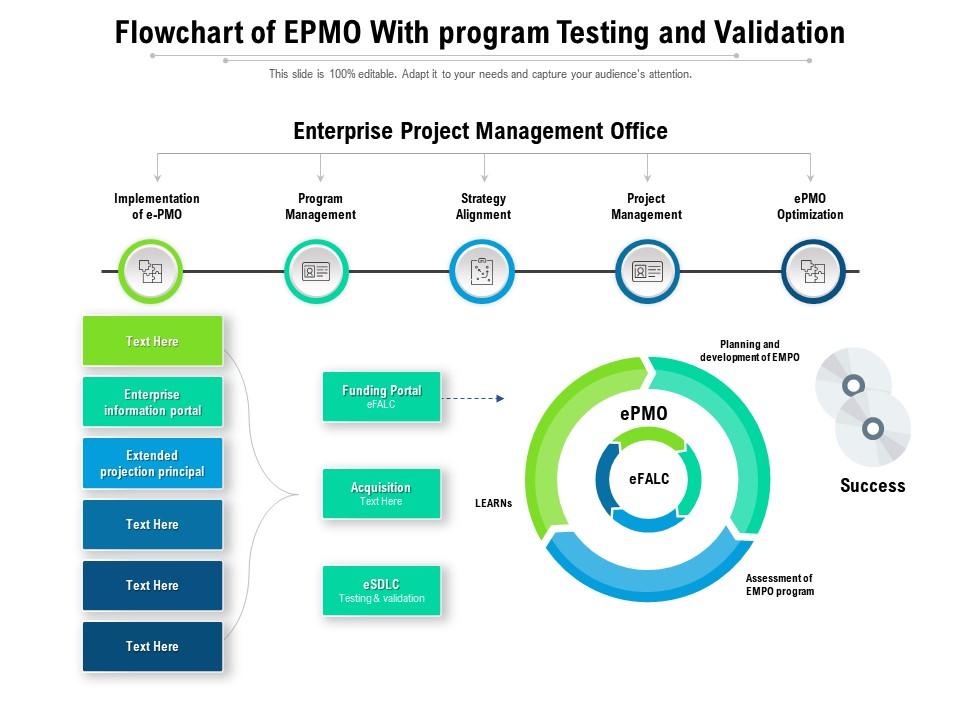
Flowchart of epmo with program testing and validation
Try Before you Buy Download Free Sample Product
Audience
Editable
of Time
Our Flowchart Of EPMO With Program Testing And Validation are topically designed to provide an attractive backdrop to any subject. Use them to look like a presentation pro.
People who downloaded this PowerPoint presentation also viewed the following :
Flowchart of epmo with program testing and validation with all 2 slides:
Use our Flowchart Of EPMO With Program Testing And Validation to effectively help you save your valuable time. They are readymade to fit into any presentation structure.
FAQs for Flowchart of epmo with program
So basically, an EPMO flowchart shows you how your Enterprise Project Management Office actually runs day-to-day. It's like a visual map of who does what and when - from someone first pitching a project idea all the way through wrapping it up. Honestly, these diagrams are lifesavers when you're trying to figure out why projects keep getting stuck. You can trace exactly where the bottleneck is happening. Plus they're great for getting new people up to speed without having to explain your whole process from scratch. I'd definitely dig yours out next time a project gets delayed - you'll probably spot the problem way faster than just guessing.
EPMO flowcharts are honestly game-changers for avoiding those "I thought YOU were doing that" disasters. You get this visual map showing who handles what and when - way better than digging through email threads trying to figure out next steps. Your team can actually see how their work connects to everyone else's, plus spot where things might get stuck. I'd start by just sketching out your current process with the team (grab some coffee, make it collaborative). You'll probably uncover communication gaps you had no clue existed. It's like finally having directions instead of wandering around lost.
So for your EPMO flowchart, start with project intake and evaluation criteria - that's your foundation. Then map out approval gates with clear decision points, resource allocation workflows, and where stakeholders get looped in. Honestly, most people completely forget about feedback loops but they're super important. Also include escalation paths for when stuff inevitably goes wrong, plus regular checkpoint reviews. The whole thing should show how projects move from initial idea through to delivery, highlighting exactly where the EPMO actually adds value. I'd say keep it simple at first - you can always add more complexity once your team gets the hang of it.
Okay so EPMO flowcharts are basically the master view - they're tracking how multiple projects fit together and hit strategic goals. Regular project flowcharts? Just mapping one project's steps from start to finish. With EPMO you're dealing with approval gates, who gets resources, compliance stuff that nobody really wants to think about but has to be there. Traditional ones are more like "okay first we do this, then that, then we're done." The big thing is scale - you're running the system that runs projects instead of just managing one thing at a time. Way more stakeholders to keep happy too.
Dude, an EPMO flowchart is basically your resource traffic map. Shows you exactly where people and budget are going across projects. Super helpful for catching those "oh crap, three teams all need the same developer" moments before they happen. You can spot overlaps and figure out when resources free up to move around. Honestly saved my butt last quarter when I realized two projects were about to clash over the design team. The sequencing part is clutch too - way easier to plan when you can actually see the flow. Just start with mapping what you've got now, then build from there.
Flowcharts are honestly a game-changer for this stuff. Map out who reports to who, where decisions happen, how info flows between your PMO, steering committees, and project teams. I swear it's the only way to make those confusing reporting relationships actually make sense. Start with EPMO at the top, then branch down - portfolio managers, program leads, individual PMs. Don't forget decision gates and escalation paths so people know where they fit. Oh, and create different charts for different scenarios. Budget approvals work way differently than scope changes, trust me.
So the EPMO flowchart is basically your roadmap for tracking risks from start to finish. Shows who does what when things get messy - super helpful when people start blaming each other later. You'll see exactly where risks get bumped up the chain and what approvals you need. Plus it maps out how info moves between teams, which honestly saves so much confusion. Look for bottlenecks before they bite you. Oh, and definitely walk your team through it so everyone knows their part when the next crisis hits.
Your EPMO team basically gets a visual roadmap for making decisions the same way every time. No more winging it or starting from scratch. Resource allocation becomes way less of a headache - trust me on this one. The visual part helps you catch holes in your process too. I'd start with whatever decisions you're making most often, then create flowcharts for those specific scenarios. It cuts down on all that endless back-and-forth arguing about priorities. Plus everyone's following the same logic instead of doing their own thing.
So for EPMO flowcharts, I'd probably go with Visio first - it's built for this stuff and plays nice with Office. But honestly? Draw.io is incredible for being completely free, plus it's web-based so collaboration doesn't suck. Lucidchart's another solid web option if you need fancier features. SmartDraw works too, or hell, even PowerPoint if you're in a rush. Main thing is making sure everyone on your team can actually access and edit whatever you pick. Budget tight? Start with Draw.io. Need real-time collaboration? Lucidchart's your friend.
Dude, flowcharts are seriously clutch for training new PMs. Way better than handing them some massive binder nobody's gonna read. You can map out your standard processes visually - decision points, who to loop in, where things usually get stuck. New people can actually follow along instead of guessing. Plus everyone learns the same way, which is nice for consistency. I'd make them for your most common project types. Oh and definitely keep updating them when processes change - nothing worse than outdated training materials that confuse people more than help.
Don't overcomplicate it from the start - that's the biggest mistake I see. People try mapping every weird scenario and end up with this tangled mess nobody wants to touch. Build it with your team, not locked away in some conference room for weeks. I've watched people create these "perfect" flowcharts that totally miss how work actually flows. Start with the common stuff that happens 80% of the time. You can always add complexity later, but honestly? Simple usually wins. Test it out, see where people get confused, then tweak it. Treating it like some sacred document is a recipe for failure.
Quarterly reviews are the baseline, but honestly? Monthly checks work way better in year one. Things change faster than you'd expect, especially when people actually use the flowcharts daily. I'd set a calendar reminder tied to your regular process meetings. Here's the thing though - if your team keeps asking questions that aren't in the flowchart, don't wait for the next review. Update it right away. Those moments tell you exactly what's missing. Keep them as living docs, not something that sits gathering dust on a server somewhere.
Honestly, start with your project's complexity and what your stakeholders actually need. Your team's experience matters too - no point creating some elaborate process if they're seasoned pros who don't need handholding. Cut out any governance steps that don't apply to your specific situation. I'd focus on decision points that affect your real deliverables and deadlines. Also think about compliance stuff if that's relevant (ugh, always adds extra approval layers). Strip away the fluff but keep the checkpoints that actually matter. Take your standard template and just ruthlessly delete anything that won't help your project succeed.
Show up to those stakeholder sessions and put your feedback in writing through whatever system they're using. EPMOs usually build review points right into their process - they actually want your input, so don't sit there waiting for them to read your mind! Go to the workshops, submit written comments during review windows, then follow up to make sure they got everything. Being proactive is key here. Oh, and definitely ask your EPMO lead about their timeline and how they want feedback submitted. Missing that window would suck after all that effort.
Map out what you're actually doing now, not what you think you should be doing. Visual is key - too many decision branches and people just check out. Stick with basic flowchart symbols that don't need explanation. You'll want clear start/end points and make it obvious who owns what step. Honestly, run it by a couple teammates first because your "obvious" might be their "huh?" Also set up times to revisit it regularly. Processes change faster than we think, and there's nothing worse than following an outdated flowchart that leads nowhere.
-
The Designed Graphic are very professional and classic.
-
The Designed Graphic are very professional and classic.