

FMEA To Identify Potential Failure Modes Powerpoint Presentation Slides




Try Before you Buy Download Free Sample Product
 Impress Your
 Audience
 100%
100% Editable
 Save Hours
 of Time


FMEA is a technique that various companies use to detect product failures or defects. It is a qualitative and highly structured process used by analysts looking to reduce the chances of faults by detecting problems and their possible repercussions. Here is a professionally designed template on FMEA to Identify Potential Failure Modes that is useful for the corporates specifically production companies that want to identify potential risks regarding occupational and health hazards and environmental hazards. This can also be used by the companies that have just initiated a new process and want to identify the potential threats failure in the process. The deck covered the details related to sections such as FMEA process overview, team structure and responsibilities, possible effects and cause of the failure, Severity, Occurrence, and Detection SOD ranking, risk assessment, action steps to eliminate the failure, RPN Risk priority number calculations, etc. The presentation covers critical steps involved in the process, analysis of the process, fundamental failure modes, potential effects of failure mode, FMEA scoring regarding SOD, etc. Customize this 100 percent editable template now.
People who downloaded this PowerPoint presentation also viewed the following :
Content of this Powerpoint Presentation
Slide 1: This slide introduces FMEA to Identify Potential Failure Modes. State Your Company Name and begin.
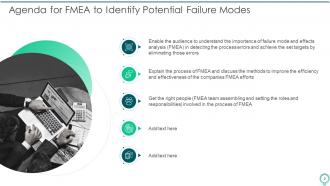
Slide 2: This slide states Agenda of the presentation.
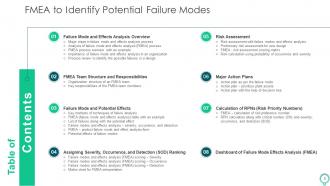
Slide 3: This slide presents Table of Content for the presentation.
Slide 4: This slide depicts title for five topics that are to be covered next in the template.
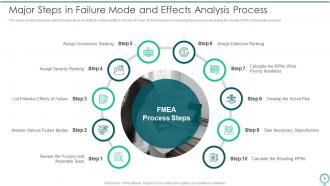
Slide 5: This slide provides the major steps in Failure Mode and Effects Analysis (FMEA) Process.
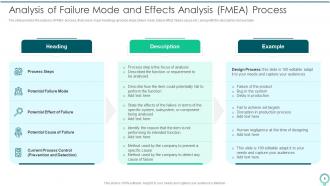
Slide 6: The slide provides the analysis of FMEA process, that covers major headings (process steps, failure mode, failure effect, failure cause etc.).
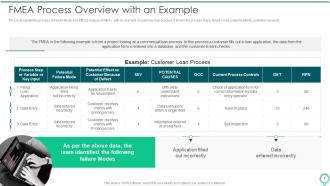
Slide 7: This slide explain the process of Failure Mode and Effects Analysis (FMEA), with an example of customer loan process.
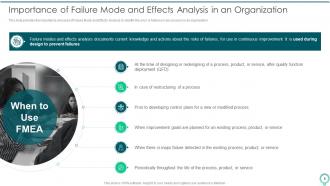
Slide 8: This slide provides the importance and uses of Failure Mode and Effects Analysis to identify the error or failures in any process in an organization.
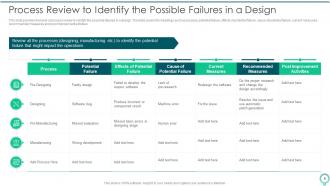
Slide 9: This slide provides the table of process review to identify the possible failures in a design.
Slide 10: This slide depicts title for two topics that are to be covered next in the template.
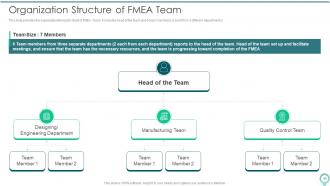
Slide 11: This slide provides the organization/hierarchy chart of FMEA Team.
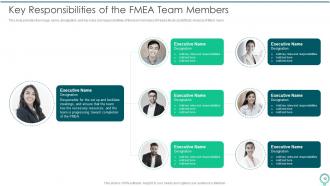
Slide 12: This slide provides the image, name, designation, and key roles and responsibilities of the team members of FMEA team.
Slide 13: This slide depicts title for six topics that are to be covered next in the template.
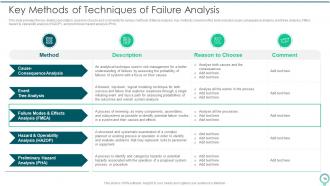
Slide 14: This slide provides the key details (description, reason to choose and comments) for various methods of failure analysis.
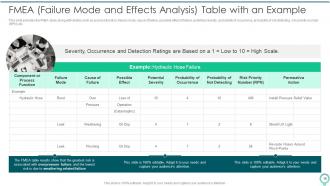
Slide 15: This slide provides the FMEA table along with details such as process function, failure mode, cause of failure, etc.
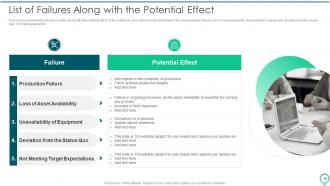
Slide 16: This slide provides the list of failure mode, along with the potential effect of those failures.
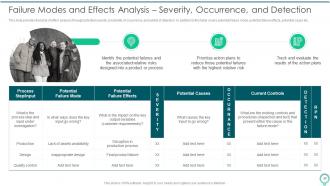
Slide 17: This slide provides the table of effect analysis through potential severity, probability of occurrence, probability of detection.
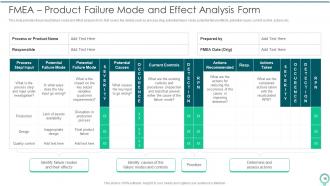
Slide 18: This slide provides the product failure mode and effect analysis form, that covers the details such as process step, potential failure mode, etc.
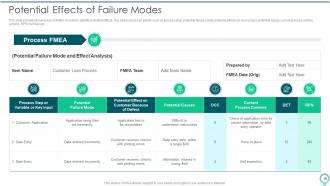
Slide 19: This slide provides the process of FMEA in order to identify potential effects.
Slide 20: This slide depicts title for four topics that are to be covered next in the template.
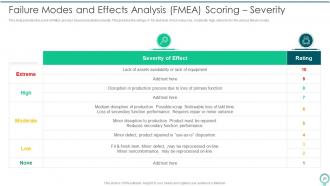
Slide 21: This slide provides the score of FMEA process based on potential severity.
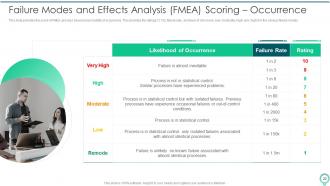
Slide 22: This slide provides the score of FMEA process based on probability of occurrence.
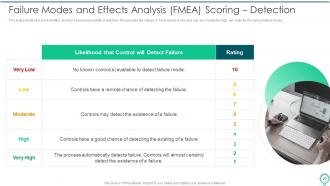
Slide 23: This slide provides the score of FMEA process based on probability of detection.
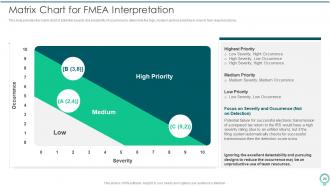
Slide 24: This slide provides the matrix chart of potential severity and probability of occurrence to determine the high, medium and low priorities.
Slide 25: This slide depicts title for four topics that are to be covered next in the template.
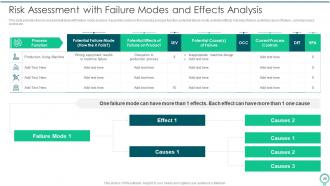
Slide 26: This slide provides the risk assessment table with failure mode analysis.
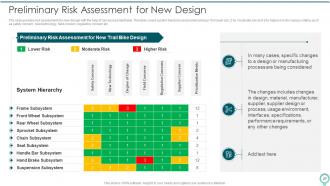
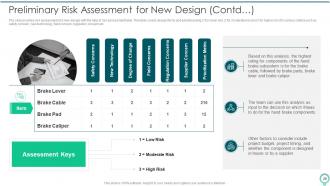
Slide 27: The slide provides risk assessment of a new design with the help of risk assessment table.
Slide 28: The slide provides risk assessment of a new design with the help of risk assessment table.
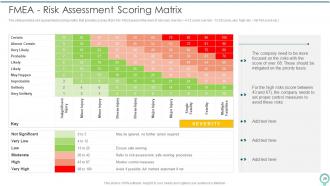
Slide 29: The slide provides risk assessment scoring matrix, that provides scores (from 0 to 100) based on the level of risk.
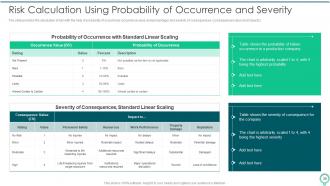
Slide 30: The slide provides the calculation of risk with the help of probability of occurrence and severity of consequences.
Slide 31: This slide depicts title for three topics that are to be covered next in the template.
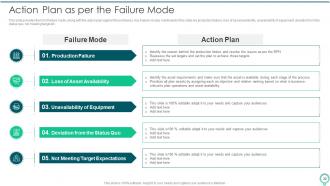
Slide 32: This slide provides the list of failure mode, along with the action plan against those failures.
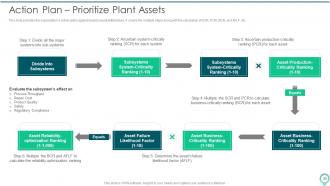
Slide 33: This slide provides the organization’s action plans against asset unavailability failure.
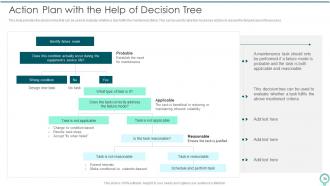
Slide 34: This slide provides the decision tree that can be used to evaluate whether a task fulfils the mentioned criteria.
Slide 35: This slide depicts title for two topics that are to be covered next in the template.
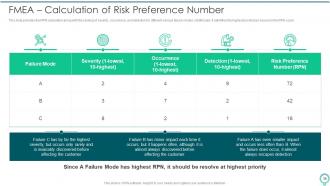
Slide 36: This slide provides the RPN calculation along with the ranking of severity, occurrence, and detection for different various failure modes.
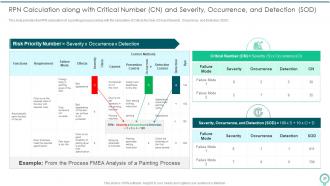
Slide 37: This slide provides the RPN calculation (of a painting process) along with the calculation of Critical Number (CN) and Severity, Occurrence, etc.
Slide 38: This slide depicts title for three topics that are to be covered next in the template.
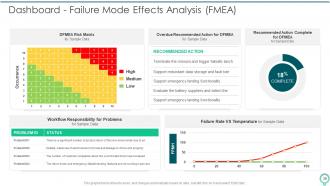
Slide 39: This slide presents Dashboard - Failure Mode Effects Analysis (FMEA).
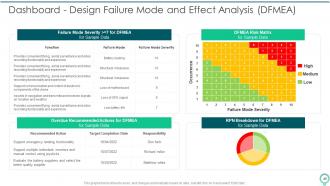
Slide 40: This slide exhibits Dashboard - Design Failure Mode and Effect Analysis (DFMEA).
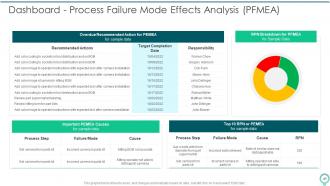
Slide 41: This slide illustrates Dashboard - Process Failure Mode Effects Analysis (PFMEA).
Slide 42: This slide displays Icons for FMEA to Identify Potential Failure Modes.
Slide 43: This slide is titled as Additional Slides for moving forward.
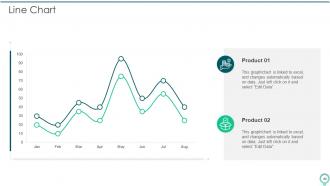
Slide 44: This slide describes Line chart with two products comparison.
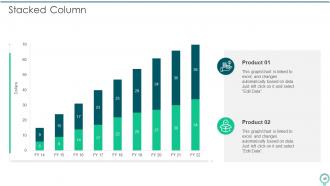
Slide 45: This slide represents Stacked Bar chart with two products comparison.
Slide 46: This is About Us slide to show company specifications etc.
Slide 47: This is Our Mission slide with related imagery and text.
Slide 48: This slide shows Post It Notes. Post your important notes here.
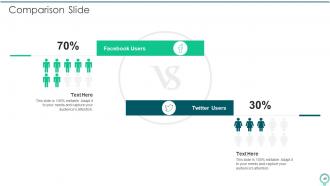
Slide 49: This is a Comparison slide to state comparison between commodities, entities etc.
Slide 50: This slide contains Puzzle with related icons and text.
Slide 51: This slide depicts Venn diagram with text boxes.
Slide 52: This is Our Team slide with names and designation.
Slide 53: This slide provides 30 60 90 Days Plan with text boxes.
Slide 54: This is a Thank You slide with address, contact numbers and email address.
FMEA To Identify Potential Failure Modes Powerpoint Presentation Slides with all 59 slides:
Use our FMEA To Identify Potential Failure Modes Powerpoint Presentation Slides to effectively help you save your valuable time. They are readymade to fit into any presentation structure.






FAQs for FMEA To Identify Potential Failure Modes
So basically you've got three main things: failure modes (what breaks), effects (what happens after), and causes (why stuff breaks in the first place). Rate each one on severity, occurrence, and detection - multiply those together for your RPN score. Yeah, the rating feels pretty subjective when you're starting out, but you get the hang of it. Focus your action plans on whatever scores highest. Oh, and don't rush the brainstorming part where you list every possible failure. Even the weird unlikely ones matter. Being thorough there saves you headaches later.
So FMEA basically helps you spot failures before they blow up into expensive disasters. You go through each design stage and figure out what could go wrong, how bad it'd be, and how likely it is. Honestly kind of boring at first but super worth it. Your team ends up thinking through weird edge cases that would've bit you later during testing - or god forbid, after launch. I'd start with whatever components seem riskiest and think backwards from how it'd screw over customers. Saves you so much pain down the road.
DFMEA focuses on design flaws - like what happens if this part breaks or these materials don't play nice together. PFMEA is all about manufacturing screwups during actual production. So you're asking "what could go wrong with our design?" versus "what could mess up when we're building this thing?" Different timing too - do DFMEA while you're still designing, then hit PFMEA when planning how to make it. They actually work pretty well together since both design problems and production issues can totally wreck a launch. I always found the manufacturing one trickier honestly.
So you'll want to calculate the RPN first - that's Severity × Occurrence × Detection. Higher numbers = bigger problems to fix first. Most companies use 100-125 as their cutoff point, but honestly I'd also flag anything with super high severity even if the RPN isn't crazy high. Nobody wants a catastrophic failure on their watch, you know? Start with your highest RPNs and work down systematically. Oh, and don't just blindly follow the numbers - context matters too. Sometimes a slightly lower RPN might actually be more urgent based on what's happening in your specific situation.
Brainstorming with your team is a solid starting point - they deal with the headaches daily so they know what breaks. Map out your whole process visually, makes it way easier to spot weak links. Don't sleep on your historical data either, patterns jump out when you actually dig into past screw-ups. Oh and those fishbone diagrams are clutch for tracking down root causes. But honestly? Best move is walking around and chatting with the people doing the actual work. They catch things that look fine on paper but are disasters in real life. Mix a few methods together though, don't just pick one.
Honestly, FMEA fits right into whatever quality system you're already running. Map out where you're doing risk stuff now - design reviews, process validation, that kind of thing. Then just drop FMEA workshops into those spots. Most ISO 9001 setups already have the bones for this anyway. Don't make it some big separate thing though - weave it into your normal workflow instead. I'd probably start with just one product line to test it out. Once your team gets the hang of it (and stops groaning when you mention another meeting), then roll it out everywhere else.
For FMEA to actually work, you need people from different departments in those meetings. Design engineers will catch the technical stuff, but your manufacturing team knows where things break in real life. Quality people understand what customers actually complain about. Honestly, it's kind of annoying how long these cross-functional meetings take, but you miss so much when it's just one group. Different perspectives reveal failure modes nobody would've thought of alone. Don't make the mistake of only inviting engineering - get manufacturing, quality, maybe even sales in there from the start.
Update your FMEA whenever you hit major milestones - design changes, customer complaints, new failure modes popping up. Mature products? At least once a year. I've watched teams completely forget about theirs and then scramble when preventable issues hit. Major updates need the whole team involved, but smaller tweaks can happen whenever. It's supposed to be a living doc, not something gathering dust in a folder. Honestly, just set a calendar reminder right now. I know it sounds boring but you'll be so glad you did when you actually catch something early instead of dealing with fires later.
Honestly, the worst mistake is being way too vague about what could go wrong. Get your experts involved right away - I've watched teams burn weeks analyzing stuff that literally can't happen because they didn't ask the people who actually know. Don't obsess over getting every single risk score perfect either. Hit the big scary stuff first and make your descriptions detailed enough that someone can actually do something about it. Oh, and start with whatever process would really screw you if it broke. Work from there.
Honestly, FMEA software is a game changer - it handles all the boring calculation stuff automatically and keeps your team from accidentally messing up shared spreadsheets. You'll get standardized risk rankings and RPN scores without the headache. Real-time collaboration is clutch too, plus you can actually generate decent-looking reports instead of whatever nightmare Excel usually spits out. The coolest feature is linking failure modes between different projects so you're not starting from scratch every time. Skip the basic Excel route if you can. Even a simple dedicated FMEA tool beats wrestling with formulas that break constantly.
Look at defect rates and customer complaints first - those should drop if your FMEA's doing its job. Track your RPN trends too, plus how many high-risk items you've actually fixed. Process cycle times matter since you're trying to prevent rework. Some teams go nuts calculating RPNs but totally miss the bigger picture, which drives me crazy. Set up a simple before/after dashboard for your top risks. Management eats that stuff up and it's way easier than explaining the whole methodology to them every time.
Look, FMEA is basically your early warning system - it spots problems before they blow up your budget. Keep updating it when processes change or you notice new failure patterns. The risk numbers help you tackle the worst stuff first instead of randomly fixing things. Honestly, some of the best improvements I've seen came from those team brainstorming sessions during FMEA reviews. People just connect dots they hadn't seen before. Don't treat it like a one-time checkbox thing though - review it quarterly or you'll miss half the value.
FMEA is massive in automotive, aerospace, and medical devices - anywhere failure gets really expensive or dangerous. Ford, Boeing, Medtronic all use it because regulators demand it, plus one missed failure mode means millions in recalls. Manufacturing and pharma rely on it too since process screwups can kill entire production lines. My old manager used to say "oops doesn't pay the bills" which sounds cheesy but it's true. Prevention beats scrambling after things break. If you're in high-stakes stuff, honestly just start using FMEA now - it'll save your butt later.
Start with proper FMEA training - cover the methodology plus hands-on practice. Basic concepts first: failure modes, severity rankings, detection methods, the whole framework. But here's the thing - skip generic textbook examples. Have them work through real scenarios from your actual processes instead. People learn way better when they can apply stuff to something they already know. Pair newbies with experienced FMEA folks for mentoring. Maybe bring in external trainers initially to set good habits. Oh, and make everything project-based right from the start - that's where the real learning happens.
Honestly, these sessions can be brutal if you don't prep right. Get your process expert in there first - they're crucial. Then grab people from quality, engineering, and ops. Set ground rules early: we're finding problems, not fixing them yet (trust me on this). Work through each step methodically with a good template. I always rotate who's at the whiteboard because it keeps people engaged, and don't let that one guy monopolize everything. You'll need multiple sessions - nobody finishes this stuff in one go. Block 4-6 hours minimum and yeah, definitely have coffee ready. People get cranky without caffeine.
-
The design is clean-cut, modern, and sleek, keeping the users' needs in mind. The multiple uses make this product worth every penny!
-
My team has been relying on SlideTeam’s professional PPT designs for a while now. It has greatly sped up quality work at my organization. So thanks!