Follow up updates ppt professional demonstration

Follow up updates ppt professional demonstration
Slide 1 of 5

or

Favourites Favourites

Try Before you Buy Download Free Sample Product

Audience Impress Your
Audience
Editable 100%
Editable
Time Save Hours
of Time
The Biggest Sale is ending soon in
0
0
:
0
0
:
0
0
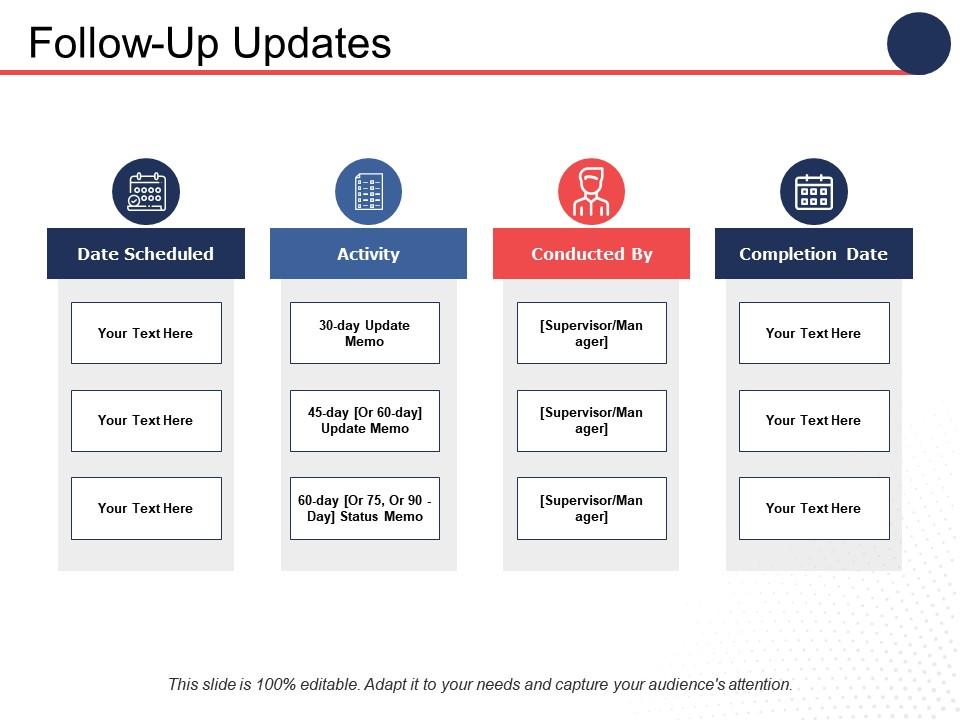
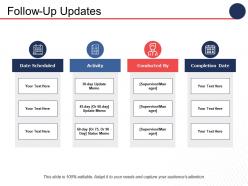
This is a four stage process. The stages in this process are Date Scheduled, Activity, Completion Date, Marketing, Management.

FAQs for Follow up updates

Definitely send that follow-up within 24-48 hours - you want it fresh in everyone's heads. Hit the main points, action items with actual names and dates, plus whatever you promised to send them. I always throw in the slide deck because honestly, people ask for it anyway. Make it thorough enough that someone who wasn't there could figure out what's happening next, but don't just word-vomit everything. Use headers to break it up nicely. Oh, and nail down when you'll circle back - otherwise this stuff just dies a slow death.

Honestly, visuals are a game-changer for updates. People's eyes just glaze over when they see massive text blocks, you know? A quick chart or screenshot gets your point across way faster than paragraphs of bullet points. Key metrics actually stand out when you throw them in a graph. Before/after comparisons work really well too—I started doing those and suddenly got way fewer confused replies asking me to explain stuff again. Even something as basic as a progress bar makes everything feel more... I dunno, digestible? Your stakeholders will thank you.

Honestly, audience feedback is like having a cheat sheet for your content strategy. Look at what gets people commenting and asking questions - that's your gold right there. Short sentences work. But you also want to notice patterns in what makes people engage versus what just sits there getting ignored. People are surprisingly blunt about telling you what they want more of, which makes your job way easier. I'd set up something simple to track this stuff - maybe just a notes app where you jot down recurring themes, or actual surveys if you're feeling fancy. Then just use all that info to plan what you'll create next. It's honestly the best way to stop guessing about what your audience actually cares about.

Honestly, I'd go with every 1-2 weeks for most stuff. Weekly's solid if it's urgent or moving fast, but bi-weekly works better for longer projects. I've watched people spam daily updates and just annoy everyone - like, we get it, you're busy. But wait a whole month? You've already lost people by then. Pick whatever feels right and actually stick to it though. That's the thing that matters most. People want to know when to expect you. I'd probably start bi-weekly and see how it goes, then tweak from there.

Honestly, I'd start with the basics - open rates and click-throughs tell you if people actually care about what you're sending. Response rates are obvious but super important. Oh, and track how fast people get back to you since quick replies usually mean your message hit the mark. Don't sleep on unsubscribe rates either - if those jump up, you're probably being annoying or sending irrelevant stuff. Conversion metrics matter too, like whether they're actually doing what you asked them to do. I check mine weekly and tweak things based on the numbers.

Dude, templates are a lifesaver. I used to waste so much time staring at blank emails trying to figure out what to say. Now I just have sections like "Progress This Week" and "Blockers" already set up. Fill in the details and you're done. Your stakeholders will actually thank you because they know exactly where to find stuff - no more hunting through paragraphs for the important bits. Plus you won't accidentally forget to mention something crucial (been there). Start simple and adjust based on what people actually respond to. Game changer, seriously.

Honestly, most people mess up by being way too vague or waiting forever to send the thing. Lead with what's actually changed - don't bury it under a bunch of fluff. I see this all the time where you're hunting through paragraphs just to find the real news. Skip the endless apologies too (though yeah, we've all done it). Keep things factual and look ahead instead of dwelling on what went wrong. Oh, and double-check you're sending it to the right people! Nothing worse than realizing you forgot someone important. Quick test before hitting send: what do they need to know and what do you need from them?

Dude, personalization works because it shows you actually give a damn. Reference their specific project or something from your last chat - people can smell mass emails from a mile away. I always throw in their name and maybe mention their company's recent win or whatever. Those "Dear Valued Customer" things? Straight to trash. Even tiny stuff like "hope that conference went well" can bump your response rates up 20-30%. Honestly, people just want to feel seen, you know? Track which personal touches work best - you'll start seeing patterns pretty quick.

So here's what I've learned the hard way - clients want to see clear progress with actual numbers and what's coming next. Your internal team? They need the real stuff: what's blocking us, what decisions we're waiting on, resource drama. Stakeholders just want the big wins and if timelines changed (let's be honest, most of them barely read these anyway). The trick is matching your depth to the audience. Clients need context so they don't panic. Teammates need specifics they can actually act on. Execs want the TLDR version. Always put your most important point first - bury the weeds at the bottom.

Get that first follow-up out within 24-48 hours - trust me on this one. Include your key points, next steps, whatever you promised them. After that, weekly updates work for active stuff, bi-weekly for longer projects. I've watched so many solid presentations just... die because someone waited too long to circle back. People forget fast when they're juggling ten other things. Don't overthink the timing though. Being consistent beats being perfect every time. Set those calendar reminders now before you get buried in other work and completely space on it.

Oh man, there's actually a bunch of good options for this! HubSpot and Salesforce are solid if you want full CRM systems - they'll auto-trigger email sequences when customers do stuff. Mailchimp's pretty decent for just email automation, and Zapier's great for connecting different apps together (though honestly it can get confusing fast). Monday.com sends automatic status updates too. Even Gmail has scheduling now which is kinda wild. I'd say just start with whatever you're already using - like your current email or CRM - then build from there. Don't overcomplicate it right away.

Honestly, video follow-ups are clutch when you need to build trust or explain messy situations. Like if a client's pissed about delays - your face and tone can calm them down way better than some formal email. Complex project changes? Yeah, those definitely need visual walkthroughs. You can clarify stuff in real-time instead of going back and forth twenty times. I mean, written updates work fine for basic progress reports. But when it's relationship stuff or something complicated, that face-to-face connection hits different. Trust me - next time you're about to write a novel-length email about drama, just record a quick video instead.

Okay so here's what I learned from watching our sales folks - structure your updates like little stories. Begin with where things stood before, then hit the problem you ran into, and wrap up with how you solved it or where you're at now. Way more engaging than those boring bullet point emails nobody reads. Honestly, people remember stories way better because there's actual emotion involved. Use real details too, not just "we made progress." Next time you need to update stakeholders, try framing some roadblock you overcame as a mini story. Trust me, they'll actually pay attention for once.

Honestly, it totally depends on your team and how urgent stuff is. Quick emails are solid for status updates since people can reference them later. Dashboards or longer docs work better when stakeholders need to dive deep into details. I use Slack for casual check-ins, but fair warning - messages get lost in there constantly. Video calls are your best bet when you need immediate feedback or you're explaining something complex. Oh, and here's the thing that actually matters most: just match whatever format your team already uses and likes. Fighting their communication style is pointless.

Honestly, your analytics are gonna tell you everything - check what's getting clicks and actual engagement first. Then just ask people directly! Even a basic poll works. I always look at the questions people drop in comments or shoot me in emails. They're basically giving you a content roadmap for free. Peek at what competitors are doing too (for ideas, not copying obviously). Social media mentions are gold for seeing what gets people talking. Mix all that data stuff with real feedback and you'll know exactly what updates your audience actually cares about. Way better than guessing.

Ratings and Reviews

0% of 100
Review Form
Write a review
Most Relevant Reviews

No Reviews