

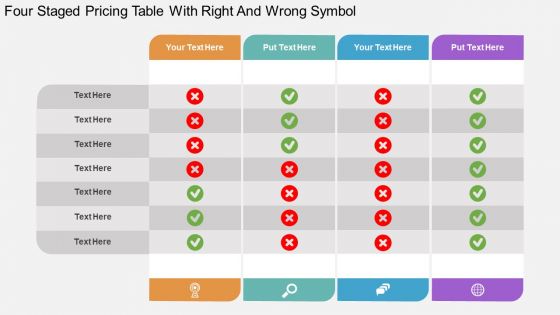
Id four staged pricing table with right and wrong symbol flat powerpoint design





Try Before you Buy Download Free Sample Product
 Impress Your
 Audience
 100%
100% Editable
 Save Hours
 of Time


Wish to achieve consistency in pricing practice keeping in mind the demand oriented approach- businessmen now days look up for a tabular PPT representation to monitor the growth and keep a check and price analysis for the same. Your menu strategy can be managed via four staged pricing table with segregated right and wrong symbol in PowerPoint design thus ensuring major important characteristics like flexible pricing, price bundling, contemporary pricing or customer loyalty discounts. The grand design in PPT layout gives all the more creative and professional touch to your work ideas and thus gives you an upper edge in compiling your ideas and putting them across the table in a meeting with internal or external stakeholders. Life becomes all the more easy by editing, compiling or addition of text or graphical images in presentation slides how when it comes to handling the clients or customers. The presentation slide helps to establish good working relationship with the client base and business partners, satisfy them to the maximum level. Our Id Four Staged Pricing Table With Right And Wrong Symbol Flat Powerpoint Design contain grand designs. They generate a feeling of exuberance.
People who downloaded this PowerPoint presentation also viewed the following :
Id four staged pricing table with right and wrong symbol flat powerpoint design with all 4 slides:
Our Id Four Staged Pricing Table With Right And Wrong Symbol Flat Powerpoint Design will absorb your ideas. They will become one with your thoughts.

FAQs for Id four staged pricing table with right and wrong symbol
Look, four tiers just work better than three or five - trust me on this. Your customers can actually compare without their eyes glazing over. The magic happens when you make that second or third tier your "recommended" one. People see it sitting between the basic and fancy options and think "yeah, that's reasonable." Shows you actually get that different people need different things too, instead of some lazy one-size-fits-all approach. I'd start with whatever your main offering is, then build the cheaper and pricier versions around that. Way easier than starting from scratch with four random price points.
Four tiers is honestly the sweet spot for pricing tables. Your customers won't get overwhelmed trying to figure out what's different between 7 random options (been there, it's a mess). Basic/Professional/Business/Enterprise works really well - people get the progression immediately. Here's the trick though: make your second-highest tier the one you want most people buying. That's where you'll make bank. The whole thing just flows better when clients can easily see what they're getting at each level and pick what fits. Way less confusing than cramming everything into two options or going overboard with choices.
Make your pricing super scannable with bullet points and clear spacing between tiers. Definitely highlight one plan as "recommended" - seriously, this trick works every time I've seen it tested. Bold colors or a little badge does the job perfectly. Don't overcomplicate it with crazy graphics though. Users just want to compare features quickly and see the value jump from basic to premium. Your pricing should be the biggest, most obvious thing in each column. Oh, and test different ways to make that middle plan pop - what works varies so much by audience. Keep the whole thing clean and the comparison will basically sell itself.
Skip the boring "Basic/Pro/Premium" names - call them something that actually means something to your customers like "Starter/Growth/Enterprise." Talk about outcomes instead of just dumping feature lists. Like "perfect for teams ready to scale" rather than "includes 50 users." Your copy should speak to where people are in their journey. Someone just starting out has totally different pain points than a company trying to manage 200 employees. Help them figure out which tier fits by focusing on what they'll actually achieve. Honestly, most SaaS pricing pages are so generic they could be for any product!
SaaS companies kill it with four-tier pricing - makes sense since they've got natural service levels. Digital agencies too. Consulting firms can really show that value jump from basic to premium packages. Even seen e-commerce doing this well with subscription boxes. Honestly though, it works for pretty much anyone selling different versions of the same core thing. Just don't create fake tiers that confuse people - I've seen that backfire. Look at what your clients actually buy now and build around those patterns. The sweet spot is when customers can easily see themselves moving up a level. Makes the whole decision process way smoother.
Don't create totally different pricing tables - just tweak the language and what you emphasize. B2B folks want to hear about enterprise features, security stuff, ROI. Regular consumers? Keep it simple, focus on personal benefits. Same four tiers, different spin. I've watched so many companies overthink this and totally bomb it. Swap out the technical jargon for plain English when you're going after consumers. For enterprise buyers, throw in those compliance badges they love. Oh, and test your CTAs - "Start Free Trial" hits different than "Get Demo" depending on who's buying.
Don't make all your tiers look equally good - you want people choosing your preferred one. Price them far enough apart or customers will just freeze up deciding. I see this mistake constantly and it kills conversions. Skip the jargon too, nobody wants to decode what "enterprise-grade optimization" actually means. Your feature lists shouldn't be novels either - just highlight what genuinely separates each tier. Oh, and definitely make that middle "recommended" option pop visually. Most people will gravitate there anyway if you position it right as the sweet spot.
Honestly, color psychology is everything for pricing tables. Make one tier pop with a bold color - orange or green work great - while keeping the others neutral. Warm colors push people to act fast, blues build trust (though I've had weird luck with purple lately, don't ask me why). Short version: you want that middle or premium option screaming "pick me!" without looking desperate. Test different combos though - what works for one audience totally bombs with another. The goal is making people's eyes land on your preferred choice before they even start comparing features.
Track conversion rates for each tier and your overall close rates - that's your bread and butter data right there. Watch how long prospects spend looking at each tier during presentations too. If they're staring at tier 3 but buying tier 2, you've got gold there. Also notice when you're having to defend pricing vs. just flowing through smoothly. Honestly, the best thing to measure is questions vs. "yes" responses per tier. Some tiers make people think, others make them buy. Run this tracking for your next 10 presentations to get a solid baseline going.
Dude, animations totally help with pricing tables. Start with hover effects - easiest thing to implement and makes each card feel clickable. Fade-ins work great as people scroll through your tiers, keeps them moving from basic to premium naturally. I'm a sucker for those subtle pulse animations on the "popular" plan - draws attention but isn't obnoxious about it. Keep everything under 300ms though or it'll feel laggy. Oh, and slide transitions between tiers are solid too. Just don't go overboard - you want smooth, not distracting. The whole point is guiding their eyes, not making them dizzy.
Honestly, Canva's probably your best bet if you want to design it yourself - they've got solid templates. Figma works too but it's a bit more complex. Not feeling the whole design thing? PricingBot and Paddle's builder are made specifically for pricing pages, so they're pretty foolproof. Easy Pricing Tables is decent if you're on WordPress. Oh, and definitely make your "recommended" plan stand out visually - like, really obvious which one you want people to pick. Keep the feature comparisons simple so people don't get overwhelmed. Mobile testing is crucial since that's where everyone browses these days anyway.
Just match the testimonials to each tier - small business quotes for basic plans, enterprise stuff for premium tiers. Works best when customers mention specific results from their actual plan level. Honestly, the ROI mentions are gold. You could throw in a "Customer Success" section between the tiers too, maybe with rotating quotes or mini case studies. Main thing is the social proof fits the audience looking at that tier. Start collecting testimonials where people specifically say which plan they used and what happened after. I've seen this crush it when done right.
Dude, typography makes or breaks pricing tables. Your font sizes need to create a clear hierarchy - prices and plan names should pop immediately. I can't tell you how many tables I've seen where everything's the same size and you just get lost looking at them. Make your featured plan stand out with bolder text or whatever. Keep fonts simple and readable since people are trying to make quick decisions here. Also spacing matters more than you'd think! Oh and definitely check it on mobile - that's probably where most people will actually see your table anyway.
Yeah totally! Icons work super well for this - like throw a basic user symbol on your starter tier, maybe a rocket for the premium one. Colors help too since they create that visual flow people need. Honestly, I'm always grateful when pricing pages aren't just walls of boring text because my brain just glazes over. The trick is picking visuals that actually help people decide, not random pretty stuff that doesn't mean anything. Oh, and definitely A/B test different icon styles. Your audience might surprise you with what clicks for them.
Don't dump all four tiers on screen at once - people's brains just shut off. Start with tier names only, then build out features row by row. I always highlight the recommended option with a bright border or something. Screen annotation is your friend here - circle stuff as you talk through it. Oh, and definitely pause after each tier! Ask for questions before moving to the next one. Trust me, I learned this the hard way after watching people's eyes glaze over during my first few pricing demos. Way better engagement when you break it up.
-
Topic best represented with attractive design.
-
Great quality slides in rapid time.