

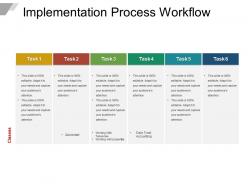
Implementation process workflow






Try Before you Buy Download Free Sample Product
 Impress Your
 Audience
 100%
100% Editable
 Save Hours
 of Time


Depend on the complete backing of our Implementation Process Workflow. Become the brain behind the enterprise.
People who downloaded this PowerPoint presentation also viewed the following :
Implementation process workflow with all 5 slides:
Do something you care about. Our Implementation Process Workflow will dish out all the assistance you desire.



FAQs for
Honestly, start with figuring out who's actually doing what (not what the org chart says they do - trust me, it's different). Map your current mess versus where you want to be. Focus on bottlenecks and dependencies first since those kill everything. You'll need clear handoff points and some way to measure if it's working. Oh, and brace yourself - people will hate any changes to their workflow. That's just how it goes. Definitely test with a small group first to catch the random stuff you missed before going company-wide.
Start by mapping out everything step-by-step - who does what, how long it takes, all that stuff. Document it properly. Then hunt for bottlenecks and those annoying handoff points where work just sits there. Honestly, those "waiting for approval" steps that somehow drag on for days drive me crazy. Talk to the actual workers, not just their managers. They know where the real problems are hiding. Once you've got that baseline mapped out, the obvious inefficiencies will jump out at you. Then it's just prioritizing which workflows are the biggest disasters first.
Dude, automation will save your sanity. All those repetitive tasks that eat up your day? Gone. Set up triggers for approvals, notifications, data transfers - stuff keeps moving even when you're swamped. Pick your most annoying repetitive process first. I'd start simple, maybe automated emails or file routing, then build from there. Honestly once you see how much faster everything moves without constant manual work, you'll wonder why you waited so long. Way fewer mistakes too since people aren't doing the same boring stuff over and over.
Honestly? Your team dynamics will make or break any new workflow you try to roll out. When people actually trust each other and communicate well, they'll stick with the new processes. But if there's drama or someone feels excluded from decisions, you're gonna get pushback and sneaky workarounds that mess everything up. I've watched amazing workflows completely bomb because nobody got team buy-in first - such a waste. Get everyone involved during planning. Address their concerns early. Find a few enthusiastic people who can help others adjust. Oh, and definitely figure out who has influence over who on your team first.
Ugh, the classic mistake is trying to automate literally everything right off the bat. People do this ALL the time and it's such a disaster. Start with just one process - seriously, just one. Skip the whole system overhaul thing for now. Oh, and actually talk to the people who'll be using it! Can't tell you how many workflows I've seen fail because nobody asked the actual users what they needed. Pick your most annoying manual task first, nail that one, then move on. Don't forget testing either - people won't magically know how to use something new without training.
Honestly, just bake the feedback right into your process from day one. Walk through the workflow with people who'll actually use it - sending diagrams is pretty much useless. Get them to test pilot versions with real work, then fix whatever's broken or awkward. Regular check-ins work way better than one big review at the end. Their input will show you the pain points and bottlenecks you'd never catch otherwise. Oh, and make sure it's ongoing - not just a checkbox thing you do once.
Focus on efficiency first - how long tasks take and where stuff gets stuck. Then track quality like error rates and how often you're redoing work. But honestly? None of this matters if your team hates the new process and won't use it. So definitely monitor adoption rates and actually listen to their complaints. Customer satisfaction is worth tracking too if they're affected. I'd pick maybe 3-4 metrics max - you don't want to drown in spreadsheets. Just choose the ones that connect to whatever problem you were trying to solve originally.
Honestly, tech adoption can totally make or break your workflow setup. If your team jumps on new tools quickly, things usually work out great. But resist the tech or skip training? Your workflow's dead in the water. I've seen this happen so many times - even brilliant workflows crash because people just won't use them. Getting buy-in upfront is huge. Show everyone how it'll actually make their lives easier, not more complicated. Oh, and definitely start with a small pilot group first to iron out the weird issues before going company-wide.
Honestly, skip the big presentation approach - just get everyone practicing with real examples right away. People learn way better that way. Don't dump everything on them at once though. Spread it out over a few days because nobody retains much after like two hours anyway. Find a couple people who pick it up fast and let them help the others - saves you from answering the same question twenty times. Oh, and write down the weird issues that come up so you don't forget. Let people mess up without freaking out. Check back in two weeks to see what's actually broken.
Dude, visual workflows are a game changer. You can see the whole mess at once instead of trying to decode paragraphs of text. Flowcharts make decision points super obvious. Process diagrams? They'll show you bottlenecks hiding in plain sight. I've literally saved myself hours by sketching things out first - even sloppy drawings work better than walls of documentation. Your team will catch gaps and redundancies way faster when it's all mapped out. Stakeholders actually pay attention to diagrams too, which is honestly kind of surprising. Just use basic shapes and arrows to start.
Honestly, communication is everything here. Start with the "why" behind the change - people hate surprises at work. Follow up with proper training and docs. Hit them where they actually check stuff: email, Slack, meetings, whatever. I learned this the hard way when a rollout completely bombed because nobody knew what was happening until launch day. Give people time to practice and ask questions beforehand. Oh, and definitely get a few change champions in each department - they're lifesavers for helping teammates adjust and fixing problems that come up.
Honestly, workflow implementation is a total game-changer for resource allocation. You get actual visibility into where your team's time goes instead of just guessing. I've seen this work so well with teams - you spot bottlenecks and redundancies right away. Then you can make real decisions about who should work on what and when you need extra help. My advice? Start super small though. Pick just one workflow, run it for a few weeks, then use that data to optimize everything else. It sounds boring but the insights you get are actually pretty eye-opening.
Honestly, Agile just makes everything less stressful. Instead of these massive projects that drag on forever, you work in small chunks - usually 2-week sprints work pretty well. When requirements change (and trust me, they always will), you can pivot without wanting to throw your laptop out the window. Those daily check-ins keep everyone on the same page. You catch problems early instead of discovering them at the worst possible moment. The whole iterative thing means you're always tweaking and improving rather than crossing your fingers and hoping everything works at the end. Way more manageable.
You'll want to pull together a cross-functional team - basically grab someone from each department that touches the process. Finance, operations, legal, whoever's involved. Get them all in a room early because fixing workflows after you've already built them is such a nightmare. Have each team walk through what they currently do, step by step. Then you can spot where things overlap or where stuff gets dropped between departments. The handoff points are usually where everything goes wrong, so map those out first. Short sentences work better than long explanations when you're doing this - people zone out otherwise.
Set up monthly check-ins right away to see what's actually working. Your team needs an easy way to call out problems without making it weird - nobody wants to schedule a meeting just to say something sucks. Track stuff like how long things take and error rates so you're not just guessing. Honestly, the workflows that last are the ones that keep changing based on what people tell you. Make it super clear that suggesting fixes is good, not complaining. Those review sessions? Schedule them now before you forget.
-
Topic best represented with attractive design.
-
Editable templates with innovative design and color combination.