Information technology business support process with help desk

Information technology business support process with help desk
Slide 1 of 2

or

Favourites Favourites

Try Before you Buy Download Free Sample Product

Audience Impress Your
Audience
Editable 100%
Editable
Time Save Hours
of Time
The Biggest Sale is ending soon in
0
0
:
0
0
:
0
0
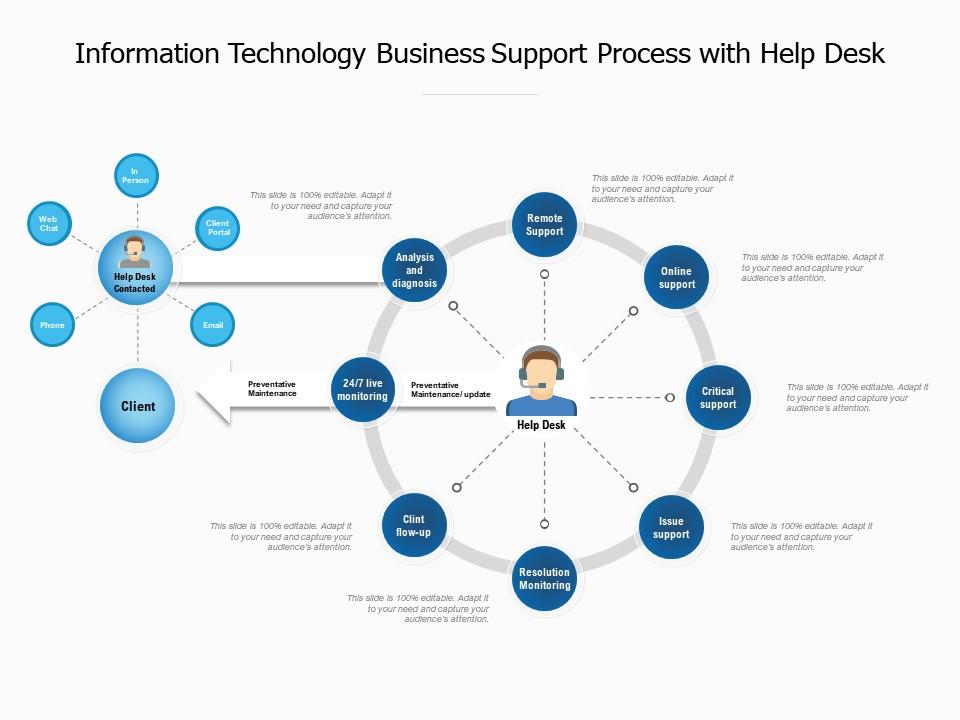
Presenting this set of slides with name Information Technology Business Support Process With Help Desk. The topics discussed in these slides are Analysis, Resolution Monitoring, Critical Support, Online Support, Issue Support, Clint Flow Up. This is a completely editable PowerPoint presentation and is available for immediate download. Download now and impress your audience.

FAQs for Information technology business support process

So you've got ticket creation, then triage (which honestly gets crazy when everyone claims their stuff is "urgent"). After that it goes to the right tech for investigation and troubleshooting. Once they fix it, you close it out - but here's the thing, always double-check with the user first that it's actually working. I learned that one the hard way when tickets kept bouncing back to me. Oh, and document everything as you go because it helps track your SLAs and you'll start noticing patterns in what breaks most often.

Honestly, start with a self-service portal - users can fix their own basic stuff instead of bugging your team constantly. Prioritize tickets properly too so the urgent fires get put out first. Chatbots work great for handling the repetitive questions (though some people hate them). Set up workflows that automatically send tickets to whoever actually knows how to fix them. Oh, and track your response times and satisfaction scores - you'll spot where things are getting stuck. I know a team that cut their response time by like 50% doing this exact stuff. The self-service thing probably gives you the biggest immediate win.

Dude, automation basically runs IT support now. Chatbots handle the basic stuff, tickets get routed automatically, and systems fix themselves before users even know something broke. Pretty crazy how much happens without anyone touching it. The trick is getting your automation rules right from the start - mess that up and you'll just create more headaches for yourself. I'd say start with whatever tickets you see most often, the really predictable ones. Those are easy wins that'll free you up for the actual brain-bending problems.

Look, tracking IT metrics is how you figure out what's actually broken vs what just feels broken. Resolution times, first-call fixes, customer satisfaction - that stuff shows you real patterns. Maybe certain ticket types are nightmare fuel, or maybe Sarah's team is way better at fixes than everyone else (and you should probably ask her what she's doing differently). Without numbers you're basically throwing darts blindfolded. Pick maybe 3-4 metrics your users actually care about and check them weekly. Then you can fix the right problems instead of guessing.

Oh man, ticket chaos is the worst part. People submit stuff like "computer broken" and your team spends forever just figuring out what they mean. Everything becomes "urgent" even when it's not, which is honestly ridiculous. Plus you get those knowledge silos where only Bob knows how to fix the printer issue. Repetitive problems eat up so much time when they should be automated. Communication between teams falls apart too. Get a decent ticketing system going and build up that knowledge base - trust me, it'll save your sanity.

Honestly, ticketing systems are total lifesavers for IT stuff. No more hunting through endless email chains or wondering if your request just disappeared into the void. You can actually see who's working on what and when things'll get done. The priority levels help too - like, your broken mouse doesn't need the same urgency as the server being down (though some people will disagree lol). Best part? Users stop bugging you every five minutes asking for updates since they can just check their ticket status. Just make sure everyone actually uses it consistently or you'll end up with the same chaos you started with.

Honestly, skip the theory stuff and throw them into real situations right away. Have them shadow someone good first, then slowly give them harder tickets on their own. Role-playing angry customers is clutch - I've watched brilliant techs completely bomb because they couldn't talk to normal people without using tech speak. Oh, and definitely do a buddy system for like the first month. Keeps them from freaking out when weird stuff comes up. Don't forget regular check-ins on new software and processes too. Otherwise they'll be using outdated methods forever.

Dude, communication in IT support is honestly way more crucial than people realize. Half the time it matters more than actually knowing tech stuff. You've gotta figure out what's really broken - not just what they're telling you is wrong, which can be totally different things. Then explain the fix without sounding like a robot manual. Keep them in the loop too, or they'll think you disappeared. I've seen simple 5-minute fixes turn into week-long nightmares just because someone couldn't communicate properly. Trust me, when users actually like working with you, everything gets easier. Always double-check you understand the problem first.

Honestly, start with ITIL - it's boring but it works for incident and change management stuff. Kanban boards are clutch for visualizing your ticket pipeline (I swear by them). Lean Six Sigma sounds fancy but really just helps you cut out the BS that slows everything down. Your team will be way more responsive if you throw in some Agile methods too. Tools like ServiceNow or Jira can automate a ton of the grunt work. Oh, and don't try to fix everything at once - map out what's broken first, then pilot one approach. Trust me on this one.

Honestly, just ask people straight up how you did after closing their tickets - automated surveys work great for this. Track your response times and first-call resolution rates too. The 1-10 rating thing is fine, but those open-ended comments? That's where the real gold is. People will actually tell you what sucks about your process. NPS surveys are solid - ask if they'd recommend your IT support to coworkers. Also watch your escalation patterns since nobody escalates when they're happy, you know? Oh, and send those surveys right after you fix their issue while it's still fresh in their mind.

Okay so first thing - get a decent ticketing system like ServiceNow or Jira. Everything revolves around that. Remote access tools are obviously key too (TeamViewer, RDP, whatever). But honestly? The knowledge base might be more important than people think. You'll be googling the same fixes constantly otherwise. Monitoring stuff like Nagios catches problems early, which saves your sanity. Oh and don't sleep on asset management - tracking licenses is boring but necessary. I'd probably start with ticketing first since that's where all your workflows begin anyway.

Honestly, IT support can make or break someone's whole day at work. When everything's running smooth, people don't even think about it - that's the sweet spot. But the second something breaks? Total nightmare if support sucks. You want quick fixes and people who actually get what you're dealing with, not someone reading off a script (ugh, we've all been there). Being proactive helps too. Look, if users aren't constantly griping about tech problems, you're probably nailing it. Sometimes no news really is good news in IT.

Dude, having your own IT knowledge base is clutch. Your team can fix stuff themselves instead of waiting around for tickets to get answered - and trust me, that waiting is the worst part. Common problems get solved way faster. Everyone uses the same fixes too, so you're not getting different answers from different people. Oh and it keeps growing as you add more solutions, which is pretty cool. Honestly? Just start throwing your most common issues into a Google doc or whatever. You don't need anything fancy at first.

Honestly, the biggest shift is gonna be moving everything to remote tools - screen sharing, VPNs, cloud ticketing systems, all that stuff. Get your communication sorted first though. Teams or Slack, whatever people actually prefer using. The annoying part? No more walking over to someone's desk to see what's broken. You'll be doing a LOT more hand-holding over the phone now. "Click this, now scroll down, see that button?" It gets old fast. Make sure your online knowledge base doesn't suck because people will actually need to find answers themselves. Start by figuring out what absolutely needs you there in person, then find workarounds for everything else.

Okay so incident management is basically your safety net when IT stuff goes sideways. You need a solid process to handle disruptions and get everything back up quickly. Problems always hit at 3pm on a Friday, right? Without proper incident management, you're just scrambling around while everyone's breathing down your neck. The trick is setting up clear escalation paths and making sure people actually communicate - otherwise things slip through the cracks constantly. Honestly, just start by writing down whatever messy process you have now. You can clean it up later, but at least you'll have something to work with.

Ratings and Reviews

0% of 100
Review Form
Write a review
Most Relevant Reviews

No Reviews