Diseño de PowerPoint de comunicación interna y externa
Try Before you Buy Download Free Sample Product
Audience
Editable
of Time
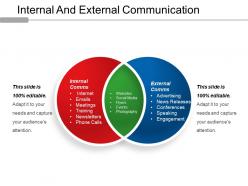
Mejore las habilidades de comunicación de los empleados de su organización empresarial utilizando nuestro diseño de PowerPoint de comunicación interna y externa. Este PPT de componentes internos y externos de su organización empresarial le permitirá discutir varios procesos relacionados con el negocio como Internet, correos electrónicos, reuniones, capacitación, boletines, llamadas telefónicas, sitios web, redes sociales, folletos, eventos, fotografía, publicidad, nuevos lanzamientos, conferencias. , charlas, participación, etc. Nuestros expertos en negocios tienen especialmente para los profesionales de negocios como usted que no tienen tiempo para diseñar las diapositivas ellos mismos hicieron esta presentación de diapositivas en PowerPoint de gestión de la comunicación. Le aseguramos que al utilizar estas diapositivas comerciales de entrada y salida podrá impresionar a su audiencia sin hacer muchos esfuerzos. Este modelo PPT de diagrama de Venn ha sido diseñado utilizando diapositivas de alta resolución y calidad premium que le permitirán elevar el estándar de su trabajo. El uso de este conjunto de diapositivas prediseñado lo ayudará a deshacerse de todo el estrés y la carga de trabajo, ya que después de descargarlo todo lo que tiene que hacer es editarlo y presentarlo. Déles un motivo para aplaudir su esfuerzo con nuestro diseño de PowerPoint de comunicación interna y externa. Impresionará a los más exigentes.
Características de estas diapositivas de presentación de PowerPoint:
SlideTeam se siente inmensamente orgulloso de presentarles a todos ustedes su diseño de PowerPoint de comunicación interna y externa altamente ajustable. Esta plantilla empresarial le permite realizar una serie de cambios en las diapositivas, incluido el color de fuente, el tamaño de fuente y el estilo de fuente del texto utilizado. La presentación de PowerPoint después de ser descargada se puede ver en una proporción de pantalla de tamaño estándar de 4: 3 o en una proporción de pantalla ancha de 16: 9. La plataforma de diapositivas es muy fácil de usar, ya que se puede guardar en formato JPG o PDF y también es compatible con Google Slides.
People who downloaded this PowerPoint presentation also viewed the following :
Diseño de PowerPoint de Comunicación Interna y Externa con las 5 diapositivas:
Siéntelo en las entrañas con nuestro diseño de PowerPoint de comunicación interna y externa. Generará una excelente idea.
FAQs for Internal and external
Oh man, non-verbal stuff is HUGE for presentations. Like, you could have amazing content but if you're fidgeting or staring at your shoes the whole time, people just won't buy it. I learned this the hard way lol. Eye contact makes such a difference - and I mean real eye contact, not that weird staring thing. Your posture basically tells everyone whether to take you seriously or not. Hand gestures help too, just don't go overboard and look like you're directing traffic. Honestly, record yourself practicing once. You'll cringe but it's so worth it for catching those weird habits you didn't know you had.
Honestly, knowing your audience is everything because you can actually craft messages that hit instead of just throwing stuff at the wall. Figure out their pain points and how they like to communicate first. executives? Skip the technical stuff and get to the point. Some people want Slack updates, others need those formal emails (ugh). I always ask myself "what does this specific group actually need to hear?" before I start typing. Oh, and the delivery method matters just as much - wrong channel and your message gets ignored completely. When you nail both the content and the format, people actually listen.
Oh dude, so formal communication is like your proper emails with full sentences and titles - reports, presentations, that whole deal. Informal's just casual stuff like Slack messages or chatting by the coffee machine. I honestly used to stress about this too much lol. Here's what matters: think about who you're talking to and why. Senior leadership or documenting something important? Go formal. Quick brainstorming with your team or just catching up? Keep it casual. The situation tells you what to do. Don't overthink it - just match the vibe to what actually makes sense.
Oh man, this is so true! Your cultural background totally changes how you communicate at work. Some people are super direct while others beat around the bush to keep things peaceful. I used to think this one coworker was being harsh, but turns out that's just how they communicate - no filter, straight facts. You'll notice differences in everything from eye contact to how people handle disagreements. Even silence means different things! My advice? Don't assume anything. Just ask your teammates how they prefer to communicate and pay attention to body language. It's honestly a game-changer once you figure it out.
Okay so first thing - just say your main point right away, don't bury it. Then back it up with whatever details. Keep sentences short and ditch the corporate jargon (seriously, who talks like that?). I always break up walls of text with bullet points or whatever. But here's the thing that actually helps - read it like you're the person receiving it. Would you get it with zero background? That's usually where things go wrong. Oh and stick to one idea per paragraph. Sounds basic but it really does work.
Here's the thing - stories just work better than boring slides full of bullet points. Your brain is wired to remember narratives, so when you tell people about an actual customer's problem instead of rattling off statistics, they retain like 65% more info. I've seen this happen so many times. Start with a real scenario that went wrong, then walk them through how it got fixed. It's way more engaging than "here are our five key benefits" or whatever. People will actually pay attention instead of checking their phones. Trust me, ditch the corporate speak and just tell them what happened like you're explaining it to a friend over coffee.
Dude, definitely keep your slides super clean - one main point each. I can't tell you how many presentations I've sat through where someone just reads every bullet point out loud. So awkward. Your visuals should back up what you're saying, not be the whole show. Talk TO your slides, don't just recite them. Oh, and test your tech first! Nothing's worse than watching someone wrestle with the projector while everyone sits there. Make sure people in the back row can actually read your stuff too.
Watch people's faces while you're presenting - are they nodding along or looking totally lost? If someone's scrolling their phone, you've probably lost them. Ask stuff like "make sense so far?" instead of just plowing through slides. I always throw in quick polls or raise-your-hand moments to check if people are actually getting it. Honestly, the best presentations feel more like conversations anyway. You can slow down if they seem confused, or skip ahead if they're clearly bored. Just don't be that person who ignores all the signs and keeps going.
Oh man, public speaking anxiety is the worst! Here's what actually works though. Rehearse your opening until you could say it in your sleep - seriously, that first minute makes or breaks everything. Do some breathing exercises beforehand (I used to think this was BS but it's legit). Find a few friendly faces and just talk to them instead of the entire scary crowd. People are honestly rooting for you anyway - nobody's there hoping you'll bomb. Keep water handy and don't be afraid to pause when you need it. You've got this!
Honestly, tech is super helpful for work stuff - video calls, instant messaging, all those collaboration apps that keep projects moving. But it's also kind of a mess sometimes? Like people will literally message you instead of just walking over to your desk (which is weird). Everything moves so fast now that you're drowning in notifications. And don't get me started on how many fights happen because someone's text came across wrong. I've learned to just call people for anything complicated. Save the quick messages for simple updates and actually talk when it matters.
Want to nail your presentation? Start by dropping your credentials early so people actually listen to you. Then ditch the boring data dumps - nobody cares about your spreadsheets. Tell stories instead. Make them feel something. I swear, the best presentations I've seen always have that one story that sticks with you. Structure your points logically with solid evidence backing them up. Match how your audience talks and what they worry about. Oh, and here's the big one - end with a specific ask, not some weak "questions?" They need to know exactly what you want them to do.
Start with ground rules - get the quiet people talking by actually asking them directly. Rotate who runs meetings so it's not always the same voices. You know those people who always dominate? Yeah, watch out for them. Check that remote people can actually participate (not just sit there muted). Some folks hate speaking up but they'll chat or work better in small groups. Honestly, skip the fancy jargon too - keep it simple. You can't just hope everyone will magically contribute. Be intentional about it. Create different ways for people to jump in.
Dude, active listening is honestly such a game changer. Instead of just waiting for your turn to talk, you're actually absorbing what they're saying - their tone, body language, all of it. People can totally sense when you're really tuned in versus just going through the motions. You'll catch stuff you would've missed otherwise and ask way better follow-up questions. The whole dynamic shifts because they feel heard, which makes them way more open to whatever you're saying back. Oh, and that thing where you repeat back what you heard before responding? Sounds weird but it works incredibly well for avoiding those awkward misunderstandings.
Honestly, transparency, and don't share stuff that's supposed to be private - those are the big three. Never mislead people or cherry-pick data just to make things look rosier. Seriously, I've watched so many people crash and burn doing exactly that! Your language should be inclusive too, since you never know who's reading. Oh, and always think about how different people might react to what you're saying. Before you send anything, just ask yourself if you're being fair and honest. Sounds simple but it's harder than you'd think sometimes.
Watch people's faces while you're talking - are they nodding or looking confused? That tells you everything. Good questions afterward usually mean they got it. I always send a quick follow-up text or email the next day asking if anything was unclear. Honestly, most people won't tell you directly if your presentation sucked, so you gotta read between the lines. The real test? See if they can explain your main points back to you a week later. If they're still talking about it or asking follow-up questions, you nailed it.
-
I discovered this website through a google search, the services matched my needs perfectly and the pricing was very reasonable. I was thrilled with the product and the customer service. I will definitely use their slides again for my presentations and recommend them to other colleagues.
-
Appreciate the research and its presentable format.