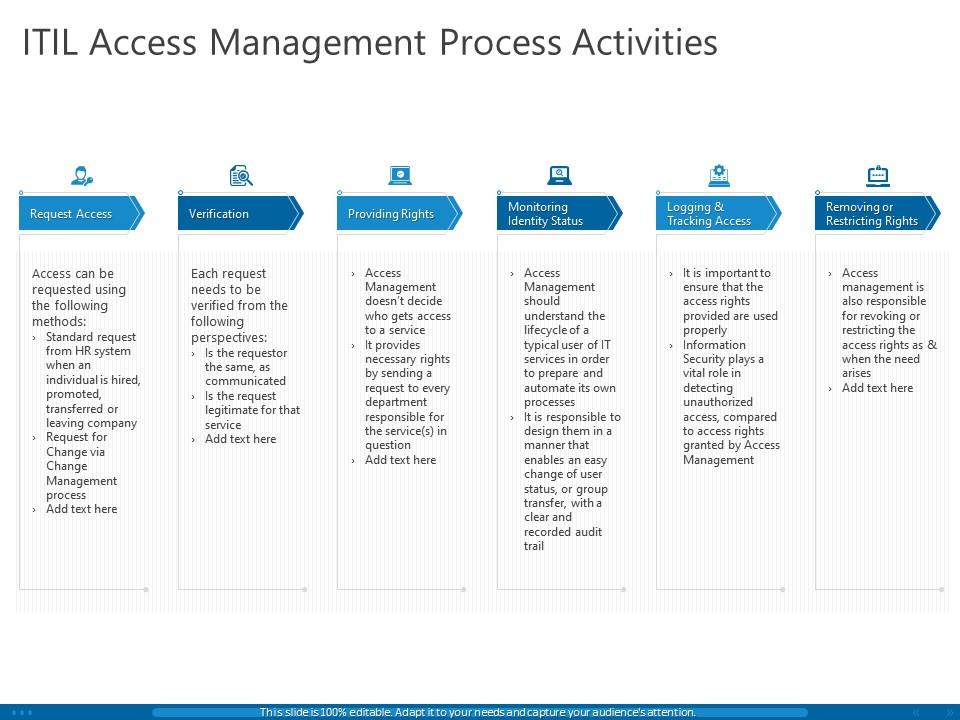
Itil access management process activities ppt powerpoint presentation infographics
Try Before you Buy Download Free Sample Product
Audience
Editable
of Time
Examine areas that grab your interest with our ITIL Access Management Process Activities Ppt Powerpoint Presentation Infographics. Discover avenues to invest.
People who downloaded this PowerPoint presentation also viewed the following :
Itil access management process activities ppt powerpoint presentation infographics with all 2 slides:
Guide initial investors with our ITIL Access Management Process Activities Ppt Powerpoint Presentation Infographics. Give them information on handling finances.
FAQs for Itil access management process activities ppt
So basically you're the gatekeeper for all your company's digital stuff. Access Management is all about making sure the right people can get into systems they need while keeping everyone else out. Think of it like being a bouncer, but for software instead of clubs. You'll spend time adding new users, updating permissions, and cutting off access when people leave or change roles. The trick is not making it such a pain that employees hate you for it. Oh, and definitely map out what you're currently doing first - I bet you'll find some weird gaps nobody thought about before.
Dude, think of it like this - Identity Management is proving you're actually you (like showing your driver's license), while Access Management decides what you can do once they believe you. So Identity handles all the "who are you?" stuff - passwords, biometrics, whatever. Then Access kicks in and goes "okay cool, but you still can't get into the server room." It's kinda like having a gym membership vs. actually being allowed in the pool area, you know? Identity gets you through the front door, Access controls which doors open after that. Two totally different jobs but they work together.
Basically it starts with someone requesting access to whatever system they need. Then you verify who they are - standard identity stuff. Authorization comes next, which honestly gets messy fast with all those approval workflows flying around. After that's sorted, you grant them access and keep tabs on whether they still actually need it. Documentation is huge here since you'll want to track everything and do regular reviews. Oh, and monitoring their rights ongoing is pretty crucial too. It's one of those processes that seems simple but has a lot of moving parts once you dig in.
Track the basics first - time to provision/revoke access, violation counts, and audit compliance. User satisfaction matters too since grumpy employees will find workarounds. Here's something most people miss: monitor which access rights actually get used. So much dead access just sits there creating unnecessary risk. Security incidents tied to bad permissions are obviously critical. Don't go crazy trying to measure everything though - pick 2-3 metrics that actually move the needle for your situation. Regular access reviews help, but only if you're tracking whether people actually complete them.
So access control in SACM is all about who gets to mess with your configuration data. You don't want random people viewing, changing, or deleting stuff in your CMDB - that's a recipe for chaos. Role-based permissions work best here. Some folks get read-only access, others can update certain CIs, and maybe three people tops get admin rights. Honestly, I've seen too many places skip this step and regret it later. It connects to your change management too since you only want approved changes going through. Set up those controls early or you'll be cleaning up messes forever.
Yeah so access management and incident/problem management are pretty connected. Most access issues turn into incident tickets - like when someone can't get into a system they need. You'll start noticing patterns after a while, which is actually kind of interesting. Say five people suddenly can't connect to VPN - that's probably not five separate issues, right? That's when problem management needs to dig deeper and find the real cause. The trick is building solid provisioning processes upfront so you're not constantly firefighting. Honestly, those access-related tickets are great for spotting bigger systemic problems if you pay attention to them.
Start with identity federation and SSO - it'll save you so much headache later. RBAC is your friend here, but don't forget to audit regularly because cloud sprawl is real and honestly kind of sneaky. Set up automated provisioning workflows since doing it manually will drive you crazy once things scale up. Log everything (compliance teams love this stuff) and create alerts for weird access patterns. Oh, and treat your cloud access as part of your overall identity strategy rather than managing each service separately. Trust me on that last part.
Think of access management as your company's bouncer - it controls who gets into what systems and when. You want people to have just enough access to do their jobs, nothing more. Way too many places give everyone admin rights "just in case" which is honestly asking for trouble. It keeps logs of everything too, so when something goes wrong you can actually trace what happened. The cool thing is how it plays nice with your other security tools and identity systems. I'd start by auditing what access people currently have - you'll probably find some scary stuff that's been sitting there forever.
Most companies go with IAM platforms - Active Directory, Okta, SailPoint handle the user provisioning and role stuff. Single sign-on is huge too since nobody's remembering dozens of passwords (I sure wouldn't). Azure AD and Ping Identity are solid choices there. For the request side, you need something like ServiceNow or Remedy to track who's asking for what access. Honestly though, integration is where most places screw up. If your tools don't talk to each other well, you'll spend forever just trying to make them work together instead of actually doing your job.
So Access Management is like your safety net for compliance stuff. It tracks who's getting into what systems and when - auditors love seeing that kind of documentation. You'll get consistent processes for giving out permissions and taking them away too. Honestly, the automatic logging is probably the biggest win since regulations like SOX and HIPAA are super strict about access controls. I'd start by checking your current processes against what you actually need for compliance. You'll likely find some holes that need fixing, but at least you'll know where they are.
Honestly, the hardest part is usually getting everyone on board - IT teams hate changing processes they've done forever. Identity management gets messy fast too. You'll spend forever trying to make old systems play nice together when they were never meant to. Role definitions are a nightmare because what makes sense to accounting doesn't work for engineering, you know? Nobody wants to document their current chaos either, but you kinda have to map out the mess first. Can't fix what you can't see. Start there even if it looks terrible.
Dude, automating access management will save you SO much time. No more manually creating accounts or updating permissions every time someone joins or switches roles. Set up workflows that pull from HR data and handle provisioning automatically - honestly wish I'd done this years ago instead of drowning in tickets. You'll cut down on those annoying human errors too. The consistent policy application across systems is nice, but really it's about getting your life back. Start with whatever tasks you're doing over and over again. Those repetitive ones? Perfect candidates and you'll see the biggest impact there.
Track stuff like how long it takes to give/remove access, plus access violations and auto vs manual requests. Mean time to fix access problems is huge too. Oh, and rejected requests due to missing info - users hate that shit. Compliance audit scores matter obviously. User satisfaction is key though - if they're pissed, you're doing something wrong. Weekly dashboards work best for spotting trends. You'll catch issues before they snowball into major fires. Also throw in some basic metrics around approval workflows since those always get messy.
RBAC is a game-changer for managing user access - it groups permissions by job roles instead of setting up each person individually. Think "Marketing Manager" or "IT Support" with pre-built permission sets. Way less headache than the manual approach, trust me. You'll speed up onboarding since new hires just get dropped into their role. Auditing becomes simple too because you can instantly see what each role accesses. Oh, and fewer mistakes since you're not constantly tweaking individual permissions. Start by listing your main job functions and what systems they need - builds a solid base for everything else.
Start with surveys and help desk tickets to see what's bugging people. Exit interviews are honestly your best bet though - people leaving will actually tell you the truth about what sucks. Track stuff like how long access requests take and how often they get rejected. Then match that up with satisfaction scores. Oh, and watch for patterns - like if everyone keeps asking for the same type of access over and over. The whole thing's pointless if you just collect feedback and never do anything with it.
No Reviews