Lead Generation Dashboard For Tracking Conversion Rates Improving Client Lead Management
Try Before you Buy Download Free Sample Product
Audience
Editable
of Time
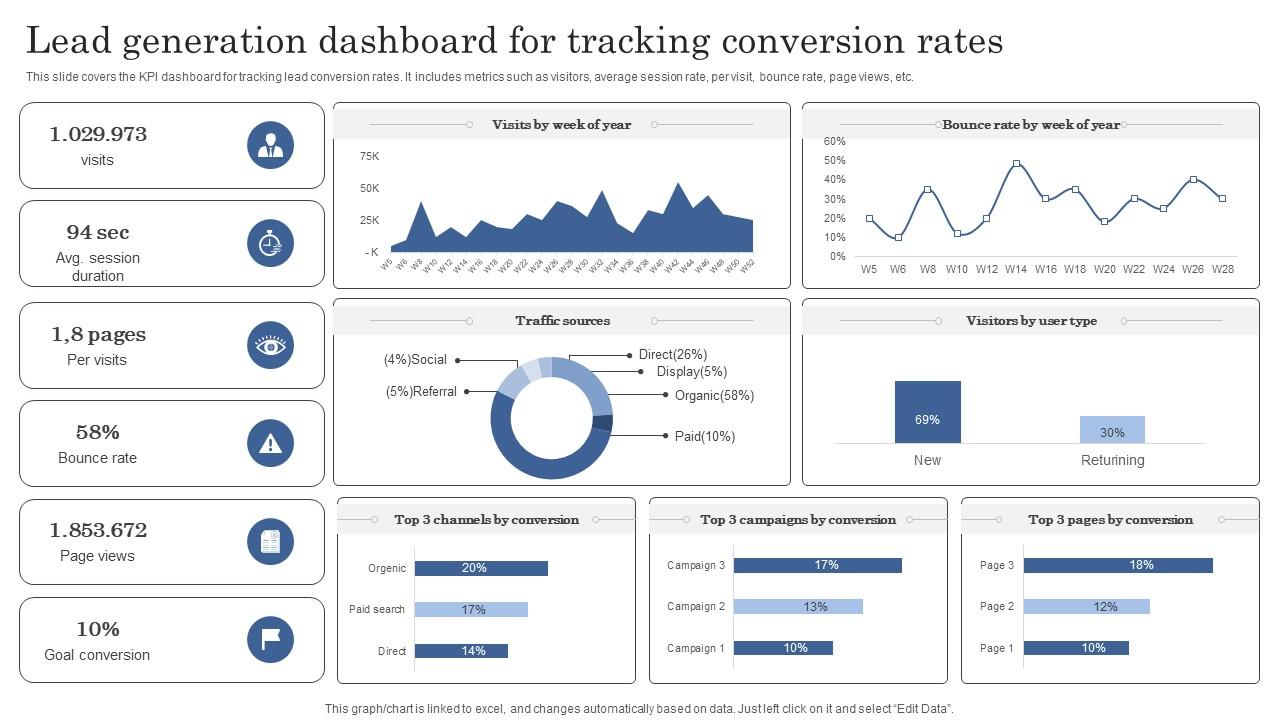
This slide covers the KPI dashboard for tracking lead conversion rates. It includes metrics such as visitors, average session rate, per visit, bounce rate, page views, etc.
People who downloaded this PowerPoint presentation also viewed the following :
Lead Generation Dashboard For Tracking Conversion Rates Improving Client Lead Management with all 7 slides:
Use our Lead Generation Dashboard For Tracking Conversion Rates Improving Client Lead Management to effectively help you save your valuable time. They are readymade to fit into any presentation structure.
FAQs for Lead Generation Dashboard For Tracking Conversion Rates Improving
Track your lead volume and conversion rates at each stage first - that's your foundation. Cost per lead and quality scores matter too. Honestly, lead source performance is huge because you'll waste so much money otherwise on channels that suck. Time-to-conversion shows how fast things move through your pipeline. Monthly recurring revenue from those converted leads? That's what actually matters to the business. Oh, and lead velocity - almost forgot that one. Start here, then add industry-specific stuff once you've nailed the basics.
Dude, seriously - charts and graphs will save your sanity here. Raw lead data is basically useless until you can actually see what's happening. I'd start with simple bar charts showing your lead sources, then add conversion funnels. Heat maps are clutch for catching where people bail out (way better than staring at spreadsheets for hours). You can spot trends instantly - like which channels actually work or when your conversions tank. Interactive dashboards are pretty sweet too since you won't need custom reports every time you want to dig into something specific. Those two basics alone will totally flip how you think about your whole approach.
Start with HubSpot or Salesforce - their APIs don't suck and they actually connect to stuff. Zapier's clutch for hooking everything together without coding (saved my ass so many times). Dashboard-wise, Tableau and Power BI are what everyone uses, but honestly? Google Data Studio does the job and won't cost you anything. Just make sure whatever you pick actually talks to your lead sources - learned that one the hard way. Map out where your leads come from first, then find a dashboard that already connects to most of them. Way easier than trying to force incompatible tools to work together.
Honestly, lead scoring is where you wanna start - it ranks people by engagement, company size, budget stuff. I always sort by score first, then hit up the "hot" leads who've been opening emails or checking out pricing pages. The recency filter is seriously clutch for catching warm prospects (I swear this changed my whole routine). Check that "intent signals" column too - shows who's actually researching solutions like yours right now. Here's what I do: make a custom view mixing high scores with recent activity, then just work through it top-down every morning.
Dude, automation is what saves your dashboard from turning into old garbage data. Your CRM, marketing tools, website forms - they all feed info automatically so you're not stuck updating spreadsheets like some cave person. Trust me, I've wasted entire mornings doing that nonsense. Half your day would disappear just keeping numbers fresh instead of actually calling leads. The system handles syncing, updates lead scores, and pings you when metrics hit your targets. Start with automated feeds from your main sources first. That's where you'll cut the most time and stop making those stupid manual errors.
Honestly? Every 15-30 minutes is perfect for lead gen dashboards. I mean, updating faster than that is just overkill - you'll drive yourself crazy watching every tiny change. But wait too long and those hot leads go cold while you're not paying attention. Most teams I know get obsessed with checking every few minutes, which is kinda pointless unless you're running massive campaigns. Twenty minutes hits that sweet spot where you catch important stuff without getting distracted by random fluctuations. Set it and forget it, then actually focus on following up with the leads you're getting.
Track your organic search, paid ads, social media, email, referrals, and direct traffic first. Those are your bread and butter. If you do webinars or trade shows, add those too - honestly webinars convert way better than people think. Break out each social platform separately since Instagram and LinkedIn perform totally different. Same with ad networks. The trick is getting UTM tracking set up properly from day one, otherwise you're flying blind. Content downloads are huge for B2B if that's your thing. Start basic and add more sources as you figure out what actually moves the needle.
Okay so segmentation is a game-changer - you take all your lead data and break it into groups that actually make sense. Like by where they came from, what industry, company size, how they behave on your site, whatever. Once you do this you'll see which channels bring in the good stuff vs the junk leads. I wish I'd started doing this way earlier honestly. You can spot which segments convert fast and where you're basically throwing money away. Don't overthink it though - just pick 2-3 segments your sales team cares about most and start there.
Dude, biggest thing is don't cram everything onto one screen - I've seen dashboards that look like NASA control rooms and they're useless. Pick like 5-7 metrics max to start. Conversion rates, lead sources, sales velocity - the stuff that actually moves the needle. Oh and this is huge - get everyone to agree on what counts as a "qualified" lead before you build anything. Seriously. Otherwise you'll have sales and marketing arguing over numbers that don't even mean the same thing. Start basic, then add more later once people actually use it.
Just hook your A/B test data straight into your dashboard - way easier than juggling spreadsheets. Track each variant separately so you can actually see conversion rates and cost per lead side by side. Honestly, nothing beats having that visual comparison right there. Set up different sections for your current tests vs historical stuff (your team will thank you later). The real game-changer is automating the whole data flow thing. No more weekly manual updates that nobody wants to do. Once you spot the clear winners, go all-in on those and ditch whatever's not working.
So basically, a lead gen dashboard stops your marketing and sales teams from constantly playing phone tag. Both sides can see which campaigns actually work and track lead scores as they happen. Marketing finally gets to see what happens after they hand leads off, and sales can give feedback that doesn't just disappear into the void. The trick is picking KPIs that both teams actually care about - not just vanity metrics. You'll want to review it together regularly to catch problems before they snowball. Honestly, it's one of those things that seems obvious once you have it set up.
Start with role-based access - only give dashboard permissions to people who really need them. SSL encryption for transmissions, plus encrypt your database too. I hate saying this, but you gotta do multi-factor auth even though it's a pain. Set up audit logs so you can see who's looking at what and when. For shared views, mask sensitive stuff like phone numbers and emails. Oh, and don't keep old lead data sitting around forever - create retention policies to clean house regularly. Honestly, if you nail the access controls first, that's where you'll see the biggest impact.
Look at your past data - it'll show you which channels actually bring in good leads versus the garbage ones. Check when your conversion rates are highest throughout the year (I totally missed our Q3 goldmine for way too long). Month-over-month comparisons are clutch for spotting patterns. See which content actually drives revenue, not just vanity metrics that make you feel good. Honestly, most campaigns look impressive on paper but do nothing for your bottom line. Find what's working and go all-in. Ditch everything else without mercy.
Okay so basically you want to give each team their own view with stuff that actually matters to them. Sales people want pipeline numbers and conversion rates. Executives just need the big picture ROI stuff. Marketing teams are obsessed with where leads come from and how campaigns perform - honestly they get way too into the weeds sometimes. But here's the thing: when people see metrics that relate to their actual job, they'll actually use the dashboard instead of ignoring it. Nobody wants to dig through a bunch of random data that doesn't affect them. Just ask each team what their top 3 metrics are and build from there.
Honestly, just ask your users what sucks about it. They'll tell you exactly what's broken - maybe the filters are garbage, or they can't find the metrics they actually care about. I've watched dashboards go from total disasters to genuinely helpful tools just because someone finally listened to people complaining about load times or confusing layouts. You could do formal feedback sessions if you're fancy, but even a basic feedback button works. The key is actually fixing what they mention instead of ignoring it. You'd be surprised how obvious the problems become once real users start poking around your dashboard daily.
-
They helped us design the pamphlets for our church’s food drive! The people loved the design, and I’m happy to say it was successful. Thank you, SlideTeam!
-
“I always have a wonderful experience with SlideTeam. It's my ""go to"" when I need a template.”