

Learning curve showing performance percentage attempts graph




Try Before you Buy Download Free Sample Product
 Impress Your
 Audience
 100%
100% Editable
 Save Hours
 of Time


Address intense emotions with our Learning Curve Showing Performance Percentage Attempts Graph. Ensure folks don't act immaturely.
People who downloaded this PowerPoint presentation also viewed the following :
Content of this Powerpoint Presentation
Description:
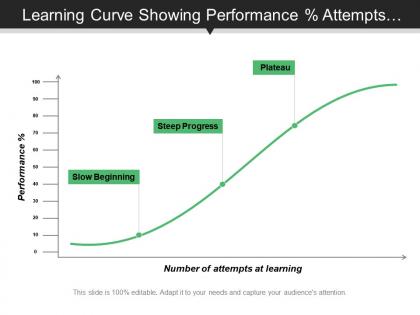
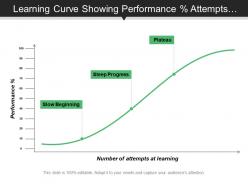
This image is a graphical representation of a typical learning curve, illustrating how performance improves with increasing attempts at learning a particular skill or task. The X-axis shows the number of attempts at learning, while the Y-axis shows the performance percentage. The curve is segmented into three labeled phases: "Slow Beginning," "Steep Progress," and "Plateau."
Use Cases:
The learning curve visualized here serves as a versatile tool for various industries to analyze and improve learning and performance outcomes.
1. Education:
Use: Analyzing student learning progression
Presenter: Teachers or educational consultants
Audience: Students, educators, or school administrators
2. Human Resources:
Use: Training program effectiveness assessment
Presenter: HR trainers or organizational development specialists
Audience: Employees or management teams
3. Healthcare:
Use: Evaluating clinician skill acquisition over time
Presenter: Medical educators or healthcare administrators
Audience: Medical staff or health service managers
4. Sports Coaching:
Use: Monitoring athlete skill development
Presenter: Coaches or sports psychologists
Audience: Athletes or sports teams
5. Manufacturing:
Use: Assessing worker proficiency in assembly or operation
Presenter: Production managers or process engineers
Audience: Factory workers or operational staff
6. Sales Training:
Use: Tracking salesperson skills improvement
Presenter: Sales trainers or team leaders
Audience: Sales representatives or sales teams
7. Software Development:
Use: Measuring programmer learning with new technologies
Presenter: Lead developers or IT project managers
Audience: Software developers or engineering teams
Learning curve showing performance percentage attempts graph with all 5 slides:
Ensure folks don't cross the boundaries with our Learning Curve Showing Performance Percentage Attempts Graph. It helps control the intensity.
FAQs for Learning curve showing performance
Honestly, three things matter most for learning curves. What they already know is huge - if someone's got the basics down, they'll fly through new stuff. Motivation's the real game-changer though. When people actually want to learn something, it's crazy how much faster they pick it up. Teaching style matters too. Some need visuals, others gotta get hands-on, some are fine with straight lectures. Mix it up based on what works. Quick tip - figure out what your students bring to the table first, then switch up your approach to keep different types engaged. Makes a massive difference.
Honestly, the learning curve thing is a game changer for presentations. People absorb info in stages, right? So start simple, then build up complexity - don't just vomit everything onto slide 1. I've sat through so many trainings where they lost me immediately because they went too deep too fast. Map out where your audience will probably hit walls or get confused. That's where you throw in extra examples or maybe a quick break. Makes a huge difference. Your people will actually remember stuff instead of just nodding along politely while their brain checks out.
Honestly, everyone learns stuff at totally different speeds depending on a bunch of factors. Your background knowledge makes a huge difference - like if you've done similar things before, you'll pick it up way faster. Plus people learn differently too. Some need to see it, others have to actually do it with their hands (I'm definitely more of a hands-on person). How motivated you are matters a ton, obviously. Same with how much time you can actually practice and whether you believe you can do it. Oh and don't stress about keeping up with other people - that's just gonna mess with your head. Figure out what clicks for you and just stay consistent.
Dude, try Otter.ai - it'll call out your "ums" and pacing issues in real time. Recording yourself is awkward but you'll catch stuff you never realized you do. Oh, and there are practice platforms that mimic actual Zoom meetings which is pretty cool. Some presentation software tracks when your audience gets bored (brutal but useful). Honestly? Don't overthink it. Pick one tool, practice 5 minutes daily instead of panicking before your next big meeting. Way better than cramming everything last minute.
Honestly, feedback is like having GPS when you're learning something new. You know exactly what you're doing wrong instead of just wandering around hoping for the best. I used to practice guitar for months thinking I was nailing it - turns out my timing was completely off lol. The trick is getting specific feedback, not just "nice work!" Tell me exactly what sucked and how to fix it. Otherwise you end up practicing the same mistakes until they're stuck in your brain. I always ask my coworkers to tear apart my presentations now. Way better than finding out during the actual meeting that nobody understood what I was talking about.
Okay so first thing - get your baseline measurements down before you do anything else. I usually check progress weekly or every two weeks using the same criteria each time. Pre and post assessments are clutch, but honestly don't ignore the observational stuff and participant surveys either. You need to measure the same skills repeatedly or you won't actually see if things are improving or plateauing. Document literally everything because you'll forget the small changes otherwise - trust me on this one. Start with maybe 3-4 key indicators instead of going overboard trying to track everything at once.
So here's the deal with learning curves - people are gonna struggle at first, then get better. Start with tons of hand-holding and micro-lessons, then back off as they improve. The annoying thing is everyone learns differently. Some fly through basics while others need to sit with fundamentals forever (honestly, I'm the second type). Build checkpoints so fast learners can skip ahead and slower ones can circle back for more practice. Adaptive paths work way better than forcing everyone through the same sequence. Test their progress and let the data decide what they see next.
Honestly, just make different versions for different skill levels. Give beginners the hand-holdy ones with prompts and pre-filled stuff. Intermediate gets some helper text they can ignore if they want. Advanced people just get the bare bones framework - they'll figure it out. We totally screwed this up at first. Our newbies were drowning in these crazy complex templates meant for experts! Now I always add those toggle features so people can dial up or down the complexity. Label everything super clearly though - nobody wants to feel dumb picking the "beginner" option. Start by looking at what trips people up most in your current templates.
Mix up how you teach so everyone can jump in - some kids need visuals, others learn by doing stuff with their hands. Honestly, the pacing thing is what makes the biggest difference. Quick learners can work on harder projects while others nail down the basics first. I'm always doing little check-ins to see who's getting it and who needs help. Strategic group work is clutch too - pair kids who complement each other. Oh, and don't try everything at once or you'll lose your mind. Pick maybe two strategies and see how they work first.
Okay so you know how learning anything new feels impossible at first? That's just how it works. You start super slow, everything's confusing, then suddenly it clicks and you improve crazy fast. After that though, you kind of plateau once you get good at it. When you're starting a new job or role, those first few weeks are gonna suck - I'm not gonna lie. But push through because that's when the real progress happens. Honestly, I wish more managers understood this pattern and actually helped people during that brutal beginning phase instead of just throwing them in the deep end.
Oh totally, visuals make such a huge difference! Your brain just clicks with images way faster than walls of text. I watched this one presentation where the guy threw up a simple flowchart and suddenly everyone got it - saved him from rambling for like 10 minutes. They're perfect for showing how things connect or explaining processes that sound confusing when you just talk through them. Data trends too, obviously. Just don't go crazy with them though. Keep it simple and use them to back up your main points, not distract from them. You'll see the difference right away.
Honestly, working with others on presentations is a game-changer because you get everyone's different skills mixed together. Like, maybe Sarah's amazing at design but can't tell a story to save her life, while you're the opposite. You'll pick up her tricks way faster than trying to figure out Photoshop alone (trust me on this one). Real-time feedback is huge too. Bouncing ideas back and forth beats sitting there second-guessing yourself for hours. Just make sure everyone actually contributes instead of letting one person carry the whole thing. Give people roles that match what they're good at, then switch it up so everyone learns something new.
So there's actually some solid research behind this stuff. Cognitive Load Theory explains why that initial steep curve happens - your brain literally can't handle too much new info at once. Makes sense, right? Adults also learn differently than kids (there's a whole theory called Andragogy about it). We're more self-directed and want to solve actual problems, not just memorize random facts. Social Learning Theory backs this up too - you learn way better when you can watch others and get real feedback. I mean, that's probably obvious from your own experience. Bottom line: build training that starts simple and gives people chances to learn from each other.
Stories just hit different, you know? Your brain latches onto that whole beginning-middle-end thing way better than random facts thrown at you. People connect new stuff to patterns they already know - like problem/solution or cause/effect. I swear the retention is crazy good when you do this. Plus emotions keep people locked in instead of zoning out when things get technical. Oh, and the narrative thread makes complex info actually digestible. Next time try building your whole presentation around a customer's journey or some case study. Works every time.
Honestly, the worst myth is thinking everyone learns at the same speed. Total BS. People also assume you'll always struggle hard at first then get better, but some skills are weird - you cruise along then BAM, suddenly it clicks or gets brutal. Oh, and struggling doesn't mean you suck at something. Plateaus happen to literally everyone (I felt like an idiot for weeks during my coding bootcamp). For your training stuff, just be realistic with timelines. Make struggle seem normal because it is. And do frequent check-ins instead of one massive test at the end.
-
Easy to edit slides with easy to understand instructions.
-
Helpful product design for delivering presentation.