

Linear sequential timeline with years powerpoint slides





Try Before you Buy Download Free Sample Product
 Impress Your
 Audience
 100%
100% Editable
 Save Hours
 of Time


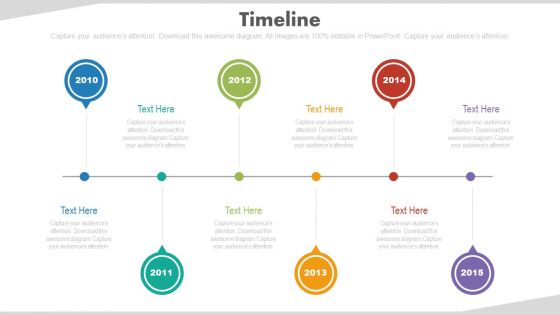
Download our linear sequential timeline with years PowerPoint slide and educate your audience with snapshot of business activities and milestones of your organization’s growth. This linear sequential timeline with years PPT layout will help you outline your business plans, address queries of investors and also illustrate year wise progress of your project. This creative timeline PowerPoint template has been designed by our dedicated resources to help you demonstrate authoritative PPT slides. With the help of this business plan timeline slide, you can write narrative of your business in a chronological order and also project different stages business has passed from. This PowerPoint timeline graphic will help you assess timeframe of your business end goals and will facilitate you to keep track of the activities of the business. This multicolored timeline based PPT layout can be an essential tool in managing tasks to reach your goals and to determine the feasibility of targets and upcoming costs. This presentation deck will help you in visualizing long term events with a breakdown of achieved milestones with target dates. Create the perfect timeline to highlight your business accomplishments. Our creative and proficient designing team has created this masterpiece for you. Business development relies on the support of stakeholders and team work. Our presentation template slide enables you to share the business journey with your partners and colleagues. You can show them as from where you started as an organization and what all has been achieved in the past years. The roadmap templates PPT diagram show the six-year timeline from 2010 to 2015 which you can easily edit as per your requirements. Apart from this, you may use it to let you understand the importance of meeting the deadlines to ensure customer satisfaction. If you can deliver what you have promised, then your customer will surely show interest in your organization. Every decision needs to be taken after complete research and analysis. So, take the correct decision by downloading the PPT template slide in your presentation and then share it with your audience. Our Linear Sequential Timeline with Years PowerPoint Slides get the adrenaline gushing. The desire to achieve will grow big fast.
People who downloaded this PowerPoint presentation also viewed the following :
Linear sequential timeline with years powerpoint slides with all 4 slides:
Ensure expansive coverage with our Linear Sequential Timeline With Years Powerpoint Slides. Function on a broader bandwidth.
FAQs for Linear sequential timeline with
Start with chronological flow - events should move left to right or top to bottom. Don't cram text everywhere since timelines get messy quick (trust me, squinting at tiny fonts sucks). Your visual elements need consistency - same shapes, colors, spacing between milestones. Otherwise it'll look like a hot mess. Make dates clearly visible and spaced out properly. Icons help make key events stick in people's minds. Oh, and definitely check how it looks on a smaller screen before presenting - I've seen too many timelines that become unreadable when projected.
Honestly, visuals beat boring date lists every time. Your audience will actually remember stuff when you use consistent colors and icons that tie to each milestone. I always stick to 2-3 colors max - looks way cleaner that way. The trick is creating some kind of visual thread throughout, like maybe an evolving image or character that moves through time with your story. People can follow cause-and-effect way better this way. Trust me, nobody's falling asleep during your presentation when there's actual visual flow instead of just bullet points and dates.
Honestly, stick with high contrast colors that naturally pull your eye left to right. Blue and white is solid - clean and professional looking. Dark backgrounds with bright pops work amazing too (navy + orange is *chef's kiss*). You don't want everything blending into mush like I see all the time! Keep it simple: main color for the timeline itself, contrasting shade for big events, maybe something subtle for extra text. That's it. Oh and make sure each point stands out clearly - nobody wants to squint at your presentation trying to figure out what's what.
So basically, animation keeps people actually paying attention instead of just staring blankly at your slide. When stuff appears step-by-step, you're controlling how they process the info - no brain overload from seeing everything dumped at once. Movement grabs eyeballs way better than static text (obviously). The sequential reveals really help show chronological relationships too. I'd stick with simple fade-ins or slides from the left though - those spinny, bouncy effects are just distracting and honestly kind of annoying. Your content should be the star, not your PowerPoint skills.
Oh man, I've seen so many bad timelines! First thing - don't cram everything together or use tiny text blocks. Your audience will just zone out. Space is your friend here. Keep your dates consistent too (pick one format and stick with it), and honestly? Go chronological. I know it seems obvious but people mess this up constantly. Use the same colors and fonts throughout - looks way cleaner. Here's my test: could someone understand your timeline without you explaining it? If not, cut more stuff out. Less is definitely more with these things.
Icons are super helpful for timeline stuff - they make it way easier to scan through events quickly. Just make sure they actually match what you're talking about (lightbulb for new ideas, calendar for dates, whatever makes sense). Size and style should stay consistent, though I swear half the timelines I see online look like someone just grabbed random icons from different websites. Images can work too but honestly? Use them sparingly or things get messy fast. Only put them on the really big milestones. Oh, and keep your colors consistent - it makes everything look more polished and helps people follow along better.
Look for shape formatting and color tools first - that's what'll make everything match your brand. Text editing is huge since you're always swapping content. Animation stuff is nice for revealing things step by step, but honestly I've seen way too many people go crazy with transitions and lose their audience. Oh, and make sure you can duplicate elements easily - such a timesaver. Drag-and-drop is clutch when you're moving milestones around. Being able to group objects together helps when you need to shift whole sections too.
Yeah, so timelines work differently depending on who you're dealing with. Tech companies are obsessed with showing product roadmaps and feature releases. Consulting firms map out project phases for clients. Healthcare tracks patient treatments, manufacturing does production workflows - you get the idea. Finance teams are probably the worst offenders though, they timeline literally everything from quarterly reports to budget cycles. It's kind of overkill honestly. But here's the thing: executives want high-level milestones only. Operational teams? They need the nitty-gritty dates and dependencies. Just match your style to whoever's reading it.
Honestly, typography can make or break your timeline. Different font sizes help people instantly know what they're looking at - like making dates bold and event titles bigger than the details underneath. I'd stick to maybe 2-3 fonts max though, otherwise it gets messy fast. The whole point is someone should be able to scan it in 10 seconds and get the gist. I've definitely seen timelines where everything's the same size and... yeah, good luck following that mess! Oh, and colors help too - even just using one accent color for dates makes a huge difference.
Totally depends on your audience! Executives want the bare minimum - just hit the major milestones with clean visuals. They're busy and honestly don't care about your process details. Technical folks are the opposite though - they actually want all the granular stuff and detailed notes. For clients, focus on what matters to them (outcomes, not your internal chaos). Oh and age matters too - younger crowds dig dynamic visuals while older audiences usually prefer straightforward layouts. Just match your timeline's complexity to who's sitting across from you. Dense info for tech people, streamlined for suits.
Oh there's tons of ways to do this! Mini bar charts or line graphs work great next to specific timeline dates. You could also stick small pie charts right into the timeline nodes, or use color-coded data points that match your theme. Sometimes I'll put charts above or below the timeline points instead. Progress bars are cool too - especially for showing growth over time. Just don't go crazy with it or you'll mess up the chronological flow. Honestly, start simple with one chart type first. Once that looks good, then you can get fancier with it.
Yeah, break your timeline into separate slides that can work on their own. Mix up the order however makes sense for your story - start with the big moment, then flash back to how it all began. Way more interesting than just going A to B to C, honestly. Color code different themes or add icons so people can follow along when you jump around. Oh, and make sure each slide has enough context that it still makes sense if someone zones out for a second. I do this constantly and it's such a game changer for keeping people engaged.
Your timeline needs those big milestone moments - they're what make everything click for people watching. Random dates without context? Totally meaningless. It's like trying to follow directions when someone just says "turn left" without mentioning the gas station or whatever. Key events show how one thing led to another and help your audience see the actual story unfolding. Honestly, most timelines I see are way too cluttered with tiny details that nobody cares about. Stick to the stuff that actually mattered - the moments that changed the game or shifted everything in a new direction.
Honestly, less is more with timeline design. Stick to 2-3 colors max and one clean font - I've seen way too many that look like a rainbow exploded on them! Make the flow super obvious, left to right or top to bottom. Don't cram everything together either; white space actually helps people follow along. Keep your text short and use different font sizes so the important stuff pops. Oh, and here's a random tip - stand at the back of the room when you're done. If you can't read the key dates from there, nobody else will be able to either.
Timeline presentations are tricky - you really need to nail those transitions between time periods. Like going from "1995" to "2010" can feel super choppy if you don't connect them smoothly. I always bomb this part initially, honestly. Don't rush the early stuff either or you'll run out of time for the recent developments (learned that the hard way). Record yourself at least once to catch weird pauses. Run through it with your actual slides three times minimum. The whole thing should feel like you're telling a story, not just listing dates.
-
The content is very helpful from business point of view.
-
Visually stunning presentation, love the content.