

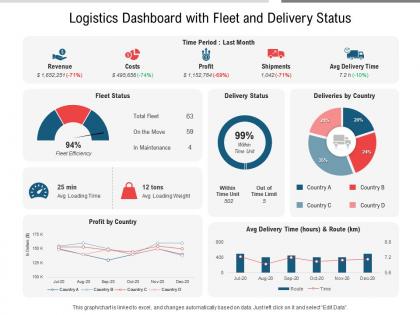
Logistics dashboard with fleet and delivery status




Try Before you Buy Download Free Sample Product
 Impress Your
 Audience
 100%
100% Editable
 Save Hours
 of Time


Our Logistics Dashboard With Fleet And Delivery Status are topically designed to provide an attractive backdrop to any subject. Use them to look like a presentation pro.
People who downloaded this PowerPoint presentation also viewed the following :
Logistics dashboard with fleet and delivery status with all 2 slides:
Use our Logistics Dashboard With Fleet And Delivery Status to effectively help you save your valuable time. They are readymade to fit into any presentation structure.
FAQs for Logistics dashboard with fleet
Start with the basics that actually matter: on-time delivery rates, shipping costs per package, and how fast you're moving inventory. I'd skip the fancy stuff for now - seen too many people get lost in metrics that look cool but don't help when things go sideways. Throw in capacity utilization and order accuracy too. Your dashboard should basically scream at you when something's broken or costing money. Carrier performance scores are clutch if you're working with multiple partners. Six solid metrics beats twenty confusing ones every time. You can always add more later once you figure out what you're actually missing.
Dude, real-time data is so much better than staring at yesterday's numbers. When stuff changes - like a shipment gets delayed or inventory runs low - you see it instantly on your dashboard. That means you can actually do something about it right away instead of scrambling to fix problems later. Honestly, the difference is huge. You can reroute drivers on the spot, give customers a heads up, whatever needs doing. My advice? Figure out what changes most often in your business first. Those are the things worth tracking live. It's way better than playing catch-up all the time.
Dude, visualization totally changes the game with logistics data. You can spot delivery bottlenecks and seasonal trends instantly instead of drowning in boring spreadsheets. Heat maps work great for routes, line charts for tracking stuff over time. Real-time dashboards are clutch - they'll catch issues before everything goes sideways. Honestly, nobody wants to manually comb through thousands of shipping records looking for patterns. It's like trying to find a needle in a haystack, except the haystack is made of numbers and your eyes are bleeding.
So basically you'll want to set up different user profiles with custom permissions for each role. Managers need the big picture stuff - KPIs, cost breakdowns, performance trends for making those strategic calls. Meanwhile, your operators are focused on real-time tracking, delivery alerts, route details, all that operational nitty-gritty. Most dashboard platforms are pretty flexible about this. You can configure different homepage layouts and widgets for each user type. Honestly, the key is just figuring out what each person actually needs to get their work done first. Then build their view around those specific tasks and workflows.
Most logistics dashboards use BI tools like Tableau or Power BI for the front-end stuff. Custom web apps with React work too if you need something specific. The tricky part? Data integration from your WMS, TMS, and ERP systems - that's where things get complicated fast. Tools like Informatica help clean up all the messy warehouse data. Some teams just build custom Python dashboards with Plotly instead. Power BI's probably your best bet if you're already using Microsoft products. Works well for tracking logistics KPIs without being a total pain to set up.
So predictive analytics is pretty cool - it takes all your old shipping data and spots patterns to forecast when demand's gonna spike or when trucks might break down. You get alerts about route jams and inventory running low before it actually happens. Way better than finding out about problems when it's too late, you know? I'd honestly start small though - pick whatever's driving you crazy most, like late deliveries or running out of stock. Set up alerts for just those things first. The whole "seeing bottlenecks three days ahead instead of scrambling last minute" thing is actually huge for logistics.
Put your critical stuff first - delivery performance, inventory levels, any alerts screaming for attention. Don't create data soup (seriously, I've seen dashboards that look like someone threw metrics at a wall). Group related KPIs together and stick with consistent colors for status updates. Most important info should be visible right away - no scrolling required. Actually test this with real users first though. What clicks for you might totally confuse them. Oh, and leave some breathing room with white space. Dense dashboards just stress people out.
Honestly, these dashboards are game-changers for supply chain stuff. You get to see everything happening in real-time - shipment tracking, inventory levels, supplier performance, the works. No more awkward calls asking "um, where's our order?" because everyone's looking at the same info. Bottlenecks become way easier to spot before they screw you over. Plus you'll have all this historical data sitting there for audits or when customers inevitably ask what went wrong three months ago. My advice? Figure out your most critical metrics first and build around those. Don't try to track everything right away or you'll just get overwhelmed.
Oh man, data integration is gonna be your worst enemy. All your logistics stuff lives in different places - WMS, TMS, ERP systems that hate talking to each other. Plus good luck getting anyone to ditch their precious Excel sheets for something new. Everyone's gonna want their own special metrics on the dashboard too, which gets messy fast. Honestly though? Just pick one process to start with and maybe 3-4 key metrics max. Once people see it actually works and saves them time, they'll stop fighting you on it. Trust me on this one.
Your logistics KPIs should actually connect to what matters for your business. Trying to cut costs? Track transportation spend per unit and warehouse efficiency. More focused on keeping customers happy? Watch on-time delivery and order accuracy rates. Revenue growth is the priority? Then inventory turnover and supply chain velocity are your friends. Honestly, too many companies just measure random stuff because it's convenient. Start with what outcomes your logistics team can realistically influence. Build the dashboard around those specific metrics instead of cramming in everything you can track.
Honestly, cloud dashboards are a game changer for getting everyone on the same page. Your warehouse folks can see the same live inventory data as customer service – no more "let me check and get back to you" nonsense. Everyone gets real-time shipping updates and can actually collaborate instead of playing email tag all day (which, let's be real, nobody enjoys). You can comment on shipments, set up alerts, assign tasks right in there. The tricky part? Getting your team to actually use it consistently. I'd start small – maybe pick one project to prove it works, then expand from there once people see how much easier their lives get.
Honestly, user training is what makes or breaks your logistics dashboard. People will either ignore it completely or read the data wrong - happens way more than you'd expect. Short, role-specific sessions work way better than some boring generic overview for everyone. Show them how each feature connects to what they actually do daily, not just button-clicking tutorials. Once your team gets how to read metrics and spot trends, they'll stop treating it like decoration. Then you'll see real decisions instead of people just nodding at colorful charts.
So basically you get this real-time view of your whole supply chain - transit times, inventory, carrier stuff, all that. Pretty handy honestly. When things get stuck (and they will), you'll catch it early instead of waiting for angry customers to call. The dashboard flags weird patterns too, like if one warehouse keeps screwing up deliveries or certain routes are consistently slow. Then you can actually dig into why it's happening and fix it. Way better than just putting out fires all day, which gets exhausting fast.
Start with role-based access - warehouse folks only see ops data, executives get everything financial. Skip emailing screenshots (they're like digital herpes, spread everywhere). Use expiring share links instead. Two-factor auth is annoying but do it anyway. Mask sensitive supplier costs when sharing with external partners. Honestly, audit logs are clutch for tracking who touched what data. The access controls thing will give you the biggest bang for your buck security-wise, so tackle that first.
Honestly, logistics dashboards are a game-changer for compliance stuff. They pull data from your TMS, WMS, whatever systems you've got running and track everything in real-time - delivery times, temp logs, safety incidents. Then they just spit out the reports regulators need without you having to dig through a million spreadsheets. You can even set alerts when things go sideways. I'd start by figuring out which regulations are giving you the biggest headache (probably the ones with the steepest fines, let's be real), then build your dashboard views around those first. Way less stressful than scrambling at month-end.
-
Easily Editable.
-
Graphics are very appealing to eyes.