Office timeline with decide budget site check wrap up conference
Try Before you Buy Download Free Sample Product
Audience
Editable
of Time
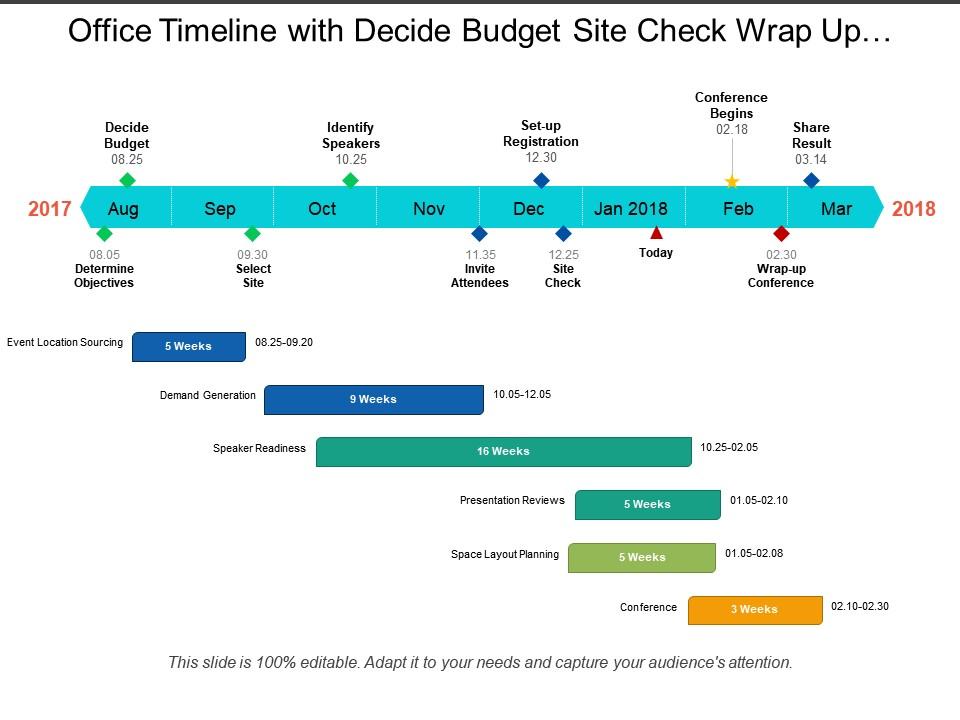
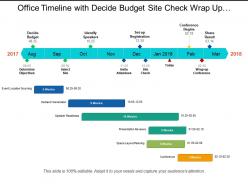
The office timeline meeting PowerPoint template is a perfect template to illustrate the discussion points of a successful conference. The conference timeline presentation slide helps a user to provide a visual insight of meeting in progress. The business conference PPT template is very useful in delivering topics, for example, teamwork, behavior, guidelines or problem solving as well as decision-making situation. Office meeting timeline slide is productive in a variety of business presentations such as board meeting guidelines, organizational internal meetings, brainstorming innovative ideas, etc. The graphical illustrations of this business convention PowerPoint template help in the increasing interest of the audience. The main objective of budget wrap up meeting presentation slide is to deliver a message across, in less time while making sure that viewers understood its objective. The use of flat vector shapes in office timeline with decide budget PPT slide in the presentation makes it easy to deliver views with maximum visual content. The online meetings, seminars can take benefit of this business meeting template. The business timeline convention design slide helps in describing various topics such as decide budget, determine objective, select site, identify speakers, invite attendees, site in check, set up registration, conference begins, wrap up conference and other topics that discussed in the conference. Benefit from goodwill with our Office Timeline With Decide Budget Site Check Wrap Up Conference. Folks will extend a friendly hand.
People who downloaded this PowerPoint presentation also viewed the following :
Office timeline with decide budget site check wrap up conference with all 5 slides:
Discard insubstantial evidence with our Office Timeline With Decide Budget Site Check Wrap Up Conference. Build your case on concrete facts alone.
FAQs for Office timeline with decide budget site check
Office timelines enhance project management by providing visual clarity, improving resource allocation, facilitating milestone tracking, and enabling better stakeholder communication throughout project lifecycles. These strategic tools streamline coordination across teams, departments, and external partners, with many organizations finding that comprehensive timeline visualization reduces delays, minimizes miscommunication, and ultimately delivers more predictable project outcomes and enhanced operational efficiency.
Office timelines enhance team collaboration by providing shared visibility into project phases, deadlines, dependencies, and individual responsibilities, creating unified understanding across departments. Through visual project mapping, teams coordinate handoffs more effectively, anticipate bottlenecks, and align resource allocation, with many organizations finding that timeline transparency reduces miscommunication and accelerates project delivery.
Key elements for an effective office timeline presentation include clear project milestones, defined deadlines, resource allocation details, responsible team members, and progress indicators. These components enhance project visibility by streamlining communication, minimizing scheduling conflicts, and enabling proactive planning, with many organizations finding that comprehensive timeline presentations ultimately deliver improved accountability and faster project completion rates.
Different industries utilize office timelines based on their operational requirements, with healthcare focusing on patient care schedules, manufacturing tracking production cycles, financial services managing regulatory deadlines, and retail coordinating seasonal campaigns. These sector-specific approaches enable organizations to streamline workflows, enhance resource allocation, and maintain compliance standards, ultimately delivering improved efficiency and competitive advantage in their respective markets.
Common mistakes include unrealistic deadlines, insufficient buffer time, overlooking dependencies between tasks, inadequate stakeholder consultation, and failing to account for resource constraints. Many organizations find that overly optimistic scheduling, poor communication protocols, and lack of regular timeline reviews ultimately lead to project delays, budget overruns, and reduced team productivity, while proper timeline management enhances operational efficiency and delivers better business outcomes.
Digital tools improve office timeline efficiency by automating scheduling, enabling real-time collaboration, providing drag-and-drop interfaces, offering template libraries, and integrating with project management systems. These platforms streamline timeline creation through instant updates, resource allocation tracking, and milestone visualization, with many organizations finding that automated features reduce timeline development time while enhancing accuracy and team coordination.
Design transforms office timelines into compelling visual narratives through strategic color coding, clear typography, balanced whitespace, and intuitive layout structures that guide the eye naturally. These visual elements enhance comprehension and engagement, with many organizations finding that well-designed timelines improve stakeholder communication, streamline project understanding, and ultimately deliver more effective presentations that drive decision-making and maintain audience attention throughout complex project discussions.
An office timeline demonstrates project milestones to stakeholders by providing visual clarity of key deliverables, deadlines, and progress checkpoints in a format that's easily understood and tracked. Through clear milestone markers and progress indicators, stakeholders can quickly assess project status, identify potential bottlenecks, and make informed decisions, ultimately enhancing transparency and accountability across the organization.
Comparing multiple project timelines side by side enables better resource allocation, identifies scheduling conflicts, reveals dependencies between projects, and highlights potential bottlenecks across portfolios. This strategic approach streamlines project management by facilitating informed decision-making, optimizing team utilization, and ensuring deadline alignment, with many organizations finding that visual timeline comparison ultimately delivers enhanced operational efficiency and competitive advantage.
Office timelines enhance resource allocation by providing clear visibility into project phases, task dependencies, and resource requirements across multiple initiatives simultaneously. Through strategic timeline planning, organizations can identify potential conflicts, optimize team utilization, and redistribute resources proactively, ultimately preventing bottlenecks while ensuring optimal productivity and project delivery schedules.
Effective ways to update office timelines include implementing version control systems, establishing regular review cycles, creating buffer periods for scope adjustments, using collaborative project management tools, and maintaining clear change documentation protocols. These approaches streamline timeline modifications by enabling real-time updates, facilitating stakeholder communication, and preserving project momentum, with many organizations finding that structured change management processes ultimately deliver greater project flexibility and reduced deadline stress.
Color coding in office timelines enhances clarity by creating visual distinctions between project phases, team responsibilities, priority levels, and milestone categories, enabling instant recognition of critical elements. This strategic approach streamlines project tracking, reduces miscommunication across departments, and accelerates decision-making processes, with many organizations finding that color-coded systems significantly improve team coordination and deadline management.
Key performance indicators for office timelines include milestone completion rates, budget adherence, resource utilization efficiency, stakeholder satisfaction scores, and deadline variance percentages. These metrics enable project managers to identify bottlenecks, optimize resource allocation, and maintain accountability, with many organizations finding that consistent tracking ultimately delivers improved project outcomes and enhanced operational transparency.
An office timeline facilitates better communication by providing shared visibility into project schedules, milestone dependencies, and resource allocation across departments. This transparency enables teams to coordinate handoffs more effectively, anticipate bottlenecks, and align their workflows with organizational priorities, ultimately reducing miscommunication and enhancing cross-functional collaboration in increasingly complex business environments.
Creative formats for presenting office timelines include interactive digital dashboards, animated video presentations, infographic-style visuals, milestone celebration boards, and story-driven narrative presentations. These approaches enhance audience engagement by combining visual storytelling with data visualization, enabling organizations to showcase company evolution, project progress, and strategic achievements more memorably, ultimately delivering stronger stakeholder communication and improved organizational transparency.
-
Amazing product with appealing content and design.
-
Easy to edit slides with easy to understand instructions.