Online learning roadmap ppt slide
Try Before you Buy Download Free Sample Product
Audience
Editable
of Time
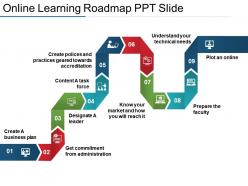
Our team of expert designers have compiled this excellent info graphic slide based on Online Learning Roadmap PPT Slide. A transition from the old to the new is hard and so is adapting to the novel concept of e-learning. In order to tackle this situation well, we have this PowerPoint template wherein you can present all the aspects involved on the path of internet based education in a step – by – step sequence. The template covers nine stages such as identifying a business plan, consent from the administration, appointing leaders, getting a task force, creating strategies, technical requirements, market research, arranging faculty and going online with high – quality content. This PPT design uses exclusively designed icons which make it visually attractive and will help you captivate your audience. The bright colors used in the roadmap slide give distinction to each step. So, click the button and download this PPT template. Our Online Learning Roadmap Ppt Slide enable access to the facts. You won't have to make a guess.
People who downloaded this PowerPoint presentation also viewed the following :
Online learning roadmap ppt slide with all 5 slides:
Bargain confidently with our Online Learning Roadmap Ppt Slide. Be assured of having all the information at hand.
FAQs for Online learning
You definitely need solid learning goals and a timeline with actual deadlines - trust me, without those people just procrastinate forever. Mix up your content too, like videos, readings, quizzes, whatever keeps it interesting. Build in checkpoints so you can see how everyone's doing. Some folks learn faster than others, so leave room for that. Honestly, the interaction part is huge even though it's online. People still want to feel connected somehow. Oh, and have tech support ready because someone's always gonna have WiFi issues or can't figure out how to submit assignments. Start with your end goal and work backwards - makes the whole thing way easier to organize.
Honestly, roadmaps are game-changers because students can actually see where they're headed instead of wandering around confused. Break your content into bite-sized chunks with clear milestones - like those progress bars in video games that keep you hooked. Students stay way more motivated when they can track wins and see how everything fits together. You can throw in interactive stuff and group work at smart spots too. Oh, and real-world examples help tons. Start with your main learning goals, then work backwards to create those checkpoint moments that actually matter.
Think of learning objectives like your GPS for course design. Without them, your content becomes a hot mess - modules jumping around randomly, activities that don't connect. I've watched so many courses fall apart this way. Write 3-5 specific, measurable objectives before you touch any content creation. They'll show you exactly how to sequence everything and what activities actually make sense. Plus your learners won't be sitting there confused about what they're supposed to get out of it. Honestly, it's the difference between a course that works and one that just... exists.
So you'll need both the hard data and the soft stuff to know if it's actually working. Completion rates, assessment scores, time-to-competency - that's your numbers side. But honestly? Student feedback and what instructors are seeing day-to-day might tell you more. Also watch engagement - are people actually participating in discussions, using the resources? I'd do check-ins monthly or quarterly where you look at everything together. Oh, and definitely don't wait until semester's over to figure out something's broken. That's just painful for everyone.
Set up review sessions every 2-3 months to see what's actually working. Build your roadmap in chunks instead of rigid steps - makes it way easier to pivot when things change (and they will). Honestly, tracking engagement and feedback is huge because it tells you when content's falling flat before it's too late. Always pad your timeline though. Something unexpected always pops up. I learned this the hard way on my last project. Your roadmap should flex with you, not trap you into bad decisions. Schedule that first review now while you're thinking about it.
Honestly, tech makes building a learning roadmap way easier than doing it all manually. AI tools can spot your skill gaps and suggest paths that actually match what you're trying to achieve. Progress tracking through learning platforms is clutch - no more wondering if you're actually getting anywhere. The analytics part is pretty cool too since it shows exactly which topics are kicking your butt. Then you can pivot your plan instead of just powering through and getting frustrated. I'd start basic with something like Coursera or LinkedIn Learning - they've got tracking built right in. Once you're comfortable with that setup, you can always upgrade to fancier platforms later.
Honestly, just figure out what you're actually trying to do in each lesson first. Real-time stuff is perfect for discussions, Q&A sessions, anything where you need that back-and-forth energy. But async is your friend for straight knowledge dumps and letting kids work at their own speed. I do maybe 60/40 async-heavy, though that totally depends on what you're teaching. The main thing? Don't just default to Zoom for everything because it feels simpler. That's exhausting for everyone. Map out your goals first, then pick whatever method actually makes sense for each one.
Don't just slap assessments at the end of modules - that's lazy design, honestly. Sprinkle quick knowledge checks throughout, throw in some peer reviews, and create projects that mirror actual job tasks. Mix up your sentence lengths and assessment types. I always map out 2-3 different assessment styles per learning goal... keeps things interesting. Self-assessment tools work great too since people like tracking their own growth. Oh, and adaptive questioning is clutch for personalized feedback. Test everything with a small group first though - saves you headaches later when you roll it out.
Honestly, you can't just make everyone learn the same way - it's brutal and doesn't work. Survey your people first to see what they actually want. Then build different paths for each topic: videos for visual folks, hands-on stuff for people who learn by doing, written guides for the readers (guilty as charged lol). Forums are clutch too for discussion. Mix in some beginner overviews and advanced deep-dives so everyone's covered. People love being able to pick their format or combine a few. Way better than forcing one route down everyone's throat.
Okay so first thing - pick a main platform like Coursera or Udemy. Khan Academy's solid if you're going free. I literally bounced around for months before learning this the hard way! Set up milestones with actual deadlines using Trello or whatever. YouTube is honestly perfect for filling gaps when your main course gets confusing. For notes, just use Google Docs or try Obsidian if you're feeling fancy. Here's the thing though - stick to maybe 2-3 resources max. Otherwise you'll end up like me with 47 browser tabs open and zero progress made.
Honestly, working with other teachers saves you from making the same mistakes they already figured out. You'll get actual data on what keeps students engaged instead of just guessing. Online teaching gets lonely too - I mean, you're basically talking to a screen half the time. Set up monthly coffee chats (virtual or whatever) with another educator. Share your biggest wins and epic fails. Even small partnerships work better than going solo. The collective brain power thing is real - someone always knows a trick you haven't tried yet.
Honestly, the main headaches are always engagement and tech disasters. People get lazy without face-to-face accountability - it's just human nature. Your platform will crash at the worst possible moment, guaranteed. Build in tons of check-ins and interactive stuff to keep everyone awake. Always have a backup plan for when things go sideways. Flexible deadlines help too since some folks learn slower than others. Oh, and set up good communication channels right away - maybe Slack or whatever works for your group. When people feel supported, they actually stick around and finish the course.
Think of student feedback like your GPS constantly updating the route. Surveys and forum posts show you where people are struggling or flying through stuff too fast. Watch completion rates too - they don't lie. The annoying part? Filtering out the one person who complains about literally everything (you know the type). Focus on patterns instead - like if multiple people say the same module is confusing or too easy. Use that intel to tweak your course structure, maybe add some prep work or rearrange sections. Set up regular check-ins so you're not scrambling to fix everything at once later.
Don't just track who finished the modules - that's basically useless. What you really need is whether people can actually apply the stuff. Check their assessment scores and how long it takes them to get competent. Are they using it in real work though? That's the key question. I'd also watch engagement metrics like discussion participation. Those predict retention way better than test scores, honestly. Then do check-ins at 30, 60, 90 days after they're done. See if it actually stuck or if they forgot everything immediately.
Start with your school's actual learning objectives and accreditation stuff - that's your foundation. Work backwards from there to figure out what skills students need to hit. I've watched so many people create these fancy roadmaps that completely whiff on the real requirements, which is honestly just painful to see. Build your online modules around those specific outcomes, not what sounds cool. Don't forget to bake in your institution's assessment methods and deadlines too. Regular checkpoints are clutch for tracking progress. A basic spreadsheet linking each roadmap piece to actual standards will save you tons of headaches later.
-
Infographic is so good
-
Understandable and informative presentation.
-
Graphics are very appealing to eyes.
-
Very good presentation templates .