

Our future plans presentation design




Try Before you Buy Download Free Sample Product
 Impress Your
 Audience
 100%
100% Editable
 Save Hours
 of Time


Get a distinct idea of your goal with our Our Future Plans Presentation Design. They are good at clearing the haze.
People who downloaded this PowerPoint presentation also viewed the following :
Content of this Powerpoint Presentation
Description:
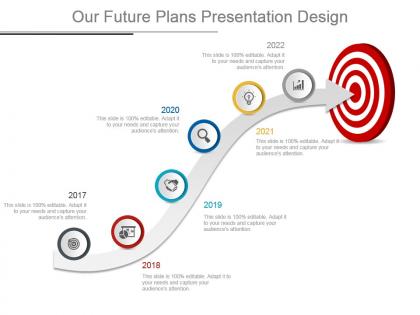
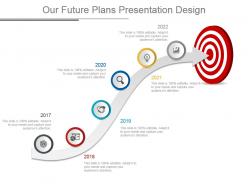
The image features a PowerPoint slide titled "Our Future Plans Presentation Design." This slide presents a chronological timeline spanning from 2017 to 2022, depicted along an upward-sloping curved path that culminates in a red bullseye, symbolizing the attainment of goals or targets. Each year on the timeline is marked with a distinct circular icon representing various strategic focuses or milestones. These icons include a handshake denoting partnerships or agreements, a graduation cap for educational achievements or objectives, a magnifying glass for research or exploration, a lightbulb for ideas or innovation, and a bar chart for growth or analytics. The slide emphasizes that the content within each section is fully editable, highlighting its adaptability for tailoring the content to specific needs and effectively engaging the audience.
Use Cases:
This versatile slide design can be effectively employed across diverse industries for tracking progress, setting goals, and highlighting significant milestones or strategies. Here are seven industries and their potential use cases:
1. Technology:
Use: Showcasing product development timelines and innovation milestones.
Presenter: Product Manager.
Audience: Stakeholders or Investors.
2. Education:
Use: Outlining curriculum developments and academic initiatives over the years.
Presenter: Academic Dean or Department Head.
Audience: Faculty members or Educational Board.
3. Healthcare:
Use: Displaying advancements in medical research or healthcare services provided.
Presenter: Chief Medical Officer or Research Head.
Audience: Medical Staff or Investors.
4. Marketing and Advertising:
Use: Tracing the evolution of marketing campaigns and branding strategies.
Presenter: Marketing Director.
Audience: Marketing Team or Clients.
5. Non-Profit Organizations:
Use: Illustrating the growth of outreach programs and impact over time.
Presenter: Program Director.
Audience: Donors or Board Members.
6. Construction and Real Estate:
Use: Exhibiting the progress of construction projects and property developments.
Presenter: Project Manager.
Audience: Developers or Investors.
7. Financial Services:
Use: Communicating the trajectory of financial growth and product launches.
Presenter: Financial Analyst or Product Development Head.
Audience: Investors or Regulators.
Our future plans presentation design with all 7 slides:
Create cohesive and striking presentations with our compelling Our Future Plans Presentation Design. Designed by our professional team they offer you both convenience and performance.
FAQs for Our future
Honestly, presentations are getting way more interactive now. AR overlays are becoming a thing, plus real-time polling that actually flows with your slides instead of feeling clunky. Voice control is starting to show up too - though I'm still not totally sold on that yet. Data viz that responds to live inputs is pretty cool, and some platforms let audiences jump in and contribute to the actual flow. The old "click through boring slides" approach feels super outdated at this point. You should mess around with interactive stuff in your current decks. Get ahead of it, you know?
Dude, AI is already making presentations way less painful - it'll write your content and design slides super fast. VR though? That's where it gets crazy. Instead of boring charts, your audience can actually walk through 3D data or explore virtual spaces. Like imagine presenting quarterly numbers where people stroll through a digital office seeing growth metrics pop up around them. Wild, right? The whole thing shifts from just talking at people to letting them experience what you're showing. I'd say start with something simple like Gamma or Beautiful.AI first - see how much time it saves you before diving into the VR rabbit hole.
Honestly, we're all just sick of boring presentations at this point! Ditch the whole "present at people" thing. Real conversations are where it's at now. Data visualization is gonna be massive too - nobody wants to stare at walls of text anymore. You'll need to get good at reading the room and switching gears mid-presentation. Personalization matters way more than it used to. Oh, and authentic storytelling - not that corporate fluff. Start practicing with smaller groups to build up those quick-thinking skills. Trust me, being able to adapt on the fly will make you stand out.
Honestly, ditch those spreadsheet slides - they're presentation killers. Try interactive dashboards instead where people can actually click around and explore the data themselves. Tableau or Power BI work great, but even PowerPoint animations beat walls of numbers. I've watched so many people zone out during quarterly reviews because of this stuff. Build each chart like you're telling a story - one leads to the next. Make mobile versions too since half your team's probably joining remotely anyway. Don't try to revolutionize everything at once though. Pick one killer visualization per presentation first, then expand from there.
Yeah, remote work is totally changing how presentation templates look. People want cleaner, simpler designs now since everyone's staring at laptop screens instead of those massive conference room displays. Bigger fonts are huge. Less flashy animations too - honestly, nobody has patience for laggy slideshows during video calls anymore. Heavy graphics? Pretty much dead. The templates that actually work focus on readability and throw in sections for Q&A or breakout rooms. Oh, and here's the thing - pick something that looks decent both full-screen AND in that tiny shared window on Zoom. Trust me on that one.
Dude, sustainability is totally changing how we do presentation stuff now. Most companies are going digital-first - way more virtual presentations and online formats instead of printing everything. I mean, who misses lugging around giant binders anyway? When you do need physical materials, people are using recycled paper and eco-friendly inks. Also smart: modular designs you can just update pieces of rather than reprinting the whole thing. Gone are the days of "let's print 200 copies just in case." Build the green thinking into your planning right from the start instead of scrambling later.
Interactive storytelling is where presentations are headed, and it's honestly pretty exciting. You can add live polls right in the middle of your stories, or let the audience pick what happens next - like a choose-your-own-adventure thing. AR and VR are making stories way more immersive too. The coolest part? You'll be able to customize stories for different audience groups on the spot using data. Multimedia stuff is getting seamless - video, audio, interactive bits all flowing together naturally. My advice? Start small and try adding some audience choice moments to your next presentation. Gets you used to the whole interactive vibe.
Honestly, grab their attention right away then switch things up every few minutes - people's brains are fried these days. Throw in polls or quick discussions instead of just lecturing at them. Even CEOs I've worked with can't focus for more than 5 minutes straight anymore, which is kinda depressing if you think about it. Keep your slides super visual and tell actual stories rather than drowning them in bullet points. Oh, and definitely address phones/laptops upfront - that awkward dance isn't worth it. Read the room though. If you're losing them, just pivot.
Dude, globalization is totally changing how we do presentations. Icons beat text-heavy slides now. Neutral colors are safer too - red means luck in China but danger here, which is kinda fascinating honestly. Your templates need to work for everyone from Tokyo to Toronto on those massive calls. Visual storytelling wins over dense paragraphs every time. Stick with symbols people recognize worldwide. Skip the regional jokes or references that'll fall flat. You should probably go through your current templates and ditch anything that won't translate well globally.
Dude, AI design help is gonna be insane - software that just knows what layout works for your content and audience. Everyone's doing real-time collab now so your team can all jump in at once. Oh and interactive stuff will blow past those basic clickable buttons... imagine live data feeds updating mid-presentation or actual simulations running. Mobile optimization's getting big too since half of us present from our phones anyway (guilty). You'll want tools that cut your prep time but make the actual presentation way more engaging. That's the sweet spot.
Dude, you gotta start tracking this stuff if you want to get better at presenting. Look at engagement metrics - are people actually paying attention? What about survey responses after you're done? Most presenters just cross their fingers and hope it went well, which is honestly pretty dumb when you think about it. The real gold is in spotting patterns across multiple talks. Maybe your intros always bomb, or people zone out during certain slide types. Once you see the trends, you can fix your timing and content. Oh, and start asking for feedback every single time, even for casual presentations.
Dude, multimedia stuff can seriously bump up your retention rates - like 20-40% from what I've read. Videos and interactive bits keep people way more locked in than boring slide decks. You know how everyone zones out during those endless PowerPoint marathons? Super annoying. The trick is being smart about it though, not just randomly dropping in YouTube clips. Try hitting people with something visual or interactive every 5-7 minutes or so. Resets their brain and keeps the energy up. Maybe aim for 2-3 good multimedia moments per presentation.
Cultural shifts totally change what people want from presentations. Gen Z craves interactive stuff and quick chunks of info - way different from older crowds. Remote work made this worse (or better?) since everyone's burned out from staring at screens all day. Your storytelling and visuals need to match these changes. I'd suggest testing different styles with your actual audience instead of guessing what works. What killed it in 2019 might bomb now. Survey people, try new formats. Honestly, even attention spans have shifted so much that you can't just rely on the same old approach.
So there's basically three big things to watch out for: data privacy, representation, and being transparent about your sources. First, scrub any personal info or company secrets before you share anything - that's obvious but easy to forget when you're rushing. Diversity matters too - try not to fall into stereotype traps with your examples or visuals (though honestly, I mess this up more than I'd like to admit). Don't cherry-pick data just because it supports what you want to say. Your audience deserves the real story, limitations and all. Oh, and accessibility stuff too - some people might need larger fonts or whatever. I'd make yourself a quick checklist before starting.
Honestly, group presentations are about to get so much easier. Real-time slide editing means no more emailing versions back and forth like it's 2010. You can give feedback instantly, work across time zones without losing your mind, and AI will help organize your messy brainstorm sessions. Plus automatic version control - because we all know someone's going to accidentally nuke the good slides. Virtual whiteboards are already pretty solid, and soon you'll have video calls built right into your presentation apps. Smart scheduling that actually finds time everyone's free? Game changer. I'd mess around with Miro or Figma now - they're basically showing us where everything's headed.
-
Innovative and Colorful designs.
-
Appreciate the research and its presentable format.