

Phishing Attacks And Strategies To Mitigate Them Powerpoint Presentation Slides




Try Before you Buy Download Free Sample Product
 Impress Your
 Audience
 100%
100% Editable
 Save Hours
 of Time


Our Phishing Attacks and Strategies to Mitigate them PowerPoint presentation focuses on phishing attacks, their impact on businesses, and strategies to mitigate them. It explains the working process of cyber phishing attacks. Additionally, the Smishing Attacks PPT delves into the various types of phishing attacks, such as email phishing, spear phishing, whale phishing, vishing, Smishing, angler phishing, pharming, pop-up phishing, clone phishing, Man-in-the-Middle attacks, evil twin scams, watering hole attacks, and search engine phishing. Each type is examined with insights into its distinctive techniques. Moreover, it includes an in-depth module on vishing attacks that explores identity theft and its tactics, presents a multi-layered approach to phishing defenses, and provides guidelines to safeguard against phishing scams effectively. Furthermore, the Spear Phishing deck focuses on phishing awareness training. It presents a well-structured plan to implement phishing awareness campaigns in organizations, along with valuable resources that companies can offer their employees to ensure protection from cybercrime. Lastly, the man-in-the-middle phishing deck incorporates a roadmap, a 30-60-90 days plan, a timeline, a checklist to secure organizations from phishing attacks, and a dashboard to track cyber-attacks efficiently. Get access to this 100 percent editable template now.
People who downloaded this PowerPoint presentation also viewed the following :
Content of this Powerpoint Presentation
Slide 1: This slide introduces Phishing Attacks and Strategies to Mitigate them. State your company name and begin.
Slide 2: This is an Agenda slide. State your agendas here.
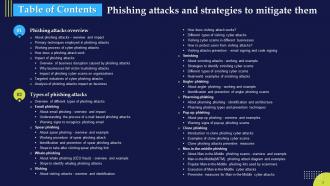
Slide 3: This slide shows Table of Content for the presentation.
Slide 4: This slide continues showing Table of Content for the presentation.
Slide 5: This slide shows title for topics that are to be covered next in the template.
Slide 6: This slide demonstrates the overview of cyber phishing attacks and presents the effectiveness of phishing scams.
Slide 7: This slide describes the ways utilized by phishers to attack victims.
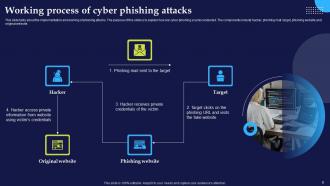
Slide 8: This slide presents the implementation and working of phishing attacks explaining how are cyber phishing scams conducted.
Slide 9: This slide demonstrates the working flow of a phishing attack it outlines various phases of phishing scams.
Slide 10: This slide outlines the amount of money lost by well-reputed companies due to phishing scams.
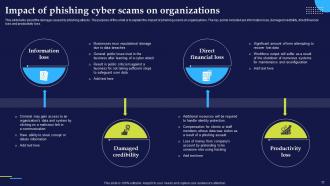
Slide 11: This slide explains the impact of phishing scams on organizations.
Slide 12: This slide also explains the impact of phishing scams on organizations.
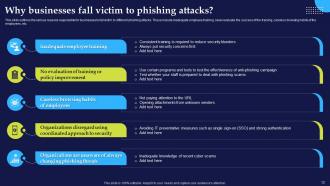
Slide 13: This slide outlines the various reasons responsible for businesses to fall victim to different phishing attacks.
Slide 14: This slide represents the statistics of most targeted industries of phishing scams.
Slide 15: This slide depicts the statistics of most vulnerable targets of phishing scams.
Slide 16: This slide shows title for topics that are to be covered next in the template.
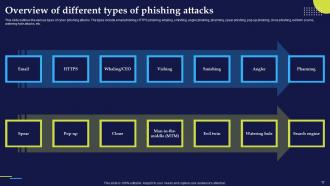
Slide 17: This slide outlines the various types of cyber phishing attacks including email phishing, HTTPS phishing, whaling and more.
Slide 18: This slide shows title for topics that are to be covered next in the template.
Slide 19: This slide presents an email phishing cyber scams in which attacker sends fake mails to the target.
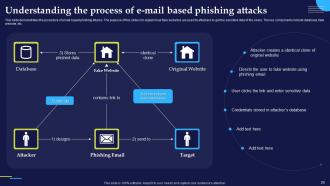
Slide 20: This slide demonstrates the procedure of email-based phishing attacks and explains how fake websites are used by attackers to get sensitive data.
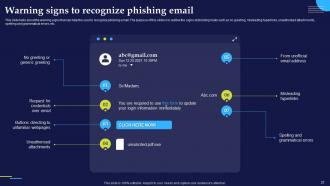
Slide 21: This slide presents the warning signs that can help the user to recognize phishing email.
Slide 22: This slide shows title for topics that are to be covered next in the template.
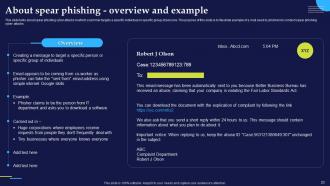
Slide 23: This slide presents spear phishing cyber attacks in which scammer targets a specific individual or specific group of persons.
Slide 24: This slide illustrates the structure of spear phishing attack and explains the working flow of spear phishing attack.
Slide 25: This slide presents various methods of identifying spear phishing cyber attacks
Slide 26: This slide illustrates the steps to be taken immediately after falling for a spear phishing scam.
Slide 27: This slide shows title for topics that are to be covered next in the template.
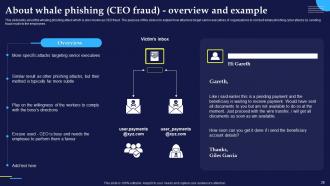
Slide 28: This slide presents the whaling phishing attack which is also known as CEO fraud.
Slide 29: This slide displays various methods of identifying whale phishing cyber attacks.
Slide 30: This slide shows title for topics that are to be covered next in the template.
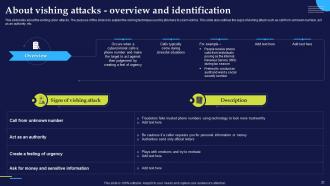
Slide 31: This slide presents the vishing cyber attacks and explains the vishing technique used by phishers to scam victims.
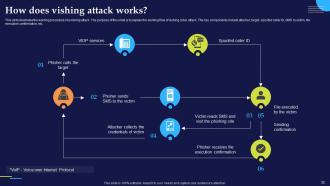
Slide 32: This slide illustrates the working procedure of a vishing attack and explains the working flow of vishing cyber attack.
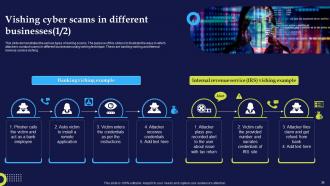
Slide 33: This slide presents the various types of vishing cyber attacks and explains different techniques of vishing scams used by the attackers to scam users.
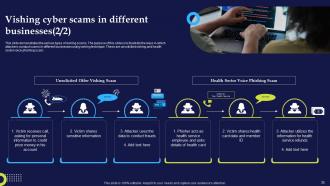
Slide 34: This slide demonstrates the various types of vishing scams.
Slide 35: This slide also demonstrates the various types of vishing scams.
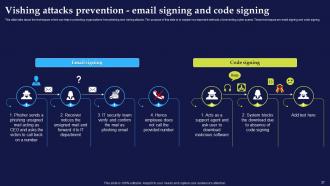
Slide 36: This slide presents the ways to protect users from vishing attacks.
Slide 37: This slide describes techniques which can help in protecting organizations from phishing and vishing attacks.
Slide 38: This slide shows title for topics that are to be covered next in the template.
Slide 39: This slide presents the smishing cyber attacks conducted by sending text messages to the targets.
Slide 40: This slide describes the various methods of identifying smishing cyber attacks.
Slide 41: This slide displays the various types of smishing cyber attacks.
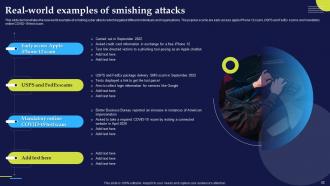
Slide 42: This slide demonstrates the real-world example of smishing cyber attacks which targeted different individuals and organizations.
Slide 43: This slide shows title for topics that are to be covered next in the template.
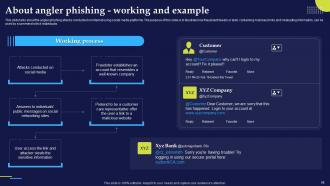
Slide 44: This slide presents the angler phishing attacks conducted on internet using social media platforms.
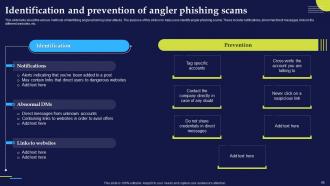
Slide 45: This slide displays the various methods of identifying angler phishing cyber attacks.
Slide 46: This slide shows title for topics that are to be covered next in the template.
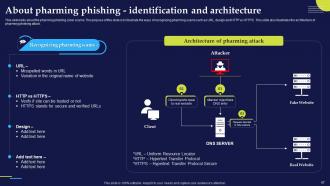
Slide 47: This slide presents the pharming phishing cyber scams and illustrate the ways of recognizing pharming scams such as URL, design and HTTP vs HTTPS.
Slide 48: This slide demonstrates the different types pf pharming phishing scams. The primary types include malware-based pharming and DNS pharming.
Slide 49: This slide shows title for topics that are to be covered next in the template.
Slide 50: This slide presents the pop-up phishing attacks conducted by sending pop-up messages to the targets.
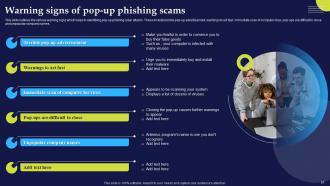
Slide 51: This slide outlines the various warning signs which helps in identifying pop-up phishing cyber attacks.
Slide 52: This slide shows title for topics that are to be covered next in the template.
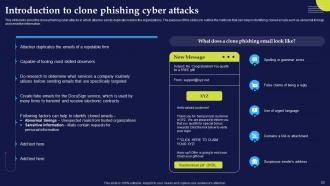
Slide 53: This slide presents the clone phishing cyber attacks in which attacker sends duplicate mails to the organizations.
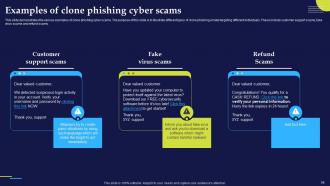
Slide 54: This slide demonstrates the various examples of clone phishing cyber scams.
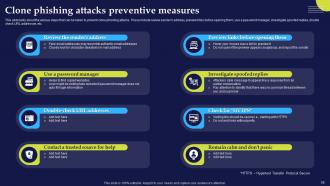
Slide 55: This slide displays the various steps that can be taken to prevent clone phishing attacks.
Slide 56: This slide shows title for topics that are to be covered next in the template.
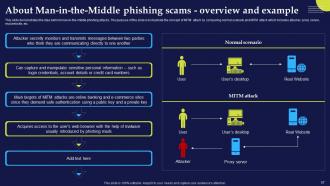
Slide 57: This slide demonstrates the idea behind man-in-the-middle phishing attacks.
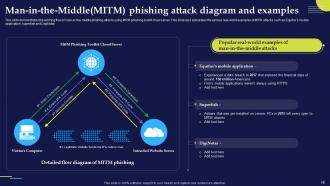
Slide 58: This slide presents the working flow of man-in-the-middle phishing attacks using MITM phishing toolkit cloud server.
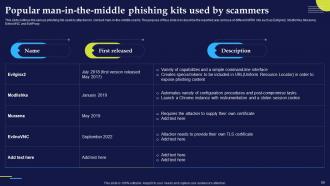
Slide 59: This slide outlines the various phishing kits used by attackers to conduct man-in-the-middle scams.
Slide 60: This slide illustrates the process of executing man-in-the-middle cyber attacks.
Slide 61: This slide outlines the various methods of preventing man-in-the-middle cyber attacks.
Slide 62: This slide shows title for topics that are to be covered next in the template.
Slide 63: This slide presents evil twin cyber attacks and outlines the types of information that can be accessed by scammers of evil twin attacks.
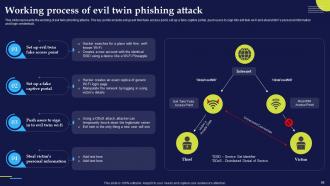
Slide 64: This slide represents the working of evil twin phishing attacks.
Slide 65: This slide outlines the various preventive measures to avoid evil twin attacks.
Slide 66: This slide shows title for topics that are to be covered next in the template.
Slide 67: This slide presents the watering hole phishing attacks which trick the victim to do activities compromising their personal data.
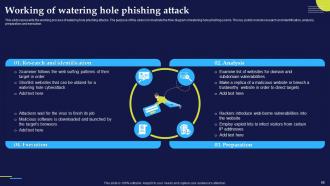
Slide 68: This slide represents the working process of watering hole phishing attacks.
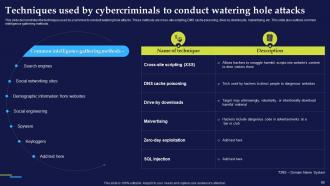
Slide 69: This slide demonstrates the techniques used by scammers to conduct watering hole attacks.
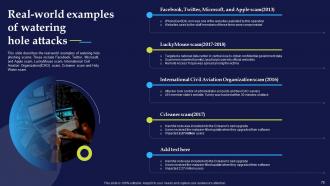
Slide 70: This slide describes the real-world examples of watering hole phishing scams.
Slide 71: This slide outlines the various preventive measures to avoid watering hole phishing attacks.
Slide 72: This slide shows title for topics that are to be covered next in the template.
Slide 73: This slide presents search engine phishing scams and explains how phishers use their own-built websites to trick victims.
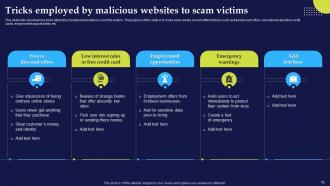
Slide 74: This slide describes various tricks utilized by fraudulent websites to scam the visitors.
Slide 75: This slide shows title for topics that are to be covered next in the template.
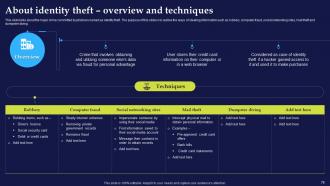
Slide 76: This slide presents major crime committed by phishers named as identity theft.
Slide 77: This slide shows title for topics that are to be covered next in the template.
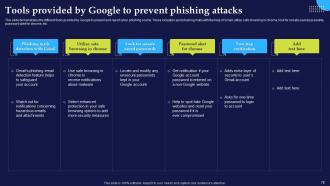
Slide 78: This slide demonstrates the different tools provided by Google to prevent and report cyber phishing scams.
Slide 79: This slide shows title for topics that are to be covered next in the template.
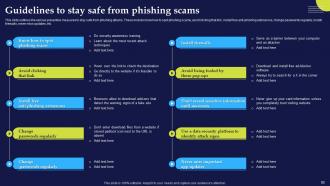
Slide 80: This slide outlines the various preventive measures to stay safe from phishing attacks.
Slide 81: This slide shows title for topics that are to be covered next in the template.
Slide 82: This slide represents the multi-layered approach to phishing defenses.
Slide 83: This slide shows title for topics that are to be covered next in the template.
Slide 84: This slide demonstrates the resources and training that can be provided by companies to their staff.
Slide 85: This slide represents the training program for employees which will help them to prevent various cyber security scams in business.
Slide 86: This slide presents the working of phishing training programs for organizations.
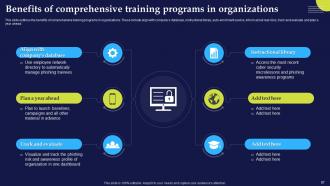
Slide 87: This slide outlines the benefits of comprehensive training programs in organizations.
Slide 88: This slide presents the measures for successful phishing awareness campaign.
Slide 89: This slide shows title for topics that are to be covered next in the template.
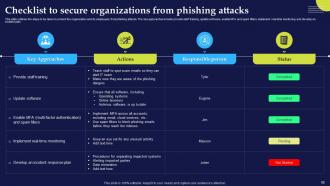
Slide 90: This slide outlines the steps to be taken to protect the organization and its employees from phishing attacks.
Slide 91: This slide shows title for topics that are to be covered next in the template.
Slide 92: This slide represents 30-60-90 plan to protect companies and their employees from phishing attacks.
Slide 93: This slide shows title for topics that are to be covered next in the template.
Slide 94: This slide presents the timeline to protect organizations from phishing for different organizations.
Slide 95: This slide shows title for topics that are to be covered next in the template.
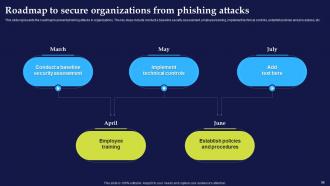
Slide 96: This slide represents the roadmap to prevent phishing attacks in organizations.
Slide 97: This slide shows title for topics that are to be covered next in the template.
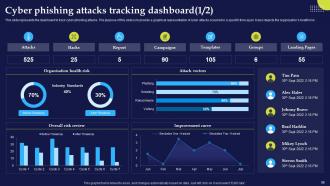
Slide 98: This slide represents the dashboard to track cyber phishing attacks.
Slide 99: This slide also represents the dashboard to track cyber phishing attacks.
Slide 100: This slide shows all the icons included in the presentation.
Slide 101: This is a Thank You slide with address, contact numbers and email address.
Phishing Attacks And Strategies To Mitigate Them Powerpoint Presentation Slides with all 106 slides:
Use our Phishing Attacks And Strategies To Mitigate Them Powerpoint Presentation Slides to effectively help you save your valuable time. They are readymade to fit into any presentation structure.













































FAQs for Phishing Attacks And Strategies To Mitigate Them
Oh man, there's so many now. Email phishing is huge - fake banks and companies asking for your info. Then there's spear phishing where they actually research you first, which is honestly creepy. Smishing comes through texts, and vishing is those old-school phone scams that somehow still work on people. Watch out for business email compromise too - scammers pretend to be your boss asking for wire transfers. They also make fake login pages that look exactly like the real thing. My rule? If it sounds urgent or pushy, just double-check everything first.
Honestly, skip the death-by-PowerPoint approach and get your people actually practicing. Those fake phishing tests where you send sketchy emails to see who bites? They work surprisingly well - plus you get some entertaining "oh crap" moments when people realize they fell for it. Teach them the obvious red flags: anything urgent, weird links, requests for passwords or personal stuff. But here's the thing - even with training, people mess up. So drill this into everyone: if something feels off, just pick up the phone or walk over and ask before clicking anything. Don't do it once and call it done either.
Phishing works because it messes with your head first, tech second. These scammers are basically amateur psychologists - they'll hit you with fake urgency like "account closes in 1 hour!" or pretend to be your bank. Pretty clever honestly. They want you reacting emotionally instead of thinking it through. The actual technical stuff? Usually pretty basic. But man, they're good at pushing the right buttons to make you panic-click. That's why spam filters only go so far. Best thing you can do is just... pause when something feels rushed. If it's legit, waiting 5 minutes won't hurt.
Definitely get some good tech protection set up first - spam filters will catch most sketchy emails before they hit your inbox. Anti-phishing software is worth it too since it scans links in real-time and warns you about dodgy sites. Some programs even detect fake login pages, which honestly blows my mind. But don't rely on tech 100% because nothing's foolproof. I learned that the hard way lol. Just make sure whatever you're using is actually enabled and stays updated. Your browser probably has decent protection built-in already.
Honestly, these scammers are pretty predictable once you know their tricks. They'll hit you with fake urgency - "your account expires in 24 hours!" or "suspicious login detected!" - anything to make you panic-click before thinking it through. The really annoying part? They're good at copying logos and official language from places like your bank or work IT. Looks legit until you actually examine it closely. Here's what I've learned: that gut feeling to act fast is exactly what they want. Take a breath, maybe forward suspicious emails to your IT team first. Trust me, real companies don't usually demand immediate action through sketchy links.
Yeah, phishing has gotten way worse since everyone started working from home. These scammers know you're on sketchy wifi and probably distracted by Netflix in the background lol. They're really good now at faking Zoom updates or fake VPN login pages. The ones that get people are always like "URGENT: verify your account in 24 hours or lose access!" Classic scare tactics. My rule is if something feels fishy, just call or text whoever supposedly sent it. Don't click first, ask questions later – learned that the hard way.
Oh no, that sucks! Change all your passwords right now - I know it's annoying but you gotta move fast on this. Check your bank statements ASAP for anything sketchy and call them if something looks off. Run a virus scan too in case they downloaded crap onto your device. Definitely tell your IT people what happened. You should probably put a fraud alert on your credit reports while you're at it. Honestly, these scammers are getting so good these days it's scary. The main thing is don't wait around - catch this stuff early before they can do real damage.
Scammers just follow wherever people are hanging out online, honestly. Email was the big thing, now they're all over text messages and social media DMs. WhatsApp, Teams, even Slack - nowhere's really safe anymore. They've gotten scary good at copying how real messages look on each platform too. Plus they jump on whatever's trending or in the news to make their scams seem legit. I kinda hate how clever they are about it. Just stay suspicious everywhere, not just your inbox - these guys literally track your digital habits and adjust accordingly.
Oh man, that's a nightmare scenario. GDPR and state privacy laws will absolutely wreck you with fines - we're talking millions sometimes. Customers can sue too, which just adds to the mess. The whole breach notification thing is required by law, but honestly it's like announcing to the world that you screwed up. Your reputation takes a hit and people lose trust fast. Getting phished isn't really an excuse anymore either - courts expect you to have proper training and response plans already set up. It's brutal but that's just how it works now.
MFA is like having a deadbolt on top of your regular lock. So even when hackers get your password from phishing emails, they're still locked out without that second code. Most attacks just grab passwords and bail when they hit the MFA step - it's honestly annoying enough that they usually move on to easier targets. Text codes work fine, but authenticator apps are better if you're feeling fancy. Just turn it on for email and banking first, then add it to whatever else matters to you.
Ugh, so AI is making phishing emails scary good now - like, actually hard to catch. Mobile attacks are huge too since we're all sloppy on our phones. What's really sneaky is how they're using legit cloud services to hide their stuff, so it slips past security. Business email scams have gotten intense - these guys research your company for weeks before hitting you. SMS phishing is everywhere lately too. Just tell your team to double-check any "urgent" money requests through a different channel first. Seriously saves so much headache.
Yeah, scammers totally tailor their approach based on what industry they're hitting. Finance gets bombarded with fake bank alerts and sketchy loan approvals - anything that'll freak people out about their money. Healthcare's different though. They go after fake patient portals and bogus insurance updates, which honestly feels more evil since they're messing with people's health stuff. The patterns are pretty obvious once you notice them. Financial scams scream "URGENT!" while healthcare ones try to sound all official and trustworthy. Worth checking what scams are common in your field so you don't fall for the obvious ones.
Oh man, there's been some crazy ones. Hillary's campaign manager clicked a fake Gmail alert in 2016 - totally got them. Toyota lost 3.1 million customers' data in 2019. But honestly? The CEO fraud stuff happens constantly - employees just wire money thinking their boss asked for it. Some Lithuanian guy even scammed Google and Facebook out of $100 million with bogus invoices, which is kind of impressive tbh. The damage is insane though - millions lost, huge fines, reputation destroyed. Always double-check through another channel before you do anything. Anyone can fall for this stuff.
Dude, you absolutely need an incident response plan for phishing attacks. People always click stuff they shouldn't - I've done it, you've probably done it. When it happens, speed matters big time. Document everything ahead of time: containment steps, how to check what got compromised, who talks to who. During actual incidents people's brains just... stop working properly. Short sentences help in your plan too. Makes it easier when everyone's freaking out. Oh and run practice drills! Those tabletop exercises sound boring but they're clutch for finding gaps before you really need the plan.
CISA's your best starting point - their phishing guidance won't cost anything and covers everything. The Anti-Phishing Working Group drops quarterly reports that are honestly pretty fascinating if you're into this stuff. For daily updates, SANS Internet Storm Center is solid. KnowBe4's blog has good intel too, though yeah, they're obviously pushing their training services. CISA also shoots out alerts when new campaigns pop up. Most security vendors offer threat feeds if you've got budget. Oh, and RSA conference research is free online - forgot about that one. Start with CISA though.
-
Unique research projects to present in meeting.
-
Time saving slide with creative ideas. Help a lot in quick presentations..