category-banner

Project kickoff project management kpi dashboard ppt powerpoint inspiration gridlines

Rating:
80%
Project kickoff project management kpi dashboard ppt powerpoint inspiration gridlines
Slide 1 of 2
Favourites Favourites

Try Before you Buy Download Free Sample Product

Audience Impress Your
Audience
Editable 100%
Editable
Time Save Hours
of Time
The Biggest Sale is ending soon in
0
0
:
0
0
:
0
0
Rating:
80%
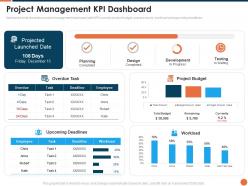
Mentioned slide illustrates project management dashboard with KPIs namely project budget, overdue tasks, workload and upcoming deadlines. Present the topic in a bit more detail with this Project Kickoff Project Management Kpi Dashboard Ppt Powerpoint Inspiration Gridlines. Use it as a tool for discussion and navigation on Planning, Design, Development, Testing. This template is free to edit as deemed fit for your organization. Therefore download it now.

People who downloaded this PowerPoint presentation also viewed the following :

FAQs for Project kickoff project management kpi dashboard ppt

Okay so for your kickoff dashboard, start with the project timeline and major milestones. Add your team roster - who's doing what, contact info, all that stuff. Budget overview is obviously crucial, plus a risk register so you're not blindsided later. Don't forget success metrics so you actually know if you're winning. Oh, and include a quick project charter summary because people forget why they're even there half the time. Make it visual, not a wall of text nobody will read. Set up communication preferences for stakeholders too - trust me, it'll save you so many annoying email chains. This becomes your go-to reference that everyone can actually use.

Honestly, having a kickoff dashboard saves you so much headache later. Everyone can see who's responsible for what and when stuff's due - no more digging through those nightmare email threads. It keeps the team on the same page about priorities, plus you'll catch problems before they blow up. New people joining halfway through? They won't need to bug everyone with basic questions since everything's right there. Oh, and make sure you can spot the key milestones and owners super easily. Trust me on this one.

Honestly, I'd start with whatever your team's already using - getting people to actually use it matters way more than picking the "perfect" tool. Notion and Monday.com are really flexible for custom views. Miro's great if you want something visual (stakeholders eat that stuff up). Already using Microsoft? Power BI works well, or even SharePoint if you design it right. Asana and Trello are solid for simpler kickoffs too. Oh, and Figma's surprisingly good for this - most people don't think of it but the collaboration features are clutch.

So first thing - figure out who actually needs to see this thing. Executives just want the big picture stuff: budgets, timelines, major milestones. Keep it visual for them. Your project team needs all the nitty-gritty details - tasks, dependencies, who's doing what. Other departments? They mostly care about when you'll bug them for stuff and how this impacts their world. I'd create different tabs for each group because honestly, nobody wants to wade through irrelevant info. Oh, and definitely ask each person what questions they're trying to answer with the dashboard. Saves you from guessing wrong later.

Dude, visuals are a game changer for project goals. Your brain just gets pictures way faster than reading through boring docs that nobody actually wants to go through anyway. Gantt charts and progress bars show everyone exactly what's happening and when stuff is due. People can finally see how their work connects to everything else instead of guessing. I swear, stakeholders actually pay attention during meetings when you've got a timeline up on screen. You'll catch problems and bottlenecks right away too. Just throw in a simple milestone tracker next time - way better than those endless bullet point lists.

Start with the basics - timeline, budget tracking, who's doing what and when they're free. Deliverable status is obvious but crucial. I always add stakeholder engagement stuff because people forget to loop others in and it bites you later. Oh, and definitely track any roadblocks or risks early on. Seriously, finding those issues upfront saves so much headache down the road. Resource utilization matters too, especially when you're juggling team members between projects. The goal is knowing if things are going sideways before they actually do. Keep it simple at first, then build from there.

Auto-connect everything to your source systems if you can - project tools, HR stuff, finance databases. Trust me, manual updates are the worst and people definitely forget. Get someone to own each section and check it weekly. Oh and add timestamps so people know if they're looking at fresh data or something from last month. Set up alerts for when things break or look weird. Before big meetings though? Double-check everything. I've seen people present old budget numbers to execs and it's painful to watch. Nothing tanks your credibility faster than stale data.

Honestly, information overload is your worst enemy here. Everyone wants to see everything, but then you get this messy dashboard nobody actually touches. Just focus on what people need for real decisions and tuck the rest into drill-downs. Getting clean data from different systems? Total nightmare - way messier than you think it'll be. Set up some automated checks and have backup manual stuff ready. Make it fast and mobile-friendly since people check these things constantly. Oh, and test with real users early! I can't stress this enough. Their feedback stops you from building something pretty but completely useless.

Stick to stuff people actually know - bar charts, pie charts, basic icons that make sense. Don't overthink the colors either, just do green for good stuff and red for problems. I swear, some dashboards look like you need a PhD to figure them out when really they should be dead simple. Group similar things together and add little tooltips if something's confusing. Oh, and definitely test it with your team first - they'll roast anything that's unclear way better than you trying to guess what works. Short labels help too.

Honestly, think of it as your early warning system for when things go sideways. Having all your metrics and timelines visible from day one means you'll catch red flags way earlier. The visual layout makes it super easy to track how risks change over time and compare what's actually happening vs what you planned. Plus stakeholders get the info they need without you having to send them massive spreadsheets (which nobody reads anyway). Build it during planning though - trust me, you don't want to be creating this stuff when you're already putting out fires.

Build in feedback loops from the start - seriously, this is where most people mess up. Get your team together regularly to talk about what's working and what sucks. I'd probably do monthly updates so you're not constantly changing things around. Make it super easy for people to give input too - maybe a quick thumbs up/down on each section? Or just a shared doc where anyone can drop suggestions. The worst dashboards I've seen are the pretty ones that nobody actually uses because no one asked what people needed. Your dashboard's gotta grow with your team, not just sit there looking nice.

Start with the basics - project goals, timeline, major milestones, who's doing what. Don't dump every tiny detail on them at once (trust me on this one). Go slow through each part and pause for questions. Deliverables and deadlines are where people get lost, so spend extra time there. Oh, and make sure everyone can actually see your screen - sounds obvious but you'd be surprised. Send them a copy afterward too. The key thing? Treat it like a discussion, not a presentation. Let people jump in with ideas or changes. Way better than just talking at them for an hour.

Weekly updates work best when things are moving fast. But honestly? Just match the pace of your project. Major milestones coming up? Maybe bump it to twice weekly. Things slowing down? Every two weeks is totally fine. The trick is not annoying your stakeholders with constant updates about tiny stuff. I learned this the hard way on my last project - nobody wants daily pings about minor tweaks. Set the schedule upfront so everyone knows what to expect. Then just stick to it. Consistency matters way more than being perfect with timing.

Honestly, the worst thing you can do is dump everything onto one screen. People take one look and just nope out. Start with basics - goals, deadlines, who to contact, what's next. Complex charts are pointless if no one gets them yet (learned that one the hard way). Don't make it some frozen document either. Things change constantly, so your dashboard needs to change too. Test it on a couple teammates first - they'll tell you what's actually useful versus what looks pretty but never gets touched. Keep tweaking from there.

Honestly, just treat those kickoff dashboards like your personal learning lab. After projects wrap up, go back and see where you totally whiffed - timelines that went haywire, risks that blindsided you, assumptions that were laughably wrong. I swear I'm always amazed at how bad my initial guesses can be! Make a quick lessons-learned doc capturing these patterns. Then actually use it when planning new projects. Trust me, you'll stop repeating the same dumb mistakes. Your future self will be way less stressed when dashboards start reflecting reality instead of wishful thinking.

Ratings and Reviews

80% of 100
Write a review
Most Relevant Reviews
  1. 80%

    by Cliff Jimenez

    The Designed Graphic are very professional and classic.
  2. 80%

    by Clinton Russell

    Awesome use of colors and designs in product templates.
  3. 80%

    by Daron Guzman

    Easy to edit slides with easy to understand instructions.
  4. 80%

    by Davis Mason

    Easily Understandable slides.
  5. 80%

    by Domingo Hawkins

    Innovative and attractive designs.

5 Item(s)

per page: