Project Management Professional Tools Decision Tree Analysis In Business Project

Rating:
80%
Project Management Professional Tools Decision Tree Analysis In Business Project
Slide 1 of 6

or

Favourites Favourites

Try Before you Buy Download Free Sample Product

Audience Impress Your
Audience
Editable 100%
Editable
Time Save Hours
of Time
The Biggest Sale is ending soon in
0
0
:
0
0
:
0
0
Rating:
80%
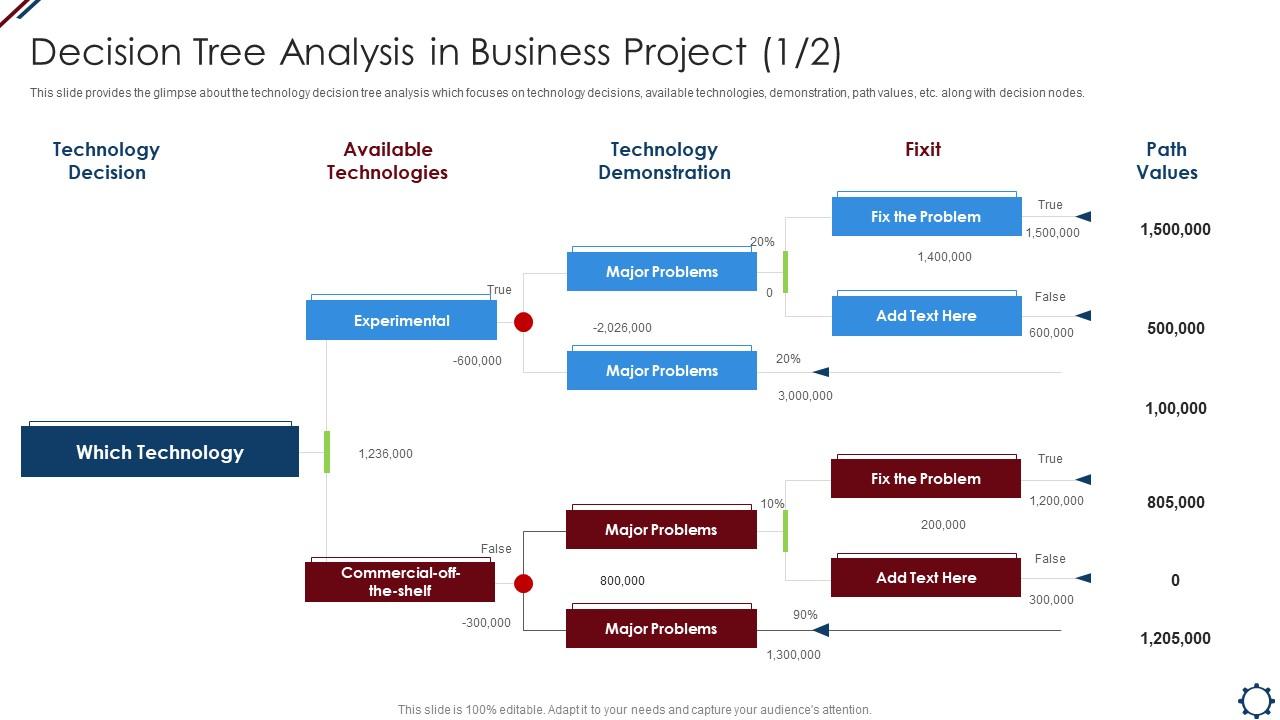
This slide provides the glimpse about the technology decision tree analysis which focuses on technology decisions, available technologies, demonstration, path values, etc. along with decision nodes. Increase audience engagement and knowledge by dispensing information using Project Management Professional Tools Decision Tree Analysis In Business Project. This template helps you present information on three stages. You can also present information on Technology Decision, Available Technologies, Technology Demonstration using this PPT design. This layout is completely editable so personaize it now to meet your audiences expectations.

FAQs for Project Management Professional Tools Decision Tree Analysis

So you've got three main pieces: decision nodes where you pick what to do, chance nodes for stuff you can't control, and end points showing what happens. Honestly, the tricky part is nailing down realistic probabilities and values - if those are off, your whole analysis tanks. Building the structure forces you to think through your assumptions though, which is pretty valuable. Oh and here's what works for me - figure out your big decisions first, then I usually work backwards from the outcomes I want. Makes the whole tree way more practical.

So Gini impurity is basically measuring how mixed up your data is at each split. If you randomly picked a data point, how confused would you be about its class? When you're choosing splits, you calculate the weighted Gini for both child nodes and go with whatever gives the lowest score. Pretty simple math once you mess around with it. Lower scores = cleaner separation between classes = better predictions. That's the whole point. Honestly, just grab a tiny dataset and work through the calculations by hand. Way better than staring at formulas online - you'll actually get why it works.

Honestly, the best thing about decision trees is how easy they are to explain. You can literally walk someone through each decision step by step - super helpful when your boss wants to know why the model rejected a loan application or whatever. They're also pretty flexible since they work with any type of data without needing to mess around with scaling or preprocessing stuff. Training is quick too. Main downside? They overfit like crazy if you're not careful. But I still think they're worth trying first, especially if you need something people can actually understand.

Oh yeah, decision trees totally do this! They get obsessed with memorizing every detail in your training data instead of actually learning useful patterns. Happens a lot with small datasets or when there's messy/noisy data. Super frustrating when your training looks perfect but then it bombs on new data. Few things that help: set depth limits, make sure each leaf has enough samples, or just prune afterward. Random forests work great too since they average out the crazy overfitting. I usually start conservative with the constraints - way easier than trying to dial back a monster tree later. Cross-validation catches it early if you're paying attention.

So basically, every path from the top to bottom shows you exactly what conditions create each outcome. Follow the yes/no branches and you'll see which combo of factors drives your result. Here's the neat part - you can work backwards from whatever outcome you want and figure out what needs to happen first. I'd focus on the paths leading to your best results, then spot which variables you can actually mess with or change. Those are the ones worth putting your energy into for strategy stuff. Makes way more sense than guessing, honestly.

So pruning basically stops your decision tree from memorizing every little detail in the training data - which ironically makes it worse at predicting new stuff. There's pre-pruning where you stop the tree early, and post-pruning where you build the whole thing then trim it back. Honestly, post-pruning with methods like cost complexity pruning tends to work better in my experience. I'd start simple with a max depth limit first. If it's still overfitting after that, then dive into the fancier pruning techniques. It's one of those things where less is actually more, you know?

So Random Forests are pretty cool - they build like hundreds of decision trees using different chunks of your data and features. Each tree gets a vote on the final prediction, kind of like polling a bunch of experts who've seen slightly different info. Single trees love to overfit, but when you average all these votes together, the weird outliers cancel out. I usually see around 5-10% better accuracy than just one tree. Oh and definitely try scikit-learn's RandomForestClassifier first - saves you from tweaking a million settings manually.

Oh man, overfitting is gonna be your biggest headache - trees love memorizing training data instead of actually learning anything useful. Categorical variables with tons of categories create these weird, messy splits too. Finding good split points for continuous data is honestly more guesswork than science half the time. Plus these things are ridiculously sensitive to tiny changes in your data. Try pruning hard and maybe use Random Forest instead? I swear ensemble methods save so much trouble. Just make sure you're testing on holdout data or you'll never catch the overfitting until it's too late.

So for evaluating your decision tree, accuracy is the obvious starting point but don't stop there. Precision and recall matter too - they show different angles of how well it's working. The confusion matrix is honestly one of my favorite tools because it shows exactly where your model gets confused between classes. Watch out for overfitting though. Compare your training accuracy to validation accuracy - if training is way higher, your tree's probably memorizing instead of learning. Cross-validation helps catch this stuff. Oh, and always test on completely fresh data at the end. That's where you'll really see if it works.

Yeah, decision trees are actually pretty good with missing values! Most libraries like scikit-learn have built-in ways to deal with it. You can fill in missing stuff with means or modes beforehand, or just let the algorithm figure out the best way to split when values are missing. Honestly, I've found decision trees way more forgiving than other models when your data's messy. The main thing is staying consistent - if you fill in missing values during training, do the same thing when you're making predictions later. Otherwise you might get weird results. Domain knowledge helps a lot too when deciding how to handle the gaps.

Think of decision trees as flowcharts that actually make sense. You follow the yes/no branches and boom - you know exactly why it made that prediction. No mysterious black box stuff where you're crossing your fingers hoping it works. Your boss asks why the model chose something? Just walk them through the splits. Honestly, they're probably the most beginner-friendly ML method out there. Anyone can look at the tree visualization and get it immediately. Perfect when you need to justify decisions to people who don't know tech.

So entropy is basically how chaotic your data looks at any given point - like, are your outcomes all jumbled together or nicely sorted? Decision trees use this to pick the best questions that'll clean things up fastest. You want splits that take messy mixed groups and turn them into cleaner subsets where most examples match the same class. Information gain just measures how much entropy drops after each split. Honestly, I think of it like organizing a really disorganized closet - you're looking for moves that make the biggest difference. Focus on high information gain splits since those are actually doing the work.

So decision trees are actually pretty great for this stuff - you basically map out what could go wrong and follow each branch to see where it leads. Start with your main risk, then draw out all the ways it could play out with rough probabilities. Way better than trying to keep track of everything mentally (which I'm terrible at anyway). The cool part is you can calculate expected values for each scenario, so you'll know which risks are actually worth it. I'd probably start simple though - maybe just do three levels deep for your first one?

Oh man, they're literally everywhere once you start noticing. Netflix picks what shows to suggest, banks decide if you get that loan, hospitals use them for diagnosis stuff. Amazon's recommendation thing? That's decision trees making them crazy money. Toyota even uses them to catch defects on their assembly lines - which is pretty cool actually. The best part is you can follow the logic step by step, not like those mysterious AI algorithms nobody understands. Honestly, look at whatever you do at work and you'll probably find three spots where these could help automate decisions.

So I'd focus on three main settings: max_depth, min_samples_split, and min_samples_leaf. For max_depth, maybe start around 5-10 (depends on your data size obviously). Then bump up min_samples_split to like 20-50 and min_samples_leaf to 5-20 - this stops the tree from getting too obsessed with tiny details. Cross-validation is your friend here. Run different combos and compare training vs validation scores. You want them fairly close together. It's kinda annoying at first since there's definitely some guesswork involved, but you'll start seeing patterns pretty quick.

Ratings and Reviews

80% of 100
Review Form
Write a review
Most Relevant Reviews
  1. 80%

    by Connor Lopez

    The quality of the templates is as fine as it could get. It was a purchase well made!
  2. 80%

    by Charlie Jones

    Illustrative design with editable content. Exceptional value for money. Highly pleased with the product.

2 Item(s)

per page: