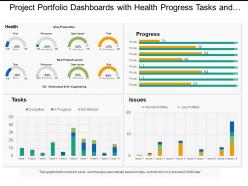
Paneles de la cartera de proyectos con tareas y problemas de progreso de la salud
Try Before you Buy Download Free Sample Product
Audience
Editable
of Time
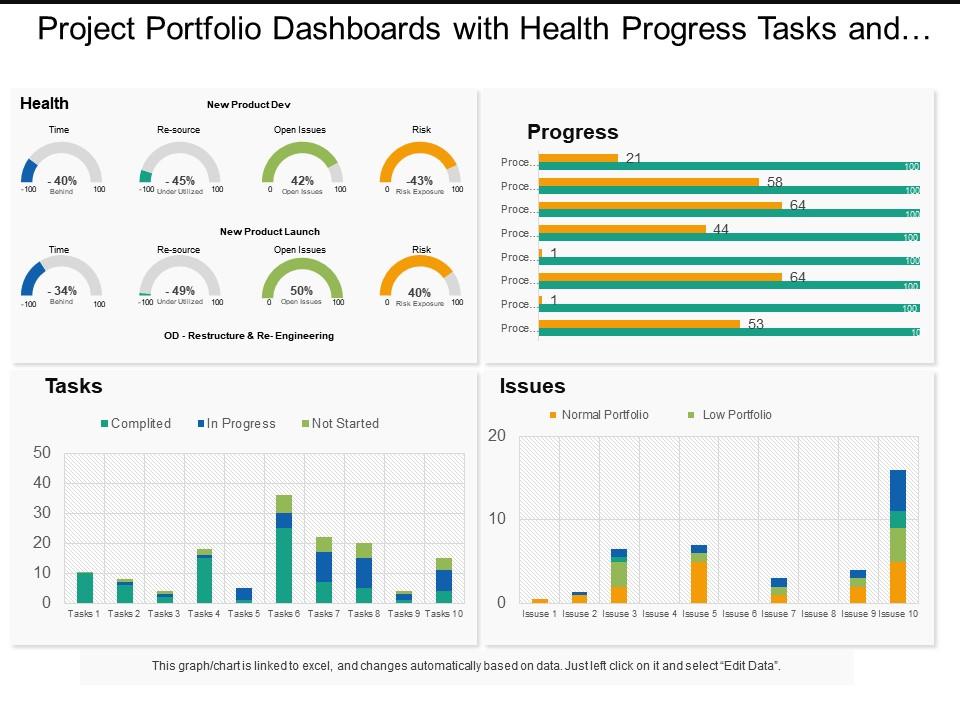
Proporciona los vínculos a través de su cadena de pensamientos. Presentamos paneles de cartera de proyectos con tareas y problemas de progreso de la salud. Deje que el diseño creativo lo supere a través de los cambios. El esquema fácil pero creativo lo ayudará a hacer que sus espectadores comprendan las consecuencias de adoptar el enfoque correcto para el desarrollo comercial. Salud, progreso, tareas, problemas son las cuatro etapas que se muestran aquí. Aquí se muestran varios indicadores de rendimiento, cuadros y gráficos con esquemas de colores llamativos. Nuestros diseñadores han elegido íconos identificables para indicar en esta diapositiva que no solo promueven la apariencia de la presentación, sino que también reflejan su propósito, como se puede ver. Combínelos y obtenga innumerables beneficios con nuestros paneles de cartera de proyectos con tareas y problemas de progreso de salud. No piense ahora y comience de inmediato. Evite gastos excesivos con nuestros paneles de cartera de proyectos con tareas y problemas de progreso de la salud. Encontrará opciones rentables.
Características de estas diapositivas de presentación de PowerPoint:
Presentación de paneles de cartera de proyectos con tareas y problemas relacionados con el progreso de la salud. Los especialistas pueden utilizar esta plantilla PPT para diseñar los paneles de su cartera de proyectos y el progreso de la salud importa para el análisis de datos. Puede cambiar el color de los componentes que se muestran en la figura y también editar el texto para escribir un breve resumen sobre los asuntos financieros de su empresa. Esta plantilla de PowerPoint también es compatible con las diapositivas de Google y se puede proyectar en una pantalla ancha para reuniones de negocios sin pixelar.
People who downloaded this PowerPoint presentation also viewed the following :
Paneles de la cartera de proyectos con tareas y problemas de progreso de la salud con las 6 diapositivas:
Los paneles de nuestra cartera de proyectos con tareas y problemas de progreso de la salud generan una invasión de ideas. Haga que su cerebro rebose de emoción.
FAQs for Project portfolio dashboards snapshot with health progress
Focus on project health, budget tracking, timeline stuff, and how you're using your resources. Risk indicators are clutch too - executives eat up those red/yellow/green dots, makes them feel like they get it instantly. Milestone completion rates and stakeholder satisfaction scores work great if you're already collecting that data. Oh, and finance people always want ROI numbers, obviously. Keep everything super visual so issues jump out at you before they become disasters. Honestly though, just start with the basics and see what questions people keep bugging you about - that'll tell you what else to add.
Dude, skip the endless spreadsheets nobody wants to read. Progress bars and burndown charts? That's where it's at. People's brains just work better with visuals - you'll catch trends and problems way faster than scanning through rows of numbers. Traffic light indicators are clutch for showing status at a glance. Here's the thing though: don't go crazy with data points. Pick maybe 3-5 metrics your stakeholders actually care about and build around those. I learned this the hard way after overwhelming my team with like 15 different charts once.
Honestly, you need real-time data or you're just guessing. Live updates let you spot problems before they blow up - like seeing your budget drain faster than expected or milestones getting pushed back. It's kinda like driving with a broken speedometer... you might think you're fine until you're not. I learned this the hard way on a project last year. Daily refreshes are the bare minimum, but hourly is way better for anything critical. Otherwise you're making decisions based on old info, which never ends well.
Add some risk widgets to your dashboard - real-time scores, heat maps, that kind of stuff. Color-code your project tiles (red/yellow/green is pretty standard). Set up alerts when things hit certain thresholds because honestly, who has time to check everything manually? I'd throw in some trend charts too so you can catch patterns early. The whole point is making risk visible at a glance. That way you'll spot which projects are about to blow up before they actually do. Small problems are way easier to fix than big ones, obviously.
So for project dashboards - Power BI and Tableau are your best bet if you want serious analytics, though there's definitely a learning curve. Monday.com and Asana have pretty good built-in dashboards that work for most teams without the headache. Don't laugh, but I've seen people build surprisingly solid dashboards in plain old Excel. It's not glamorous but it works. Oh, and before you buy anything new, check if your current project management tool (like Jira or Azure DevOps) already has reporting features. You might be overthinking this one.
Honestly, project portfolio dashboards are game-changers. Instead of juggling individual project updates, you see everything at once - budgets, timelines, resources, risks. The real magic happens when you spot patterns you'd totally miss otherwise. Like when three projects are hitting the same bottleneck, or your budget's quietly bleeding out across multiple initiatives. Makes decision-making way faster too. You can quickly see which projects need help and which ones... well, maybe it's time to cut them loose. Oh, and don't go overboard - pick 3-5 metrics that actually matter to your stakeholders first.
So here's the thing - you gotta show people what they actually want to see. Executives just need the big picture stuff: budget, risks, overall status. They don't care about individual tasks. Project managers? They want the nitty-gritty operational stuff like resources and timelines. Regular stakeholders mostly just want "hey, are we on track?" updates. Honestly, dumping everything on one screen makes people's eyes glaze over - I've seen it happen too many times. Set up different views for each group. Ask them what decisions they're trying to make first, then work backwards from there. Way easier than guessing what matters to them.
Start with your top 3-5 strategic priorities - that's your foundation. Then build visual indicators showing which projects actually move the needle versus the boring maintenance stuff (we all have way too much of that). Color-coded alignment scores work great, or progress bars tied to specific goals. Track things like strategic contribution percentage and how you're allocating resources. Honestly, the best part is quickly spotting when projects go sideways or finding gaps where you're not investing enough in the important stuff. Makes those leadership meetings so much easier when you can actually show the connection.
Don't cram everything onto one screen - that's the fastest way to make people's eyes glaze over. Skip the vanity metrics that look cool but won't actually help anyone decide anything. I learned this the hard way, but resist making custom dashboards for every single person who asks. You'll go insane maintaining them all. Stick to consistent colors, keep your data fresh so nobody's making decisions off last month's numbers, and actually test it with real users first. Honestly? Start with maybe 5-7 metrics max. You can always add more later when people get comfortable with the basics.
Dude, you HAVE to get feedback from your users or your dashboard will just sit there looking pretty while everyone ignores it. I've watched this happen so many times - looks amazing but zero actual usage. Ask the people using it daily what's actually helpful vs what's just visual noise. They'll tell you if the load time sucks, if they need different charts, or if the filters are confusing. Set up quick feedback sessions or even just send a survey. Then actually fix the stuff they complain about! Your dashboard needs to change based on how people really work, not what you think they need.
So basically, project portfolio dashboards show you the big picture of ALL your projects at once - like health status, resource allocation, that stuff. Project management tools are different. They're where you actually do the work on individual projects - assigning tasks, tracking deadlines, team stuff. Honestly? You need both if you're juggling multiple projects. The dashboard helps you spot patterns and bottlenecks across everything. Then you dive into the PM tools for the day-to-day grind. I'd probably start with the dashboard though - it's way easier to see what's actually going wrong when you can see everything at once.
Check the dashboard weekly - it shows who's swamped vs who has free time. Really helpful for catching problems early. You can filter by person, team, or project which is nice. The charts break down percentages and flag anyone over 100% capacity (happens more than you'd think). During planning meetings, I always pull this up before saying yes to new stuff. Otherwise you end up promising things when your team's already maxed out. Also good for portfolio reviews since you can spot bottlenecks across departments before they blow up.
Honestly, project portfolio dashboards are clutch for agile teams. You get real-time visibility across all your sprints without sitting through endless status meetings (thank god). Track velocity and burndown rates for multiple projects at once, plus you can quickly spot which teams are struggling or need more resources. The best part? When priorities inevitably shift, you can pivot fast since all your key metrics are right there. I'd definitely set up automated alerts for major blockers - way better than manually checking everything constantly. Makes data-driven decisions about prioritization so much easier too.
Honestly, automated validation rules will save your sanity here. Connect everything directly to your project management tools - manual updates are basically guaranteed disasters waiting to happen. Pull from one source per metric, not a mix of different systems (learned that the hard way). Set up regular check-ins with your PMs to catch weird numbers early. You'll want a simple process for when data looks off. Oh, and document where each dashboard piece comes from first - sounds boring but you'll thank yourself later when something breaks at 5pm on a Friday.
Honestly, mobile access is a total lifesaver for project dashboards. You're not stuck at your desk all day checking status updates. When you're in back-to-back meetings or traveling, you can still approve stuff and catch problems before they blow up. Real-time notifications are clutch - nobody wants issues sitting there for hours. Your team can update things on the go too, which keeps everything moving. Just make sure the responsive design doesn't suck on phones (you know how some sites just shrink everything down and call it mobile-friendly). Game changer for staying connected.
No Reviews