

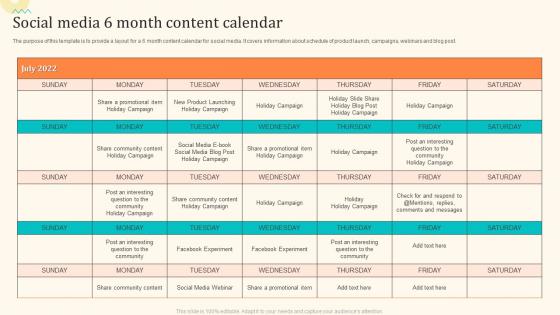
Social Media 6 Month Content Calendar




Try Before you Buy Download Free Sample Product
 Impress Your
 Audience
 100%
100% Editable
 Save Hours
 of Time


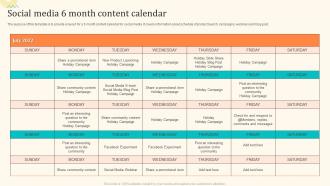
The purpose of this template is to provide a layout for a 6 month content calendar for social media. It covers information about schedule of product launch, campaigns, webinars and blog post.
People who downloaded this PowerPoint presentation also viewed the following :
Social Media 6 Month Content Calendar with all 6 slides:
Use our Social Media 6 Month Content Calendar to effectively help you save your valuable time. They are readymade to fit into any presentation structure.





FAQs for Social Media 6
Okay so basically you need posting dates/times, what platform you're using, and the actual content planned out. Themes are clutch too - like seriously, having a content calendar with random posts everywhere is chaos. Oh and don't forget hashtags and any images you'll need. If you're working with others, build in some approval process or you'll hate your life later. I always start super basic though - dates, content, done. You can get fancy with workflows and stuff once you figure out what actually works for your situation. Just make it detailed enough that future-you won't be confused.
Look, first figure out what you're actually trying to accomplish. Brand awareness? Go heavy on educational stuff and behind-the-scenes content. Need leads? Product posts with clear CTAs work way better. Timing's huge too - post when your people are online and your campaigns are live. I usually batch similar content together because it's just easier that way. Always leave space for spontaneous posts though, those can be gold. Here's the thing that trips everyone up: track what's actually working for your goals. Don't just throw stuff at the wall. If a post type isn't moving your KPIs, ditch it.
Hootsuite and Buffer are the go-to choices - both let you schedule across platforms with decent calendar views. Sprout Social costs more but the analytics are actually worth it if that's your thing. Later's perfect for Instagram-focused stuff. I've honestly seen people crush it with just Google Sheets or Trello when money's tight (sometimes simple works better anyway). CoSchedule's solid for teams since it plays nice with other marketing tools. My advice? Try 2-3 free versions first and see what feels right for how you work before spending money.
I usually do a big review every Friday - like 30 minutes to see what bombed and what actually got engagement. But honestly? I'm tweaking stuff almost daily when something trending pops up or if I have a random idea. Keep your main posting schedule consistent, but leave some wiggle room for spontaneous content. Sometimes the best posts are the ones you didn't plan anyway. Quick daily check-ins work better than overthinking it. Just don't get stuck being so rigid that you miss out on timely opportunities - those usually perform way better than your perfectly planned posts.
Honestly, audience analysis is like the backbone of your whole social media game. First thing you gotta do is check your analytics to see when people are actually engaging - no point posting when everyone's asleep, right? It shows you what content they're into and how they like consuming it. Different platforms need different vibes too. I learned this the hard way when I was posting Instagram stories like LinkedIn posts (yikes). Build your schedule around those peak engagement windows. Without knowing your audience, you're basically screaming into the void and crossing your fingers that someone notices.
Start planning seasonal stuff like 2-3 months out, but don't just do the obvious holidays everyone else hits. Coffee shops crushing National Coffee Day? Smart. Back-to-school vibes for productivity apps? Even better. I used to be terrible at remembering the smaller seasonal moments until I got one of those yearly calendar templates - game changer honestly. Skip the lazy "Happy Valentine's Day" posts with your logo thrown on top. Instead, build actual content series around each event. Create specific hashtags for discovery too. The whole point is sparking real conversations, not just checking boxes. Way more engaging that way.
Honestly, timing is everything with social posts. Instagram and Facebook? People are scrolling evenings and weekends when they're bored. LinkedIn's totally different - weekdays during business hours work best since everyone's procrastinating at work lol. Twitter moves so fast it almost doesn't matter, but still worth testing. Each platform has analytics showing when your followers are online - that's where I'd start. Post your best stuff during those peak times. Every audience is different though, so don't just copy what others do. Try different times and see what actually gets engagement for YOUR posts specifically.
Honestly, a social media calendar is a game changer - it stops your platforms from working against each other. Instead of posting random stuff everywhere, you can actually plan it out. Like your Instagram story teases tomorrow's blog post, then LinkedIn expands on it with more detail, while Twitter drives people to sign up for your email list. Makes so much more sense than the scattered approach most people do (guilty as charged lol). Each platform should serve a different purpose in getting customers. Try mapping out just one campaign across three channels next week. You'll be surprised how much better everything flows together.
Okay so first thing - check your engagement stuff like likes, comments, and saves. That tells you if people actually care about when you're posting. Also look at reach and impressions to see how many eyeballs you're getting. Click-through rates are honestly the most important though, way better than those vanity metrics everyone obsesses over. Track your follower growth too and see if certain times give you spikes. Oh and definitely compare your numbers from before you started using a calendar versus after - that's the only way you'll know if it's actually helping or if you're just wasting time being all organized for no reason.
Honestly, just pick something everyone can actually see - Asana's pretty solid, or even a basic Google Sheet works. Weekly 15-minute check-ins are a lifesaver for catching stuff before it becomes a problem. The biggest thing though? Make someone own each piece of content. Trust me, "I thought you were doing it" conversations are the worst. Also streamline approvals because nothing's more frustrating than great content just... sitting there waiting for someone to hit approve. Oh, and maybe start by asking your team what they'd actually use - some people hate new tools.
Honestly, the worst thing you can do is plan everything months out - you'll sound robotic and miss all the good trending stuff. I learned this the hard way lol. Don't just post to fill your calendar either. People can tell when you're phoning it in. Oh, and LinkedIn content bombing TikTok? Cringe. Each platform's totally different. My rule is plan maybe 70% of your stuff ahead of time, then save 30% for spontaneous posts. That way you can actually respond to what's happening instead of posting some random motivational quote while the world's on fire.
UGC is honestly a game-changer for making your brand feel real. When actual customers post about your stuff, it's way more convincing than your polished ads. People trust other people over brands every time. Your community feels appreciated when you feature their content too - like they actually matter to you. I've noticed feeds with UGC feel less "salesy" and more relatable. You'll want to aim for 2-3 UGC posts weekly (but don't be weird about it if you miss). Oh and definitely tag the original creators - they love the shoutout and you avoid looking like a content thief.
Honestly, mix it up with educational stuff, behind-the-scenes content, user posts, and some promo material. I'd go like 60% educational/fun, 40% promotional - people hate being sold to constantly. Throw in industry insights, team spotlights, customer stories. Product updates too, obviously. Interactive stuff like polls really helps with engagement - learned that the hard way. Map out these categories for the month first, then fill in the actual posts. Oh, and don't forget trending topics in your niche. Balance giving value with your business goals and you're golden.
Honestly? Block out time slots in your calendar for when stuff hits the fan - you'll thank me later. I learned this the hard way lol. Create a crisis folder with template responses, apology drafts, and all your important contacts in one place. Weekly social monitoring is clutch too. Catching problems early beats scrambling at 2am trying to find who to call. Your whole team should know where the playbook lives, not just you. Trust me, it's like insurance - totally annoying to set up but you'll be so relieved when you actually need it.
Okay so visuals are honestly game-changing for social media - they get way more engagement than just text posts. I'd suggest batching them ahead of time because scrambling for graphics at the last minute is pure chaos. Also, different platforms need different sizes and Instagram's square posts look awful on LinkedIn (learned that the hard way). Try planning your visual themes weekly so everything looks cohesive. Start by seeing what content you already have, then figure out what's missing. The biggest thing? Don't treat visuals like an afterthought - they should be part of your actual strategy from the beginning.
-
A library of engaging, customizable and content-ready templates.
-
Amazing variety of PowerPoint slides. Really helpful in designing professional presentations.