

Social Media Marketing Using Twitter Powerpoint Presentation Slides




Try Before you Buy Download Free Sample Product
 Impress Your
 Audience
 100%
100% Editable
 Save Hours
 of Time


The Social Media Marketing using Twitter deck is of great assistance to digital marketing strategists to create, publish, and distribute content based on buyer personas to attract new followers and leads, boost conversions, improve brand recognition, and increase sales. This PPT module contains slides that display the performance analysis of the companys present social media marketing channels and draw attention to their shortcomings. A plan for using Twitter as a marketing tool is also included in the PowerPoint presentation. It talks about making the organizations Twitter profiles more effective and contains a content planner for scheduling various content kinds on Twitter. The deck includes a lead generation strategy for Twitter marketing that details how to launch a Twitter Ads campaign. Additionally, it also covers Twitter benchmarking in order to assess the opposition and enhance businesses social media content publishing tactics. The Twitter advertising campaign also includes a spending plan for the Twitter marketing automation package, which will be used to carry out online advertising campaigns.
People who downloaded this PowerPoint presentation also viewed the following :
Content of this Powerpoint Presentation
Slide 1: This is the cover slide of the deck Social Media Marketing using Twitter
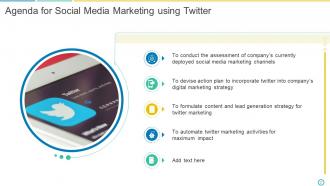
Slide 2: This slide presents Agenda for Social Media Marketing using Twitter
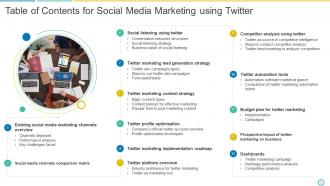
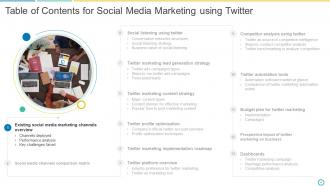
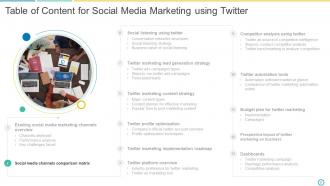
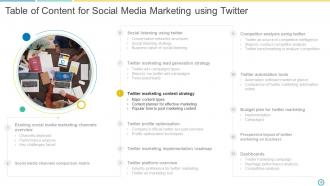
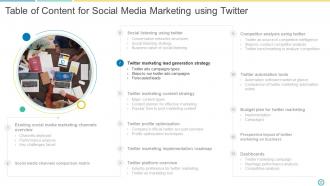
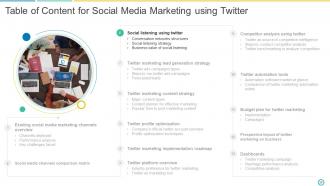
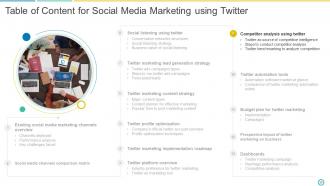
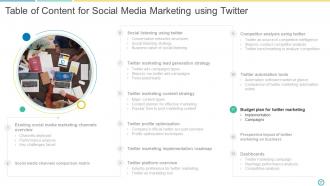
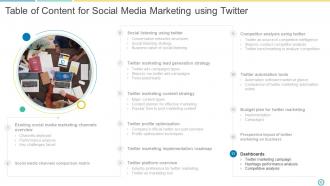
Slide 3: This slide presents Table of Contents for Social Media Marketing using Twitter
Slide 4: This slide presents existing social media marketing channels overview
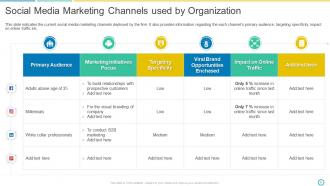
Slide 5: This slide indicates the current social media marketing channels deployed by the firm. It also provides information regarding the each channel’s primary audience, targeting specificity, impact on online traffic etc.
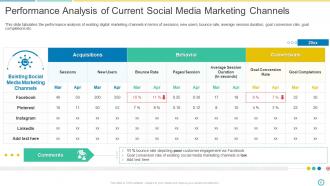
Slide 6: This slide tabulates the performance analysis of existing digital marketing channels in terms of sessions, new users, bounce rate, average session duration, goal conversion rate, goal completions etc.
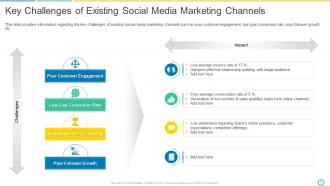
Slide 7: This slide provides information regarding the key challenges of existing social media marketing channels such as poor customer engagement, low goal conversion rate, poor follower growth etc.
Slide 8: This slide presents Table of Content for Social Media Marketing using Twitter
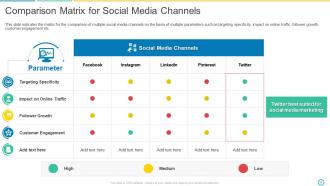
Slide 9: This slide indicates the matrix for the comparison of multiple social media channels on the basis of multiple parameters such as targeting specificity, impact on online traffic, follower growth, customer engagement etc.
Slide 10: This slide presents Table of Content for Social Media Marketing using Twitter
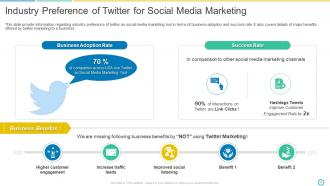
Slide 11: This slide provide information regarding industry preference of twitter as social media marketing tool in terms of business adoption and success rate. It also covers details of major benefits offered by twitter marketing to a business.
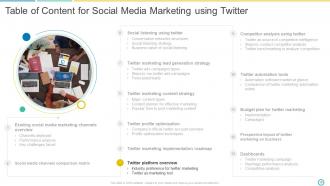
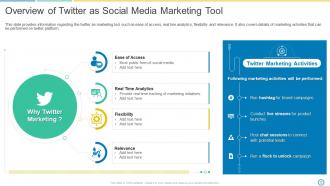
Slide 12: This slide provides information regarding the twitter as marketing tool such as ease of access, real tine analytics, flexibility and relevance. It also covers details of marketing activities that can be performed on twitter platform.
Slide 13: This slide presents Table of Content for Social Media Marketing using Twitter
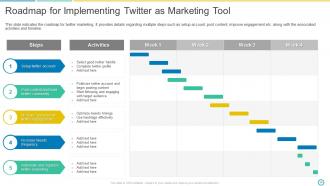
Slide 14: This slide indicates the roadmap for twitter marketing. It provides details regarding multiple steps such as setup account, post content, improve engagement etc. along with the associated activities and timeline.
Slide 15: This slide presents Table of Content for Social Media Marketing using Twitter
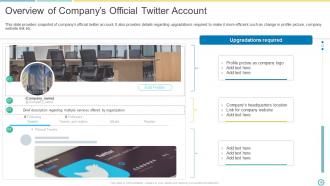
Slide 16: This slide provides snapshot of company’s official twitter account. It also provides details regarding upgradations required to make it more efficient such as change in profile picture, company website link etc.
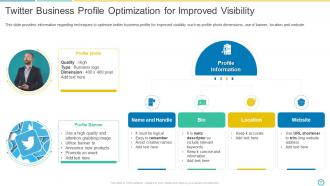
Slide 17: This slide provides information regarding techniques to optimize twitter business profile for improved visibility such as profile photo dimensions, use of banner, location and website.
Slide 18: This slide presents Table of Content for Social Media Marketing using Twitter
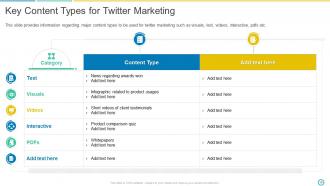
Slide 19: This slide provides information regarding major content types to be used for twitter marketing such as visuals, text, videos, interactive, pdfs etc.
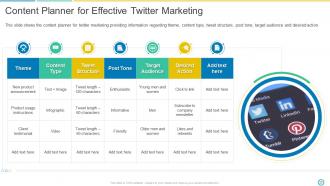
Slide 20: This slide shows the content planner for twitter marketing providing information regarding theme, content type, tweet structure, post tone, target audience and desired action.
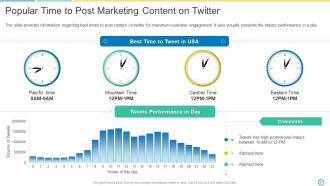
Slide 21: This slide provides information regarding best times to post content on twitter for maximum customer engagement. It also visually presents the tweets performance in a day.
Slide 22: This slide presents Twitter marketing lead generation strategy
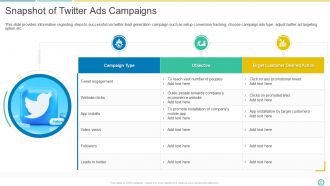
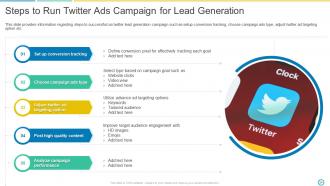
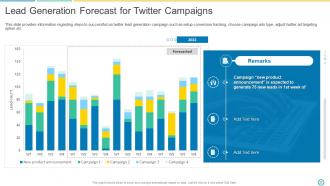
Slide 23: This slide provides information regarding steps to successful run twitter lead generation campaign such as setup conversion tracking, choose campaign ads type, adjust twitter ad targeting option etc.
Slide 24: This slide provides information regarding steps to successful run twitter lead generation campaign such as setup conversion tracking, choose campaign ads type, adjust twitter ad targeting option etc.
Slide 25: This slide provides information regarding steps to successful run twitter lead generation campaign such as setup conversion tracking, choose campaign ads type, adjust twitter ad targeting option etc.
Slide 26: This slide presents Table of Content for Social Media Marketing using Twitter
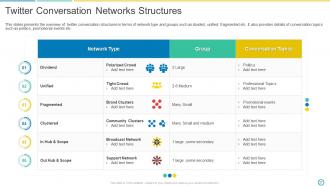
Slide 27: This slides presents the overview of twitter conversation structures in terms of network type and groups such as divided, unified, fragmented etc. It also provides details of conversation topics such as politics, promotional events etc.
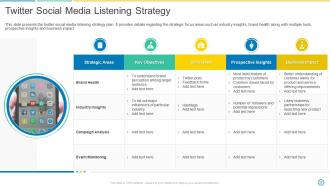
Slide 28: This slide presents the twitter social media listening strategy plan. It provides details regarding the strategic focus areas such as industry insights, brand health along with multiple tools, prospective insights and business impact.
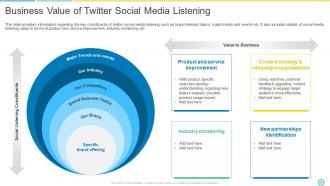
Slide 29: This slide provides information regarding the key constituents of twitter social media listening such as brand relevant topics, major trends and events etc. It also includes details of social media listening value in terms of product and service improvement, industry monitoring etc.
Slide 30: This slide presents Table of Content for Social Media Marketing using Twitter
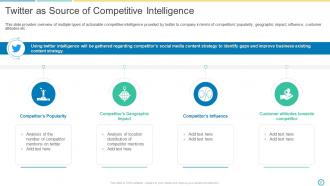
Slide 31: This slide provides overview of multiple types of actionable competitive intelligence provided by twitter to company in terms of competitors’ popularity, geographic impact, influence, customer attitudes etc.
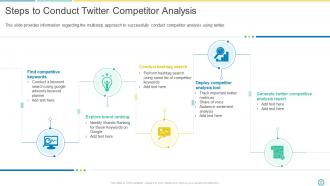
Slide 32: This slide provides information regarding the multistep approach to successfully conduct competitor analysis using twitter.
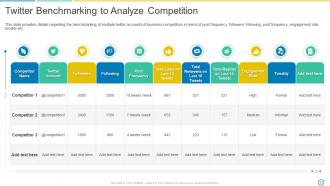
Slide 33: This slide provides details regarding the benchmarking of multiple twitter accounts of business competitors in terms of post frequency, followers, following, post frequency, engagement rate, tonality etc.
Slide 34: This slide presents Table of Content for Social Media Marketing using Twitter
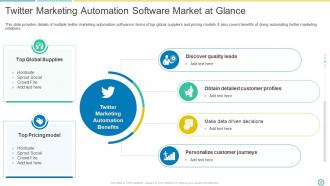
Slide 35: This slide provides details of multiple twitter marketing automation software in terms of top global suppliers and pricing models. It also covers benefits of doing automating twitter marketing initiatives.
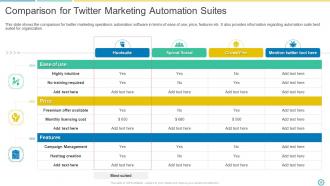
Slide 36: This slide shows the comparison for twitter marketing operations automation software in terms of ease of use, price, features etc. It also provides information regarding automation suite best suited for organization.
Slide 37: This slide presents Table of Content for Social Media Marketing using Twitter
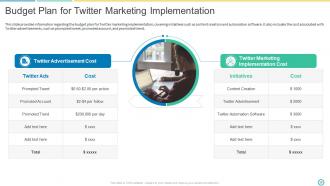
Slide 38: This slide provides information regarding the budget plan for Twitter marketing implementation, covering initiatives such as content creation and automation software. It also includes the cost associated with Twitter advertisements, such as prompted tweet, promoted account, and promoted trend.
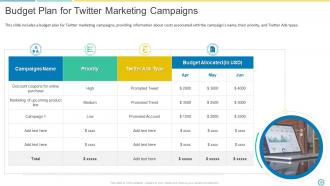
Slide 39: This slide includes a budget plan for Twitter marketing campaigns, providing information about costs associated with the campaign's name, their priority, and Twitter Ads types.
Slide 40: This slide presents Table of Content for Social Media Marketing using Twitter
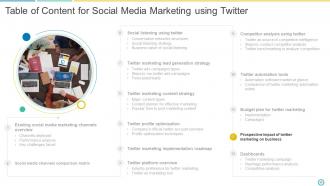
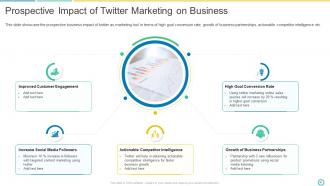
Slide 41: This slide showcase the prospective business impact of twitter as marketing tool in terms of high goal conversion rate, growth of business partnerships, actionable competitor intelligence etc
Slide 42: This slide presents Table of Content for Social Media Marketing using Twitter
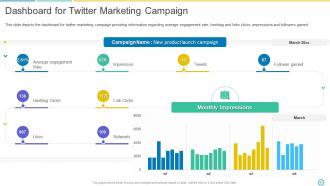
Slide 43: This slide depicts the dashboard for twitter marketing campaign providing information regarding average engagement rate, hashtag and links clicks, impressions and followers gained.
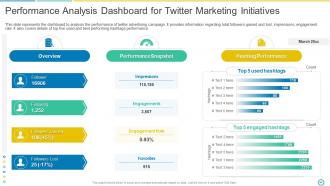
Slide 44: This slide presents performance analysis dasboard for Twitter Marketing Initiatives
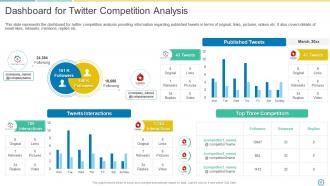
Slide 45: This slide represents the dashboard for twitter competition analysis providing information regarding published tweets in terms of original, links, pictures, videos etc. It also covers details of tweet likes, retweets, mentions, replies etc.
Slide 46: This is an Icon Slide For Social Media Marketing Using Twitter
Slide 47: This slide presents Additional Slides
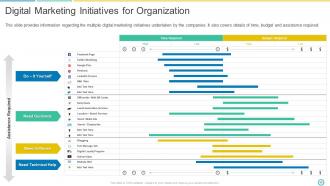
Slide 48: This slide presents Digital Marketing Initiatives for Organization
Slide 49: This is an About Us slide.
Slide 50: This is Our Team slide that can be used to present the team members.
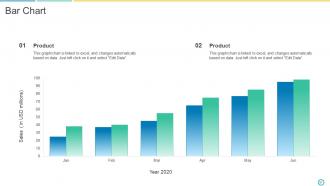
Slide 51: This is the Bar Chart slide that can be used to compare different products.
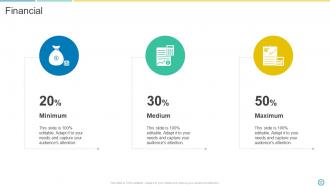
Slide 52: This is a Financial score slide that can be used to present company's financials.
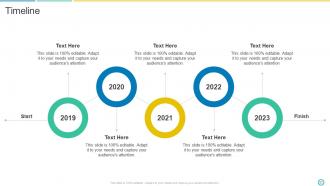
Slide 53: This is a Timeline slide that can be used to present series of events.
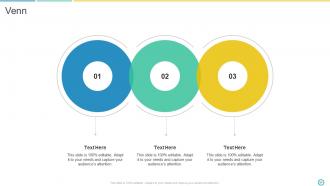
Slide 54: This is a Venn diagram slide that can be used to compare three different elements.
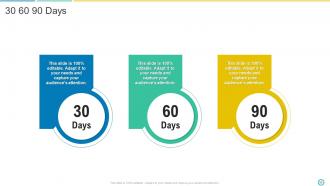
Slide 55: This is a 30 60 90 Days slide that can be used to prepare company's goals.
Slide 56: This is a Thank you slide for acknowledgment.
Social Media Marketing Using Twitter Powerpoint Presentation Slides with all 61 slides:
Use our Social Media Marketing Using Twitter Powerpoint Presentation Slides to effectively help you save your valuable time. They are readymade to fit into any presentation structure.







FAQs for Social Media Marketing Using Twitter
Honestly, AI content tools are everywhere now, but people still crave that authentic, unpolished stuff over super-produced videos. Short-form is still king (ugh, TikTok isn't going anywhere). Social commerce is blowing up too - customers buy straight from posts without bouncing to another site. Behind-the-scenes content performs crazy well right now. Community building through private groups? Huge. I'd pick one thing that fits your vibe and test it out. Maybe try some casual BTS posts this week - you'll probably see your engagement shift pretty quickly.
Honestly, you've got a huge advantage over big brands - you can actually be real. They're stuck waiting for corporate approval while you're out here responding to DMs instantly and showing what actually happens behind the scenes. People are obsessed with supporting businesses that feel human, not some faceless corporation. I'd say pick one or two platforms where your people actually are (don't spread yourself thin) and just crush those. Partner with smaller influencers who genuinely like your stuff, engage with your local community, and let your personality shine through. Your authentic voice beats their polished nonsense every time.
Honestly, start with engagement rate and conversions - that's where the real insights are. I know follower count is tempting to obsess over (guilty of this myself), but it doesn't actually tell you if people care about what you're posting. Engagement shows you're connecting with your audience. Conversions? That's proof your boss will actually understand. Throw in reach and click-through rates too. But here's the thing - don't try tracking everything right away. Pick maybe 3-4 metrics that match what you're trying to accomplish. You'll drive yourself crazy otherwise.
Honestly, you can't just copy-paste the same post everywhere and expect it to work. Instagram's all about pretty visuals and that lifestyle stuff people love scrolling through. LinkedIn? Way more professional - think industry insights and actually useful business content. TikTok's where you gotta get weird with trends (makes me feel old but whatever). Facebook's still solid for building communities and posting longer stuff that people actually read. Oh, and match your tone to what people expect on each platform. Like, don't post a formal LinkedIn article on TikTok - it'll flop hard.
Honestly, user-generated content is like having your customers do your marketing for you. People don't trust what brands say anymore - we're all too cynical for that. But when Sarah from Ohio posts about loving your skincare routine? That hits different. Real customers sharing their actual experiences kills that fake advertising vibe that makes everyone roll their eyes. It snowballs too - one person posts, others see it and think "oh, real people actually use this." Try getting customers to share photos with a branded hashtag or run some easy contests. Way more believable than your polished ads.
First thing - figure out who you're actually trying to reach. Demographics, what keeps them up at night, all that stuff. Facebook's targeting is honestly kind of creepy with how specific you can get, but it works. LinkedIn's your best bet for B2B - you can target by job titles and company size. Start with broader audiences, then narrow down once you see what's actually working. I always A/B test different segments because sometimes the results are totally unexpected. Oh and don't sleep on Instagram if your audience is there - their tools are basically the same as Facebook's now.
Honestly, just make stuff your audience actually cares about - solve their problems or make them laugh. Nobody's stopping for boring text posts anymore, so visuals are everything. I'd definitely use Stories more if I were you, they're crushing it right now. Mix things up with behind-the-scenes content, user posts, quick tips, polls... whatever feels natural. Don't worry about being super polished - authenticity beats perfection every time. Post regularly but don't burn yourself out churning out crap. Oh, and ask questions in your captions! People love sharing their opinions. Track what works and do more of that.
Ugh, so algorithms are basically these invisible bouncers that decide who gets to see your stuff. Instagram's obsessed with Stories and Reels lately, while LinkedIn weirdly loves native video and posts that get people arguing in the comments. Each platform prioritizes different things - how much people engage, how recent your post is, whether you actually know your followers. Here's the annoying part though: they change constantly. Like, what worked last month? Totally useless now. I'd focus on getting real engagement instead of just chasing likes. Make content that actually stops people mid-scroll.
Okay so first thing - always disclose your sponsorships and partnerships upfront. Don't be shady about it. Also, actually respect people's data privacy instead of just saying you do. I know the algorithm loves drama, but try not to manipulate emotions just for engagement (easier said than done, I get it). Fact-check stuff even when you're in a rush to post. Oh and don't treat your followers like they're just numbers on a screen - they're actual humans. Maybe start by looking at your recent campaigns and asking yourself if you'd be cool with someone treating you the same way?
So first thing - forget follower counts, seriously. A micro-influencer with 10K people who actually care beats some mega-influencer's dead audience any day. Make sure their vibe matches yours and their followers are actually your people. Don't script every word they say (we can all smell a forced ad from miles away). Just give them guidelines and let them do their thing. Oh, and be super clear upfront about what you want, when you need it, and what you'll pay. Track the stuff that matters - clicks and actual sales, not just likes. Honestly, start small if you're new to this whole thing.
Oh man, biggest mistakes are not knowing who you're actually targeting and copy-pasting the same content everywhere. Instagram isn't LinkedIn, you know? Also - and this one bit me hard once - forgetting to set up conversion tracking before you go live. People hate being sold to constantly on social, so don't make every post an ad. Test your creative way more than you think you need to. I'd start small with different audiences, see what clicks, then throw money at the winners. Way better than burning cash on everything at once hoping something sticks.
Dude, you've gotta try storytelling instead of just posting product pics constantly. People scroll right past that boring stuff, but they'll actually stop for real stories - like how your thing helped someone or what happened behind the scenes. The engagement difference is crazy honestly. Plus you'll never run out of content ideas because literally everything can be a story - customer wins, company mess-ups, random Tuesday moments. I mean, even your failures make good content sometimes. Just pick one authentic story and post it this week. You'll see how differently people react compared to your usual posts.
Okay so first things first - grab a scheduling tool like Hootsuite or Buffer because posting manually will drive you crazy. Canva is amazing for graphics, seriously a game changer. The native analytics on each platform are fine to start, but Sprout Social shows you the full picture across everything. Oh and get Bitly for tracking your links - forgot about that one last time I helped someone set this up. Don't go overboard though. Pick one scheduler and one analytics tool first, then build from there once you figure out what actually works for your stuff.
Okay so first thing - respond fast and publicly so everyone sees you actually give a shit. Then move the real conversation to DMs because honestly, nobody wants to watch you guys argue in the comments. Stay cool even when they're being totally unreasonable (easier said than done, I know). If you actually screwed something up, just own it and tell them what you're doing to fix it. Don't delete their comment unless it's like, genuinely abusive spam stuff. The goal is basically turning your haters into fans by showing you care. Oh and set up Google alerts or whatever so you catch this stuff quickly!
So basically everything's moving toward automation and AI targeting - honestly it's kinda wild how good platforms are getting at predicting what people want. Privacy stuff like iOS updates is forcing everyone to build their own data systems too. Video content is absolutely crushing static posts right now, which makes sense since that's where algorithms want to spend money anyway. Oh and interactive formats are huge. My biggest tip? Start messing around with automated bidding now rather than later. Focus on video that actually stops people mid-scroll. The whole landscape feels different than even last year.
-
“Immediate response, professional support, and effective solutions that were customized and immediately provided. Well done- Thank you!”
-
Out of the box and creative design.