


Powerpoint Templates and Google slides for Product Backlog Prioritization
Save Your Time and attract your audience with our fully editable PPT Templates and Slides.

-
 Product Backlog Management Powerpoint Ppt Template Bundles
Deliver a credible and compelling presentation by deploying this Product Backlog Management Powerpoint Ppt Template Bundles. Intensify your message with the right graphics, images, icons, etc. presented in this complete deck. This PPT template is a great starting point to convey your messages and build a good collaboration. The twelve slides added to this PowerPoint slideshow helps you present a thorough explanation of the topic. You can use it to study and present various kinds of information in the form of stats, figures, data charts, and many more. This Product Backlog Management Powerpoint Ppt Template Bundles PPT slideshow is available for use in standard and widescreen aspects ratios. So, you can use it as per your convenience. Apart from this, it can be downloaded in PNG, JPG, and PDF formats, all completely editable and modifiable. The most profound feature of this PPT design is that it is fully compatible with Google Slides making it suitable for every industry and business domain.
-
 Product Backlog Refinement Icon In Scrum Event
Presenting our set of slides with Product Backlog Refinement Icon In Scrum Event. This exhibits information on three stages of the process. This is an easy to edit and innovatively designed PowerPoint template. So download immediately and highlight information on Product Backlog Refinement, In Scrum Event.
-
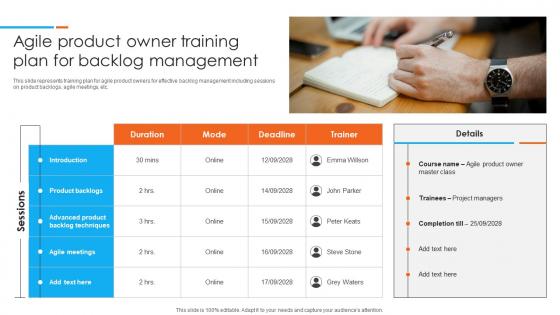 Agile Product Owner Training Plan For Backlog Management
This slide represents training plan for agile product owners for effective backlog management including sessions on product backlogs, agile meetings, etc. Presenting our set of slides with Agile Product Owner Training Plan For Backlog Management This exhibits information on one stages of the process. This is an easy to edit and innovatively designed PowerPoint template. So download immediately and highlight information on Product Backlogs, Introduction, Agile Meetings
-
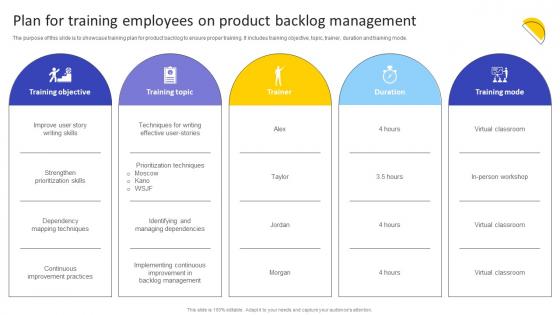 Plan For Training Employees On Product Backlog Agile Product Owner Training Manual DTE SS
The purpose of this slide is to showcase training plan for product backlog to ensure proper training. It includes training objective, topic, trainer, duration and training mode. Deliver an outstanding presentation on the topic using this Plan For Training Employees On Product Backlog Agile Product Owner Training Manual DTE SS. Dispense information and present a thorough explanation of Training Objective, Training Topic, Training Mode using the slides given. This template can be altered and personalized to fit your needs. It is also available for immediate download. So grab it now.
-
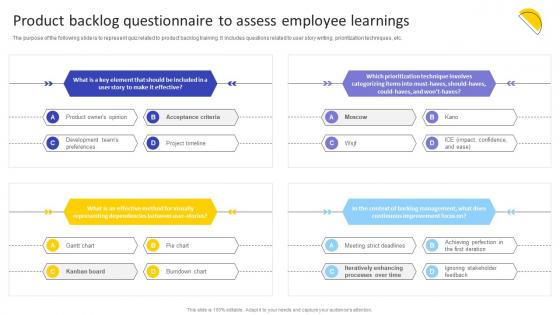 Product Backlog Questionnaire To Assess Employee Agile Product Owner Training Manual DTE SS
The purpose of the following slide is to represent quiz related to product backlog training. It includes questions related to user story writing, prioritization techniques, etc. Present the topic in a bit more detail with this Product Backlog Questionnaire To Assess Employee Agile Product Owner Training Manual DTE SS. Use it as a tool for discussion and navigation on Gantt Chart, Pie Chart, Burndown Chart. This template is free to edit as deemed fit for your organization. Therefore download it now.
-
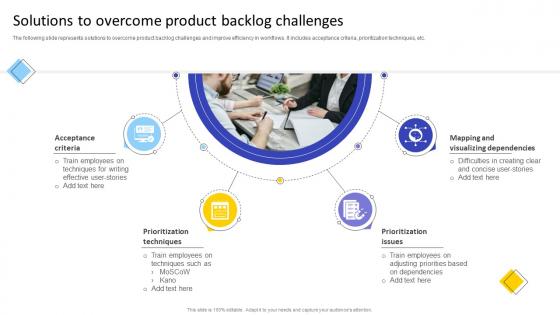 Solutions To Overcome Product Backlog Challenges Agile Product Owner Training Manual DTE SS
The following slide represents solutions to overcome product backlog challenges and improve efficiency in workflows. It includes acceptance criteria, prioritization techniques, etc. Increase audience engagement and knowledge by dispensing information using Solutions To Overcome Product Backlog Challenges Agile Product Owner Training Manual DTE SS. This template helps you present information on four stages. You can also present information on Mapping And Visualizing Dependencies, Prioritization Issues, Prioritization Techniques using this PPT design. This layout is completely editable so personaize it now to meet your audiences expectations.
-
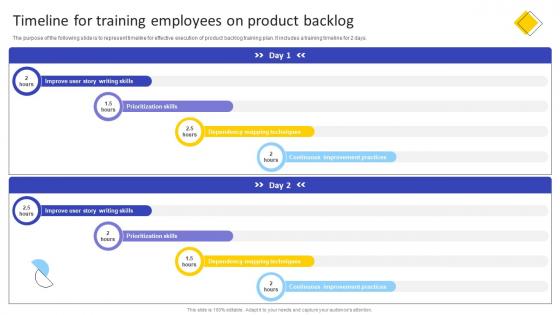 Timeline For Training Employees On Product Backlog Agile Product Owner Training Manual DTE SS
The purpose of the following slide is to represent timeline for effective execution of product backlog training plan. It includes a training timeline for 2 days. Deliver an outstanding presentation on the topic using this Timeline For Training Employees On Product Backlog Agile Product Owner Training Manual DTE SS. Dispense information and present a thorough explanation of Continuous Improvement Practices, Mapping Techniques, Prioritization Skills using the slides given. This template can be altered and personalized to fit your needs. It is also available for immediate download. So grab it now.
-
 Product Backlog Process Components Planning Prioritization Organisation Framework
This complete deck can be used to present to your team. It has PPT slides on various topics highlighting all the core areas of your business needs. This complete deck focuses on Product Backlog Process Components Planning Prioritization Organisation Framework and has professionally designed templates with suitable visuals and appropriate content. This deck consists of total of nine slides. All the slides are completely customizable for your convenience. You can change the colour, text and font size of these templates. You can add or delete the content if needed. Get access to this professionally designed complete presentation by clicking the download button below.
-
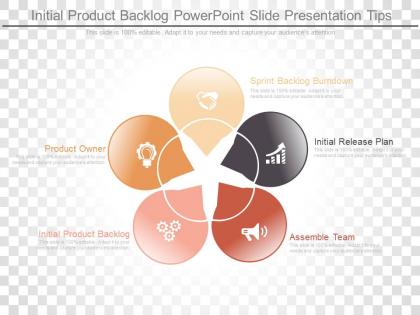 Initial product backlog powerpoint slide presentation tips
Presenting initial product backlog powerpoint slide presentation tips. This is a initial product backlog powerpoint slide presentation tips. This is a five stage process. The stages in this process are sprint backlog burndown, initial release plan, assemble team, initial product backlog, product owner.
-
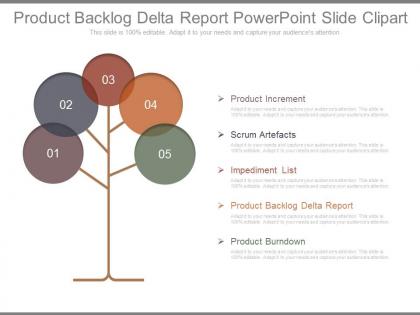 Product backlog delta report powerpoint slide clipart
Presenting product backlog delta report powerpoint slide clipart. This is a product backlog delta report powerpoint slide clipart. This is a five stage process. The stages in this process are product increment, scrum artefacts, impediment list, product backlog delta report, product burndown.
-
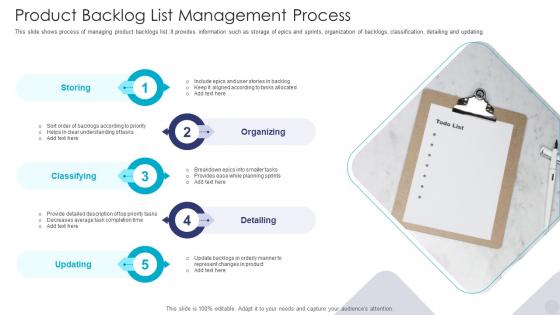 Product Backlog List Management Process
This slide shows process of managing product backlogs list. It provides information such as storage of epics and sprints, organization of backlogs, classification, detailing and updating. Introducing our premium set of slides withProduct Backlog List Management Process. Ellicudate the five stages and present information using this PPT slide. This is a completely adaptable PowerPoint template design that can be used to interpret topics likeStoring, Organizing, Classifying, Detailing, Updating. So download instantly and tailor it with your information.
-
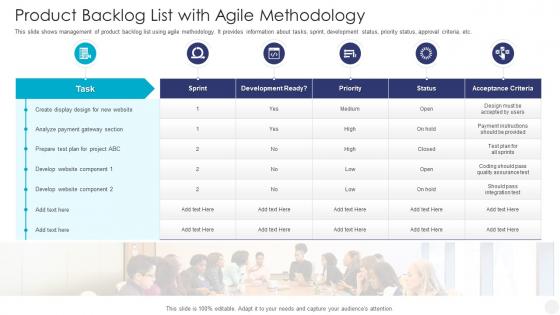 Product Backlog List With Agile Methodology
This slide shows management of product backlog list using agile methodology. It provides information about tasks, sprint, development status, priority status, approval criteria, etc. Introducing ourProduct Backlog List with Agile Methodology set of slides. The topics discussed in these slides areAcceptance Criteria, Development Ready, Analyze Payment Gateway Section. This is an immediately available PowerPoint presentation that can be conveniently customized. Download it and convince your audience.
-
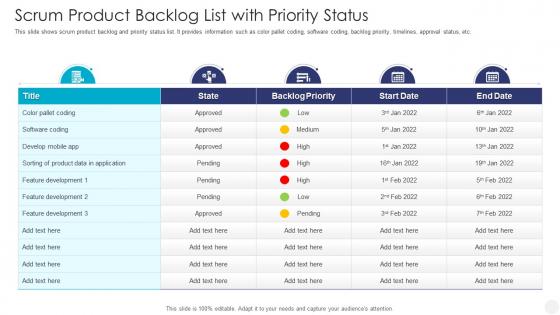 Scrum Product Backlog List With Priority Status
This slide shows scrum product backlog and priority status list. It provides information such as color pallet coding, software coding, backlog priority, timelines, approval status, etc. Presenting our well structuredScrum Product Backlog List with Priority Status. The topics discussed in this slide are Backlog Priority, Develop Mobile App, Product Data. This is an instantly available PowerPoint presentation that can be edited conveniently. Download it right away and captivate your audience.
-
 Scrum Product Icon With Backlog List
Presenting our set of slides with Scrum Product Icon With Backlog List. This exhibits information on four stages of the process. This is an easy to edit and innovatively designed PowerPoint template. So download immediately and highlight information on Scrum Product Icon With Backlog List.
-
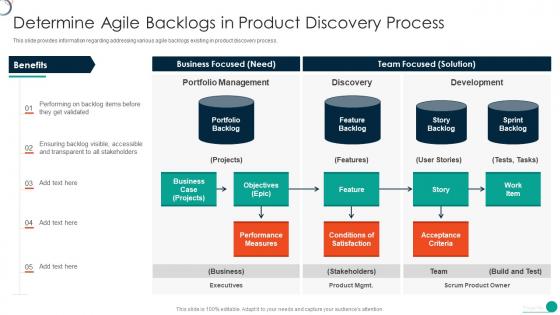 Determine Initial Phase For Successful Software Development Agile Backlogs In Product Discovery
This slide provides information regarding addressing various agile backlogs existing in product discovery process. Present the topic in a bit more detail with this Determine Initial Phase For Successful Software Development Agile Backlogs In Product Discovery. Use it as a tool for discussion and navigation on Portfolio Management, Discovery, Development. This template is free to edit as deemed fit for your organization. Therefore download it now.
-
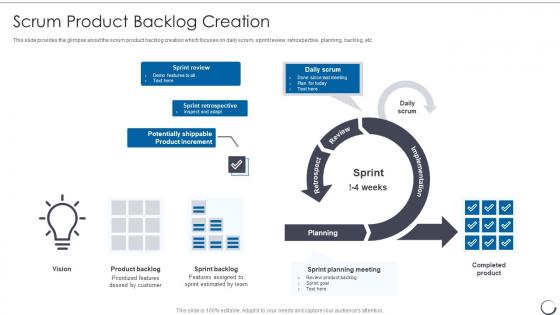 Product Backlog Creation Agile Scrum Methodology
This slide provides the glimpse about the scrum product backlog creation which focuses on daily scrum, sprint review, retrospective, planning, backlog, etc. Deliver an outstanding presentation on the topic using this Product Backlog Creation Agile Scrum Methodology. Dispense information and present a thorough explanation of Planning, Implementation, Product using the slides given. This template can be altered and personalized to fit your needs. It is also available for immediate download. So grab it now.
-
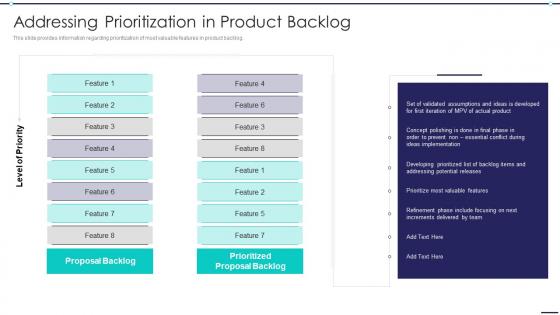 Agile Digitization For Product Addressing Prioritization In Product Backlog
This slide provides information regarding prioritization of most valuable features in product backlog. Deliver an outstanding presentation on the topic using this Agile Digitization For Product Addressing Prioritization In Product Backlog. Dispense information and present a thorough explanation of Proposal Backlog, Prioritized, Proposal Backlog, Level Priority using the slides given. This template can be altered and personalized to fit your needs. It is also available for immediate download. So grab it now.
-
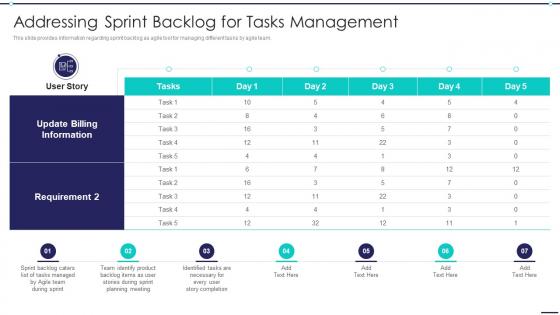 Agile Digitization For Product Addressing Sprint Backlog For Tasks Management
This slide provides information regarding sprint backlog as agile tool for managing different tasks by agile team. Deliver an outstanding presentation on the topic using this Agile Digitization For Product Addressing Sprint Backlog For Tasks Management. Dispense information and present a thorough explanation of Update Billing Information, Requirement, Team Identify Product Backlog using the slides given. This template can be altered and personalized to fit your needs. It is also available for immediate download. So grab it now.
-
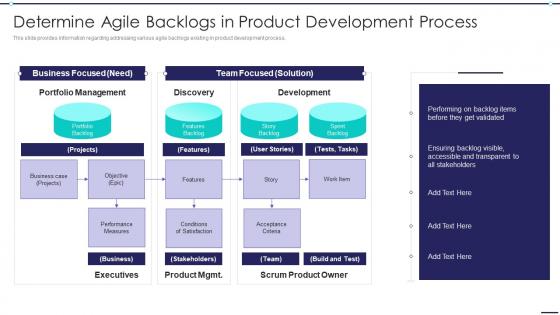 Agile Digitization For Product Determine Agile Backlogs In Product Development Process
This slide provides information regarding addressing various agile backlogs existing in product development process. Increase audience engagement and knowledge by dispensing information using Agile Digitization For Product Determine Agile Backlogs In Product Development Process. This template helps you present information on one stages. You can also present information on Business Focused, Team Focused, Development, Portfolio Management, Discovery using this PPT design. This layout is completely editable so personaize it now to meet your audiences expectations.
-
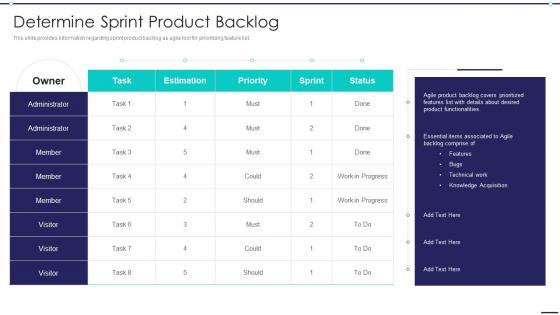 Agile Digitization For Product Determine Sprint Product Backlog
This slide provides information regarding sprint product backlog as agile tool for prioritizing feature list. Deliver an outstanding presentation on the topic using this Agile Digitization For Product Determine Sprint Product Backlog. Dispense information and present a thorough explanation of Administrator, Estimation, Priority, Sprint using the slides given. This template can be altered and personalized to fit your needs. It is also available for immediate download. So grab it now.
-
 Scrum Project Plan With Product Backlog Management
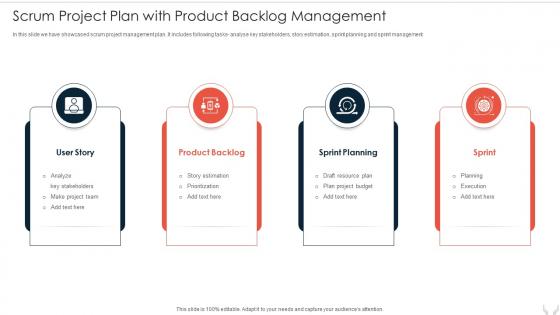
In this slide we have showcased scrum project management plan. It includes following tasks- analyse key stakeholders, story estimation, sprint planning and sprint management Introducing our premium set of slides with Scrum Project Plan With Product Backlog Management. Elucidate the four stages and present information using this PPT slide. This is a completely adaptable PowerPoint template design that can be used to interpret topics like User Story, Product Backlog, Sprint Planning, Management. So download instantly and tailor it with your information.
-
 Agile Initiation Playbook Determine Iteration Planning To Manage Product Backlog Items
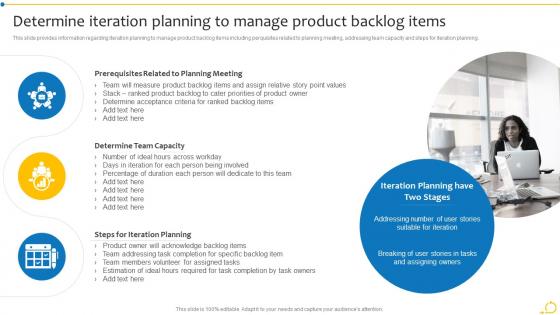
This slide provides information regarding iteration planning to manage product backlog items including perquisites related to planning meeting, addressing team capacity and steps for iteration planning. Introducing Agile Initiation Playbook Determine Iteration Planning To Manage Product Backlog Items to increase your presentation threshold. Encompassed with three stages, this template is a great option to educate and entice your audience. Dispence information on Prerequisites Related, Planning Meeting, Determine Team Capacity, using this template. Grab it now to reap its full benefits.
-
 Scrum Framework Scrum Product Backlog Creation Ppt Layouts Format
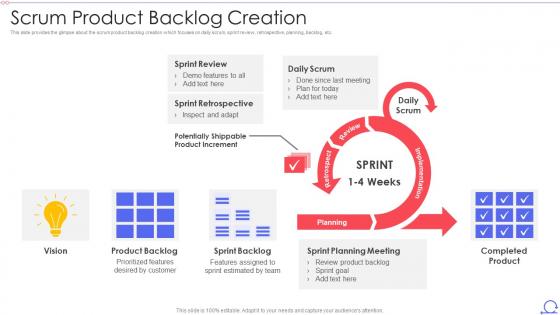
This slide provides the glimpse about the scrum product backlog creation which focuses on daily scrum, sprint review, retrospective, planning, backlog, etc. Deliver an outstanding presentation on the topic using this Scrum Framework Scrum Product Backlog Creation Ppt Layouts Format. Dispense information and present a thorough explanation of Sprint Review, Sprint Retrospective, Daily Scrum, Product Backlog, Sprint Backlog using the slides given. This template can be altered and personalized to fit your needs. It is also available for immediate download. So grab it now.
-
 Agile Playbook Determine Iteration Planning To Manage Product Backlog Items
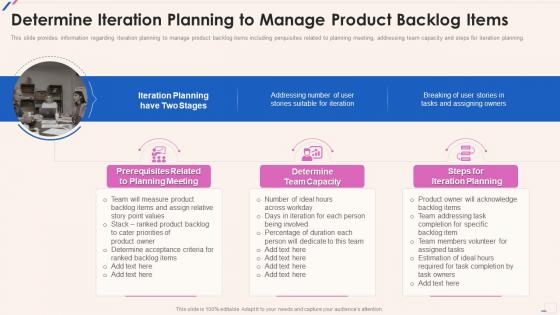
This slide provides information regarding iteration planning to manage product backlog items including perquisites related to planning meeting, addressing team capacity and steps for iteration planning. Introducing Agile Playbook Determine Iteration Planning To Manage Product Backlog Items to increase your presentation threshold. Encompassed with three stages, this template is a great option to educate and entice your audience. Dispence information on Prerequisites Related To Planning Meeting, Determine Team Capacity, Steps For Iteration Planning , using this template. Grab it now to reap its full benefits.
-
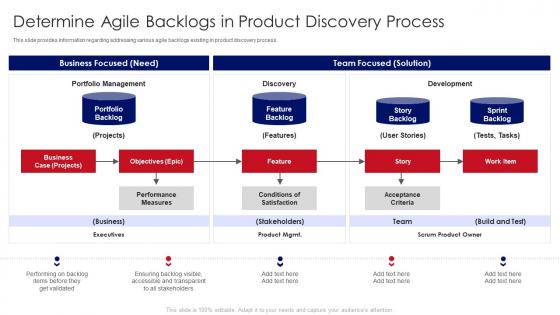 Determine Agile Backlogs In Product Discovery Process Developing Product With Agile Teams
This slide provides information regarding addressing various agile backlogs existing in product discovery process. Deliver an outstanding presentation on the topic using this Determine Agile Backlogs In Product Discovery Process Developing Product With Agile Teams. Dispense information and present a thorough explanation of Determine Agile Backlogs In Product Discovery Process using the slides given. This template can be altered and personalized to fit your needs. It is also available for immediate download. So grab it now.
-
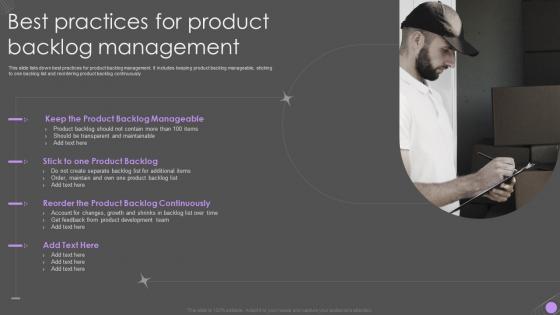 Best Practices For Product Backlog Management
This slide lists down best practices for product backlog management. It includes keeping product backlog manageable, sticking to one backlog list and reordering product backlog continuously. Presenting our set of slides with Best Practices For Product Backlog Management. This exhibits information on one stages of the process. This is an easy to edit and innovatively designed PowerPoint template. So download immediately and highlight information on Product Backlog Manageable, Product Backlog Continuously, Account For Changes.
-
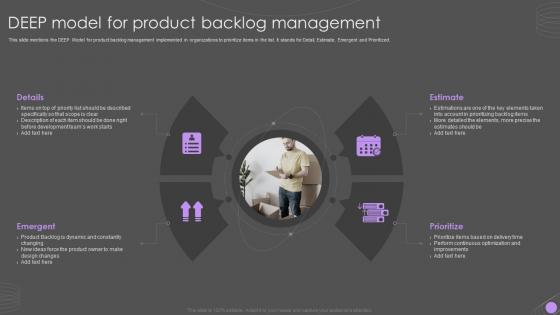 DEEP Model For Product Backlog Management
This slide mentions the DEEP Model for product backlog management implemented in organizations to prioritize items in the list. It stands for Detail, Estimate, Emergent and Prioritized. Introducing our premium set of slides with DEEP Model For Product Backlog Management. Ellicudate the four stages and present information using this PPT slide. This is a completely adaptable PowerPoint template design that can be used to interpret topics like Details, Emergent, Estimate, Prioritize. So download instantly and tailor it with your information.
-
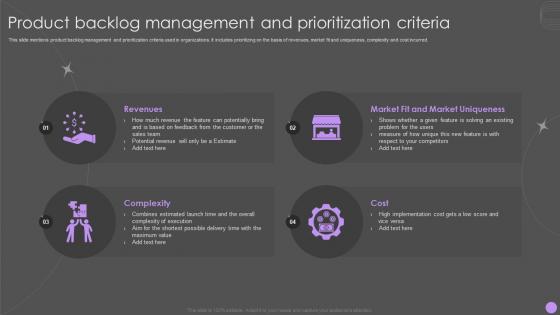 Product Backlog Management And Prioritization Criteria
This slide mentions product backlog management and prioritization criteria used in organizations. It includes prioritizing on the basis of revenues, market fit and uniqueness, complexity and cost incurred. Presenting our set of slides with Product Backlog Management And Prioritization Criteria. This exhibits information on four stages of the process. This is an easy to edit and innovatively designed PowerPoint template. So download immediately and highlight information on Revenues, Market Fit, Market Uniqueness, Cost, Complexity.
-
 Product Backlog Management And Prioritization Icon
Introducing our Product Backlog Management And Prioritization Icon set of slides. The topics discussed in these slides are Product Backlog Management, Prioritization Icon. This is an immediately available PowerPoint presentation that can be conveniently customized. Download it and convince your audience.
-
 Product Backlog Management And Task Checklist Icon
Presenting our well structured Product Backlog Management And Task Checklist Icon. The topics discussed in this slide are Product Backlog Management, Task Checklist Icon. This is an instantly available PowerPoint presentation that can be edited conveniently. Download it right away and captivate your audience.
-
 Product Backlog Management Software For Organizations
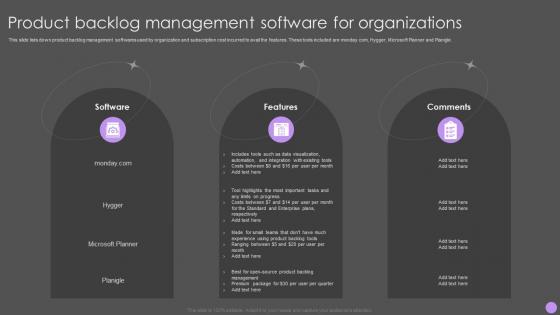
This slide lists down product backlog management softwares used by organization and subscription cost incurred to avail the features. These tools included are monday.com, Hygger, Microsoft Planner and Planigle. Introducing our premium set of slides with Product Backlog Management Software For Organizations. Ellicudate the three stages and present information using this PPT slide. This is a completely adaptable PowerPoint template design that can be used to interpret topics like Features, Comments, Software. So download instantly and tailor it with your information.
-
 Product Backlog Management Techniques For Organizations
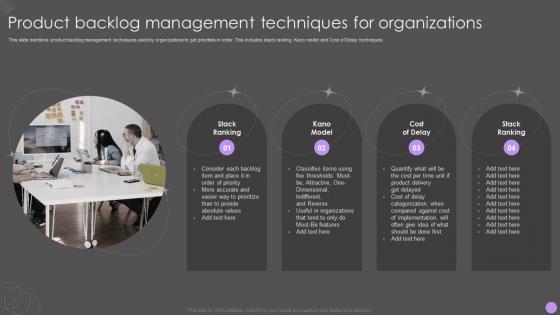
Presenting our set of slides with Product Backlog Management Techniques For Organizations. This exhibits information on four stages of the process. This is an easy to edit and innovatively designed PowerPoint template. So download immediately and highlight information on Stack Ranking, Kano Model, Cost Of Delay.
-
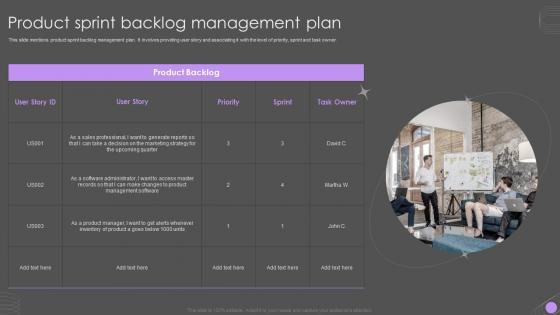 Product Sprint Backlog Management Plan
This slide mentions product sprint backlog management plan. It involves providing user story and associating it with the level of priority, sprint and task owner. Introducing our premium set of slides with Product Sprint Backlog Management Plan. Ellicudate the one stages and present information using this PPT slide. This is a completely adaptable PowerPoint template design that can be used to interpret topics like Product Backlog, Priority, Sprint. So download instantly and tailor it with your information.
-
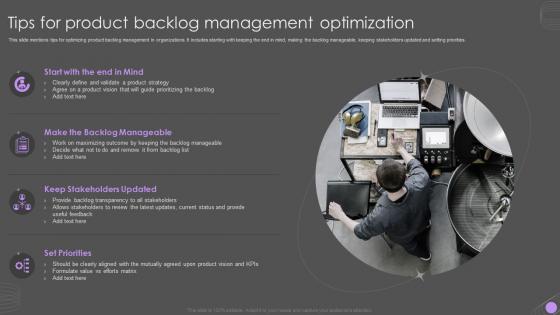 Tips For Product Backlog Management Optimization
This slide mentions tips for optimizing product backlog management in organizations. It includes starting with keeping the end in mind, making the backlog manageable, keeping stakeholders updated and setting priorities. Presenting our set of slides with Tips For Product Backlog Management Optimization. This exhibits information on four stages of the process. This is an easy to edit and innovatively designed PowerPoint template. So download immediately and highlight information on Backlog Manageable, Keep Stakeholders Updated, Set Priorities.
-
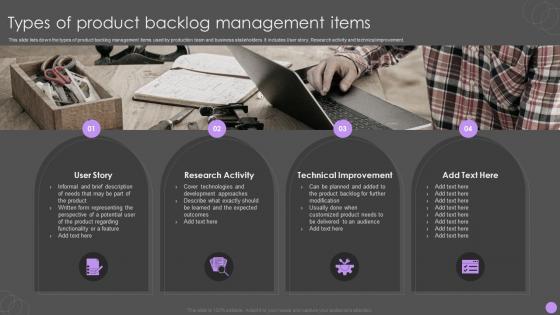 Types Of Product Backlog Management Items
This slide lists down the types of product backlog management items used by production team and business stakeholders. It includes User story, Research activity and technical improvement. Introducing our premium set of slides with Types Of Product Backlog Management Items. Ellicudate the four stages and present information using this PPT slide. This is a completely adaptable PowerPoint template design that can be used to interpret topics like User Story, Research Activity, Technical Improvement. So download instantly and tailor it with your information.
-
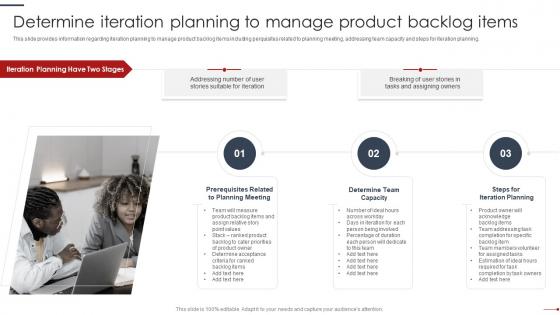 Determine Iteration Planning To Manage Product Backlog Items Agile Project Management Playbook
This slide provides information regarding iteration planning to manage product backlog items including perquisites related to planning meeting, addressing team capacity and steps for iteration planning. Introducing Determine Iteration Planning To Manage Product Backlog Items Agile Project Management Playbook to increase your presentation threshold. Encompassed with three stages, this template is a great option to educate and entice your audience. Dispence information on Prerequisites Related, Planning Meeting, Determine Team Capacity, Steps Iteration Planning, using this template. Grab it now to reap its full benefits.
-
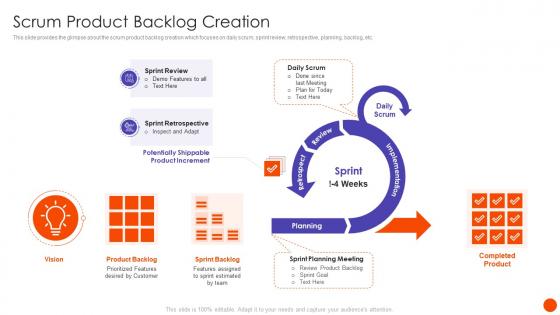 Scrum In SDLC Scrum Product Backlog Creation Ppt Download
This slide provides the glimpse about the scrum product backlog creation which focuses on daily scrum, sprint review, retrospective, planning, backlog, etc. Deliver an outstanding presentation on the topic using this Scrum In SDLC Scrum Product Backlog Creation Ppt Download. Dispense information and present a thorough explanation of Scrum Product Backlog Creation using the slides given. This template can be altered and personalized to fit your needs. It is also available for immediate download. So grab it now.
-
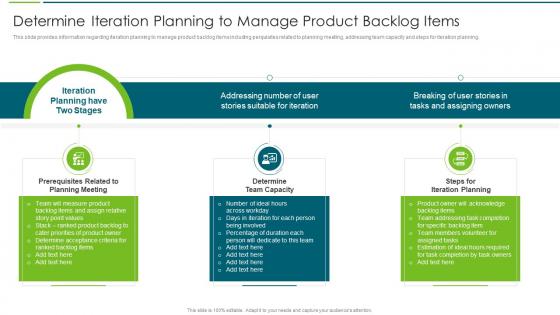 Agile Transformation Approach Playbook Iteration Planning To Manage Product Backlog Items
This slide provides information regarding iteration planning to manage product backlog items including perquisites related to planning meeting, addressing team capacity and steps for iteration planning. Deliver an outstanding presentation on the topic using this Agile Transformation Approach Playbook Iteration Planning To Manage Product Backlog Items. Dispense information and present a thorough explanation of Planning, Provides Information, Including Perquisite using the slides given. This template can be altered and personalized to fit your needs. It is also available for immediate download. So grab it now.
-
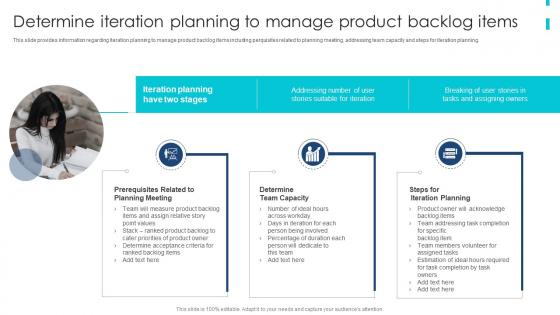 Agile Product Development Playbook Determine Iteration Planning To Manage Product Backlog
This slide provides information regarding iteration planning to manage product backlog items including perquisites related to planning meeting, addressing team capacity and steps for iteration planning. Introducing Agile Product Development Playbook Determine Iteration Planning To Manage Product Backlog to increase your presentation threshold. Encompassed with three stages, this template is a great option to educate and entice your audience. Dispence information on Prerequisites Related, Planning Meeting, Determine Team Capacity, Steps For Iteration Planning, using this template. Grab it now to reap its full benefits.
-
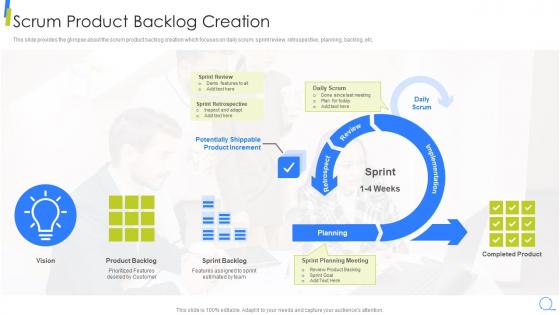 Scrum Product Backlog Creation Scrum Model Step By Step
This slide provides the glimpse about the scrum product backlog creation which focuses on daily scrum, sprint review, retrospective, planning, backlog, etc. Deliver an outstanding presentation on the topic using this Scrum Product Backlog Creation Scrum Model Step By Step. Dispense information and present a thorough explanation of Scrum Product Backlog Creation using the slides given. This template can be altered and personalized to fit your needs. It is also available for immediate download. So grab it now.
-
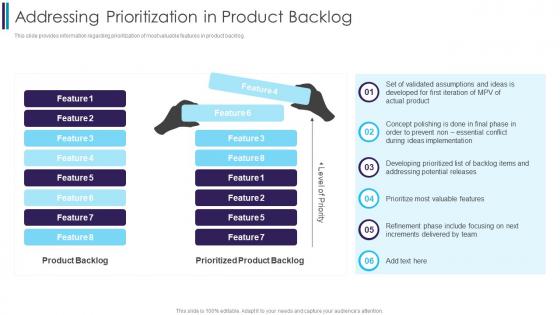 Addressing Prioritization In Product Backlog Digitally Transforming Through Agile It
This slide provides information regarding prioritization of most valuable features in product backlog. Present the topic in a bit more detail with this Addressing Prioritization In Product Backlog Digitally Transforming Through Agile It. Use it as a tool for discussion and navigation on Implementation, Prioritization, Product. This template is free to edit as deemed fit for your organization. Therefore download it now.
-
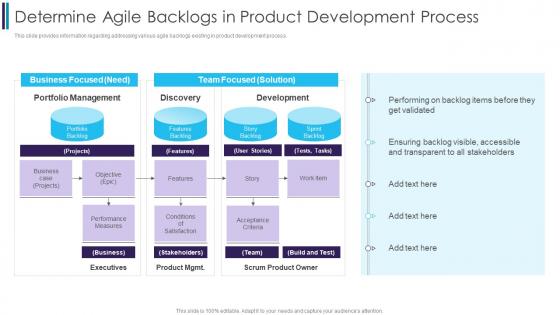 Determine Agile Backlogs In Product Development Process Digitally Transforming Through Agile It
This slide provides information regarding addressing various agile backlogs existing in product development process. Present the topic in a bit more detail with this Determine Agile Backlogs In Product Development Process Digitally Transforming Through Agile It. Use it as a tool for discussion and navigation on Product, Development, Process. This template is free to edit as deemed fit for your organization. Therefore download it now.
-
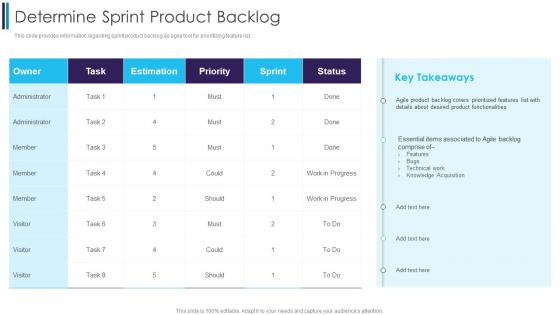 Determine Sprint Product Backlog Digitally Transforming Through Agile It
This slide provides information regarding sprint product backlog as agile tool for prioritizing feature list. Deliver an outstanding presentation on the topic using this Determine Sprint Product Backlog Digitally Transforming Through Agile It. Dispense information and present a thorough explanation of Product, Functionalities, Associated using the slides given. This template can be altered and personalized to fit your needs. It is also available for immediate download. So grab it now.
-
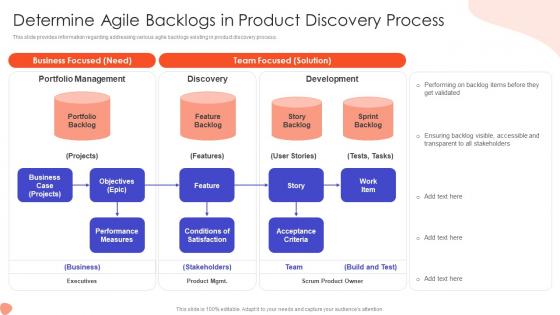 Determine Agile Backlogs In Addressing Foremost Stage Of Product Design And Development
This slide provides information regarding addressing various agile backlogs existing in product discovery process. Deliver an outstanding presentation on the topic using this Determine Agile Backlogs In Addressing Foremost Stage Of Product Design And Development. Dispense information and present a thorough explanation of Portfolio Management, Discovery, Development, Business, Stakeholders using the slides given. This template can be altered and personalized to fit your needs. It is also available for immediate download. So grab it now.
-
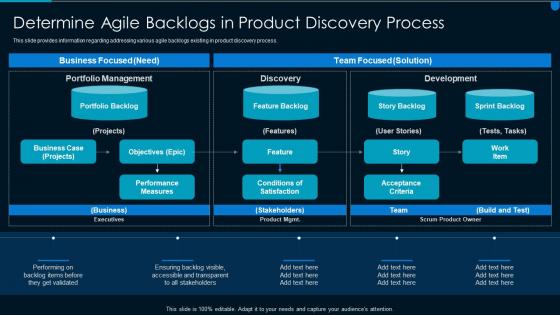 Implementing effective solution development agile backlogs in product discovery process
This slide provides information regarding addressing various agile backlogs existing in product discovery process. Deliver an outstanding presentation on the topic using this Implementing Effective Solution Development Agile Backlogs In Product Discovery Process. Dispense information and present a thorough explanation of Product, Discovery, Process using the slides given. This template can be altered and personalized to fit your needs. It is also available for immediate download. So grab it now.
-
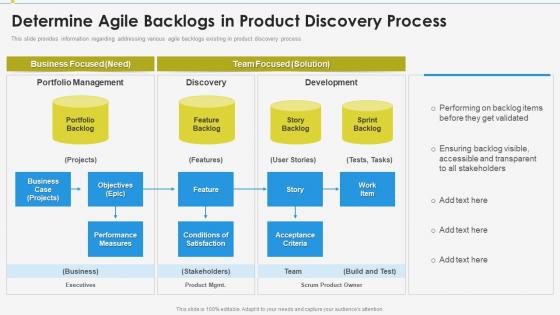 Determine agile backlogs in enabling effective product discovery process
This slide provides information regarding addressing various agile backlogs existing in product discovery process. Present the topic in a bit more detail with this Determine Agile Backlogs In Enabling Effective Product Discovery Process. Use it as a tool for discussion and navigation on Business Focused Need, Team Focused Solution, Portfolio Management, Discovery, Development, Portfolio Backlog, Business Case. This template is free to edit as deemed fit for your organization. Therefore download it now.
-
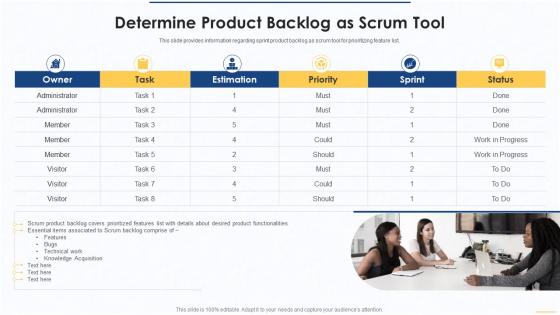 Determine product backlog as scrum tool essential scrum tools for agile project management it
This slide provides information regarding sprint product backlog as scrum tool for prioritizing feature list. Introducing Determine Product Backlog As Scrum Tool Essential Scrum Tools For Agile Project Management IT to increase your presentation threshold. Encompassed with one stages, this template is a great option to educate and entice your audience. Dispence information on Estimation, Priority, Progress, Technical Work, Knowledge, Acquisition , using this template. Grab it now to reap its full benefits.
-
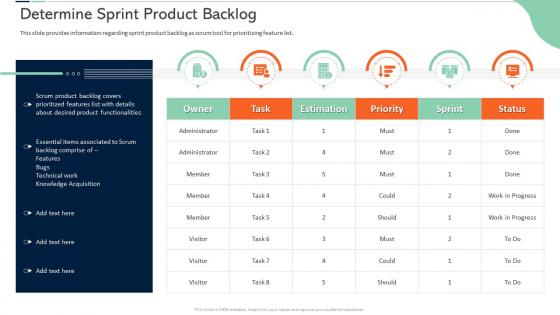 Scrum certificate training in organization determine sprint product backlog
This slide provides information regarding sprint product backlog as scrum tool for prioritizing feature list. Deliver an outstanding presentation on the topic using this Scrum Certificate Training In Organization Determine Sprint Product Backlog. Dispense information and present a thorough explanation of Determine Sprint Product Backlog using the slides given. This template can be altered and personalized to fit your needs. It is also available for immediate download. So grab it now.
-
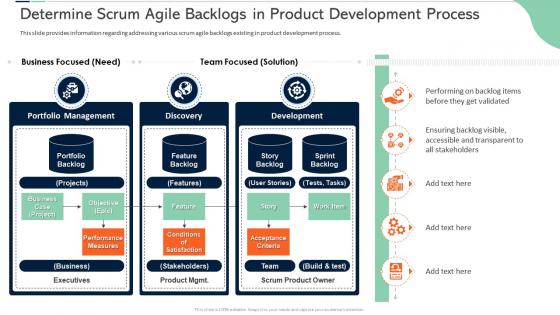 Determine scrum agile backlogs in product scrum certificate training in organization
This slide provides information regarding addressing various scrum agile backlogs existing in product development process. Introducing Determine Scrum Agile Backlogs In Product Scrum Certificate Training In Organization to increase your presentation threshold. Encompassed with three stages, this template is a great option to educate and entice your audience. Dispence information on Product, Team, Executives, Portfolio Management, Development, using this template. Grab it now to reap its full benefits.
-
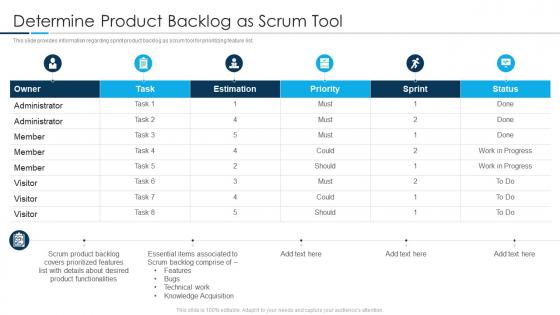 Determine product backlog as scrum tool scrum tools utilized by agile teams it
This slide provides information regarding sprint product backlog as scrum tool for prioritizing feature list. Deliver an outstanding presentation on the topic using this Determine Product Backlog As Scrum Tool Scrum Tools Utilized By Agile Teams It. Dispense information and present a thorough explanation of Desired, Product, Technical using the slides given. This template can be altered and personalized to fit your needs. It is also available for immediate download. So grab it now.
-
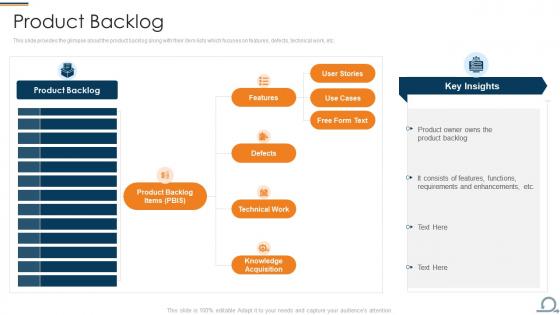 Product backlog work scrum process framework ppt inspiration professional
Goal, Method, Metrics Present the topic in a bit more detail with this Product Backlog Work Scrum Process Framework Ppt Inspiration Professional. Use it as a tool for discussion and navigation on Product Backlog. This template is free to edit as deemed fit for your organization. Therefore download it now.
-
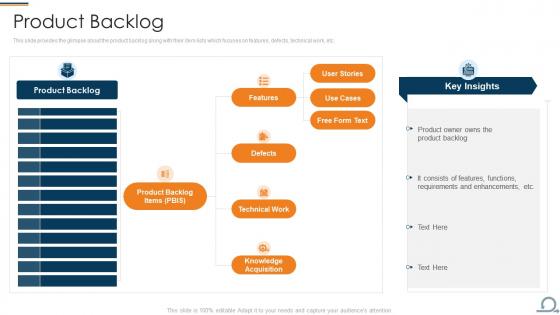 Scrum process framework product backlog ppt slides outline
This slide provides the glimpse about the product backlog along with their item lists which focuses on features, defects, technical work, etc. Present the topic in a bit more detail with this Scrum Process Framework Product Backlog Ppt Slides Outline. Use it as a tool for discussion and navigation on Features, Functions, Requirements. This template is free to edit as deemed fit for your organization. Therefore download it now.
-
 Product backlog scrum ppt powerpoint presentation icon templates cpb
Presenting our Product Backlog Scrum Ppt Powerpoint Presentation Icon Templates Cpb PowerPoint template design. This PowerPoint slide showcases five stages. It is useful to share insightful information on Product Backlog Scrum This PPT slide can be easily accessed in standard screen and widescreen aspect ratios. It is also available in various formats like PDF, PNG, and JPG. Not only this, the PowerPoint slideshow is completely editable and you can effortlessly modify the font size, font type, and shapes according to your wish. Our PPT layout is compatible with Google Slides as well, so download and edit it as per your knowledge.
-
 Implementing agile marketing in your organization project backlog product backlog template
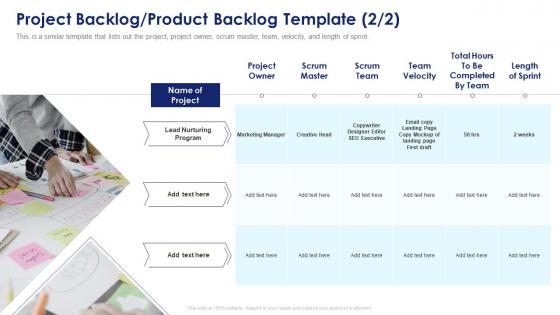
This is a similar template that lists out the project, project owner, scrum master, team, velocity, and length of sprint. Introducing Implementing Agile Marketing In Your Organization Project Backlog Product Backlog Template to increase your presentation threshold. Encompassed with three stages, this template is a great option to educate and entice your audience. Dispence information on Project Backlog Product Backlog Template, using this template. Grab it now to reap its full benefits.
-
 Project backlog product backlog template implementing agile marketing in your organization
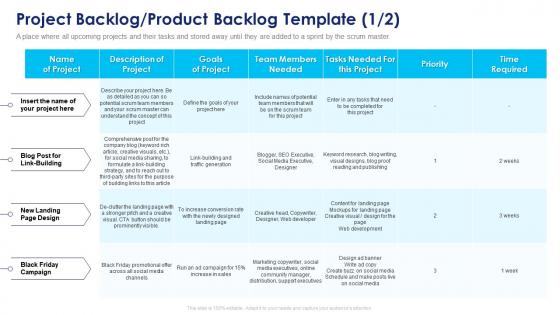
A place where all upcoming projects and their tasks and stored away until they are added to a sprint by the scrum master. Deliver an outstanding presentation on the topic using this Project Backlog Product Backlog Template Implementing Agile Marketing In Your Organization. Dispense information and present a thorough explanation of Project Backlog Product Backlog Template using the slides given. This template can be altered and personalized to fit your needs. It is also available for immediate download. So grab it now.
-
 Scrum development scrum product backlog creation
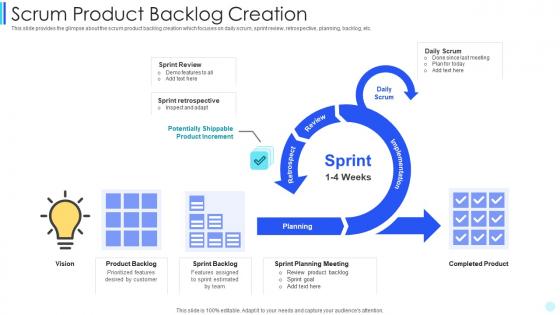
This slide provides the glimpse about the scrum product backlog creation which focuses on daily scrum, sprint review, retrospective, planning, backlog, etc. Present the topic in a bit more detail with this Scrum Development Scrum Product Backlog Creation. Use it as a tool for discussion and navigation on Scrum Product Backlog Creation. This template is free to edit as deemed fit for your organization. Therefore download it now.
-
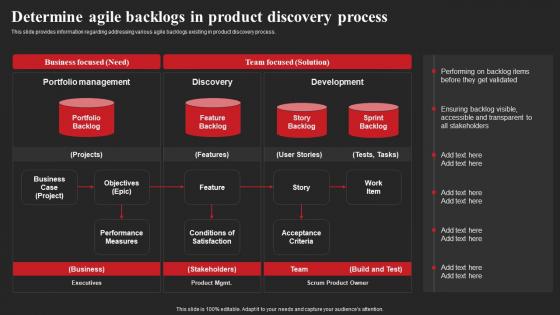 Determine Agile Backlogs In Product Discovery Process Ppt File Background Designs
This slide provides information regarding addressing various agile backlogs existing in product discovery process. Present the topic in a bit more detail with this Determine Agile Backlogs In Product Discovery Process Ppt File Background Designs. Use it as a tool for discussion and navigation on Backlog Items, Business Focused, Stakeholders. This template is free to edit as deemed fit for your organization. Therefore download it now.
-
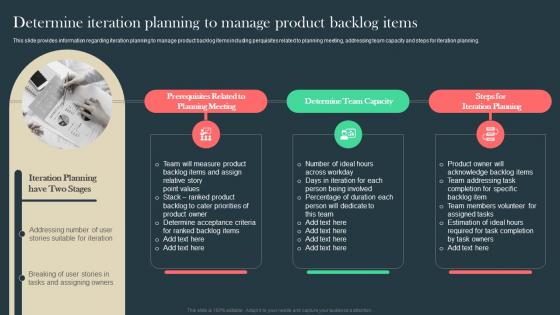 Agile Aided Software Development Determine Iteration Planning To Manage Product Backlog Items
This slide provides information regarding iteration planning to manage product backlog items including perquisites related to planning meeting, addressing team capacity and steps for iteration planning. Introducing Agile Aided Software Development Determine Iteration Planning To Manage Product Backlog Items to increase your presentation threshold. Encompassed with three stages, this template is a great option to educate and entice your audience. Dispence information on Prerequisites Related, Planning Meeting, Determine Team Capacity, using this template. Grab it now to reap its full benefits.
-
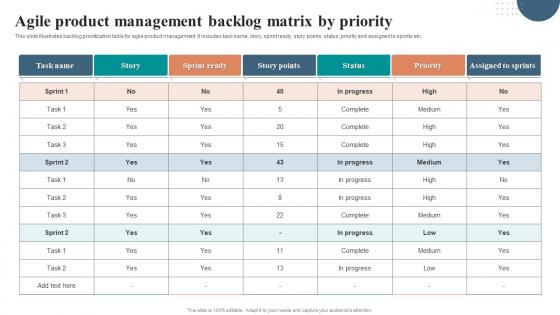 Agile Product Management Backlog Matrix By Priority
This slide illustrates backlog prioritization table for agile product management. It includes task name, story, sprint ready, story points, status, priority and assigned to sprints etc. Presenting our well structured Agile Product Management Backlog Matrix By Priority. The topics discussed in this slide are Agile Product, Management Backlog, Matrix By Priority. This is an instantly available PowerPoint presentation that can be edited conveniently. Download it right away and captivate your audience.
-
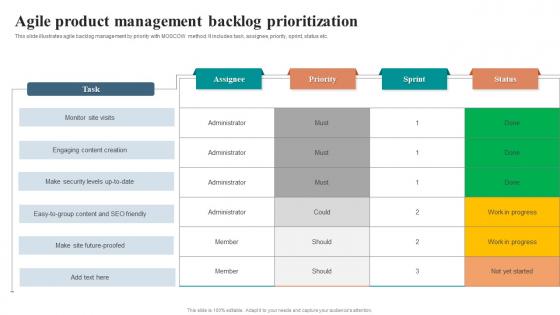 Agile Product Management Backlog Prioritization
This slide illustrates agile backlog management by priority with MOSCOW method. It includes task, assignee, priority, sprint, status etc. Introducing our Agile Product Management Backlog Prioritization set of slides. The topics discussed in these slides are Agile Product, Management Backlog, Prioritization. This is an immediately available PowerPoint presentation that can be conveniently customized. Download it and convince your audience.
