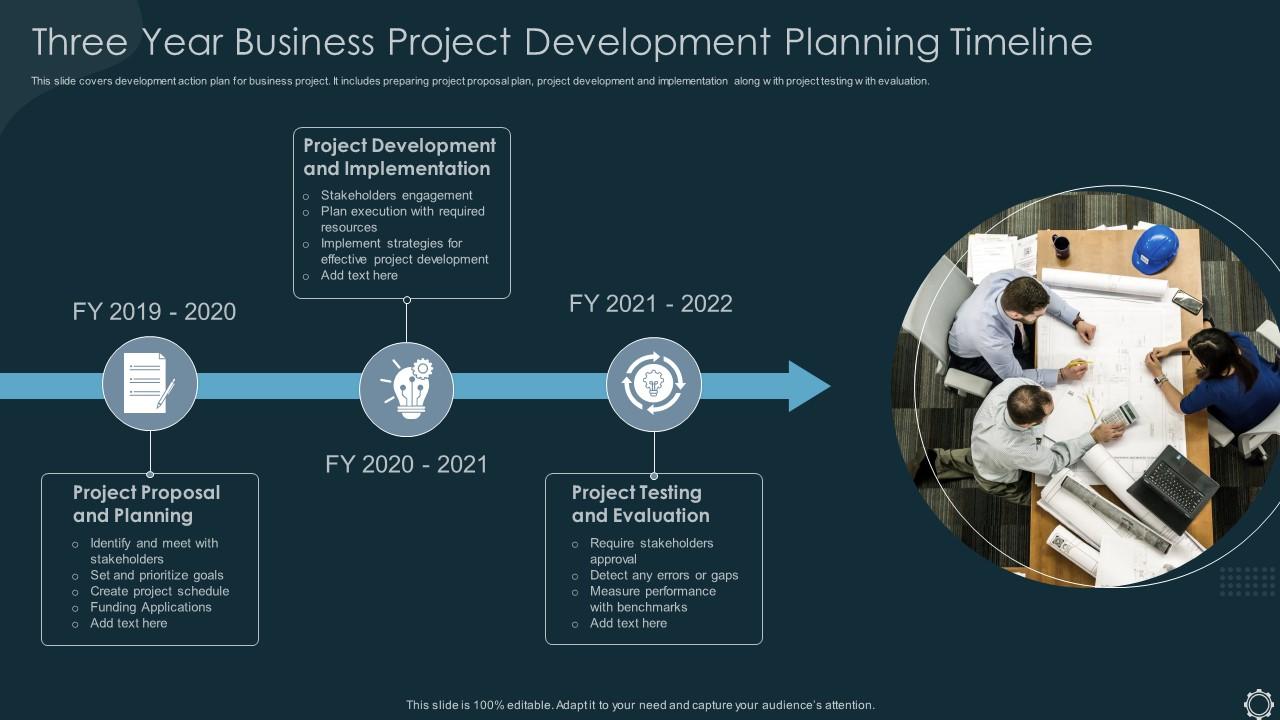
Three Year Business Project Development Planning Timeline
Try Before you Buy Download Free Sample Product
Audience
Editable
of Time
This slide covers development action plan for business project. It includes preparing project proposal plan, project development and implementation along with project testing with evaluation.
People who downloaded this PowerPoint presentation also viewed the following :
Three Year Business Project Development Planning Timeline with all 6 slides:
Use our Three Year Business Project Development Planning Timeline to effectively help you save your valuable time. They are readymade to fit into any presentation structure.
FAQs for Three Year Business Project
So you need project phases with start/end dates, tasks, deliverables, who's doing what. The big thing is dependencies - seriously, that's where everything goes to hell because people forget task B needs task A finished first. Buffer time is clutch for reviews and approvals. I always add a column for potential delays too, just being realistic. Oh and don't forget external deadlines you can't move. Start simple though - my first timeline was basically a glorified to-do list but it worked. You can get fancy later once people actually use the thing consistently.
Ugh, this happens to everyone! First thing - reach out the second you know something's off. Don't sit there hoping it'll somehow work out (spoiler: it won't). Tell them what's changed, why it went sideways, and when things will actually be ready. Also mention how it affects other stuff since projects are basically dominoes. Use whatever platform your team actually pays attention to - could be Slack, email, whatever. The main thing is being upfront about what happened and giving people time to shuffle their own deadlines around.
Honestly, Microsoft Project is the gold standard if you're dealing with complex stuff. For team collab, I'd go with Asana or Monday.com - they're pretty solid. Gantt charts? Smartsheet and TeamGantt are decent options. But here's the thing - I've watched people build amazing timelines in plain old Excel and it worked perfectly fine. Sometimes you don't need all the bells and whistles, you know? Trello's great for quick visual stuff with those card boards. If you want more robust features, Wrike or ClickUp let you switch between different views. Try the free versions first though - no point paying until you know what actually works for your team.
Honestly, I'd start with mapping your critical path stuff - like what tasks will screw everything else if they're late. Rank by business impact and what resources you actually have. The urgent-but-not-important crap will try to steal your whole day, so watch for that. Hit blockers first, then your high-value stuff with tight deadlines. Always buffer time for stakeholder reviews because there's gonna be changes. Trust me on this one. Work backwards from your key milestones and tell your team upfront what trade-offs you're making.
So risk assessment is basically looking at your timeline and asking "what's gonna screw this up?" List out the stuff that could derail each phase - team members taking time off, vendors being slow, clients changing their minds (they always do). Then pad those sketchy parts with extra time. Don't just cross your fingers and hope everything goes perfect, because it won't. I learned this the hard way on my last project. Focus on your biggest worries first and build in realistic buffers. Way better than scrambling later when things inevitably go sideways.
Honestly, visual timelines are a game-changer for this stuff. People can actually see how everything connects instead of drowning in spreadsheets or endless email threads (ugh, the worst). Your team will spot bottlenecks way faster, and everyone gets where they fit in the big picture. Stakeholders eat this up too - they don't want to wade through technical garbage to figure out if you're on track. Pro tip: use different colors for teams or priorities. Makes it super easy to scan during those quick status meetings. Way better than trying to explain dependencies verbally.
Update that thing weekly, maybe twice a week if stuff's moving fast. Honestly, tell people about changes right away - even tiny ones. They'll figure it out eventually anyway and then you look sketchy. Version control is your friend so you can see what shifted and when. Don't just react to what already happened, try to spot what's coming next. Oh and write down WHY you made changes. I learned this the hard way - once you're consistent with updates, people actually trust your timelines instead of padding them with extra time behind your back.
Okay so definitely set your major deadlines in stone - those can't move. Everything else though? Add like 20-30% buffer time because I swear projects always take way longer than you think. I learned this the hard way lol. Try doing 2-week chunks where you can pivot if things go sideways. The biggest thing is flagging problems early instead of hoping they'll magically fix themselves. Weekly check-ins are clutch for catching stuff before it snowballs. Don't wait until you're already screwed to speak up.
Track your schedule variance first - are you hitting deadlines or not? Budget variance matters too since delays always cost money. I'd watch milestone completion rates and resource usage closely. Task completion percentage helps, but honestly the real killer is usually dependencies you didn't see coming. Team productivity and stakeholder happiness are worth measuring if you can swing it. Set maybe 3-5 metrics before you start, not everything under the sun. Review weekly and actually use the data - I've seen too many projects track stuff then ignore it completely.
First thing - figure out who's free when and what they can actually handle. Block out the non-negotiable deadlines, then work backwards from there. Honestly, I'd skip trying to do this mentally because you'll miss something important. Gantt charts aren't sexy but they work. Always pad each phase with extra time - people get sick, other projects pop up, life happens. The worst is when you're perfectly on schedule and then everything falls apart. Update it every week and tell your team right away when stuff changes, or they'll be working off old info.
Honestly, timelines are a game changer because everyone can see what's due and who's doing what. No more of that "oh I thought you were handling that" nonsense. Dependencies become super obvious too - like you'll know task B can't start until Sarah finishes task A. The accountability factor is huge since nobody wants to be the person holding everyone up when the whole team can see the board. Plus you catch problems way earlier instead of scrambling at the end. We use Asana but whatever tool works, just make sure it updates in real-time so people aren't working off old info.
Dude, the worst mistake? Not accounting for how long stuff actually takes. Everyone forgets about review rounds and approvals - those eat up SO much time. I always throw in at least 20% buffer now because something random will definitely go wrong. Dependencies are huge too. Map out what has to finish before other tasks can even start, or you're screwed. Also, don't estimate alone - your team knows the work way better than you do. Build in checkpoints so you can course-correct when things inevitably get messy.
So first figure out what methodology you're actually working with. Waterfall means you'll map out everything upfront - sequential phases, fixed milestones, the whole nine yards. Pretty straightforward. Agile's totally different though. Break it into those 2-4 week sprints and focus on what you can deliver each cycle instead of some massive end goal. I honestly think Agile feels way less stressful once you get the hang of it, even though it seems chaotic at first. The big difference? Waterfall shows your complete roadmap from day one. With Agile, your timeline basically grows and shifts as you learn stuff each sprint.
Dude, color coding is a game changer for project timelines. I can spot which team owns what task instantly - no more squinting at endless black text trying to figure out who's doing what. Red for urgent stuff, blue for design team, green for dev work, whatever makes sense. Honestly saves me like 10 minutes every time I open the damn thing. Your stakeholders will actually pay attention to colorful timelines too instead of glazing over. Bottlenecks and overlapping deadlines just pop out visually. Start with maybe 3 colors and don't go crazy with it.
Oh man, time zones are just the beginning of your problems. Some cultures are all about speed and getting stuff done yesterday, while others need like five meetings before deciding on lunch. Then you've got random holidays popping up that nobody mentioned - suddenly half your team disappears for Golden Week or Eid. Communication is weird too. Germans will just tell you "no" straight up, but in other places you'll get this polite dance that takes forever to decode. Honestly? I always pad my timelines by at least 25% now. Learn from my mistakes and look up their major holidays before you commit to anything.
-
Based on my personal experience, I would recommend other people to subscribe to SlideTeam. No one can be disappointed here!
-
Great product with highly impressive and engaging designs.