


Utilizing Social Media Handles For Business Growth Powerpoint Presentation Slides Strategy CD V





Try Before you Buy Download Free Sample Product
 Impress Your
Audience
 100%
Editable
 Save Hours
of Time


A social media strategy outlines the companys content posting plans, duties of social media staff, and platforms utilized to advertise the brand. Its primary purpose is to streamline digital marketing efforts, increase customer engagement and earn additional profits for the business. Here is a competently designed Presentation on Utilizing Social Media Handles for Business Growth that provide a general overview of the industrial landscape, trends, significance, etc. The Metaverse Marketing deck incorporates approaches to develop fundamental social media aspects, namely goals, auditing, target audience, content sharing, etc. Our Social Network Strategy PPT offers access to multiple strategies that can help businesses promote their products or services on platforms such as Facebook, Instagram, YouTube, TikTok, Snapchat, Twitter, and Metaverse. Furthermore, this complete Social Media Marketing Plan module contains slides that can help the marketing department through the org chart, RACI chart, and training program. Lastly, it also provides details related to costs and software selection for implementing these strategies in social media marketing and showcases its performance through impact analysis, KPIs, and dashboards, along with use case insights for brands such as Instagram and Facebook. Get access now
People who downloaded this PowerPoint presentation also viewed the following :
Content of this Powerpoint Presentation
Slide 1: This slide introduces Utilizing Social Media Handles for Business Growth. Commence by stating Your Company Name.
Slide 2: This slide depicts the Agenda of the presentation.
Slide 3: This slide includes the Table of contents.
Slide 4: This slide exhibits the Title for the Topics to be covered in the next template.
Slide 5: The following slide illustrates the overview of current social media landscape.
Slide 6: This is yet another slide continuing the overview of current social media landscape.
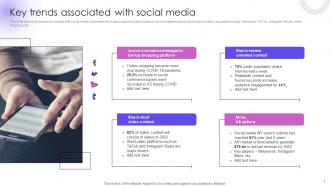
Slide 7: This slide shows the key trends associated with social media.
Slide 8: This slide incorporates the Heading for the Contents to be discussed further.
Slide 9: This slide highlights the importance of planning social media strategy for business growth.
Slide 10: This slide showcases comparative assessment of top social media platforms.
Slide 11: This slide reveals the User overlap analysis across social media platforms.
Slide 12: This slide elucidates the social media usage analytics worldwide.
Slide 13: This slide presents information about which social media platform is suitable for businesses.
Slide 14: This slide mentions the Title for the Topics to be covered further.
Slide 15: This Slide represents the Timeline for Implementing Social Media Strategy Across Platforms.
Slide 16: This slide mentions the Heading for the Components to be covered in the forth-coming template.
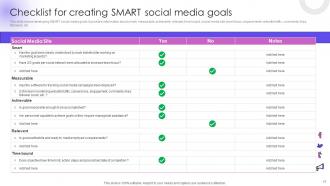
Slide 17: This slide focuses on the Checklist for creating SMART social media goals.
Slide 18: This slide states the social media presence audit for company’s profiles.
Slide 19: This slide elucidates the assessing of insights social media target audience.
Slide 20: This slide states the steps for building social media marketing strategy.
Slide 21: This slide outlines the Strategies for sharing content across social media platforms.
Slide 22: This is yet another slide continuing the strategies for sharing content across social media platforms.
Slide 23: This slide highlights social media marketing campaign outline.
Slide 24: This slide focuses on the Title for the Topics to be covered further.
Slide 25: This slide shows promoting social media posts with Facebook ads feature.
Slide 26: This slide exhibits the strategies to maintain relations with Facebook followers and communities.
Slide 27: This slide focuses on organizing Facebook local marketing strategy.
Slide 28: This slide represents the Heading for the Ideas to be discussed in the upcoming template.
Slide 29: This slide provides information about promoting brand through YouTube video ads.
Slide 30: This slide showcases increasing reach of YouTube videos through search engine optimization (SEO).
Slide 31: This slide mentions about increasing YouTube video views organically.
Slide 32: This slide includes the Title for the Topics to be covered further.
Slide 33: This slide potrays improving social commerce strategy using Instagram.
Slide 34: This slide shows Instagram influencer marketing objectives.
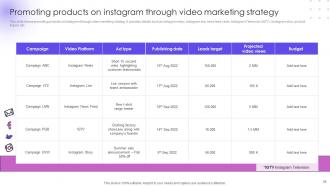
Slide 35: This slide highlights promoting products on Instagram through video marketing strategy.
Slide 36: This slide exhibits the Heading for the Components to be discussed next.
Slide 37: This slide reveals the TikTok influencer marketing strategy.
Slide 38: This slide mentions about implementing trending hashtags and challenges campaign.
Slide 39: This slide represents the Title for the Topics to be covered further.
Slide 40: This slide deals with increasing app downloads through Snapchat marketing strategy.
Slide 41: This slide showcases promoting products with augmented reality (AR) snapchat filters.
Slide 42: This slide incorporates the Heading for the Ideas to be further discussed.
Slide 43: This slide reveals increasing customer engagement through twitter response strategy.
Slide 44: This slide displays the Title for the Topics to be covered further.
Slide 45: This slide showcases the Metaverse social media marketing process.
Slide 46: This slide reveals the major strategies for promoting brands in Metaverse.
Slide 47: This slide presents the major sources to market brands inside Metaverse.
Slide 48: This slide highlights the Heading for the Ideas to be covered in the following template.
Slide 49: This slide illustrates the social media progress monitoring tools.
Slide 50: This slide reveals the social media competitive analysis with key competitors.
Slide 51: This is yet another slide continuing the social media competitive analysis with key competitors.
Slide 52: This slide contains the Title for the Topics to be discussed next.
Slide 53: This slide mentions about the key members of social media management team.
Slide 54: This slide elucidates the social media team RACI chart.
Slide 55: This slide talks about the social media team training plan.
Slide 56: This slide exhibits the Heading for the Components to be covered in the upcoming slide.
Slide 57: This slide presents a budget plan for implementing social media strategy.
Slide 58: This slide deals with choosing suitable tools for social media strategy management.
Slide 59: This slide incorporates the Title for the Topics to be discussed further.
Slide 60: This slide focuses on measuring positive impact of social media strategy on key platforms.
Slide 61: This slide potrays the analyzing impact of social media strategy on application downloads.
Slide 62: This slide reveals assessing impact of social media marketing services.
Slide 63: This slide includes the Title for the Ideas to be discussed next.
Slide 64: This slide showcases a dashboard for tracking social media traffic.
Slide 65: This slide exhibits a dashboard for tracking social media key performance indicators (KPIs).
Slide 66: This slide reveals a dashboard for monitoring Snapchat marketing performance.
Slide 67: This slide presents the Heading for the Topics to be covered in the upcoming template.
Slide 68: This slide shows case study of Chanel Instagram marketing strategy.
Slide 69: This slide displays the Corcoran Group Real Estate strategy from Facebook.
Slide 70: This is the Icons Slide containing all the Icons used in the plan.
Slide 71: This slide is used for depicting some Additional information.
Slide 72: This is the About Us slide for showcasing Company's information.
Slide 73: This is Our Mission slide. State your organization's mission, vission, and goals here.
Slide 74: This slide elucidates the 30 60 90 Days Plan for efficient planning.
Slide 75: This slide deals with the Timeline of the Company.
Slide 76: This slide outlines the Company's SWOT analysis.
Slide 77: This slide mentions information on the Financial topic.
Slide 78: This slide includes the Post it Notes for reminders and deadlines.
Slide 79: This is the Thank You slide for acknowledgement.
Utilizing Social Media Handles For Business Growth Powerpoint Presentation Slides Strategy CD V with all 84 slides:
Use our Utilizing Social Media Handles For Business Growth Powerpoint Presentation Slides to effectively help you save your valuable time. They are readymade to fit into any presentation structure.













FAQs for Utilizing Social Media Handles For Business Growth Powerpoint Presentation Slides
So you need five main things sorted out: goals that actually connect to what your business wants, detailed profiles of who you're talking to, a content calendar so you're not scrambling last minute, ways to get people engaged and build community, plus metrics to see what's working. Honestly, most people totally phone it in on the audience research part - big mistake. Also figure out your brand voice and visual vibe early so everything looks cohesive. Oh, and don't trash what you're already doing! Audit it first, then build on the good stuff.
Check out your current customers first - where are they actually spending time online? Your platform analytics will show you demographics and when people are most active. Honestly, social listening tools are worth the investment for tracking industry conversations. Creep on your competitors' followers too (don't judge me, everyone does it). See who's commenting and engaging with their posts. Build detailed personas from all this data, then test content with smaller groups. Pick one platform to master before you spread yourself thin everywhere else. Way easier than trying to be everywhere at once.
Honestly, content quality makes or breaks everything. I've watched smaller accounts crush it while bigger ones flop because their stuff actually connects with people. Good content gets shared, saved, commented on - all that stuff algorithms love. When you're posting something that entertains or helps solve a problem, people want to engage. It's weird how obvious it sounds but so many people miss this. Don't just push what you want to promote. Think about scrolling through your feed - what would make you actually stop? That's what you should be creating.
Honestly, Instagram and Facebook work best with daily posts, but LinkedIn's totally different - stick to 2-3 times a week there since people expect more professional stuff. Twitter though? Go nuts. You can tweet like 5 times a day and nobody cares. The thing is, being consistent beats posting a ton. I'd rather see someone post decent content regularly than go crazy for a week then disappear for a month. Start small with whatever you can actually handle, then maybe add more later. Oh and definitely check your engagement at different posting frequencies - that's how you'll figure out what actually works for your specific audience on each platform.
Skip the vanity metrics - follower count won't pay your rent. Focus on engagement rate, click-throughs, and actual conversions instead. Website traffic from social matters way more than looking popular. I'd also track brand mentions to see what people really think about you (sometimes it's brutal but helpful). Pick maybe 3-4 metrics that actually connect to your goals. Don't get crazy tracking everything or you'll drown in data. Set up a basic dashboard and check it monthly so you can actually do something with the info instead of just staring at numbers.
UGC is honestly a game changer. People trust other customers way more than brands – like, it's not even close. Get your customers sharing photos or reviews by running hashtag campaigns or contests. Or just ask them to tag you when they post. Always grab permission before you repost though (learned that one the hard way). Start by searching your existing brand mentions and hit up people already posting about you. The best part? It's free content that actually converts because it feels real. Make it super easy for them to participate and you'll see way better results.
Honestly, just focus on visuals that actually matter instead of random stock photos. Your colors and fonts should match across everything - yeah it's boring to set up but trust me, people notice. Size your images right for each platform because cropped posts look so unprofessional. Faces always perform better than random objects, so throw people in there when you can. Oh and don't skip alt text! I'd start by looking at what you've posted recently. See what got engagement and what flopped, then do more of what worked.
Honestly, picking your platform is like 90% of the battle. LinkedIn's where you drop those thoughtful business posts, TikTok wants snappy videos that catch trends. Instagram? Pure eye candy. Twitter's more like shouting into the void but in real-time lol. I've watched people bomb hard trying to post identical stuff everywhere - it's painful to see. Figure out where your people actually scroll first. Maybe audit their habits? Then focus on like 2-3 platforms max instead of spreading yourself thin. Your whole content schedule and budget should follow that lead. Way better than being mediocre everywhere.
Buffer's been my go-to for like 3 years now - super easy to use and their free plan is decent. Hootsuite's another solid option with good multi-platform scheduling. If you've got money to burn, Sprout Social has insane analytics but it's pricey. Later works great for Instagram stuff since it's so visual-focused. Oh, and don't forget about the free native tools! Facebook Creator Studio and LinkedIn's scheduler work fine if you're just posting on those platforms. I'd honestly just start with Buffer's free version and see how you like it before paying for anything fancy.
Make a brand voice guide that nails down your personality and messaging. Then actually stick to it - seriously, so many brands just make it up as they go and it shows. Keep your core voice the same everywhere but tweak the tone a bit for each platform. Like Instagram can be more casual than LinkedIn, obviously. Get your whole team trained on it and check up on things regularly because people drift without realizing. Oh, and keep a shared doc with go-to phrases and responses. Trust me, it'll save you when you're staring at a blank post wondering how to respond to something.
Respond fast but don't be reactive - acknowledge their comment publicly first. Move the real conversation to DMs if it gets detailed. Here's the thing: deleting negative stuff makes you look shady unless it's actually abusive. Address their specific issues and offer solutions instead. Your response is basically free content for everyone else lurking, so stay cool even when they're being jerks. Trolls? Just acknowledge briefly then ignore them - don't get sucked into drama. Honestly, negative feedback is like free market research if you're smart about it. Use it to actually fix your product.
Dude, think of ads as rocket fuel for your best organic stuff. When you've got a post that's already doing well, boost it and watch it blow up. The targeting data is gold too - shows you exactly who's vibing with your content so you can make more of what works. I mean, honestly the accounts I've seen grow fastest use both together, like 3x faster than just doing one thing. Traffic from ads can build your organic following too, which is kinda genius when you think about it. Just start small though - pick one post that's already getting love and throw some money at it.
Honestly, short-form video is still crushing it, but everyone's doing that already. What's really working now? AI personalization and interactive stuff - polls, AR filters, live Q&As. Gets people actually engaged instead of just scrolling past. Employee advocacy is smart too since it feels way more real than corporate posts. Oh, and social commerce is massive - nobody wants to click away to buy anymore. Community building through private groups or Discord is solid but takes time. My advice? Don't chase every new feature. Pick like 2-3 things your audience would actually use.
Check your analytics weekly - seriously, this stuff tells you way more than guessing ever will. Engagement rates and click-throughs show which posts actually work vs. the ones that flop. I always get surprised by the demographic data too - sometimes you're reaching totally different people than you thought. Focus more on whatever's already performing well, then try tweaking those successful posts. Oh, and don't ignore conversion data if you're trying to sell anything. When something's clearly not working, just drop it. Your gut might say one thing, but the numbers don't lie.
Honestly, influencer partnerships are a game changer for reaching new people. You're basically tapping into their audience - people who already trust them. It's way more effective than regular ads because their followers actually listen to what they say. The content feels more authentic too, which is huge these days. I'd start with smaller influencers in your space though. They usually have way better engagement than the mega-famous ones (and they're cheaper lol). Plus you don't have to stress about creating all your own content from scratch.
-
Thanks for all your great templates they have saved me lots of time and accelerate my presentations. Great product, keep them up!
-
Well-designed and informative templates. Absolutely brilliant!