Graphiques Powerpoint de résumé financier des actifs et des revenus

Rating:
90%
Assets and revenue financial summary powerpoint graphics
Slide 1 of 5
Favourites Favourites

Try Before you Buy Download Free Sample Product

Audience Impress Your
Audience
Editable 100%
Editable
Time Save Hours
of Time
The Biggest Sale is ending soon in
0
0
:
0
0
:
0
0
Rating:
90%

Caractéristiques de ces diapositives de présentation PowerPoint :

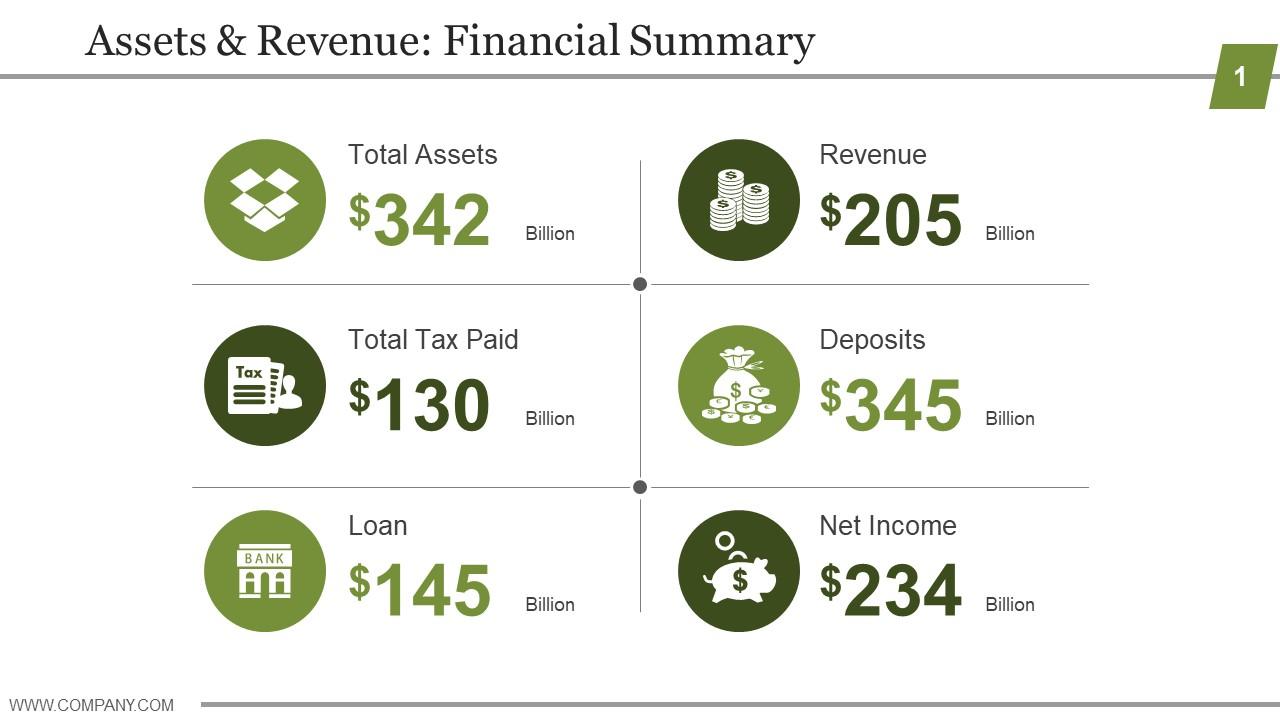
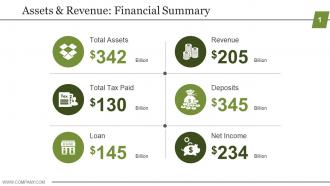
Présentation de graphiques PowerPoint de résumé financier des actifs et des revenus. Il s'agit d'un graphique PowerPoint de résumé financier des actifs et des revenus. Il s'agit d'un processus en six étapes. Les étapes de ce processus sont les actifs totaux, le total des impôts payés, le prêt, les revenus, les dépôts, le revenu net.

FAQs for Assets and revenue financial

Start with clear titles and stick to the same colors throughout - your audience shouldn't have to decode what they're seeing. Break data into bite-sized pieces. Legible fonts matter way more than you'd think, and organize everything left-to-right or top-to-bottom so it flows naturally. Bold the most important numbers or call them out somehow. Charts are cool, but honestly? Sometimes a basic table gets the job done better than some overcomplicated graph. Don't forget context stuff like dates, currency, footnotes. If someone can't grasp the main points in 30 seconds, you've lost them. Test it on a coworker first.

Dude, charts and graphs are total game-changers for financial stuff. Nobody wants to stare at spreadsheets all day - I mean, who has time for that? Visual dashboards let people spot trends and weird outliers instantly. Your boss can see if revenue's climbing or if expenses are getting out of hand without digging through rows of data. Pick the right chart type though, that actually matters. Oh and keep things simple - I'd start with your top 3 KPIs first. Clean visuals beat cluttered ones every time. It's basically turning boring numbers into stories people can actually understand quickly.

Waterfall charts are your go-to for income statements - they show that nice flow from revenue down to net income with each expense step. Stacked bars work well too, especially when you're comparing different time periods. Honestly, skip the pie charts - they just look messy with all those line items. Horizontal bar charts are solid if you want to highlight your biggest expense categories. Oh, and simple bar charts never hurt anyone either. But seriously, start with waterfall charts. Executives eat that stuff up because they can see exactly how you get from top line to bottom line.

Dude, colors totally mess with how people read financial stuff. Red screams "we're doomed" and green means everything's great - though that's not universal everywhere. Your layout choice matters too. Put the biggest chart up top? You're basically screaming "LOOK HERE FIRST." I swear I've watched the exact same numbers look either terrifying or awesome just because someone switched from red to blue. Dark colors grab attention whether you want them to or not. Honestly, show your charts to someone else before you present - they'll catch stuff you missed.

Dude, financial storytelling is what saves you from putting everyone to sleep with boring spreadsheets. You're basically creating a narrative around your numbers - like explaining why revenue tanked during that supply chain mess or how that risky investment actually paid off. People will actually pay attention instead of checking their phones. Structure your charts so they build up to your main point, don't just randomly dump data on them. I learned this the hard way after watching executives' eyes glaze over during my first big presentation lol. Makes such a huge difference.

Think about what each group actually needs from your data. Investors want the big picture stuff - ROI, growth trends, clean charts that tell a story without making them squint. Your internal team? They need the nitty-gritty operational details, budget breakdowns, things they can act on. I swear, nothing kills a pitch faster than showing investors a breakdown of office supply costs when they just want to know if you're profitable. Keep investor slides simple and story-focused. Internal presentations can get way more detailed since those folks will actually use that info to make decisions.

Honestly, I'd go with **Tableau** or **Power BI** first - they're made for this stuff and handle financial data super well. **Excel** is actually pretty solid too if you know the advanced chart tricks (most people don't realize how good it can be). **Adobe Illustrator** gives you way more design control but ugh, the learning curve is brutal. I probably wasted entire weekends trying to get one chart perfect. **Canva's** decent for quick infographics when you're in a rush. Just use whatever you already have first, then figure out if you need to upgrade later.

Definitely go with line charts for financial trends - they're perfect for showing whether your numbers are climbing, tanking, or just sitting there doing nothing. You can throw multiple metrics on one chart with different colors, though if it gets too crowded, maybe split them up. Bar charts are solid too when you want to compare specific time periods head-to-head. Here's the thing that drives me nuts: people love shoving everything into boring spreadsheet tables when one good visual would tell the whole story in seconds. Oh, and make sure your time periods match up consistently - stakeholders need to spot those patterns and weird outliers fast.

Don't mess with scales or pick random timeframes to make your point - people will call you out instantly. Y-axis manipulation is the worst offender here, honestly makes me cringe every time I see it. Too much data crammed into one chart just confuses everyone. Keep your colors consistent and always cite sources. Random thought but I've noticed bad charts spread way faster than good ones on social media, which is frustrating. Test it on someone fresh first - if they squint at it for more than 3 seconds, you've lost them. Clear labels save lives.

Dude, infographics are perfect for this stuff! You take all those messy numbers and turn them into something people actually want to look at. Like, use pie charts for budget breakdowns or bar graphs to show growth over time. Way better than dumping a spreadsheet on someone's desk. Even the higher-ups prefer these over boring reports - probably because they can skim them in 30 seconds. Here's what works: pick your 2-3 biggest points first, then find visuals that tell that story. Oh, and color coding is your friend. Makes everything cleaner and easier to follow.

Dude, interactive stuff is a game-changer for financial reports. Hover effects show breakdowns without mess, and clickable drill-downs let people dig into whatever catches their eye. Dynamic filters are clutch too - viewers can customize what they're looking at instead of being stuck with your version. Once you try it, static charts feel kinda dead honestly. I always start with basic hover states first (way less overwhelming), then add more complex features. Oh and interactive tooltips are perfect when you need extra context but don't want to crowd everything. People love exploring data themselves rather than following some rigid storyline.

Honestly, font choice can make or break your charts. Sans-serif fonts like Arial work way better for numbers - way easier to scan than those fancy serif ones. I made this "elegant" chart once that nobody could actually read during presentations. Major fail. Keep font sizes the same for similar stuff, and don't use light gray text on white backgrounds (people will hate you). Short sentences work well. Mix in some longer ones so it doesn't sound robotic. If people are squinting at your data, you've already lost the room.

Ugh, financial graphics are such a pain but yeah, you gotta hit your industry's disclosure rules first. Public companies have to deal with SEC stuff - disclaimers, consistent accounting standards, all that fun paperwork. Don't get cute with timeframes either, regulators will call you out faster than you think. Private companies get off easier but GAAP is still your friend. Honestly? Just have legal and accounting sign off before anything goes live. Way better than dealing with compliance issues later, especially for investor docs.

Dude, templates are a lifesaver. I used to waste hours redoing the same charts every month - what a nightmare. Now I just swap in new numbers and boom, done. Your reports look way more professional too since everything matches. The formulas are already locked in so you won't mess up calculations (learned that the hard way). Start with whatever you make most - income statements, cash flow charts, budget comparisons. Honestly can't believe I waited so long to set these up. Makes quarterly reports actually manageable instead of wanting to pull your hair out.

Real companies have totally transformed their reporting with better visuals. There's this tech startup that cut board meeting questions by 40% just by ditching those awful dense spreadsheets for clean dashboards. Pretty impressive, right? An investment firm also slashed client onboarding time in half using simplified portfolio summaries. The side-by-side comparisons are honestly striking when you see them. These studies usually track stuff like how fast people understand the data, decision-making speed, and whether stakeholders are actually satisfied. Definitely hunt for examples in your specific industry though - financial communication varies so much between sectors.

Ratings and Reviews

90% of 100
Review Form
Write a review
Most Relevant Reviews
  1. 80%

    by Dennis Stone

    The Designed Graphic are very professional and classic.
  2. 100%

    by Danilo Woods

    Excellent Designs.

2 Item(s)

per page: